Skip to Main Content
Sams Club
Sams Club
Customer reviews for Epson EcoTank ET-4958 Wireless All-in-One Color Supertank Printer, 1 Bonus Black Ink Bottle for
Epson EcoTank ET-4958 Wireless All-in-One Color Supertank Printer, 1 Bonus Black Ink Bottle
4.2 out of 5 stars
stars141 ratings113 reviews
  1. 5 stars64% (90)
  2. 4 stars17% (24)
  3. 3 stars4% (6)
  4. 2 stars6% (9)
  5. 1 star9% (12)

Member photos

Sort by |
Showing 41-50 of 113 reviews
Dec 6, 2025
Fidel
1 out of 5 stars review

piece of trash

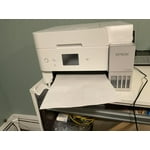
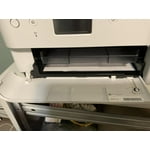
I'm not even able to print a single oiece of paper it keeps jamming all the time im tired returning it tomorrow the worst.

Helpful?373OTNA1GT2F16188611314
Feb 28, 2026
ANGIE
2 out of 5 stars review

Don’t waste your money or time on this!

I’m writing this after clearing out ANOTHER jam - have not gotten through a print job yet without it getting a jam. Doesn’t matter if it’s plain paper, labels, cardstock - it will jam! Also the red color stuff I’ve printed is off. Gotta go clear out another jam!

Helpful?373OTNA1GT2F16188611314
Mar 27, 2026
tet68vet
1 out of 5 stars review

It Is Junk. Do not buy

I have an EP-4958. It sucks! Never have I had so many problems and issues. Even the diagnostic tool does not work effectively. For what I saved in ink costs I have used So much more paper and ink I could have purchased a gazillion cartridges.....Install was not easy. Extremely cumbersome and time consuming. Definitely not user-friendly. If I had the money I would just junk this thing and go elsewhere.

Review from epson.com
Helpful?373OTNA1GT2F16188611314
Dec 20, 2025
JAMES
3 out of 5 stars review

Not what I expected for this price

I was hoping for a better device when I bought this. Saving money on ink was obvious, and that's a big deal if you print a lot. It has FAX, unlike its less expensive mates, and the display is a color touch screen. The paper feeder folds away and the output paper tray is motorized so that the space it takes when it's not in use is minimized. Unfortunately, the plastic used in the paper tray is so thing that it makes the printer feel like it's an economy model. The paper feeder does not adjust to allow items narrower than letter paper to be fed straight, so they must be scanned individually on the glass. The scanner can only copy items on legal-length paper by using the automatic feeder, and that means that items are long and narrow can't be handled well. For me, that was a critical design flaw. I returned the item.

Helpful?373OTNA1GT2F16188611314
Mar 29, 2026
Bill Bunker Hill
5 out of 5 stars review

Accurate, Fast, Economical, Dependable

I purchased this printer and installed it about 6 months ago. I won't be going back to any other ink jet brand. This was set up wirelessly quickly and it is replete with options to suit what ever you want to print. It is a fast printer, double sided too. I print every day and it looks like I won't need to refill the tanks for a long time. One you get an Epson Eco Tank printer there is no going back to the others

Review from epson.com
Helpful?373OTNA1GT2F16188611314
Apr 16, 2026
JMatt64
2 out of 5 stars review

BAD WiFi Connectivity/Reliability

I have had this printer for two plus months now. Yes it prints awesome pictures and text. But WiFi connectivity is very bad! I have to repeatedly re-establish my wifi connection on this unit. WiFi reliability is VERY BAD! YES my router is less than 3 feet away from the printer. Another note: Good luck printing directly using an Android product. You must use the Epsom app 97% of the time! Definitely rethinking I made the wrong purchase.

Review from epson.com
Helpful?373OTNA1GT2F16188611314
Apr 7, 2026
Nice printer
5 out of 5 stars review

Great printer, highly recommended

I am 5 months into the purchase and it works great. Easy set up and wifi connection. Low volume printing here with 10 ish pages per day and is just right. It replaced my Canon Pixma Megatank G7020 which was a horrific printer. My Epson before the Canon was bullet proof and this one is great so I am sold on Epson.

Review from epson.com
Helpful?373OTNA1GT2F16188611314
Dec 5, 2025
GONZALEZ
1 out of 5 stars review

Poor Communication Skills

Techs have difficulty with English! Difficult to communicate!

Helpful?373OTNA1GT2F16188611314
Jan 22, 2026
anonymous
4 out of 5 stars review

Only selling point is the ink and quality.

First day of use and the paper already jams. I have a cheaper version of this machine which I use for sublimation and no issues because everything is manual and I feed the paper from the top and the scanner is a flatbed scanner. This item has too many fancy parts. No need for the paper holder to be controlled electronically to come in and out. That should have been manual. If you push it back in an error will say it can't print. It is in the way when I insert my paper. I haven't scanned yet so hopefully that goes well. Colors print very well. Sometimes I get asked what type of paper and size I want to print before it prints even though I chose it on my computer settings which is odd. So if I am printing from another room, I would assume it was printing when it really was not. I have had my HP printer for almost 6 years, exact features less fancy parts. Only difference is the ink cost effective since I can no longer use aftermarket ink. My HP only started jamming around the 5th year and that is every blue moon.

Helpful?373OTNA1GT2F16188611314
Jan 28, 2026
Alex K
2 out of 5 stars review

Worst Printer I Have Ever had the Misfortune of Dealing With

This is the single worst piece of equipment I have ever bought and used. Connectivity between household WIFI is weak and inconsistent, cannot download any firmware update to try to fix any problem, and will not allow me to print via WIFI from any other device, Android, IOS, Windows, or Mac. Printer based WIFI is also weak and inconsistent, often dropping its own service in the middle of a job, canceling any task midway, and stopping itself from clearing the job queue. Those issues only actually IF the printer is willing to take itself out of its own "Printer is Busy" status, which it will keep itself in for an indeterminate amount of time, or put itself into that status with no warning, when you are trying to use it, or not. Save your self the time and headache, look elsewhere, literally anywhere.

Review from epson.com
Helpful?373OTNA1GT2F16188611314