Skip to Main Content
Sam's Club
Sam's Club
All Departments
All Services
Customer reviews for SAMSUNG 85” Class DU7200 Series 4K Smart TV for
SAMSUNG 85” Class DU7200 Series 4K Smart TV
4.3 out of 5 stars
stars
1,178 ratings1,031 reviews
  1. 5 stars63% (745)
  2. 4 stars18% (208)
  3. 3 stars8% (98)
  4. 2 stars5% (58)
  5. 1 star6% (69)

Member photos

  • +175 images
Sort by |
Showing 1-10 of 1,031 reviews
Sep 6, 2024
Reviewer name: Tony Cicarella
5 out of 5 stars
5 out of 5 stars review

Verified Purchase

Great TV, easy setup and beautiful picture.

Despite having the first delivery of this TV returned due to damage the SAMS team quickly issued a replacement and pickup of the damaged unit. The second delivery came with no issues and I was able to get it up and running with no problems. Set up was a breeze ( have two other SAMSUNG TVs, I love them). This model has a great picture and pretty good sound. I will probably get a soundbar in the near future. Overall I’m extremely happy with this model.

Helpful?1RMTE3JL1NV513893753801
Mar 23, 2026
Reviewer name: Aleco112
5 out of 5 stars
5 out of 5 stars review

I’m very impressed with the Samsung UN85DU7200DXZA

[This review was collected as part of a promotion.] The Samsung UN85DU7200DXZA is an impressive TV that delivers a truly immersive viewing experience with its massive 85-inch screen and sharp 4K picture quality. Colors are vibrant, clarity is excellent, and even non-4K content looks great thanks to Samsung’s processing. The smart TV interface is smooth, easy to navigate, and gives quick access to popular apps like Netflix and YouTube. Setup was simple, and the overall design is sleek and modern, fitting well in any living space. While the built-in sound is decent, pairing it with a soundbar enhances the experience. Overall, this TV offers outstanding value for its size and performance, making it a great choice for movies, sports, and gaming.

Review from Samsung US
Helpful?1RMTE3JL1NV513893753801
May 16, 2026
Reviewer name: Tubbs
5 out of 5 stars
5 out of 5 stars review

The picture is awesome. Some shows I watch the pop

[This review was collected as part of a promotion.] I enjoy my Samsung tv…. Now and then occasional stopping in the middle of A TV program but overall, it works very well. Enjoy it.

Review from Samsung US
Helpful?1RMTE3JL1NV513893753801
Aug 25, 2024
Reviewer name: Brian
5 out of 5 stars
5 out of 5 stars review

Verified Purchase

Good TV bad service from Sam's club

I am very happy with the TV but have learned that I will never be buying anything from Sam's club online again. They're online program is absolutely terrible

Helpful?1RMTE3JL1NV513893753801
Sep 25, 2024
Reviewer name: Ben
2 out of 5 stars
2 out of 5 stars review

Verified Purchase

You definitely get what you paid for!

Not bad for the price but if you're looking for crisp and vibrant pictures, pay a lot more for better performance. Samsung makes the experience worse by locking the TV unless you link your account. It makes no sense to buy something that's useless without opening a Samsung account! It's a pain... Terrible experience overall. 😪 I don't recommend.

Helpful?1RMTE3JL1NV513893753801
reply from Samsung

Hi Ben,<br /><br />I&#39;m sorry to hear that you are not satisfied with your DU7200 Series TV image. Please know that the TV will upscale any content sent to it as best as possible. The closer your content is to 4K, the better the image will look on the screen. <br /><br />Here are some tips to help improve picture clarity:<br /><br />1) HDMI cables are recommended for optimal HD viewing. <br />2) If you have an analog cable box or satellite box, upgrade to a digital cable box or satellite box. <br />3) Change the output resolution of your devices, such as digital broadcast receivers, IPTV, and set-top boxes, to UHD or HD.<br />4) You can further adjust your sharpness, brightness, contrast, color, and more by going to Settings &gt; All Settings&gt; Picture &gt; Expert Settings<br />5) Choose a Picture Mode by going to Settings &gt; All Settings&gt; Picture &gt; Picture Mode and choose from Dynamic, Standard, Natural, Movie, or Filmmaker Mode.<br /><br />Should you ever have questions or need help with TV features, specs, or operations, we are here to help. You can call us at 1-800-SAMSUNG, 8 AM - 12 AM EST, seven days a week. Our LiveChat agents are also available by clicking on the ‘Support’ link on our website.<br /><br />~ Samsung Advisor

May 25, 2025
Reviewer name: Sams Member
2 out of 5 stars
2 out of 5 stars review

Verified Purchase

No wonder why it is this cheap.

Picture is very week even though it says 4K. Not much option when it comes to plug ins. There is no connection for the sound bar, and only 3 HDMI connections. And when you are up close to the TV, you can't make the faces of the people in the game, or whatever game it is, but from distance it is alright. So, since it took lot of time to put it up, wall mont it and everything else, I would not take it back. But if I have time to return it, I would. Its is not worth my money.

Helpful?1RMTE3JL1NV513893753801
reply from Samsung

Hi Sams Member,<br /><br />Thank you for sharing your thoughts on your DU7200 TV. The TV will upscale any content sent to it as best as possible. The closer your content is to 4K, the better the image will look on the screen. <br /><br />Here are some tips to help improve picture clarity:<br /><br />1) HDMI cables are recommended for optimal HD viewing. <br />2) If you have an analog cable box or satellite box, upgrade to a digital cable box or satellite box. <br />3) Change the output resolution of your devices, such as digital broadcast receivers, IPTV, and set-top boxes, to UHD or HD.<br />4) You can further adjust your sharpness, brightness, contrast, color, and more by going to Settings &gt; All Settings&gt; Picture &gt; Expert Settings<br />5) Choose a Picture Mode by going to Settings &gt; All Settings&gt; Picture &gt; Picture Mode and choose from Dynamic, Standard, Natural, Movie, or Filmmaker Mode.<br />6) For optimal motion image performance, you may want to adjust the picture clarity setting by going to Settings &gt; All Settings&gt; Picture &gt; Expert Settings &gt; Picture Clarity Settings.<br /><br />Should you ever have questions or need help with TV features, specs, or operations, we are here to help. You can call us at 1-800-SAMSUNG, 8 AM - 12 AM EST, seven days a week. Our LiveChat agents are also available by clicking on the ‘Support’ link on our website.<br /><br />~ Samsung Advisor

Feb 21, 2026
Reviewer name: 72Golfer
1 out of 5 stars
1 out of 5 stars review

TV's Not Samsung's best effort

[This review was collected as part of a promotion.] This TV automatically returns to Samsung TV Channel interrupting the show we are actively watching. Extremely aggravating, wife and I hate this TV. We have search for settings to disable this function and can't locate one.

Review from Samsung US
Helpful?1RMTE3JL1NV513893753801
Jan 12, 2025
Reviewer name: ASSA
1 out of 5 stars
1 out of 5 stars review

Terrible Refund Process and Garbage Product
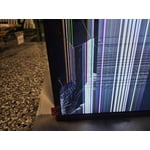
The entire process since I purchased this product online at Sam's Club has been a nightmare for me. First, Sam's Club's refund process is completely inaccurate and very slow. It's been 1 month and 10 days since I purchased the product, and 10 days since I returned the second product, but I still haven't received the refund. I've called the customer service center more than 10 times so far, but no one has taken responsibility and processed the refund. It's really disappointing that Sam's Club's customer service level is this bad. Of course, I will definitely get a refund, but their customer service score is absolutely failing. Second, after the first product was delivered with a broken display, I requested a replacement, but the product they sent back was a defective product with a more damaged display and a red label indicating a defect attached to the display. I don't know where Sam's Club or Samsung is doing this, but I don't know how this can happen.

Helpful?1RMTE3JL1NV513893753801
reply from Samsung

Hi ASSA,<br /><br />I&#39;m very sorry that you received two damaged televisions and are experiencing issues receiving a refund. Please know your feedback will be shared with our internal teams. If you have not already done so, I recommend getting in touch with Sam&#39;s Club for an update on your refund. <br /><br />Should you ever decide to give Samsung TVs another try and have questions or need help with settings, setup, or features, we would be happy to help. Call us at 1-800-SAMSUNG, 8 AM – 12 AM EST, seven days a week. LiveChat with an agent, as well as manuals, software, and warranty info, can be found at the ‘Support’ link on our Samsung website.<br /><br />We hope to regain you as a customer in the future. <br /><br />~ Samsung Advisor

Dec 29, 2024
Reviewer name: Assa
1 out of 5 stars
1 out of 5 stars review

Verified Purchase

Critical Defect for something else

I really don't know what was going on, but 1st TV and 2nd TV for the replacement, both had arrived as broken.

Helpful?1RMTE3JL1NV513893753801
reply from Samsung

Hi Assa, <br /><br />I&#39;m very sorry you have received two damaged TVs. Please reach out to Sam&#39;s Club to assist you. I&#39;m very sorry for the inconvenience and appreciate your patience. <br /><br />If there’s anything we can ever help with, please call us at 1-800-SAMSUNG, 8 AM - 12 AM EST, seven days a week. Or visit us on the Samsung website and click on the ‘Support’ link for:<br />1) LiveChat<br />2) Manuals, Software, &amp; Warranty Info<br /><br />~ Samsung Advisor

Apr 25, 2025
Reviewer name: Lingbtime member
1 out of 5 stars
1 out of 5 stars review

Verified Purchase

Horrible Shipping experience.
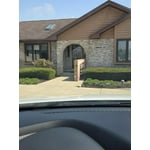
The shipping process is horrible. I paid $99 justbto have who ever delivered it leavevthe TV in my driveway.

Helpful?1RMTE3JL1NV513893753801
reply from Samsung

Hi Lingbtime member, <br /><br />Thank you for sharing your experience with us. You may want to reach out to Sam&#39;s Club directly to share your experience. <br /><br />If there’s anything we can ever help with, please call us at 1-800-SAMSUNG, 8 AM - 12 AM EST, seven days a week. Or visit us on the Samsung website and click on the ‘Support’ link for:<br />1) LiveChat<br />2) Manuals, Software, &amp; Warranty Info<br /><br />~ Samsung Advisor