Skip to Main Content
Sam's Club
Sam's Club
All Departments
All Services
Customer reviews for SAMSUNG 60" Class DU7200 Series 4K Smart TV for
SAMSUNG 60" Class DU7200 Series 4K Smart TV
4.2 out of 5 stars
stars
1,028 ratings965 reviews
  1. 5 stars61% (626)
  2. 4 stars20% (201)
  3. 3 stars9% (92)
  4. 2 stars5% (49)
  5. 1 star6% (60)

Member photos

  • +150 images
Sort by |
Showing 121-130 of 965 reviews
Feb 5, 2025
Reviewer name: Dbone
3 out of 5 stars
3 out of 5 stars review

Not a great purchase!

Bought this a few weeks ago for my mom. The remote is a joke. You can't control the volume other than mute it and there's not even an input button. I find this TV not very user friendly. Had to buy a Roku with a better remote for her to work it correctly. Picture quality seems decent.

Review from Samsung US
Helpful?39HMRPI2C1I113892053645
reply from Samsung Advisor

Hi, We appreciate your feedback on the DU7200 TV remote. Please know that you can control the volume of your TV by pressing the +/- button up to increase the volume and down to decrease the volume. To mute the sound, press the button. You can also learn how to use your remote directly from your TV. Just go to Home> (left directional button) Settings> Support> Remote Control Guide. If you ever have questions or need help, Samsung is here for you! Give us a call at 1-800-SAMSUNG, 8 AM - 12 AM EST, seven days a week. Our LiveChat agents are also available by clicking on the ‘Support’ link on our website. Thanks for being a part of the Samsung family! ~ Samsung Advisor

Apr 19, 2025
Reviewer name: stelrok
3 out of 5 stars
3 out of 5 stars review

Great TV, horrible Remote

I love this tv, the color is amazing it would be a perfect tv and I would have given it five stars but I couldn’t because the remote sucks I’ve never seen a remote so horrible you have to push the button two or three times and then it might work it’s terrible I’m going to try to find a replacement if possible if it wasn’t for the remote it would be perfect

Review from Samsung US
Helpful?39HMRPI2C1I113892053645
reply from Samsung Advisor

Hi stelrok, We appreciate your review of the DU7200 TV. To learn how to use your Samsung remote and understand the settings on your TV, please use your remote to access the remote guide. Go to Home> (left directional button) Settings> Support> Remote Control Guide. If you need more help, Samsung is here for you. Please call us at 1-800-SAMSUNG, 8 AM - 12 AM EST, seven days a week. Our LiveChat agents are also available by clicking on the ‘Support’ link on our website. ~Samsung Advisor

Mar 7, 2025
Reviewer name: Ducati
1 out of 5 stars
1 out of 5 stars review

Very disappointed !! We have always bought Samsun

We bought this item 1/28/25 (received it 1/31/25) . As of today 3/6/25 it stopped working this afternoon!! We unplugged - waited awhile - then plugged in again, still did not work ! The screen was dimly lit (very dark blue, hard to notice in the daylight} We then notice the red led light on the bottom right side tv was not on, this is why the remote control does not work. We Tried pressing the button by the led with no results. disappointed

Review from Samsung US
Helpful?39HMRPI2C1I113892053645
reply from Samsung Advisor

Hi Ducati, Please give us a chance to make this right by calling us at 1-800-SAMSUNG, 8 AM - 12 AM EST, seven days a week. Or visit us on the Samsung website and click on the ‘Support’ link for: 1) LiveChat 2) Manuals, Software, & Warranty Info ~ Samsung Advisor

Mar 5, 2025
Reviewer name: MeMe
4 out of 5 stars
4 out of 5 stars review

Mostly satisfied

Have had my Samsung for a short period. Been satisfied for the most part. Have had a problem with it communicating with an AT&T wireless router. It has decided not to communicate. Then a day later it connects back up. Don’t understand why. Other than that, have enjoyed the TV

Review from Samsung US
Helpful?39HMRPI2C1I113892053645
Apr 21, 2025
Reviewer name: DfamOf5
3 out of 5 stars
3 out of 5 stars review

Nice tv, but cuts out while gaming

This is a great tv, but we have one major problem with it. When my family is playing video games, the screen will randomly go black for a few seconds, then come back on. It's like it switches itself off of game mode by itself. Very frustrating, but other than that, it has been a nice tv. Wish there was a way to fix this problem.

Review from Samsung US
Helpful?39HMRPI2C1I113892053645
reply from Samsung Advisor

Hi DfamOf5, If you've switched on your TV and the sound comes through fine, but you do not see any picture, there are three potential issues. 1) A connection issue is the most common problem where there is a bad connection, faulty cables, or improper installation. 2) An issue with the device connected to the TV. There may be a video output setting on the device that you must set properly before it will output to the TV. 3) There is something wrong with the TV, requiring a technician to assess the TV and find a solution. Please give us the opportunity to assist you by contacting Samsung Customer Support via any of the following options: 1-800-SAMSUNG, 8AM - 12AM EST, 7 days a week. Or visit us on the Samsung website and click on the ‘Support’ link for: • LiveChat • Manuals, Software, & Warranty Info ~Samsung Advisor

Feb 5, 2025
Reviewer name: Disappointed Joe
2 out of 5 stars
2 out of 5 stars review

Not happy at all

When I bought this tv I was very disappointed with the multi function remote and it's abysmal instruction sheet. My Netflix account is set up through Roku so it would not let me sign in to Netflix ,because it did not support Roku. I really disliked that remote! It also has no audio outputs except for a USB port. I could not connect my soundbar to it. I have returned the tv to were I bought it.

Review from Samsung US
Helpful?39HMRPI2C1I113892053645
reply from Samsung Advisor

Hi, Thank you for choosing the Samsung DU7200 TV and for taking the time to provide us with detailed feedback on your experience. Your opinion is important to us and will be shared with our internal product teams. The DU72000F TV offers 3 HDMI ports and is Bluetooth and Wi-Fi capable, allowing a seamless connection across multiple devices at a time. If your external device requires an Optical port, we recommend utilizing an HDMI to Optical Converter. These can be found at your local electronics store. Please also keep in mind that an Optical port can be found on our DU8000F Series and above. If you have any questions or would like any support with your audio experience or choosing a Samsung Soundbar to complement your viewing enjoyment, please reach out to us at 1-800-SAMSUNG, 8 AM - 12 AM EST, seven days a week. Or visit us on the Samsung website and click on the ‘Support’ link for: 1) LiveChat 2) Manuals, Software, & Warranty Info ~ Samsung Advisor

Feb 6, 2025
Reviewer name: Philh
4 out of 5 stars
4 out of 5 stars review

Great TV - No Digital Audio

Great Picture. I love the Samsung for the Samsung TV - It's like most of what's on cable and a lot of streaming for free. I'd give it 5 stars but I'm really tired of manufacturers removing choice, in this instance where'd the digital/optical audio out go? Bluetooth has latency and quality issues.

Review from Samsung US
Helpful?39HMRPI2C1I113892053645
Feb 8, 2025
Reviewer name: Bawitdaba
4 out of 5 stars
4 out of 5 stars review

Beautiful picture

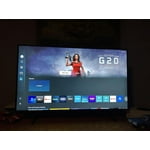
Crystal clear screen. Could do without the clutter of app icons I don't have or want. Would be nice if they only appeared after subscribing. Could be easier to navigate for the less tech savvy. The "legs" are unattractive. Sturdy enough, but wider legs would create a more balanced aesthetic for more cosmetic appeal. Removed one star for the things I don't like but the picture quality is beautiful.

Review from Samsung US
Helpful?39HMRPI2C1I113892053645
Mar 17, 2025
Reviewer name: BlaineO
4 out of 5 stars
4 out of 5 stars review

I bought this to use as a monitor for my Geochron

I bought the 55" Class Crystal UHD DU7200D to use primarily as a monitor connected to my Geochron Atlas 4k. It works very well for this purpose as well as a normal "Smart" TV. When first turned on it comes up on the channel selection screen and takes a minute or so to switch automatically to the HDMI input. I really wish the remote had a number keypad. I find it disappointing that TV manufactures are removing this simple feature.

Review from Samsung US
Helpful?39HMRPI2C1I113892053645
Mar 6, 2025
Reviewer name: None
4 out of 5 stars
4 out of 5 stars review

Siri except for the automatic cut off feature.

Not like the feature that you all have added, it turns the TV off every so often to avoid overuse or overuse of the CBT. We have had a number of TVs and have never worn out of CRT from leaving it on too much. And in out of inevitably it interrupts something important.

Review from Samsung US
Helpful?39HMRPI2C1I113892053645