
 Customer reviews for SAMSUNG 60" Class DU7200 Series 4K Smart TV for
Member photos


 +150 images
Great find. Thanks Samsung human logical proramr .
1 month old. accepted my internet router easily. Nice as I am not a Tekkie. Very satisfying picture. New unique remote actually user friendly. look intimidating. Easy access to all settings. Oh, and the picture...very pleasing. sharp and comfortable!!!
Not that happy with this tv.
We've always liked Samsung products. This time, we bought a 65 inch crystal screen tv. The picture is great. However, the sound has to be turned up high (35-50, or more) to comfortably listen to. Movies are much worse. I learned that the volume limit is 100. We've had in the high 80s for movies. I'm very disappointed in this aspect.
Hi noteableburn, Thank you for sharing your experience with low volume. There are several volume features you can adjust, which may improve your audio experience. 1) Auto Volume automatically adjusts the sound to a certain level when changing channels or switching to another external input. Go to Settings > All Settings> Sound > Expert Settings > Auto Volume. 2) Adaptive Sound automatically adjusts to a specific volume level while watching TV. The TV analyzes your volume usage history by time period to automatically adjust the volume when you use an app or switch to an external input source. Go to Settings> All Settings> Sound> Sound Mode> Adaptive Sound. 3) Several Sound Modes are likewise available to meet your personal preferences: Home > Settings > All Settings> Sound > Sound Mode. Also, some sources have their own volume control, which might need to be set higher. Please check the volume control of the external device (cable box or satellite box, DVD, Blu-ray, etc.) connected to your TV. Also, check the cable connection between an external device and the TV and then try the cable connection again. I hope this helps improve your audio experience. Should you need further assistance or have any questions, please contact Samsung Customer Support at 1-800-SAMSUNG, 8 AM - 12 AM EST, seven days a week. Or visit us on the Samsung website and click on the ‘Support’ link for: 1) LiveChat 2) Manuals, Software, & Warranty Info ~ Samsung Advisor
Garbage TV
I purchase this tv about a month or so ago and it’s the worst one I every purchase I had to purchase a sound bar to be able to hear the audio the had to purchase apps to be able to play my stuff . The remote is a piece of junk This Tizen operating system is a piece of garbage and if I could afford it some one else TV I’d take a hammer to it so no one would have my issues

Hi Calvin, I'm very sorry you are not satisfied with the DU7200 TV. Please know your opinion is important to us and will be shared with our internal product teams. If there’s anything we can ever help with, please call us at 1-800-SAMSUNG, 8 AM - 12 AM EST, seven days a week. Or visit us on the Samsung website and click on the ‘Support’ link for: 1) LiveChat 2) Manuals, Software, & Warranty Info ~ Samsung Advisor
43” Samsung tv
We replaced our older tv because it was not a smart tv. We have a Samsung smart tv in another room and have been very pleased with it’s performance so when we decided to replace the older tv we decided to get another Samsung. I do not want to get more emails. Please!
Rating: 2/5 – Stay Away
I had high expectations when purchasing the Samsung 85” TV, but after months of use, I can confidently say this model has been a huge disappointment. Application Hub & Performance Issues The biggest frustration comes from the sluggish and unresponsive application hub. Navigating between apps feels unnecessarily slow, and the transition from the app hub to an actual app takes far longer than it should. For a premium TV, I expected smooth and seamless performance, but instead, I deal with lag and unresponsiveness that make even basic tasks frustrating. Severe Burn-In Problems The burn-in issue is by far the worst problem with this TV. I enjoy watching darker, high-contrast films, but after some use, the burn-in is so extreme that certain scenes are completely unwatchable. Blacks are inconsistent, and ghosting from previous images makes the viewing experience painful. I’ve already had the display replaced once, yet the problem persists—meaning this is either a widespread issue with this model or poor quality control from Samsung. Final Thoughts For the price, I expected much better performance, both in terms of smart features and display quality. Between the unbearably slow application hub and severe burn-in problems, I cannot recommend this TV to anyone looking for a premium viewing experience. Even after a display replacement, there has been no improvement, which makes it clear that this is a fundamental flaw in the design or manufacturing of this model.
Hi Adam, Thank you for your feedback and patience in having your TV serviced. If you are still having issues with your TV screen, please reach out to us so we can schedule a warranty appointment. You can call us at 1-800-SAMSUNG, 8 AM - 12 AM EST, seven days a week. Our LiveChat agents are also available by clicking on the ‘Support’ link on our website. ~ Samsung Advisor
Sound/Audio Issue.
We've had the Samsung TV since June 2024. The picture is very good. We've had some trouble with the audio/sound. When changing channels, sometimes the sound "pops" and we lose sound on the new channel. If we turn the TV off for a few seconds and turn it back on, the sound returns to normal. I plan to call Samsung customer/technical service to discuss this issue the next time we experience the problem.
Good TV, lousy remote.
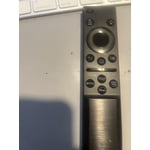
The tv is fine and the picture is great. My problem is with the remote which is sort of indecipherable Gone are all the familiar ttems like vol. arrows, channel arrows, and basically all words. The control and buttons are too small and trickier to work. I gave up trying to figure it out and just use my internet subscriber remote. Probaly missing out on things but it is what it is.
Great Picture/Sound Problems
we bought this for our anniversary in May of 2024. Everything was great with the beautiful picture and the great sound until about 4 months after we bought it. Then suddenly, in the middle of a show we are watching, the sound will turn off completely. We have tried everything. The only thing we can do with this smart "alec" TV is to turn the whole thing off, and turn it on again, and then find out way back to our show. Sometimes we have to do that several times before the sound comes back on. Ridiculous!
Hi Valerie, We appreciate you sharing details of the sound issue you’re experiencing on your DU7200 TV. There are a few troubleshooting steps I recommend trying: 1) Please check the volume control of your TV, and then check the volume control of any external devices (cable box or satellite box, DVD, Blu-ray, etc.) connected to your TV. Also, check the cable connection between any external device and the TV and then try the cable connection again. 2) Set Sound Output to the TV Speaker by going to Settings > All Settings> Sound > Sound Output. 3) Check whether Digital Output Audio Format is set to Pass-Through by going to Settings > All Settings> Sound > Expert Settings > Digital Output Audio Format > Auto. I hope this helps. Should your issue persist, please contact Samsung Customer Support to schedule a warranty appointment. You can call us at 1-800-SAMSUNG, 8 AM - 12 AM EST, seven days a week. Our LiveChat agents are also available by clicking on the ‘Support’ link on our website. ~ Samsung Advisor
Great picture. The controller is a little hard to.
Bought this a few months ago and we have an irritating issue with the tv. While watching the tv all of a sudden the whole screen goes black. It’s like a black out. This doesn’t happen to any other tv in the house. Otherwise the picture is beautiful. Too late to take it back to Cocsco.
Great picture but not very senior-friendly remote
I bought the Samsung 65" Class Crystal UHD DU7200D as a Christmas gift for my 80-year-old mom, and overall, we’re really happy with the purchase. The picture quality is stunning—bright, crisp, and vibrant—and the sound is clear, which is a big plus for her since she doesn’t like using external speakers. It’s a big upgrade from her older Samsung, and she loves watching her shows on the larger screen. However, I had to take off two stars because she's having a hard time learning to use the remote control. The newer remotes are sleek and minimal, but for seniors, the lack of labeled buttons and the different navigation style is a real challenge. She misses her old Samsung remote, which had more direct channel buttons and was easier for her to understand. I’m wondering if Samsung offers any alternative remote options that are more senior-friendly, or if there’s a way to program an older-style remote to work with this TV? It would make a huge difference in her experience, as she currently relies on me or someone else to switch channels for her. If you're buying this TV for a senior or someone who isn't tech-savvy, keep in mind that the remote might take some getting used to—or you may need to look for a compatible universal remote that’s easier to use.
Hi Flower321, Thank you for sharing you and your mother's experience with us. I do have a few suggestions that may help. First, you should be able to use the older Samsung remote with the new TV. It should automatically work with the TV. You can also learn how to use your remote directly from your TV. Just go to Home> (left directional button) Settings> Support> Remote Control Guide. We are also always available and happy to help you with any questions you may have. You can call us at 1-800-SAMSUNG, 8 AM - 12 AM EST, seven days a week. Our LiveChat agents are also available by clicking on the ‘Support’ link on our website. ~Samsung Advisor