Skip to Main Content
Sam's Club
Sam's Club
All Departments
All Services
Customer reviews for SAMSUNG 60" Class DU7200 Series 4K Smart TV for
SAMSUNG 60" Class DU7200 Series 4K Smart TV
4.2 out of 5 stars
stars
1,028 ratings965 reviews
  1. 5 stars61% (626)
  2. 4 stars20% (201)
  3. 3 stars9% (92)
  4. 2 stars5% (49)
  5. 1 star6% (60)

Member photos

  • +150 images
Sort by |
Showing 101-110 of 965 reviews
Feb 24, 2025
Reviewer name: Like Good Products
2 out of 5 stars
2 out of 5 stars review

Size

We own several Samsung TV sets. Unfortunately, the build quality of this set is not what I am accustomed to in a Samsung TV. The 45" Samsung set we bought in 2008 and replaced with this one has better picture quality. The colors look washed out, the sound level is stuck at 15, and can be neither raised or lowered. And the flimsy back covering makes the set appear cheap. The price is great for a set this large, but build quality was substantially compromised.

Review from Samsung US
Helpful?39HMRPI2C1I113892053645
reply from Samsung Advisor

Hi Like Good Products, We appreciate you sharing your experience with the DU7200 TV. Your feedback regarding image quality is essential to us and will be shared with our internal teams. Please try adjusting the below image settings. Go to Home > Settings > All Settings > Picture > Picture Mode and select the mode that best fits your usage: 1) Standard: Default mode suitable for general viewing environments. 2) Natural: Reduces eye strain for a comfortable viewing experience. 3) Movie: Most suitable for watching TV or movies in a dark room. 4) Dynamic: Makes the picture brighter and clearer in bright viewing environments. 5) Filmmaker Mode: You can watch the source content (e.g., movie) as it is. If the image is defined as Filmmaker Mode, it will automatically switch to Filmmaker Mode while watching. You can also go to Settings > All Settings> Picture > Expert Settings > to manually fine-tune your image. For sound adjustments, go to Settings> All Settings> Sound. Should you ever have questions or need help with TV features, specs, or operations, we are here to help. You can call us at 1-800-SAMSUNG, 8 AM - 12 AM EST, seven days a week. Our LiveChat agents are also available by clicking on the ‘Support’ link on our website. ~ Samsung Advisor

Feb 8, 2025
Reviewer name: Cimp
4 out of 5 stars
4 out of 5 stars review

Great picture, but other issues exist

I purchased this TV a few weeks ago. There was no user manual and that is very disappointing. I don't have 'cable', I use a convertor box for watching TV. I got it hooked up the first day with a few issues, but it has been working fine until last night. In the middle of watching a game head into overtime, no less, the TV stopped recognizing the convertor box connection. I keep trying to get it back, but it is frustrating. On the other hand, the picture is awesome, the connect to internet works great so I can watch Peacock and Hulu, but so far, I don't really use the other features. I can't seem to adjust the volume and that is a huge irritation. I did download the manual, but it seems to be a million pages and I would really like just an easy nuts and bolts user guide to hooking up. How do I watch basic over the air TV? Like PBS, ABC, CBS, NBC, FOX and others? Am I gonna miss the Super Bowl tomorrow???

Review from Samsung US
Helpful?39HMRPI2C1I113892053645
Mar 4, 2025
Reviewer name: Fred
1 out of 5 stars
1 out of 5 stars review

Bad Quality

I bought it Over a year ago. Returned it because it was having some glitchy problems. They gave me a new one, the box was already open. And the problems were worse. I should’ve brought it back. It’s just the kitchen TV so I didn’t bother. Problems every single time I Try to rewind it. And started again

Review from Samsung US
Helpful?39HMRPI2C1I113892053645
reply from Samsung Advisor

Hi Fred, I'm very sorry you have experienced issues with your DU7200 TV. If there’s anything we can ever help with, please call us at 1-800-SAMSUNG, 8 AM - 12 AM EST, seven days a week. Or visit us on the Samsung website and click on the ‘Support’ link for: 1) LiveChat 2) Manuals, Software, & Warranty Info ~ Samsung Advisor

Mar 6, 2025
Reviewer name: LisaT
2 out of 5 stars
2 out of 5 stars review

Not completely satisfied.

My spouse bought this several months ago Khe thought we needed a bigger screen)& so far have not been completely satisfied. Not enough ports on back of TV: No port for external sound system we used on old TV, so spouse bought complete new external speakers (extra expense). Cable box uses 1 HDMI port. DVD player uses 2nd HDMI port. No ports for WII game console. Had to purchase a converter to HDMI & then have to unplug either the cable box or the DVD player to plug game consoles in. External antenna port only tunes 1 channel at a time. Have to perform a new search each time we want to watvch a different channel from the external antenna. (Same external antenna used on old TV which scanned in 14 different channels at one time) Can't figure out how to use the the streaming channels preprogrammed on TV. (Not user friendly for senior citizens) If it was up to me I would have returned this TV & used the old one we had until it croaked.

Review from Samsung US
Helpful?39HMRPI2C1I113892053645
reply from Samsung Specialist

LisaT, Thank you for sharing your thoughts on the input selection - we'll be sure to pass this feedback along to our design teams. To assist in learning the various functions, please know you can download the DU7200D TV's User Manual, e-Manual, Remote Control Leaflet, and Quick Setup Guide on Samsung's website under Support > Manuals & Software > TVs & Home Theater. You can search for and select the DU7200D TV to download the guides you would like. The e-Manual and Remote Guide are both also embedded into your TV itself under Menu > Settings > Support > Open e-Manual. If you need more help, Samsung is here for you. Please call us at 1-800-SAMSUNG, 8AM - 12AM EST, 7 days a week. Our LiveChat agents are also available by clicking on the ‘Support’ link on our website. ~ Samsung Specialist

Feb 5, 2025
Reviewer name: Katt
1 out of 5 stars
1 out of 5 stars review

Samsung TV

I purchased this tv about 3months ago and thought I was having difficulty changing channels, looking at guide was just the “ learning curve”, but no! This has to b the most difficult tv made. When using “ guide” it races through channels , when selecting a channel manually it add numbers , have to exit and start over, etc…don’t try to switch between sports games quickly you cannot. ridiculous, several tried to use tv but have same issues, Too late to return to store- going to throw out.

Review from Samsung US
Helpful?39HMRPI2C1I113892053645
reply from Samsung Advisor

Hi Katt, Thank you for sharing your experience with us. It's unfortunate you are not satisfied with your TV. I recommend ensuring your TV is up to date with the latest Firmware. Go to Settings> Support> Software Update. If you need more help, Samsung is here for you. Please call us at 1-800-SAMSUNG, 8 AM - 12 AM EST, seven days a week. Our LiveChat agents are also available by clicking on the ‘Support’ link on our website. ~Samsung Advisor

Mar 20, 2025
Reviewer name: kenac
5 out of 5 stars
5 out of 5 stars review

Execllent TV for functionality and pix quality

Purchased 6 months ago, easy to install, excellent picture, good size for living room...attached external amp via optical. USB ports all work well, price is excellent for the functionality...remote took some getting used to but found how to use via UTube

Review from Samsung US
Helpful?39HMRPI2C1I113892053645
Mar 5, 2025
Reviewer name: Lollipop
5 out of 5 stars
5 out of 5 stars review

Great picture terrible remote.

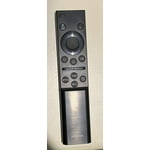
Great TV, easy to use. But hate the cellular remote! We have 3 tvs at home, 6 at a vacation rental, all Samsung. Only one has the cellular remote and it’s awful! Of course it’s our living room tv the One we use the most. Will not ever buy one that has this remote again!

Review from Samsung US
Helpful?39HMRPI2C1I113892053645
Feb 5, 2025
Reviewer name: SAMSUNG FAN
5 out of 5 stars
5 out of 5 stars review

Love my smart tv

Love the HD images and all features that Samsung had put into the tv. For me. The only downside is the remote control that doesn't have traditional bottoms and makes some of my household members frustrated. Always need to go to rescue them when they are looking to change channels or deal with tv volume 🤔

Review from Samsung US
Helpful?39HMRPI2C1I113892053645
Feb 6, 2025
Reviewer name: Robin
1 out of 5 stars
1 out of 5 stars review

Extremely Disappointed

The size and price of the television was a good value. However, the remote control is extremely difficult to use and actually prevents us from watching the television at all. We purchased this one for our bedroom and we’re going to get a larger for our family room. We definitely won’t be buying another disaster like this.

Review from Samsung US
Helpful?39HMRPI2C1I113892053645
reply from Samsung Advisor

Hi Robin, Thank you for your feedback. Samsung remotes are designed to be convenient and useful, but we understand if you’d prefer to use a third-party remote, whether it’s a universal remote, a game controller, or something else! Whether you are replacing a lost remote or using an alternative remote to help reduce clutter, a third-party remote is a great option to use to control your Samsung TV. If you need more help, Samsung is here for you! Please call us at 1-800-SAMSUNG, 8 AM - 12 AM EST, seven days a week. Our LiveChat agents are also available by clicking on the ‘Support’ link on our website. ~ Samsung Advisor

Feb 5, 2025
Reviewer name: Dave
2 out of 5 stars
2 out of 5 stars review

Somewhat disappointed

I bought this unit based on a previous Samsung 40 inch tv that we purchased some 8 years ago. The picture quality of the old unit was quite a bit better than the new one. 23 steps to the left or right of center and the picture fades considerably. Didn’t have that issue with the old one. But the price was very good.

Review from Samsung US
Helpful?39HMRPI2C1I113892053645
reply from Samsung Advisor

Hi, Thank you for sharing your thoughts on the picture quality of your DU7200 TV. I have a few recommendations that may improve your visual experience: Go to Home > Settings > All Settings > Picture > Picture Mode and select the mode that best fits your usage: 1) Standard: Default mode suitable for general viewing environments. 2) Natural: Reduces eye strain for a comfortable viewing experience. 3) Movie: Most suitable for watching TV or movies in a dark room. 4) Dynamic: Makes the picture brighter and clearer in bright viewing environments. 5) Filmmaker Mode: You can watch the source content (e.g., movie) as it is. If the image is defined as Filmmaker Mode, it will automatically switch to Filmmaker Mode while watching. You can also go to Settings > All Settings> Picture > Expert Settings > to manually fine-tune your image. If you need more help, Samsung is here for you. Call us at 1-800-SAMSUNG, 8 AM - 12 AM EST, seven days a week. Our LiveChat agents are also available by clicking on the ‘Support’ link on our website. ~ Samsung Advisor