Skip to Main Content
Sam's Club
Sam's Club
All Departments
All Services
Customer reviews for Samsung 4.1 Channel Soundbar w/Subwoofer - HW C47M for
Samsung 4.1 Channel Soundbar w/Subwoofer - HW C47M
4.2 out of 5 stars
stars
800 ratings790 reviews
  1. 5 stars66% (531)
  2. 4 stars12% (98)
  3. 3 stars6% (48)
  4. 2 stars5% (38)
  5. 1 star11% (85)
Sort by |
Showing 41-50 of 790 reviews
Mar 7, 2026
Reviewer name: WalmartCustomer
5 out of 5 stars
5 out of 5 stars review

Verified Purchase

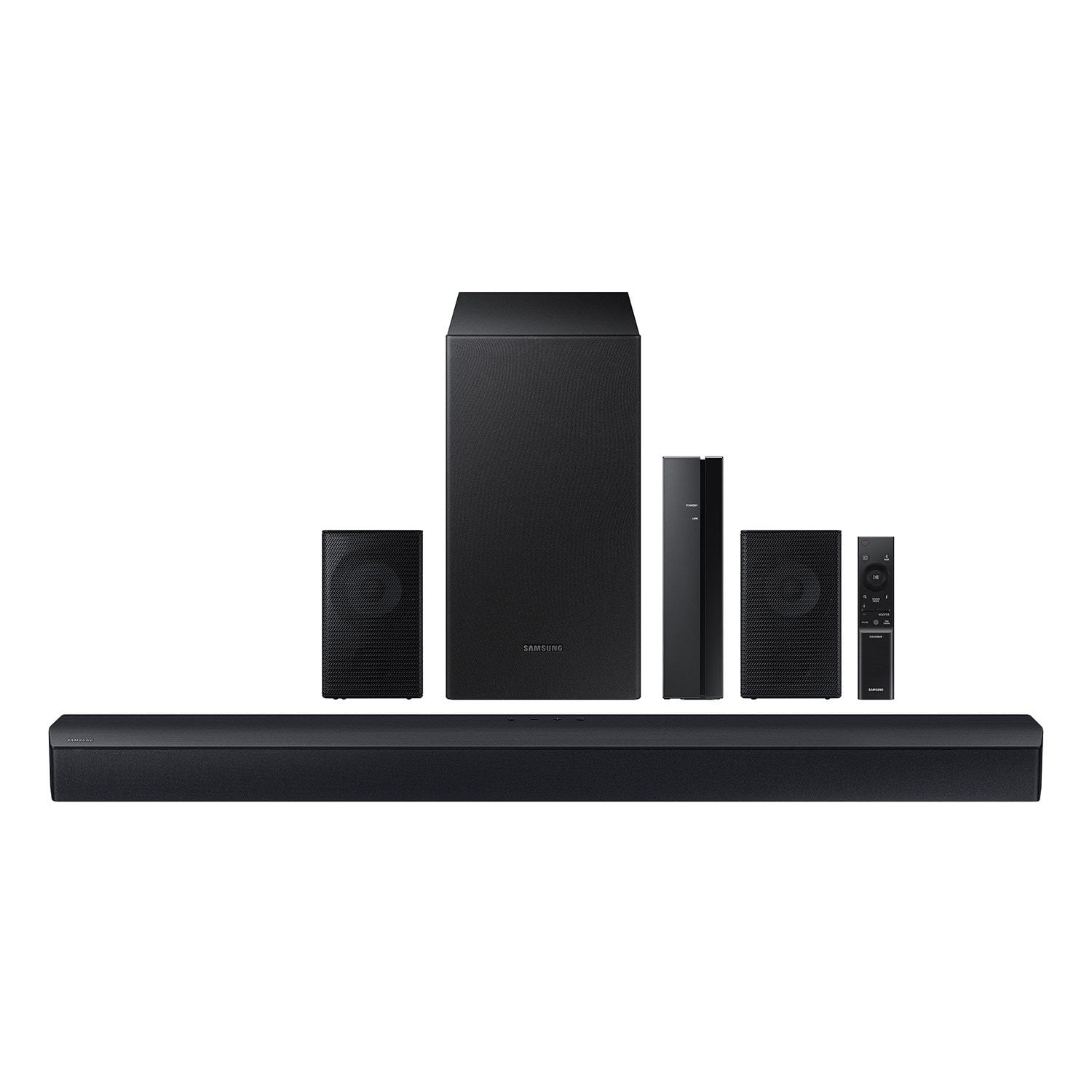
[This review was collected as part of a promotion.] One of the items appeared bigger on website otherwise very satisfied

Review from walmart.com
Helpful?6U2SK3AEJBKZ19585623078
May 15, 2026
Reviewer name: Naji Tech Solutions
5 out of 5 stars
5 out of 5 stars review

Verified Purchase

Very Decent

The sound quality is very good, no issues and for the price you can't beat this surround sound system.

Helpful?6U2SK3AEJBKZ19585623078
Feb 4, 2026
Reviewer name: Mark
1 out of 5 stars
1 out of 5 stars review

Verified Purchase

I could not get the rear speakers or subwoofer to pair with the soundbar. I texted with Samsung and they were no help. Maybe it’s just me. It seemed like a quality unit.

Review from walmart.com
Helpful?6U2SK3AEJBKZ19585623078
reply from Samsung

Hello Mark, We appreciate you taking a moment to review the Samsung HW-C47M Soundbar. When powered on for the first time, the rear speakers and subwoofer should automatically connect wirelessly. If the auto-connection process fails, you can try manually connecting the sub and rears to the soundbar. Before performing the manual connection procedure, check whether the power cables for the Soundbar and subwoofer are connected properly and make sure that the Soundbar is turned off. Press and hold ID SET on the rear of the subwoofer for at least 5 seconds. The red indicator on the rear of the subwoofer turns off and the blue indicator blinks. Press and hold the Up button on the remote control for at least 5 seconds. The ID SET message appears on the display of the Soundbar for a moment, and then it disappears. The Soundbar will automatically power on when ID SET is complete. The LINK LED indicator stops blinking and glows a solid blue when a connection is established between the Soundbar and the Wireless Subwoofer. To setup the wireless rear speaker kit included with the soundbar, first use the color-coded speaker wires to connect the rear speakers to its wireless module and place these three in the back of your room. Plug the wireless receiver module power cord into an electrical outlet and into the wireless receiver module to turn on the wireless receiver module. Press and hold the ID SET button on the back of the wireless module for at least 5 seconds or until the blue light starts blinking. Turn off your soundbar and press the Up button on the remote for 5 seconds. The ID SET message will appear on the soundbar for a short time and then disappear. After the ID SET process, the soundbar power is automatically turned on. The LINK LED indicator stops blinking and glows a solid blue when a connection is established between the soundbar and the wireless receiver module. If you’d like more help with settings, please know we’re here to help! Call us at 1-800-SAMSUNG (Ask for Soundbars), 8AM - 12AM EST, 7 days a week. Or visit us on the Samsung website and click on the ‘Support’ link for: • Live Chat • Manuals, Software, & Warranty Info • Creating a service ticket ~ Samsung Solutions

Dec 6, 2025
Reviewer name: Coranette
5 out of 5 stars
5 out of 5 stars review

Verified Purchase

Soundbar set.

Setup was fairly easy, however the instructing were not user friendly. I had to have my cousin come take a look at it because the soundbar worked but speakers would not connect. He was able to fix it and it sounds good.

Review from walmart.com
Helpful?6U2SK3AEJBKZ19585623078
Dec 24, 2025
Reviewer name: Lonnie
5 out of 5 stars
5 out of 5 stars review

Verified Purchase

great easy to hook up and affordable

we really enjoy our samsung soundbar with speakers it was easy to set up and its loud enough for us to hear over our kids it really is a great system with great surround sound would definitely recommend to everyone

Review from walmart.com
Helpful?6U2SK3AEJBKZ19585623078
Jan 21, 2026
Reviewer name: Gregory
5 out of 5 stars
5 out of 5 stars review

Verified Purchase

Great Sound Bar

I got mine on clearance for $100. For the original price I wouldn't have even considered it. It does sound amazing. Deep bass that doesn't that doesn't hurt the vocals or other sounds. Plenty of sound options for whatever you're watching

Review from walmart.com
Helpful?6U2SK3AEJBKZ19585623078
Dec 6, 2025
Reviewer name: Jeffrey
5 out of 5 stars
5 out of 5 stars review

Verified Purchase

surround sounds

I like a lot of superhero movies and deep bass is good 4 everything cept neighbors dog oops. The fun is hard to measure but the system is not disappointing. Makes music come 2 life as well

Review from walmart.com
Helpful?6U2SK3AEJBKZ19585623078
Jan 16, 2026
Reviewer name: Jesse
5 out of 5 stars
5 out of 5 stars review

Verified Purchase

Love Samsung

man I hooked this up and I couldn't believe the sound quality that was coming out of those speakers oh my God the wattage the base, and that surround sound all good!

Review from walmart.com
Helpful?6U2SK3AEJBKZ19585623078
Nov 25, 2025
Reviewer name: Renee
4 out of 5 stars
4 out of 5 stars review

Verified Purchase

When it said wireless I assumed the speakers were wireless but they connect to another box so you are limited to where you can position the speakers by the length of the cord.

Review from walmart.com
Helpful?6U2SK3AEJBKZ19585623078
Nov 8, 2025
Reviewer name: Gordon
1 out of 5 stars
1 out of 5 stars review

Verified Purchase

too much trouble to connect/install small speakers has around 5 ft. of speaker wire each, it has this small box didn't bother to hook it up. it was too much. i returned the system...

Review from walmart.com
Helpful?6U2SK3AEJBKZ19585623078
reply from Samsung

Hello Gordon, Thank you for sharing your review of the HW-C47M Soundbar. We value your feedback and will share it with our teams. If there is anything we can do to improve your enjoyment, such as helping to optimize settings for your specific sound scenario, please contact Samsung Customer Support. Just give us a call at 1-800-SAMSUNG (Ask for Soundbars), 8AM - 12AM EST, 7 days a week. Our Live Chat agents are also available by clicking on the ‘Support’ link on our website. ~ Samsung Solutions