Skip to Main Content
Sam's Club
Sam's Club
All Departments
All Services
Customer reviews for Samsung 4.1 Channel Soundbar w/Subwoofer - HW C47M for
Samsung 4.1 Channel Soundbar w/Subwoofer - HW C47M
4.2 out of 5 stars
stars
800 ratings790 reviews
  1. 5 stars66% (531)
  2. 4 stars12% (98)
  3. 3 stars6% (48)
  4. 2 stars5% (38)
  5. 1 star11% (85)
Sort by |
Showing 31-40 of 790 reviews
Feb 2, 2026
Reviewer name: Asha
5 out of 5 stars
5 out of 5 stars review

Verified Purchase

I’ve been eyeballing this speaker for quite some time. I finally got it and it and it works wonderful with my Samsung tv just as expected. Im pleased .

Review from walmart.com
Helpful?6U2SK3AEJBKZ19585623078
Feb 5, 2026
Reviewer name: Gerry
5 out of 5 stars
5 out of 5 stars review

Verified Purchase

Good sounds for price

I was skeptical at first, but the system sounds great paired with our projector. Bass is perfect balance in our space, about 20ft x 15 ft and the soundbar speakers are clear for movies or music.

Review from walmart.com
Helpful?6U2SK3AEJBKZ19585623078
Jan 2, 2026
Reviewer name: AJSmith
3 out of 5 stars
3 out of 5 stars review

Verified Purchase

Low quality surround system. Do not recommend!

Low level system. Sound not very loud. Cannot hear subwoofer speaker. Subwoofer is bluetooth but other speakers wired only. You can get much better quality system for the price this one cost!

Review from walmart.com
Helpful?6U2SK3AEJBKZ19585623078
reply from Samsung

Hello Allison,<br /><br />We appreciate you taking a moment to review the Samsung HW-C47M Soundbar.<br /><br />By pressing the TONE CONTROL button, you can adjust the volume of the treble or bass sound between -6~&#43;6 by using the Up/Down buttons. <br /><br />Additionally, using the WOOFER button on the remote, you can adjust the subwoofer’s volume between -6 to &#43;6 by toggling the button up or down. To set the subwoofer volume level to 0, press the button down. <br /><br />When you press the CH LEVEL button, you can adjust the volume of the VIRTUAL CENTER LEVEL. This will allow you to adjust the overall dialogue between -6 to &#43;6 using the UP/DOWN button on the provided Soundbar remote. When you press the CH LEVEL button when the Wireless Rear Speaker Kit connected to the Soundbar, you can adjust the rear speakers between -6 to &#43;6 using the UP/DOWN buttons. <br /><br />Press and hold the SOUND CONTROL button for about 5 seconds to adjust the sound for each frequency band. 150Hz, 300Hz, 600Hz, 1.2kHz, 2.5kHz, 5kHz, and 10kHz are selectable using the Left/Right buttons and each can be adjusted to a setting between -6 to &#43;6 using the Up/Down buttons. (Make sure the Sound mode is set to “STANDARD”. <br /><br />If we can help with anything else, please call us at 1-800-SAMSUNG (Ask for Soundbars), 8 AM – 12 AM EST, 7 days a week. LiveChat with an agent as well as manuals, software, and warranty info can be found at the ‘Support’ link on our Samsung website.<br /> <br />~ Samsung Solutions

Feb 4, 2026
Reviewer name: Mark
1 out of 5 stars
1 out of 5 stars review

Verified Purchase

I could not get the rear speakers or subwoofer to pair with the soundbar. I texted with Samsung and they were no help. Maybe it’s just me. It seemed like a quality unit.

Review from walmart.com
Helpful?6U2SK3AEJBKZ19585623078
reply from Samsung

Hello Mark,<br /><br />We appreciate you taking a moment to review the Samsung HW-C47M Soundbar.<br /><br />When powered on for the first time, the rear speakers and subwoofer should automatically connect wirelessly. If the auto-connection process fails, you can try manually connecting the sub and rears to the soundbar.<br /><br />Before performing the manual connection procedure, check whether the power cables for the Soundbar and subwoofer are connected properly and make sure that the Soundbar is turned off.<br /><br />Press and hold ID SET on the rear of the subwoofer for at least 5 seconds. The red indicator on the rear of the subwoofer turns off and the blue indicator blinks. Press and hold the Up button on the remote control for at least 5 seconds. The ID SET message appears on the display of the Soundbar for a moment, and then it disappears. The Soundbar will automatically power on when ID SET is complete. The LINK LED indicator stops blinking and glows a solid blue when a connection is established between the Soundbar and the Wireless Subwoofer.<br /><br />To setup the wireless rear speaker kit included with the soundbar, first use the color-coded speaker wires to connect the rear speakers to its wireless module and place these three in the back of your room. Plug the wireless receiver module power cord into an electrical outlet and into the wireless receiver module to turn on the wireless receiver module. <br /><br />Press and hold the ID SET button on the back of the wireless module for at least 5 seconds or until the blue light starts blinking. Turn off your soundbar and press the Up button on the remote for 5 seconds. The ID SET message will appear on the soundbar for a short time and then disappear. After the ID SET process, the soundbar power is automatically turned on. The LINK LED indicator stops blinking and glows a solid blue when a connection is established between the soundbar and the wireless receiver module.<br /><br />If you’d like more help with settings, please know we’re here to help! Call us at 1-800-SAMSUNG (Ask for Soundbars), 8AM - 12AM EST, 7 days a week. Or visit us on the Samsung website and click on the ‘Support’ link for:<br />• Live Chat<br />• Manuals, Software, &amp; Warranty Info<br />• Creating a service ticket<br /><br />~ Samsung Solutions

Apr 16, 2026
Reviewer name: Robert
5 out of 5 stars
5 out of 5 stars review

Verified Purchase

This soundbar works perfectly with my TV, it was really easy to set up, everything about it is great, i absolutely love it. its a perfect compliment to my TV.

Review from walmart.com
Helpful?6U2SK3AEJBKZ19585623078
Dec 19, 2025
Reviewer name: Tonya
2 out of 5 stars
2 out of 5 stars review

Verified Purchase

More hassle than worth

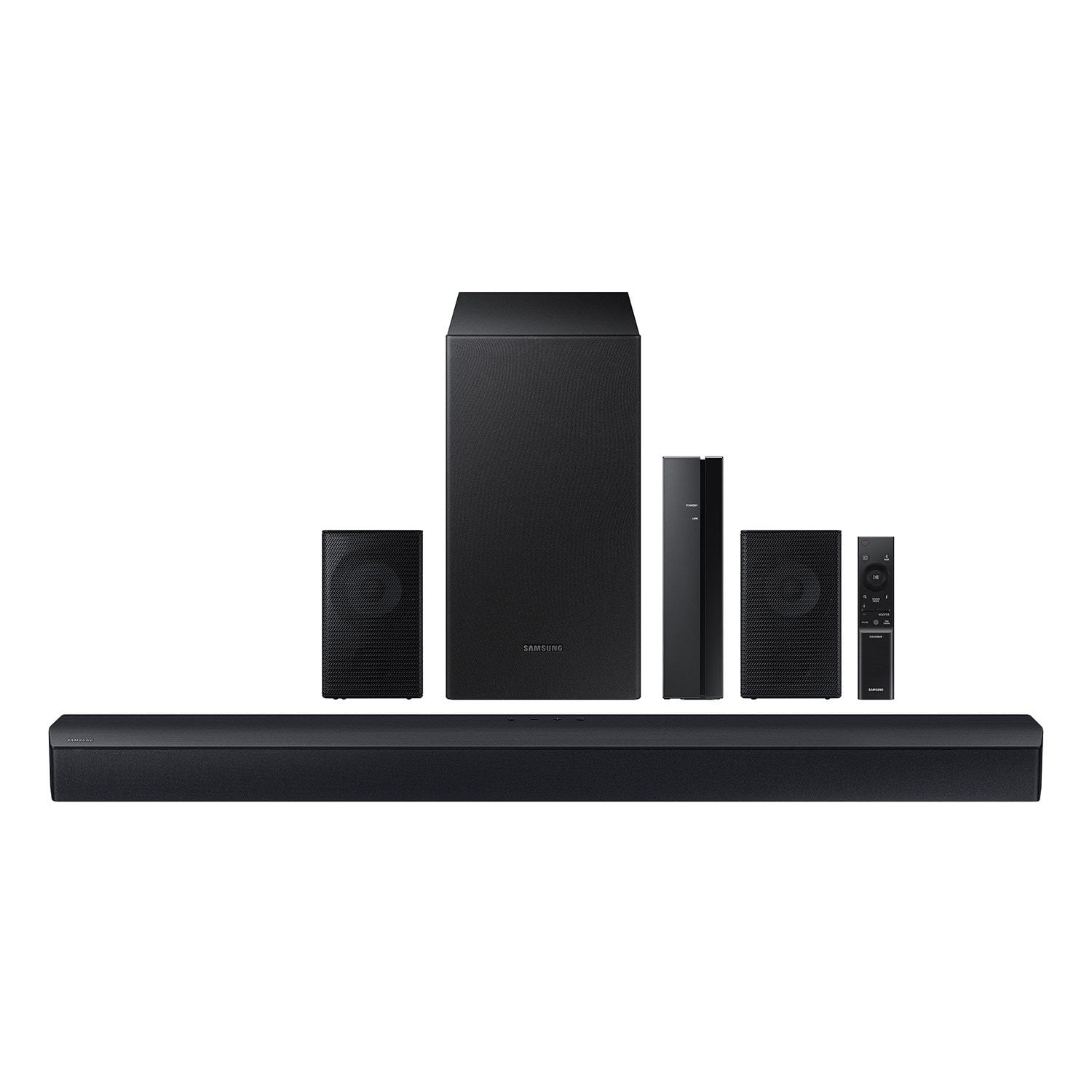
Time consuming to assemble with the speaker stands I had to purchase separately but was included in a photo to sell the thing. Rear small speakers are wired. And now that I have it all put together one of the small speakers don’t work!!!! I would not purchase again

Review from walmart.com
Helpful?6U2SK3AEJBKZ19585623078
reply from Samsung

Hi Tonya,<br /><br />Thank you for taking a moment to review the Samsung HW-C47M Soundbar. We value your feedback and will share it with our teams. <br /><br />Did you know you can optimize your audio performance to your liking by pressing the SOUND MODE button on your soundbar remote and then selecting the desired sound effect by choosing SURROUND SOUND, GAME, or STANDARD. <br /><br />By pressing the TONE CONTROL button, you can adjust the volume of the treble or bass sound between -6~&#43;6 by using the Up/Down buttons. <br /><br />Additionally, using the WOOFER button on the remote, you can adjust the subwoofer’s volume between -6 to &#43;6 by toggling the button up or down. To set the subwoofer volume level to 0, press the button down. <br /><br />When you press the CH LEVEL button, you can adjust the volume of the VIRTUAL CENTER LEVEL. This will allow you to adjust the overall dialogue between -6 to &#43;6 using the UP/DOWN button on the provided Soundbar remote. When you press the CH LEVEL button when the Wireless Rear Speaker Kit connected to the Soundbar, you can adjust the rear speakers between -6 to &#43;6 using the UP/DOWN buttons. <br /><br />Press and hold the SOUND CONTROL button for about 5 seconds to adjust the sound for each frequency band. 150Hz, 300Hz, 600Hz, 1.2kHz, 2.5kHz, 5kHz, and 10kHz are selectable using the Left/Right buttons and each can be adjusted to a setting between -6 to &#43;6 using the Up/Down buttons. (Make sure the Sound mode is set to “STANDARD”. <br /><br />If we can help with anything else, please call us at 1-800-SAMSUNG (Ask for Soundbars), 8 AM – 12 AM EST, 7 days a week. LiveChat with an agent as well as manuals, software, and warranty info can be found at the ‘Support’ link on our Samsung website. <br /><br />~ Samsung Solutions

Oct 14, 2025
Reviewer name: mike
1 out of 5 stars
1 out of 5 stars review

Verified Purchase

Sound does not sync with picture - off by ~1s

There is no HDMI input for this soundbar so the only way to connect this is via the optical cable or Bluetooth. If you use Bluetooth, the sound is off and you cannot sync it up to the picture. At first it's like watching a dubbed movie all the time but eventually it gets really annoying. This is like nearly a second off from what the screen is doing. We bought this Samsung soundbar and a new Samsung TV and they do not work together. The new TV doesn't have an optical output so the only way for these 2 devices to talk is Bluetooth. And do not call Samsung support. They started by asking if it was plugged in, then unplug both for 2 min, then connect HDMI even though they should have known that the TV doesn't have an HDMI output nor does the soundbar have an HDMI input, he asked for a picture of the back and then a new person came on and started with, "What's your first and last name"...I hung up at that point. Completely useless.

Review from walmart.com
Helpful?6U2SK3AEJBKZ19585623078
reply from Samsung

Hi mike,<br /><br />Thank you for taking a moment to review the Samsung HW-C47M Soundbar.<br /><br />If the video on the TV and audio from the soundbar are not synchronized, press the SOUND CONTROL button on the soundbar remote until you see AUDIO SYNC on the display. You can then set the audio delay between 0~300 milliseconds by using the Up/Down buttons.<br /><br />For additional troubleshooting steps, please refer to this online guide:<br />https://www.samsung.com/us/support/troubleshooting/TSG01110022/<br /><br />I hope the above helps to solve your issue. If you need further help, please reach out to Samsung Customer Support. Just give us a call at 1-800-SAMSUNG (Ask for Soundbars), 8AM - 12AM EST, 7 days a week. Our Live Chat agents are also available by clicking on the ‘Support’ link on our website.<br /><br />~ Samsung Solutions

Nov 15, 2025
Reviewer name: JT
1 out of 5 stars
1 out of 5 stars review

Verified Purchase

Not wireless and doesnt work half the time.

Its not wireless, you have to wire the small speakers and sometimes the sub-woofer works, sometimes it doesnt. Can barely hear the shows, but when the commercials come on its loud enough to rattle windows. Waste of money, buy a better quality system.

Review from walmart.com
Helpful?6U2SK3AEJBKZ19585623078
reply from Samsung

Hello JT,<br /><br />We appreciate you taking a moment to review the HW-C47M Samsung Soundbar.<br /><br />Occasionally, customers have trouble hiding and running speaker wires from the front of the room (where their soundbar is) to the back of their room (where they have their rear speakers). The Rear Speaker Kit eliminates that hassle. Connect the rear speakers to its wireless module and place these three in the back of your room. One wire is required to connect each rear speaker to the wireless module. Then plug in the power cable to the module. The “wireless” convenience is in connecting your soundbar and any other speakers at the front of the room to the rear speakers – this can now be done via Wi-Fi through the wireless module, eliminating any clutter of long wires running the length of your room.<br /><br />You can optimize your audio performance to your liking by pressing the SOUND MODE button on your soundbar remote and then selecting the desired sound effect by choosing SURROUND SOUND, GAME, or STANDARD. <br /><br />By pressing the TONE CONTROL button, you can adjust the volume of the treble or bass sound between -6~&#43;6 by using the Up/Down buttons. <br /><br />Additionally, using the WOOFER button on the remote, you can adjust the subwoofer’s volume between -6 to &#43;6 by toggling the button up or down. To set the subwoofer volume level to 0, press the button down. <br /><br />When you press the CH LEVEL button, you can adjust the volume of the VIRTUAL CENTER LEVEL. This will allow you to adjust the overall dialogue between -6 to &#43;6 using the UP/DOWN button on the provided Soundbar remote. When you press the CH LEVEL button when the Wireless Rear Speaker Kit connected to the Soundbar, you can adjust the rear speakers between -6 to &#43;6 using the UP/DOWN buttons. <br /><br />Press and hold the SOUND CONTROL button for about 5 seconds to adjust the sound for each frequency band. 150Hz, 300Hz, 600Hz, 1.2kHz, 2.5kHz, 5kHz, and 10kHz are selectable using the Left/Right buttons and each can be adjusted to a setting between -6 to &#43;6 using the Up/Down buttons. (Make sure the Sound mode is set to “STANDARD”. <br /><br />If we can help with anything else, please call us at 1-800-SAMSUNG (Ask for Soundbars), 8 AM – 12 AM EST, 7 days a week. LiveChat with an agent as well as manuals, software, and warranty info can be found at the ‘Support’ link on our Samsung website. <br /><br />~ Samsung Solutions

Dec 16, 2025
Reviewer name: Ida
5 out of 5 stars
5 out of 5 stars review

Verified Purchase

Our daughter loved it and set up in an hour!

We bought this for our daughter for Christmas. She had it set up and sounding great about an hour after she received it. I gave it to her before Christmas so her family could enjoy watching their Christmas movie’s with excellent sound. She absolutely loves it. We gave her a 65” Samsung for her Birthday in November and this surround sound paired very well. This gift was a big hit!

Review from walmart.com
Helpful?6U2SK3AEJBKZ19585623078
Nov 24, 2025
Reviewer name: Gerrod
5 out of 5 stars
5 out of 5 stars review

Verified Purchase

Because of the price i can honestly say i didn't expect much at all other than longevity. Samsung has exceeded my expectations on this. I love good sound while watching entertainment and this is Awesome sound. easy connection on my Samsung tv as well as my smarthub and smartphone. Im Samsung for life!

Review from walmart.com
Helpful?6U2SK3AEJBKZ19585623078