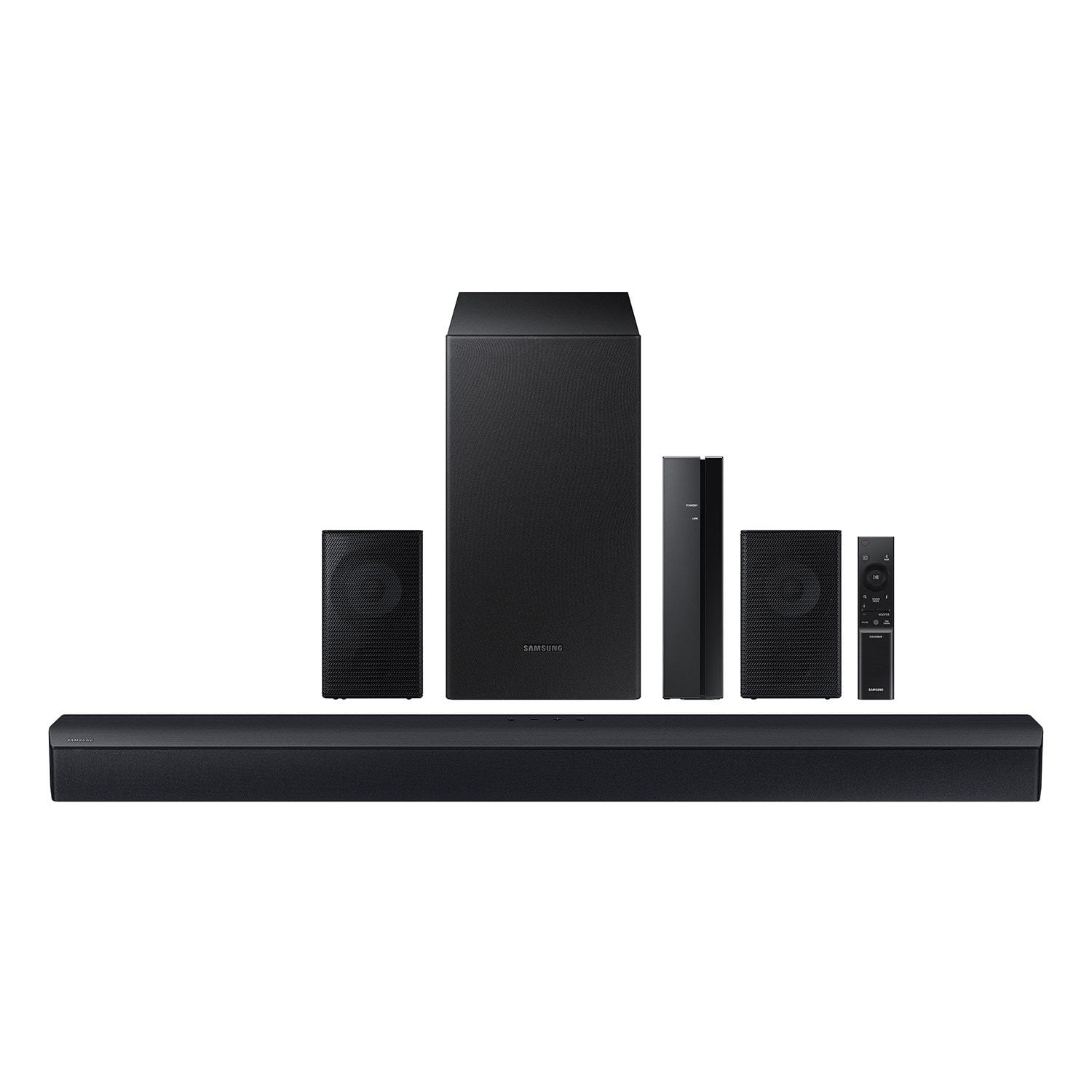
Customer reviews for Samsung 4.1 Channel Soundbar w/Subwoofer - HW C47M forVerified Purchase
Not great
Rear speakers aren’t working after 2 days . Walmart took the product back in a hassle free process . Without that issue it’s okay product for this price range
Hello Shanmukha,<br /><br />Thank you for your review of the Samsung HW-C47M Soundbar and for sharing the experience that has caused you to return your unit. Your feedback is very important to us and will be shared with our product team.<br /><br />Should you ever decide to give Samsung Soundbars another try and have questions or need assistance with settings, setup, or features, please know we are always here to help.<br /><br />Call us at 1-800-SAMSUNG (ask for Soundbars), available 8 AM – 12 AM EST, 7 days a week.<br /><br />~ Samsung Solutions
Verified Purchase
Not good
Either the sound bar works and the speakers don’t or the speakers play and the sound bar doesn’t. Everything is connected right and the subwoofer is barely audioable. Don’t be fooled by promotional ratings is not worth the purchase.
Hello ashley,<br /><br />Thank you for purchasing the new HW-C47M Soundbar. I am sorry to see that your out-of-box experience has not been ideal. <br /><br />So we can better assist you with step-by-step troubleshooting or warranty replacement, please call us at 1-800-SAMSUNG (ask for Soundbars), available 8 AM – 12 AM EST, 7 days a week.<br /><br />LiveChat with an agent by clicking the ‘Support’ link on the Samsung website.<br /><br />~Samsung Solutions
Verified Purchase
very good sounds like very much this is my second purchase of a Samsung sound bar with wireless rear speakers and subwoofer its the only brand I would by
Verified Purchase
These speakers work amazing beofre with just my tv I had to have at at almost 100 to hear anything and now I don’t even have to turn it past 20 volume definitely worth it for the price
Verified Purchase
Bad soundbar. Poor bass. Mediocre rear speakers.
Nothing about this soundbar is good. Maybe for the price it sound ok if you hook everything together. But. You will notice that horrific main soundbar immediately.
Hello Sq,<br /><br />Thank you for purchasing the new HW-C47M Soundbar. I am sorry to see that your expectations were not met. <br /><br />You can optimize your audio performance to your liking by pressing the SOUND MODE button on your soundbar remote and then selecting the desired sound effect by choosing SURROUND SOUND, GAME or STANDARD. <br /><br />By pressing the TONE CONTROL button, you can adjust the volume of the treble or bass sound. Press the button to select TREBLE or BASS and then adjust the volume between -6~+6 by using the Up/Down buttons. <br /><br />Press and hold the SOUND CONTROL button for about 5 seconds to adjust the sound for each frequency band. 150Hz, 300Hz, 600Hz, 1.2kHz, 2.5kHz, 5kHz, and 10kHz are selectable using the Left/Right buttons and each can be adjusted to a setting between -6 to +6 using the Up/Down buttons. Make sure the Sound mode is set to “STANDARD”. <br /><br />Additionally, using the WOOFER button on the remote, you can adjust the subwoofer’s volume between -6 to +6 by toggling the button up or down. To set the subwoofer volume level to 0, press the button down. <br /><br />When you press the CH LEVEL button on the remote, you can adjust the volume of the VIRTUAL CENTER CHANNEL or REAR LEVEL using the UP/DOWN buttons between -6 to +6. <br /><br />Should you ever have questions or need help, please call us at 1-800-SAMSUNG (ask for Soundbars), available 8 AM – 12 AM EST, 7 days a week. <br /><br />For additional support resources such as downloading a full manual, visit us on the Samsung website and click on the ‘Support’ link in the upper right corner of the homepage. <br /><br />~Samsung Solutions
Verified Purchase
[This review was collected as part of a promotion.] A good quality sound bar, with a clear sound and for the promotional price it seems like a very good purchase.
Verified Purchase
Good name but not what I would it would sound.
It wasn't that much better than the speaker system in my 65 inch Xumo/Panasonic Smart TV. If you want loud %26 clear don't waste your money on this soundbar!
Hello Buck,<br /><br />I’m sorry to hear that you’re dissatisfied with the performance of your HW-C47M Soundbar.<br /><br />You can optimize your audio performance to your liking by pressing the SOUND MODE button on your soundbar remote and then selecting the desired sound effect by choosing SURROUND SOUND, GAME, or STANDARD. <br /><br />By pressing the TONE CONTROL button, you can adjust the volume of the treble or bass sound between -6~+6 by using the Up/Down buttons. <br /><br />Additionally, using the WOOFER button on the remote, you can adjust the subwoofer’s volume between -6 to +6 by toggling the button up or down. To set the subwoofer volume level to 0, press the button down. <br /><br />When you press the CH LEVEL button, you can adjust the volume of the VIRTUAL CENTER LEVEL. This will allow you to adjust the overall dialogue between -6 to +6 using the UP/DOWN button on the provided Soundbar remote. When you press the CH LEVEL button when the Wireless Rear Speaker Kit connected to the Soundbar, you can adjust the rear speakers between -6 to +6 using the UP/DOWN buttons. <br /><br />Press and hold the SOUND CONTROL button for about 5 seconds to adjust the sound for each frequency band. 150Hz, 300Hz, 600Hz, 1.2kHz, 2.5kHz, 5kHz, and 10kHz are selectable using the Left/Right buttons and each can be adjusted to a setting between -6 to +6 using the Up/Down buttons. (Make sure the Sound mode is set to “STANDARD”. <br /><br />If we can help with anything else, please call us at 1-800-SAMSUNG (Ask for Soundbars), 8 AM – 12 AM EST, 7 days a week. LiveChat with an agent as well as manuals, software, and warranty info can be found at the ‘Support’ link on our Samsung website. <br />~ Samsung Solutions
Verified Purchase
NOT WIRELESS
Sound quality is decent. But this is NOT wireless like it says on box. You have to use wires for the 2 small speakers, so I had to mount the speakers close to tv due to the wires. Could not put them behind me like I wanted.
Hello marty,<br /><br />Thank you for taking a moment to review the Samsung HW-C47M Soundbar.<br /><br />You can optimize your audio performance to your liking by pressing the SOUND MODE button on your soundbar remote and then selecting the desired sound effect by choosing SURROUND SOUND, GAME, or STANDARD. <br /><br />By pressing the TONE CONTROL button, you can adjust the volume of the treble or bass sound between -6~+6 by using the Up/Down buttons. <br /><br />Additionally, using the WOOFER button on the remote, you can adjust the subwoofer’s volume between -6 to +6 by toggling the button up or down. To set the subwoofer volume level to 0, press the button down. <br /><br />When you press the CH LEVEL button, you can adjust the volume of the VIRTUAL CENTER LEVEL. This will allow you to adjust the overall dialogue between -6 to +6 using the UP/DOWN button on the provided Soundbar remote. When you press the CH LEVEL button when the Wireless Rear Speaker Kit connected to the Soundbar, you can adjust the rear speakers between -6 to +6 using the UP/DOWN buttons. <br /><br />Press and hold the SOUND CONTROL button for about 5 seconds to adjust the sound for each frequency band. 150Hz, 300Hz, 600Hz, 1.2kHz, 2.5kHz, 5kHz, and 10kHz are selectable using the Left/Right buttons and each can be adjusted to a setting between -6 to +6 using the Up/Down buttons. (Make sure the Sound mode is set to “STANDARD”. <br /><br />Occasionally, customers have trouble hiding and running speaker wires from the front of the room (where their soundbar is) to the back of their room (where they have their rear speakers). The Rear Speaker Kit eliminates that hassle. Connect the rear speakers to its wireless module and place these three in the back of your room. One wire is required to connect each rear speaker to the wireless module. Then plug in the power cable to the module. The “wireless” convenience is in connecting your soundbar and any other speakers at the front of the room to the rear speakers.<br /><br />If we can help with anything else, please call us at 1-800-SAMSUNG (Ask for Soundbars), 8 AM – 12 AM EST, 7 days a week. LiveChat with an agent as well as manuals, software, and warranty info can be found at the ‘Support’ link on our Samsung website. <br /><br />~ Samsung Solutions
Verified Purchase
disappointment
dont believe the hype i have the newest Samsung TV hooked up to this surround system and it was more money than my Vizio and the Vizio is blowing it out of the water ..
Hello David,<br /><br />We appreciate you taking a few moments to review the Samsung HW-C47M Soundbar.<br /><br />You can optimize your audio performance to your liking by pressing the SOUND MODE button on your soundbar remote and then selecting the desired sound effect by choosing SURROUND SOUND, GAME, or STANDARD. <br /><br />By pressing the TONE CONTROL button, you can adjust the volume of the treble or bass sound between -6~+6 by using the Up/Down buttons. <br /><br />Additionally, using the WOOFER button on the remote, you can adjust the subwoofer’s volume between -6 to +6 by toggling the button up or down. To set the subwoofer volume level to 0, press the button down. <br /><br />When you press the CH LEVEL button, you can adjust the volume of the VIRTUAL CENTER LEVEL. This will allow you to adjust the overall dialogue between -6 to +6 using the UP/DOWN button on the provided Soundbar remote. When you press the CH LEVEL button when the Wireless Rear Speaker Kit connected to the Soundbar, you can adjust the rear speakers between -6 to +6 using the UP/DOWN buttons. <br /><br />Press and hold the SOUND CONTROL button for about 5 seconds to adjust the sound for each frequency band. 150Hz, 300Hz, 600Hz, 1.2kHz, 2.5kHz, 5kHz, and 10kHz are selectable using the Left/Right buttons and each can be adjusted to a setting between -6 to +6 using the Up/Down buttons. (Make sure the Sound mode is set to “STANDARD”. <br /><br />If we can help with anything else, please call us at 1-800-SAMSUNG (Ask for Soundbars), 8 AM – 12 AM EST, 7 days a week. LiveChat with an agent as well as manuals, software, and warranty info can be found at the ‘Support’ link on our Samsung website. <br /><br />~ Samsung Solutions
Verified Purchase
Mis-leading product description
The website and the package described this as having wireless rear speakers. This is not accurate. The rear speakers are not wireless and will require a wired connection. Waste of time if you are expecting them to be wireless.
Hello EDWARD,<br /><br />We appreciate you taking a moment to review the HW-C47M Soundbar.<br /><br />Occasionally, customers have trouble hiding and running speaker wires from the front of the room (where their soundbar is) to the back of their room (where they have their rear speakers). The Rear Speaker Kit eliminates that hassle. Connect the rear speakers to its wireless module and place these three in the back of your room. One wire is required to connect each rear speaker to the wireless module. Then plug in the power cable to the module. The “wireless” convenience is in connecting your soundbar and any other speakers at the front of the room to the rear speakers – this can now be done with the wireless module, eliminating any clutter of long wires running the length of your room.<br /><br />If you need more help, Samsung is here for you. Please call us at 1-800-SAMSUNG, 8AM - 12AM EST (Ask for Soundbars), 7 days a week. Our Live Chat agents are also available by clicking on the ‘Support’ link on our website.<br /><br />~ Samsung Solutions