Skip to Main Content
Sam's Club
Sam's Club
All Departments
All Services
Customer reviews for Samsung 4.1 Channel Soundbar w/Subwoofer - HW C47M for
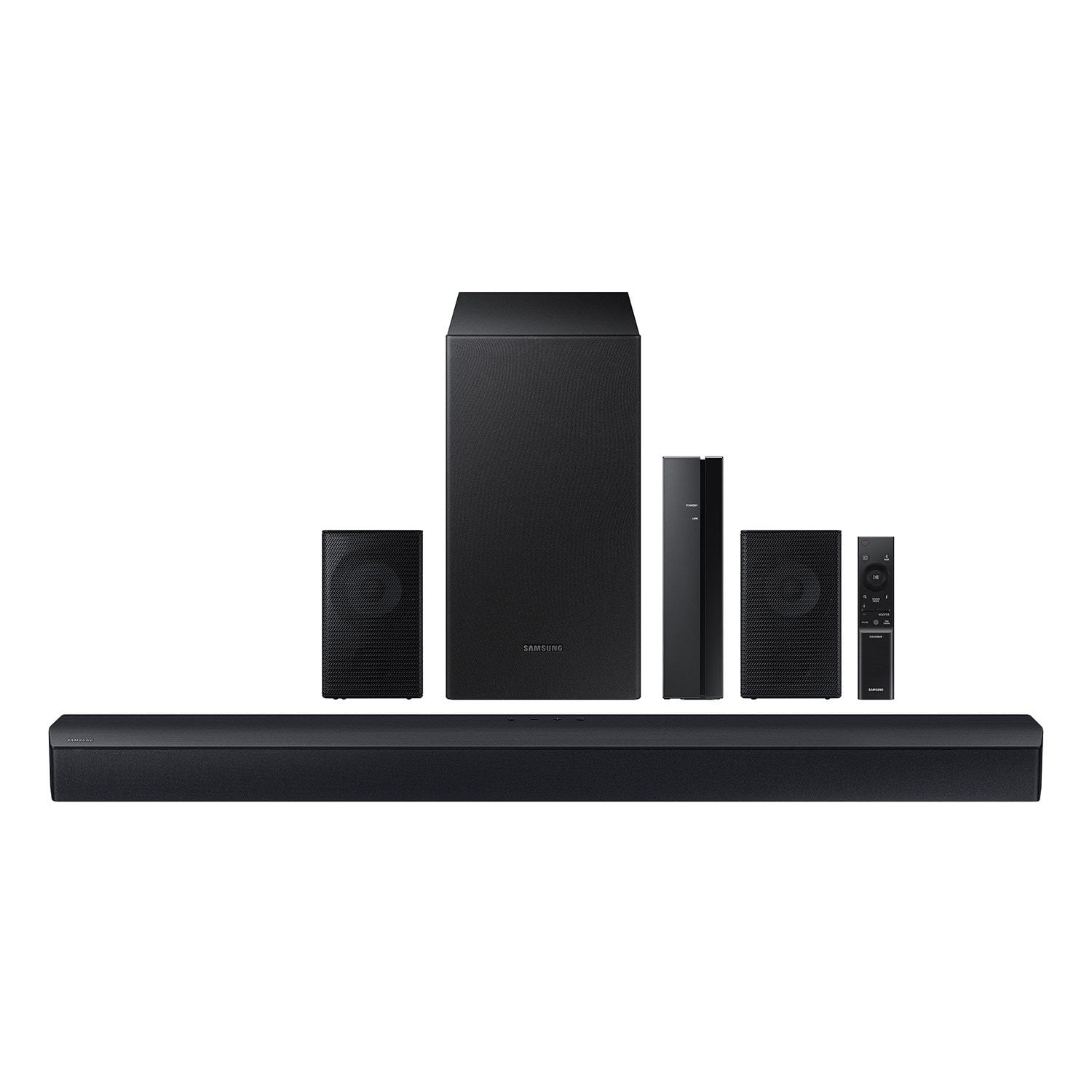
Samsung 4.1 Channel Soundbar w/Subwoofer - HW C47M
4.2 out of 5 stars
stars
800 ratings790 reviews
  1. 5 stars66% (531)
  2. 4 stars12% (98)
  3. 3 stars6% (48)
  4. 2 stars5% (38)
  5. 1 star11% (85)
Sort by |
Showing 101-110 of 790 reviews
Nov 30, 2025
Reviewer name: Warlin
5 out of 5 stars
5 out of 5 stars review

Verified Purchase

Recommend

Very clean sound and easy to install, the volume is good enough for a house incluso for a party house

Review from walmart.com
Helpful?6U2SK3AEJBKZ19585623078
Dec 5, 2025
Reviewer name: Keith
1 out of 5 stars
1 out of 5 stars review

Verified Purchase

Not Wireless

The rear speakers are not wireless. This product is very deceiving and misleading. False advertising.

Review from walmart.com
Helpful?6U2SK3AEJBKZ19585623078
reply from Samsung

Hi Keith,<br /><br />Thank you for purchasing the Samsung HW-C47M Soundbar System, which comes with a subwoofer and rear speaker kit. We appreciate you sharing your thoughts about the wireless description of the rear speakers. <br /><br />Occasionally, customers have trouble hiding and running speaker wires from the front of the room (where their soundbar is) to the back of their room (where they have their rear speakers). The Rear Speaker Kit eliminates that hassle. Connect the rear speakers to its wireless module and place these three in the back of your room. One wire is required to connect each rear speaker to the wireless module. Then plug in the power cable to the module. The “wireless” convenience is in connecting your soundbar and any other speakers at the front of the room to the rear speakers – this can now be done through the wireless module, eliminating any clutter of long wires running the length of your room.<br /><br />If you need more help, Samsung is here for you. Please call us at 1-800-SAMSUNG, 8AM - 12AM EST (Ask for Soundbars), 7 days a week. Live Chat with an agent, as well as manuals, software, creating a service ticket, and warranty info can be found at the ‘Support’ link on our Samsung website.<br /><br />~ Samsung Solutions

Sep 8, 2025
Reviewer name: chris
1 out of 5 stars
1 out of 5 stars review

Verified Purchase

the sound is crap should send it back but i can give it to a kid to play some music or whatever they watch but it is really a piece of crap.

Review from walmart.com
Helpful?6U2SK3AEJBKZ19585623078
reply from Samsung

Hello chris,<br /><br />Thank you for sharing your review of the HW-C47M Soundbar. We value your feedback and will share it with our teams. <br /><br />If there is anything we can do to improve your enjoyment such as helping to optimize settings for your specific sound scenario, please contact Samsung Customer Support. Just give us a call at 1-800-SAMSUNG (Ask for Soundbars), 8AM - 12AM EST, 7 days a week. Our Live Chat agents are also available by clicking on the ‘Support’ link on our website.<br /><br />~ Samsung Solutions

Nov 16, 2025
Reviewer name: anonymous
5 out of 5 stars
5 out of 5 stars review

Verified Purchase

i only bought it because i have a Samsung Tv so it was inly right to day and i love there brand but i wish i wouldve got the 5.1 ot more bass

Review from walmart.com
Helpful?6U2SK3AEJBKZ19585623078
Sep 11, 2025
Reviewer name: bcgal
2 out of 5 stars
2 out of 5 stars review

Verified Purchase

Very Disappointed

We could hear very little difference in sound switching back and forth from tv to soundbar. I love Samsung but not this soundbar.

Review from walmart.com
Helpful?6U2SK3AEJBKZ19585623078
reply from Samsung

Hi bcgal,<br /><br />Thank you for taking a moment to review the Samsung HW-C47M Soundbar.<br /><br />You can optimize your audio performance to your liking by pressing the SOUND MODE button on your soundbar remote and then selecting the desired sound effect by choosing SURROUND SOUND, GAME, or STANDARD. <br /><br />By pressing the TONE CONTROL button, you can adjust the volume of the treble or bass sound between -6~&#43;6 by using the Up/Down buttons. <br /><br />Additionally, using the WOOFER button on the remote, you can adjust the subwoofer’s volume between -6 to &#43;6 by toggling the button up or down. To set the subwoofer volume level to 0, press the button down. <br /><br />When you press the CH LEVEL button, you can adjust the volume of the VIRTUAL CENTER LEVEL. This will allow you to adjust the overall dialogue between -6 to &#43;6 using the UP/DOWN button on the provided Soundbar remote. When you press the CH LEVEL button when the Wireless Rear Speaker Kit connected to the Soundbar, you can adjust the rear speakers between -6 to &#43;6 using the UP/DOWN buttons. <br /><br />Press and hold the SOUND CONTROL button for about 5 seconds to adjust the sound for each frequency band. 150Hz, 300Hz, 600Hz, 1.2kHz, 2.5kHz, 5kHz, and 10kHz are selectable using the Left/Right buttons and each can be adjusted to a setting between -6 to &#43;6 using the Up/Down buttons. (Make sure the Sound mode is set to “STANDARD”. <br /><br />If we can help with anything else, please call us at 1-800-SAMSUNG (Ask for Soundbars), 8 AM – 12 AM EST, 7 days a week. LiveChat with an agent as well as manuals, software, and warranty info can be found at the ‘Support’ link on our Samsung website. <br /><br />~ Samsung Solutions

Sep 17, 2025
Reviewer name: Lance
3 out of 5 stars
3 out of 5 stars review

Verified Purchase

Weak bass

It had very weak bass, even after turning up the subwoofer and bass all the way. Much less than my Vizio that is priced similarly.

Review from walmart.com
Helpful?6U2SK3AEJBKZ19585623078
reply from Samsung

Hello Lance,<br /><br />Thank you for sharing your review of the HW-C47M Soundbar. We value your feedback and will share it with our teams. <br /><br />You can optimize your audio performance to your liking by pressing the SOUND MODE button on your soundbar remote and then selecting the desired sound effect by choosing SURROUND SOUND, GAME, or STANDARD. <br /><br />By pressing the TONE CONTROL button, you can adjust the volume of the treble or bass sound between -6~&#43;6 by using the Up/Down buttons. <br /><br />Additionally, using the WOOFER button on the remote, you can adjust the subwoofer’s volume between -6 to &#43;6 by toggling the button up or down. To set the subwoofer volume level to 0, press the button down. <br /><br />When you press the CH LEVEL button, you can adjust the volume of the VIRTUAL CENTER LEVEL. This will allow you to adjust the overall dialogue between -6 to &#43;6 using the UP/DOWN button on the provided Soundbar remote. When you press the CH LEVEL button when the Wireless Rear Speaker Kit connected to the Soundbar, you can adjust the rear speakers between -6 to &#43;6 using the UP/DOWN buttons. <br /><br />Press and hold the SOUND CONTROL button for about 5 seconds to adjust the sound for each frequency band. 150Hz, 300Hz, 600Hz, 1.2kHz, 2.5kHz, 5kHz, and 10kHz are selectable using the Left/Right buttons and each can be adjusted to a setting between -6 to &#43;6 using the Up/Down buttons. (Make sure the Sound mode is set to “STANDARD”. <br /><br />If we can help with anything else, please call us at 1-800-SAMSUNG (Ask for Soundbars), 8 AM – 12 AM EST, 7 days a week. LiveChat with an agent as well as manuals, software, and warranty info can be found at the ‘Support’ link on our Samsung website. <br /><br />~ Samsung Solutions

Nov 27, 2025
Reviewer name: Donald
5 out of 5 stars
5 out of 5 stars review

Verified Purchase

Easy to set up sounds great! Clean bass and treble plus the rear speakers are a must have definitely recommend!

Review from walmart.com
Helpful?6U2SK3AEJBKZ19585623078
Dec 5, 2025
Reviewer name: Andrew
2 out of 5 stars
2 out of 5 stars review

Verified Purchase

Not as advertised

the rear speakers were not wireless and I could not get the blue tooth to work on the small tower for the rear speakers

Review from walmart.com
Helpful?6U2SK3AEJBKZ19585623078
reply from Samsung

Hi Andrew,<br /><br />We appreciate you taking a moment to review the HW-C47M Samsung Soundbar.<br /><br />Occasionally, customers have trouble hiding and running speaker wires from the front of the room (where their soundbar is) to the back of their room (where they have their rear speakers). The Rear Speaker Kit eliminates that hassle. Connect the rear speakers to its wireless module and place these three in the back of your room. One wire is required to connect each rear speaker to the wireless module. Then plug in the power cable to the module. The “wireless” convenience is in connecting your soundbar and any other speakers at the front of the room to the rear speakers, eliminating any clutter of long wires running the length of your room.<br /><br />If you need more help, Samsung is here for you. Please call us at 1-800-SAMSUNG, 8AM - 12AM EST (Ask for Soundbars), 7 days a week. Live Chat with an agent as well as manuals, software, creating a service ticket, and warranty info can be found at the ‘Support’ link on our Samsung website.<br /><br />~ Samsung Solutions

Dec 20, 2025
Reviewer name: Cary
5 out of 5 stars
5 out of 5 stars review

Verified Purchase

Absolutely great buy. No complaints at all. Don’t know why you would need to spend more money on another.

Review from walmart.com
Helpful?6U2SK3AEJBKZ19585623078
May 25, 2026
Reviewer name: Rodrigo
5 out of 5 stars
5 out of 5 stars review

Verified Purchase

Very good. EXC Sound

Review from walmart.com
Helpful?6U2SK3AEJBKZ19585623078