Skip to Main Content
Sam's Club
Sam's Club
All Departments
All Services
Customer reviews for Samsung Galaxy Buds3 Pro for
Samsung Galaxy Buds3 Pro
4.4 out of 5 stars
stars
14.6K ratings14.6K reviews
  1. 5 stars69% (10K)
  2. 4 stars16% (2,386)
  3. 3 stars7% (1,023)
  4. 2 stars4% (557)
  5. 1 star4% (615)

Member photos

  • +3896 images
Sort by |
Showing 3,811-3,820 of 14,602 reviews
Nov 5, 2024
Reviewer name: Daniel P
5 out of 5 stars
5 out of 5 stars review

Verified Purchase

Amazing upgrade from the Bud Pros
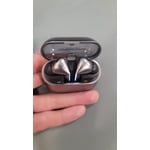
As they should be, these are a huge upgrade from the Galaxy Bud Pros. The sound quality is amazing (music and noise canceling), they fit and stay in your ears better, and the new touch controls are great.

Review from Samsung US
Helpful?3MTCIEJ7RGUC18797511992
Jul 26, 2024
Reviewer name: Joseph
5 out of 5 stars
5 out of 5 stars review

Verified Purchase

Totally recommend

These have to be some of the best galaxy buds I have ever had. The sound quality it impeccable. They fit so sung and nice. The only thing I can think of is make a silicone ear wing for even better fit.

Review from Samsung US
Helpful?3MTCIEJ7RGUC18797511992
Oct 10, 2025
Reviewer name: Sman4057
5 out of 5 stars
5 out of 5 stars review

Good headphones

[This review was collected as part of a promotion.] Love the head phones, sound is great, not sure if I like the stem controls, I prefer the controls on the bud pro 2

Review from Samsung US
Helpful?3MTCIEJ7RGUC18797511992
Apr 3, 2025
Reviewer name: Mike
5 out of 5 stars
5 out of 5 stars review

Verified Purchase

Great sound

The sound quality is great! These are so comfortable to wear and I love when the noice cancellation kicks in as soon as I put them in my ears. They have a long range which I absolutely love!

Review from Samsung US
Helpful?3MTCIEJ7RGUC18797511992
Mar 1, 2025
Reviewer name: Jack
5 out of 5 stars
5 out of 5 stars review

Verified Purchase

Amazing noise cancelling

The noise cancelling is amazing! I got these for free with pre-order of the S25 Ultra and thought I'd never use them, but the noise cancelling has come in really useful when vacuuming or doing work in a crowded cafe.

Review from Samsung US
Helpful?3MTCIEJ7RGUC18797511992
Jul 27, 2024
Reviewer name: Rodrigo Hancio
3 out of 5 stars
3 out of 5 stars review

Verified Purchase

Great audio but pinch command has bad response

Great audio quality, great response on adaptive ambient sound, but the pinch command on my left bud has an extremely poor response, demands a lot of pressure, and requires many attempts from different positions to work properly.

Review from Samsung US
Helpful?3MTCIEJ7RGUC18797511992
reply from Social Commerce

Hey there Rodrigo Hancio, thank you for your feedback on your Samsung Galaxy Buds3 Pro. We love hearing you are enjoying the audio quality of your earbuds during usage. We have provided links to the full device manual and the Samsung Support Team. These two resources below can help you troubleshoot the pinch settings of your device and ensure they are operating as intended. Thank you for being a Samsung customer. -Elizabeth Product Manuals https://www.samsung.com/us/support/downloads/ Samsung Support smsng.us/Samsung-Support Samsung Community smsng.us/Samsung-Community Facebook smsng.us/Facebook-Messenger X https://smsng.us/X-Messages

Oct 8, 2024
Reviewer name: Nate
3 out of 5 stars
3 out of 5 stars review

Verified Purchase

Ok buds but issues with feedback

These headphones are good. They are light and comfortable. There is an issue with feedback while placing them in my ears which can be quite annoying and startling if you are not prepared for it.

Review from Samsung US
Helpful?3MTCIEJ7RGUC18797511992
reply from Social Commerce

Hi there Nate, we appreciate you sharing your thoughts about your Samsung Galaxy Buds3 with us. We are happy to hear you are overall enjoying the usage of your earbuds every day, and we would love to help you with the audio quality and feedback. This is most commonly caused by an obstruction to the microphone during placement, but we have provided a link to an article if that is not the case for you. We have provided a link to the Samsung Support Team as well if this experience continues or you have any additional questions about your Samsung products. Thank you for being a Samsung customer. -Elizabeth No, low, or poor audio quality on Samsung earbuds https://www.samsung.com/us/support/troubleshooting/TSG01111323/ Samsung Support smsng.us/Samsung-Support Samsung Community smsng.us/Samsung-Community Facebook smsng.us/Facebook-Messenger X https://smsng.us/X-Messages

Aug 4, 2024
Reviewer name: chocholee
4 out of 5 stars
4 out of 5 stars review

Verified Purchase

expensive but

came from bud pro 2 and airpod pro 2, this one has much better of noise cancelation functionality. but not comfortable for wearing while in sleep unless you are using flush pillowcase.

Review from Samsung US
Helpful?3MTCIEJ7RGUC18797511992
Sep 10, 2024
Reviewer name: Amurphy
5 out of 5 stars
5 out of 5 stars review

Verified Purchase

Love my Buds !!

I enjoy the way my galaxy buds fit in my ears . I also enjoy all of the cool features and the way they light up in the dark so I can locate them very easily in the dark.

Review from Samsung US
Helpful?3MTCIEJ7RGUC18797511992
Dec 18, 2024
Reviewer name: Dave P
1 out of 5 stars
1 out of 5 stars review

Verified Purchase

Don't fit

The ear buds are oval and won't seal in ear. Tried all 3 sizes and it won't pass the seal test in the app. I don't know of anyone who has oval ear canals so very strange that Samsung would design them oval when all others are round.

Review from Samsung US
Helpful?3MTCIEJ7RGUC18797511992
reply from R&R Team

We appreciate you sharing your feedback regarding the Galaxy Buds3 Pro. Dave. The Galaxy Buds3 Pro features a Dual Amplifier system equipped with our first-ever independently controlled woofer and tweeter, allowing them to deliver a wide range of sound. To ensure a comfortable and secure fit, the earbuds come with a variety of ear tip sizes that accommodate different ear shapes. It’s essential to use the right size tips for a snug fit, as this helps prevent sound leaks and ensures optimal audio performance. If you need guidance on changing the ear tips, please refer to our Buds3 Pro tips guide. Once you have the right tips, check for directional markings on the earbuds — look for an "L" for the left earbud and an "R" for the right. Insert the right bud into your right ear with the "R" facing you and the left bud into your left ear with the "L" facing you. Angle the earbuds slightly so that the microphone points towards your mouth, then adjust them by rotating forwards and backward until they feel comfortable. Lastly, you can run an earbud fit test using the Galaxy Wearable app to confirm that you have the ideal fit. We appreciate your input and encourage you to reach out to our Samsung Support team for any further assistance with this or anything else. -Kelvin smsng.us/Samsung-Support smsng.us/Facebook-Messenger smsng.us/X-Messages smsng.us/Samsung-Community smsng.us/Warranty-Info smsng.us/Samsung-Care-Plus