Skip to Main Content
Sam's Club
Sam's Club
All Departments
All Services
Customer reviews for Samsung Galaxy Buds3 Pro for
Samsung Galaxy Buds3 Pro
4.4 out of 5 stars
stars
14.6K ratings14.5K reviews
  1. 5 stars69% (10K)
  2. 4 stars16% (2,386)
  3. 3 stars7% (1,023)
  4. 2 stars4% (557)
  5. 1 star4% (615)

Member photos

  • +3896 images
Sort by |
Showing 3,261-3,270 of 14,597 reviews
Apr 9, 2026
Reviewer name: Jackie
5 out of 5 stars
5 out of 5 stars review

Very comfortable

[This review was collected as part of a promotion.] They work perfect, right size, and appearance. Love. The noise cancelation options.

Review from Samsung US
Helpful?3MTCIEJ7RGUC18797511992
May 25, 2026
Reviewer name: Chandler
1 out of 5 stars
1 out of 5 stars review

Product battery life and functions don't meet ipod

[This review was collected as part of a promotion.] Can't speak to it to do stuff and the battery life compared to competition is under standards

Review from Samsung US
Helpful?3MTCIEJ7RGUC18797511992
reply from R&R

Hi there Chandler, Thank you for sharing your experience with the Galaxy Buds3 Pro. Features like hands-free functionality and immersive sound are designed to enhance your listening experience. We understand how crucial battery life and voice controls are, especially when comparing devices you use throughout the day. With your Galaxy Buds, you can perform various actions simply by speaking your commands. Enabling voice commands lets you play music, adjust the volume, and answer incoming calls with your voice. If you have set up a voice assistant on your phone, such as Bixby, your buds can utilize Bixby as well. Both the Galaxy Buds3 and Galaxy Buds3 Pro have their own voice commands that can be activated in the Galaxy Wearable app. Here’s how to enable voice commands: 1. Open the Galaxy Wearable app on your connected phone. 2. Tap on 'Earbuds settings.' 3. Select 'Voice controls.' 4. Toggle the switch at the top to enable voice commands. Once enabled, you can use the following commands: - **Music**: “Play music,” “Stop music,” “Next song,” or “Previous song.” - **Volume**: “Volume up” or “Volume down.” - **Phone**: “Answer call” or “Reject call.” For further details, please check out our online article linked below, which also includes tips on how to optimize the battery life of your Galaxy Buds3 Pro. We appreciate your feedback and thank you for being a Samsung customer. The battery life of your Samsung earbuds https://www.samsung.com/us/support/answer/ANS10001314/ Use voice commands with your Galaxy Buds https://www.samsung.com/us/support/answer/ANS10003614/ -Ty Samsung Support smsng.us/Samsung-Support Samsung Community smsng.us/Samsung-Community Facebook smsng.us/Facebook-Messenger X https://smsng.us/X-Messages

Mar 16, 2026
Reviewer name: EsteMed
3 out of 5 stars
3 out of 5 stars review

Poor case design

Poor case design often keeps one or another of the earpieces from charging , very weak mic is not great for calls.

Review from Samsung US
Helpful?3MTCIEJ7RGUC18797511992
reply from R&R

Hello EsteMed, Thank you for sharing your thoughts on the Galaxy Buds3 Pro. These earbuds are designed to deliver smooth listening and communication, easily connecting across Galaxy devices. Proper charging alignment and call clarity greatly improve your experience throughout the day. To get the best charging performance, make sure the earbuds align correctly with the magnetic charging port at the bottom of the case when you place them inside. If you experience unexpected audio quality issues, it might mean a software update is needed. To ensure your software updates go smoothly, follow these steps if you have a Galaxy phone: first, connect your Galaxy Buds series earbuds to the Galaxy Wearable app on your phone or tablet, or use the PC manager software to check for updates. For more information on keeping your earbuds up to date, please refer to the link below. When everything is in sync, the Buds will smoothly integrate into your daily routine. Thank you for being a Samsung customer. How to install software updates on your Samsung earbuds https://www.samsung.com/us/support/answer/ANS10001316/ -Ty Samsung Support smsng.us/Samsung-Support Samsung Community smsng.us/Samsung-Community Facebook smsng.us/Facebook-Messenger X https://smsng.us/X-Messages

Mar 27, 2026
Reviewer name: Lovegalaxyalways
5 out of 5 stars
5 out of 5 stars review

Perfect headphones!

[This review was collected as part of a promotion.] Perfect headphones for most advanced AI yet! Galaxy remains my absolute favorite.

Review from Samsung US
Helpful?3MTCIEJ7RGUC18797511992
May 27, 2026
Reviewer name: ROSE44
5 out of 5 stars
5 out of 5 stars review

Great sound

[This review was collected as part of a promotion.] Daily use love the sound and fit good in the ears recomend thre product

Review from Samsung US
Helpful?3MTCIEJ7RGUC18797511992
May 27, 2026
Reviewer name: Rosa44
5 out of 5 stars
5 out of 5 stars review

The Best tablet multitasking

[This review was collected as part of a promotion.] Daily use and replaced ĺaptop.. Watch movies, social media Great Samsung AI

Review from Samsung US
Helpful?3MTCIEJ7RGUC18797511992
Apr 13, 2026
Reviewer name: Dhdjdj
5 out of 5 stars
5 out of 5 stars review

Amazing product

[This review was collected as part of a promotion.] Ive been using this for 6 months and they have been really good so far.

Review from Samsung US
Helpful?3MTCIEJ7RGUC18797511992
May 21, 2026
Reviewer name: YaxHeartless1
5 out of 5 stars
5 out of 5 stars review

This product has great sound
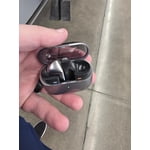
[This review was collected as part of a promotion.] Mainly used for music and videos, with great galaxy ai

Review from Samsung US
Helpful?3MTCIEJ7RGUC18797511992
Mar 30, 2026
Reviewer name: Tonio210
5 out of 5 stars
5 out of 5 stars review

Great sound

[This review was collected as part of a promotion.] Galaxy AI has help me with working out and also gaming.

Review from Samsung US
Helpful?3MTCIEJ7RGUC18797511992
Feb 24, 2026
Reviewer name: Zehui
2 out of 5 stars
2 out of 5 stars review

Not good enough to purchase
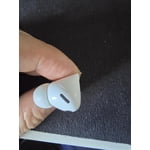
As few months used, the right side of the earpud has a crack, battery use for 6 hours after charging.

Review from Samsung US
Helpful?3MTCIEJ7RGUC18797511992
reply from R&R

Hey Zehui, Thank you for sharing your experience with us. The Galaxy Buds3 Pro are designed to deliver clear sound, lasting comfort, and dependable daily performance. We understand you noticed a small crack in your earbuds over time. Please rest assured that Samsung stands behind its product quality. We provide a warranty covering any manufacturing defects in materials and workmanship for a limited period of 12 months, as specified for each item. With this warranty, you can have confidence that your investment is protected during the coverage period, ensuring you get the reliability and performance you expect from Samsung. If you need further assistance, please contact our Samsung Support Team. Thank you again for your feedback. It emphasizes the importance of consistency in long-term use, and we value your continued trust in Samsung. Samsung Care+ https://www.samsung.com/us/support/samsung-care-plus/ Samsung Warranty https://www.samsung.com/us/support/samsung-care/ -Ty Samsung Support smsng.us/Samsung-Support Samsung Community smsng.us/Samsung-Community Facebook smsng.us/Facebook-Messenger X https://smsng.us/X-Messages