Skip to Main Content
Sam's Club
Sam's Club
All Departments
All Services
Customer reviews for Samsung Galaxy Buds3 Pro for
Samsung Galaxy Buds3 Pro
4.4 out of 5 stars
stars
14.8K ratings14.8K reviews
  1. 5 stars69% (10.1K)
  2. 4 stars16% (2,431)
  3. 3 stars7% (1,038)
  4. 2 stars4% (564)
  5. 1 star4% (619)

Member photos

  • +3976 images
Sort by |
Showing 2,321-2,330 of 14,844 reviews
Jul 10, 2025
Reviewer name: Jennifer
4 out of 5 stars
4 out of 5 stars review

Verified Purchase

Totally worth the buy

These are exactly what I needed. After years of buying earplugs every 3 months I could have saved to much by buying these. I love the look and that when I talk the volume goes down. I can actually hear better with the different settings. Sound is incredible. You can zone out the world around you. My only thing is I have to keep adjusting them. They fall out if I don't. I have to do that often, especially when I'm working or moving around. Other wise they would get a 5 star

Review from Samsung US
Helpful?3MTCIEJ7RGUC18797511992
Feb 7, 2026
Reviewer name: BucknessFalls
2 out of 5 stars
2 out of 5 stars review

They were a serious let down...

I have owned all the Galaxy Buds since the first one and these are by far the most disappointing. They almost never connect to the charging case and the controls on the earbuds are hard for anyone to use that doesn't have small fingers. In order for you to get the best sound quality you have to have Adaptive Sound on and that amplifies ambient noise whether you want it to or not, sometimes I have my earbuds in because I don't want to hear outside noise. I'm a huge fan of Samsung products but when I use these earbuds it literally feel like the didn't even make an effort to improve them. First Samsung product I regret buying.

Review from Samsung US
Helpful?3MTCIEJ7RGUC18797511992
reply from R&R

Hey BucknessFalls, Thank you for taking the time to share such thoughtful feedback. We truly appreciate your long-standing support of Galaxy Buds. Galaxy Buds3 Pro are designed to deliver premium sound, immersive audio, and advanced listening modes that adapt to different environments. Your experience highlights how comfort, control accessibility, and sound personalization play a major role in everyday enjoyment. We’re grateful for your loyalty and your honest perspective as part of the Samsung community. Thank you for choosing Samsung. -Ty Samsung Support smsng.us/Samsung-Support Samsung Community smsng.us/Samsung-Community Facebook smsng.us/Facebook-Messenger X https://smsng.us/X-Messages

Feb 20, 2025
Reviewer name: Bumkyu Kim
2 out of 5 stars
2 out of 5 stars review

Verified Purchase

Perfect for phone, but garbage for computer
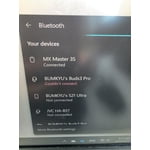
I love every things (including sounds, fitting, design, and control) except "one thing" One thing that I have the most is the software. I have Samsung galaxy book laptop. Whenever I connect it to my computer, i have to spend at least 1- 3 minutes. Software"galaxy buds in microsoft store" is garbage. If you are planning to use it for computer, Dont buy this

Review from Samsung US
Helpful?3MTCIEJ7RGUC18797511992
reply from R&R Team

Thank you for sharing your thoughts on the Galaxy Buds3 Pro, Bumkyu! We understand that you’re experiencing some challenges with pairing them with your Galaxy Book, and we’d love to assist you through this process. To get started, please make sure your Galaxy Buds3 Pro are properly placed in the charging case. After closing the lid, we recommend waiting for about 5-6 seconds before opening it again, as this will help them enter Bluetooth pairing mode automatically. If they are already paired to another device, you can easily get them into pairing mode by wearing the earbuds and holding both touchpads for a few seconds. For a fresh pairing experience, remember to press and hold the Connect button located at the bottom of the charging case for three seconds after placing the buds back in. Then, just follow your device manufacturer's instructions for pairing. We designed the Galaxy Buds3 Pro to deliver not only exceptional sound quality but also seamless connectivity to enhance your listening experience. If you have any other questions or need further assistance, please feel free to reach out to us at Samsung Support. We’re here to ensure you enjoy every moment with your Galaxy Buds3 Pro! -Kelvin smsng.us/Samsung-Support smsng.us/Facebook-Messenger smsng.us/X-Messages smsng.us/Samsung-Community smsng.us/Warranty-Info smsng.us/Samsung-Care-Plus

Dec 21, 2025
Reviewer name: ZJS99
1 out of 5 stars
1 out of 5 stars review

Not Worth it. Downgrade compared to the buds 2 pro

I traded my Buds 2 PRO for these. Its not worth it. The Buds 2 pro is way better then these. Its an expensive downgrade. Sound quality is decent but trying to talk to anyone with it is trash and unusable. I have to yell just for the person to hear me. When I had the buds 2 pro I could be on the lawn mower talking normally and be heard just fine. Don't waste your money on these. If i could reverse my trade to get my Buds 2 PRO back I would.

Review from Samsung US
Helpful?3MTCIEJ7RGUC18797511992
reply from R&R

Hi ZJS99, Thank you for sharing your experience with the Galaxy Buds3 Pro. Call clarity and microphone performance are vital for daily communication. If your Galaxy Buds3 Pro have low or no volume, or poor sound quality on one or both earbuds, there could be several reasons. You might be wearing the earbuds incorrectly, or they could have dust or debris. Also, audio quality can be impacted by outdated software, low battery, or other factors. Check your earbud settings to see if Ambient sound or Noise canceling is enabled. Ambient sound lets you hear background noise during calls, which can cause interference. Turn off Ambient sound mode to improve this. If your earbuds have Active Noise Canceling, it's best to turn it on to block out background noise. Make sure you are within Bluetooth range. Check for software updates on your Galaxy buds and install any available updates. If problems persist, service may be necessary. Please call 1-800-SAMSUNG to request service, but note that damaged earbuds are not covered under warranty. For tips on maintaining a good connection and updating software, see the links below. We value your feedback and thank you for being part of the Samsung ecosystem. Poor audio quality when using Galaxy buds to make calls https://www.samsung.com/us/support/troubleshoot/TSG10007434/ How to install software updates on your Samsung earbuds https://www.samsung.com/us/support/answer/ANS10001316/ -Ty Samsung Support smsng.us/Samsung-Support Samsung Community smsng.us/Samsung-Community Facebook smsng.us/Facebook-Messenger X https://smsng.us/X-Messages

Jul 5, 2025
Reviewer name: Kat V
2 out of 5 stars
2 out of 5 stars review

Verified Purchase

Not the quality expected

Only works with one device at a time and noise-canceling is a non-existent. Very disappointing purchase... I usually use them at work connecting to my office phone and to my computer by Bluetooth. I can listen to the news in the background as I work and if the office phone rings I can answer it through my Jabra earbuds. I can't do that with the you so they do me no good. They've been sitting on the counter.

Review from Samsung US
Helpful?3MTCIEJ7RGUC18797511992
reply from R&R Team

Thank you for your feedback on the Galaxy Buds3 Pro, Kat. The Buds3 Pro connects to one device at a time via Bluetooth. To switch devices, manually disconnect and reconnect using the Galaxy Wearable app or Bluetooth settings. They support Samsung account syncing for easier reconnections. For noise cancelling, the Buds3 Pro have Active Noise Cancelling, Adaptive, and Ambient Sound modes. You can adjust these settings in the Galaxy Wearable app or by pinching and holding the earbuds. If you have any further concerns or questions, feel free to contact us at Samsung Support for assistance! -Kelvin smsng.us/Samsung-Support smsng.us/Facebook-Messenger smsng.us/X-Messages smsng.us/Samsung-Community smsng.us/Warranty-Info smsng.us/Samsung-Care-Plus

Oct 5, 2024
Reviewer name: Cory
4 out of 5 stars
4 out of 5 stars review

Verified Purchase

Excellent Upgrade

Excellent upgrade from the Buds2! The software for noise cancelling is stunning! And it's so much better for having phone conversations, which is on of the main reasons I upgraded. The only complaint I have is they don't stay in my ears as well as the Buds2. I can go for a run with the Buds3 however I do find myself fixing them in my ear much more than the Buds2.

Review from Samsung US
Helpful?3MTCIEJ7RGUC18797511992
Jul 27, 2024
Reviewer name: Brandon D
5 out of 5 stars
5 out of 5 stars review

Verified Purchase

Quality quality quality

I had the prior version and had issues with them staying in. These are a lot better, just need to try the differnt ear cones. The sound is very good, the noise canceling is the best ever, i love the slide volume, but want the tap to answer calls back. Pinching is not as good.

Review from Samsung US
Helpful?3MTCIEJ7RGUC18797511992
Aug 13, 2025
Reviewer name: Corbyn
5 out of 5 stars
5 out of 5 stars review

Verified Purchase

I had to adjust to the feel but I love them!

Took a bit too get used to and comfortable as they made my ears slightly sore but I have never had buds with this P shape so after the adjustment I love them. The noise canceling is really quite good, the mix this the active listening and music sounds very nice, and the battery last a long time.

Review from Samsung US
Helpful?3MTCIEJ7RGUC18797511992
Nov 25, 2025
Reviewer name: MrSuicidal
4 out of 5 stars
4 out of 5 stars review

Works amazingly!!! Hard to handle in hands tho.

[This review was collected as part of a promotion.] I love the Galaxy Ai which I've set as my right ear buds quick menu for gemini! These buds are the best, especially on sale! Now picking them up to put in the charger case is awkward because the shape however who even cares when they work so immaculate!

Review from Samsung US
Helpful?3MTCIEJ7RGUC18797511992
Oct 5, 2024
Reviewer name: Katt
5 out of 5 stars
5 out of 5 stars review

Verified Purchase

So far, so good

I upgraded to these from the Galaxy Buds 2 Pro. So far, they are working really well. They go into the ear easier than the Buds 2 in that you don't accidentally put them in upside down or sideways. I like that the controls are on the stem rather than the ear piece itself. I wear these in the gym every day and generally speaking they stay in place better than the Buds 2. When I do have to push them back into my ear, I'm not accidentally skipping or pausing music by touching the ear piece. I like the case and I love the carrying case which has a carabiner on it. The only thing I do not like is the color. The silver is nice but I would have liked black or other fun colors like purple or red. I haven't really used the adaptive sound but both ambient and noise cancelling work well. The noise cancelling especially. Holy crap compared to the Buds 2 the noise cancelling is ridiculous. I didn't even realize people were talking next to me with the noise cancelling.

Review from Samsung US
Helpful?3MTCIEJ7RGUC18797511992