Skip to Main Content
Sams Club
Sams Club
Customer reviews for Samsung Galaxy Buds3 Pro for
Samsung Galaxy Buds3 Pro

Member photos

  • +3552 images
Sort by |
Showing 1,871-1,880 of 13,589 reviews
Jan 2, 2026
Wyatt
5 out of 5 stars review

Verified Purchase

Buds3 pro

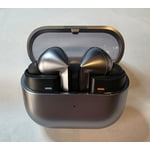
Exceptional sound quality in a sleek, small, and quality made earbud. I cant have asked for a better experience with my new samsung earbuds!

Review from Samsung US
Helpful?3MTCIEJ7RGUC18797511992
reply from R&R

Hey there Wyatt, Thank you for sharing your experience with the Galaxy Buds3 Pro. It’s wonderful to hear you appreciate the high-quality sound and sleek, compact design. Our goal is to blend craftsmanship with advanced audio technology to produce products that are both comfortable and excellent in sound. We’re pleased this experience exceeded your expectations. Thanks for choosing Samsung. -Ty Samsung Support smsng.us/Samsung-Support Samsung Community smsng.us/Samsung-Community Facebook smsng.us/Facebook-Messenger X https://smsng.us/X-Messages

Nov 3, 2025
A random user
5 out of 5 stars review

Verified Purchase

Immersion on a new level

These has to be the best choice for wireless listeners. The dedicated subwoofer adds a great deep sound while maintaining the midst and highs

Review from Samsung US
Helpful?3MTCIEJ7RGUC18797511992
Dec 28, 2025
Emeka
4 out of 5 stars review

Verified Purchase

Great sound

The sound quality is incredibly rich and clear like I'm in a recording studio. It looks so nice, but the battery runs out quicker than expected.

Review from Samsung US
Helpful?3MTCIEJ7RGUC18797511992
reply from R&R

Hey there Emeka, Thank you for sharing your experience with the Galaxy Buds3 Pro. Rich sound quality and a refined design are key to the Galaxy Buds listening experience. Feedback about battery performance helps show how users enjoy longer listening sessions while valuing the clarity and depth that make music immersive and engaging. Thank you for being a Samsung customer. -Ty Samsung Support smsng.us/Samsung-Support Samsung Community smsng.us/Samsung-Community Facebook smsng.us/Facebook-Messenger X https://smsng.us/X-Messages

Oct 16, 2025
Happy listener
5 out of 5 stars review

Verified Purchase

Surprise Suprise !!!!!!!

These earbuds are the best so far. After learning the "controls" I have fo say the sound is great, and they stay in my ears.

Review from Samsung US
Helpful?3MTCIEJ7RGUC18797511992
Oct 1, 2025
Anonymous
3 out of 5 stars review

Verified Purchase

They're great, but just not for me.

sounds okay, but since I have an ear canal that isn't "normal" one side fits weird. This wasn't an issue with the original buds.

Review from Samsung US
Helpful?3MTCIEJ7RGUC18797511992
reply from R&R

Hi Nick, Thank you for sharing your experience with the Galaxy Buds3 Pro. We appreciate your feedback on sound quality and fit. Unlike the original in-ear buds that form a seal using suction for direct sound transmission, the Galaxy Buds3 Pro sit more loosely and rely less on ear shape. They include different-sized ear tips, so choose the correct size for a snug fit—this helps prevent sound leaks and enhances audio. Look for the L and R marks at the bottom of the earbuds. Insert the R earbud into your right ear with the R facing you, and the L into your left ear with the L facing you. Slightly tilt the stem to direct the microphone toward your mouth. Adjust the earbuds by rotating them for comfort and use the fit test to confirm proper placement. We understand preferences vary, but we hope you find a good fit with your Galaxy Buds3 Pro. Thank you for your review. We’re grateful you chose Samsung. How to wear your Samsung Galaxy Buds3, Buds3 Pro, or Buds3 FE https://www.samsung.com/us/support/answer/ANS10003519/ -Ty -Ty Samsung Support smsng.us/Samsung-Support Samsung Community smsng.us/Samsung-Community Facebook smsng.us/Facebook-Messenger X https://smsng.us/X-Messages

Dec 18, 2025
Beeba
4 out of 5 stars review

Verified Purchase

Nice buds

Wish they came in black but pretty good. Sadly they are not as stealthy as the previous designs are so sneaking them on at work is quite difficult.

Review from Samsung US
Helpful?3MTCIEJ7RGUC18797511992
reply from R&R

Hello there Beeba, Thank you for sharing your feedback on the Galaxy Buds3 Pro. Design and color choices play a significant role in how earbuds fit into everyday life. I'm glad to hear that the overall performance delivered a positive experience. The Galaxy Buds3 Pro seamlessly combine contemporary design with advanced audio features that cater to different listening preferences. We appreciate your involvement in the Samsung community. -Ty Samsung Support smsng.us/Samsung-Support Samsung Community smsng.us/Samsung-Community Facebook smsng.us/Facebook-Messenger X https://smsng.us/X-Messages

Dec 9, 2025
Jamie
5 out of 5 stars review

Verified Purchase

Love the sound quality, and translator

Took me about a min to get the touch controls right, after that these are my goto headphones. I use them everyday!

Review from Samsung US
Helpful?3MTCIEJ7RGUC18797511992
Nov 25, 2025
Sterling
5 out of 5 stars review

Verified Purchase

Great Product

Great product. I have the Galaxy bus 2 pro which was a great product but the buds 3 pro is definitely a step in quality and sound

Review from Samsung US
Helpful?3MTCIEJ7RGUC18797511992
Oct 18, 2025
ABF30
5 out of 5 stars review

Verified Purchase

Great sound

These fit well and the sound is phenomenal. They stay charged for a long time. The case is the perfect size.

Review from Samsung US
Helpful?3MTCIEJ7RGUC18797511992
Oct 10, 2025
Minnesota Magic
1 out of 5 stars review

Verified Purchase

Mediocre Mic, Quality Speakers

People say that I sound really muffled on the phone biggest downfall. Great sounds quality though and battery life

Review from Samsung US
Helpful?3MTCIEJ7RGUC18797511992
reply from R&R

Hola Minnesota Magic, Thank you for reaching out and sharing your experience with your Galaxy Buds3 Pro. If you notice the mic on your earbuds is muffled during calls or recording, please check if the microphone hole is blocked; otherwise, sound may not be appropriately input. Clean the microphone hole, speaker, and air duct regularly to prevent debris from accumulating. Use a clean, dry, soft brush or cotton swab to remove earwax or other debris. After using the earbuds, wipe them with a smooth, dry cloth. Keep the earbuds dry. Be careful not to get the earbuds wet or let liquid enter them. Clean the microphone hole, speaker, and air duct regularly to prevent debris from accumulating. Note: When removing foreign substances, do not use a sharp razor, etc., and do not use excessive force. The microphone hole, speaker, and air duct may be damaged if they are tampered with. You may solve the microphone issue by resetting the earbuds. Tap the Galaxy Wearable app > Earbuds settings > Reset and follow the on-screen instructions to complete the factory reset process. If further assistance is needed, please do not hesitate to reach out to our Samsung Support Team. Thank you for your review. We are happy to have you as a part of the Samsung community. -Ty Samsung Support smsng.us/Samsung-Support Samsung Community smsng.us/Samsung-Community Facebook smsng.us/Facebook-Messenger X https://smsng.us/X-Messages