
Member photos


 +3976 images
Verified Purchase
Crystal Clear Sound & Premium Comfort!
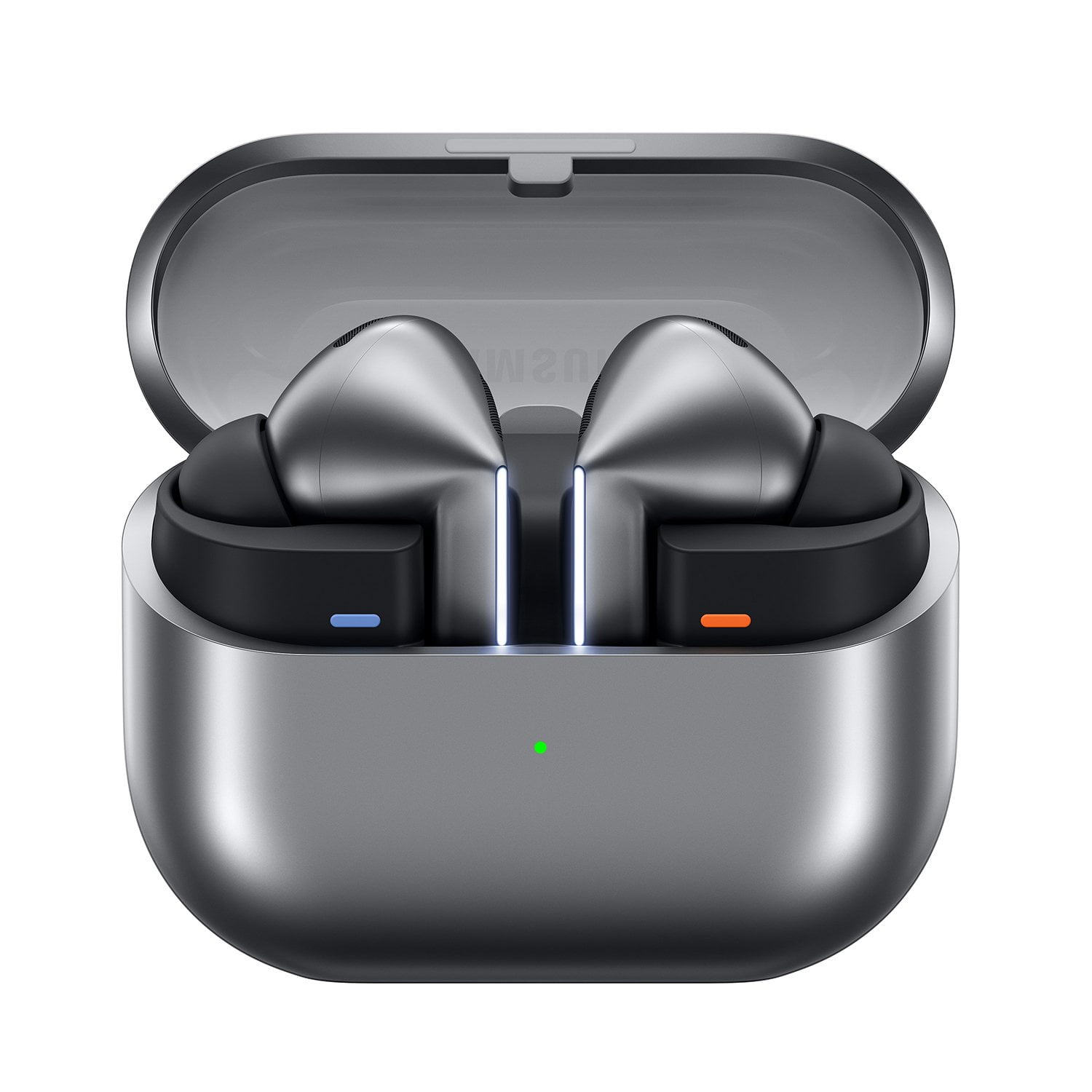
I recently got the Galaxy Buds3 Pro Silver, and they have completely exceeded my expectations! The sound quality is incredible—deep bass, crisp highs, and a well-balanced midrange make every song sound amazing. The active noise cancellation (ANC) is top-notch, blocking out background noise effortlessly, whether I’m commuting or working in a busy café. Comfort-wise, these fit perfectly in my ears and stay secure, even during workouts. The battery life is impressive, lasting hours on a single charge, and the fast charging feature is a lifesaver. Plus, the sleek silver design looks super stylish and premium. If you’re looking for high-quality earbuds with excellent sound and features, I highly recommend the Galaxy Buds3 Pro!
Verified Purchase
Excellent ear buds!
The sound quality is amazing. They are incredibly comfortable and the fit is perfect. They have not slipped out of my ears once. The touch controls are a bit awkward but the voice controls render them unnecessary. I often wear them at work so I love the fact that the audio pauses if I remove one bud to speak to someone. The battery life has been more than enough for my needs.
Verified Purchase
Good but flawed
The internet perception of these earbuds is quite bad, and it does influence how I feel about them. Personally, I think I received a mostly good pair - the fit and finish is good, the sound quality is good, etc. However, it appears to be extremely challenging to remove the rubber tips, and I really have no idea why it's so hard. Mine will probably rip when I do fully remove them, so that's going to be a bummer. For now, I think the default size fits me fine, so I'm not going to remove them for a while. Also, I noticed the ANC sort of pops in and out in the left earbud. I can't tell if that's just because my left ear canal is a slightly different size than my right ear canal and the left earbud doesn't stay as snug as the right earbud, or if it's a defect with the product, but it is indeed happening. Lastly, the touch controls were challenging to get used to, and I'm not sure it will get any easier. The "pinch" method seems very difficult to do accurately and reliably. Overall, I am disappointed due to the media reception, the difficult-to-remove rubber tips, the suspected quality issues with the sound controls, and the pinch controls being hard to use.
Hello Jesse C, thank you for sharing your thoughts with us about your Samsung Galaxy Buds3 Pro. We completely understand how important the experience with your earbuds is to you and knowing the experiences you have seen from others can cause influence. We have provided a link to a video to help you remove the ear tips with ease and see if another size can help with the seal that will also ensure the ANC feature operates as intended. If this does not help you resolve this matter, we have provided a link to the Samsung Support Team to offer additional troubleshooting assistance. Thank you for being a Samsung customer. -Elizabeth Replacing the ear tips on your Galaxy Buds3 Pro for a perfect fit https://www.youtube.com/watch?v=i3SBh9ySfgA Samsung Support smsng.us/Samsung-Support Samsung Community smsng.us/Samsung-Community Facebook smsng.us/Facebook-Messenger X https://smsng.us/X-Messages
Talk all day
[This review was collected as part of a promotion.] I enjoy never having to charge the battery on the buds. The sound quality is very good compared to most. I work in a noisy environment so others being able to clearly hear me is the most important! The fit could be a little better.
Buds are great
[This review was collected as part of a promotion.] Buds 3 pro are great. They give me private listening without others hearing them. The bass is there for ear buds, about as good as over the rear headphones. As good as the 3s are i can only imagine how good the 4 pros are
Pros and cons
[This review was collected as part of a promotion.] The Samsung Galaxy Buds3 Pro are a solid win for anyone using an Android phone, especially if you're already in the Samsung ecosystem. They moved to a "stem" design (like AirPods), which makes them much better for phone calls and easier to control. The Good Audio Quality: They use a dual-driver system that makes music sound rich and clear. The bass is punchy without being overwhelming, and the highs are crisp. Call Quality: This is the biggest upgrade. Because of the new stem design, the microphones are closer to your mouth, making your voice much clearer during calls even in windy spots. Comfort: They are very lightweight (5.4g). You can wear them for hours without that "clogged ear" feeling or fatigue. Cool Features: The "Blade Lights" on the stems aren't just for show—they help you find the buds in the dark and look pretty futuristic. The Not-So-Good The Case: The charging case has a transparent lid which looks cool, but the plastic feels a bit thin and cheap compared to older models. Samsung Required: To get the best features (like 24-bit high-res audio or seamless switching between devices), you really need a Samsung phone. They still work with other phones, but you lose the "pro" perks. Changing Tips: If you need to swap the silicone ear tips, be careful. They use a proprietary clip that can be a little tricky to pull off without worrying about tearing them. Verdict 8.5/10. If you have a Galaxy phone, these are arguably the best earbuds you can get for daily.
Galaxy Buds3 Pro: Premium Audio and AI
[This review was collected as part of a promotion.] The Galaxy Buds3 Pro have become an essential part of my daily routine, providing exceptional sound quality and comfort. Whether I am using them for work calls or focusing on school projects, the active noise cancellation is incredibly effective at blocking out distractions. A major highlight is the integration of Galaxy AI, which enhances the listening experience by automatically adjusting the audio settings based on my environment. This feature ensures that I always have the best sound profile without needing to manually tweak settings constantly. It makes the transition from a quiet office to a noisy street completely seamless. For entertainment, these earbuds are phenomenal. I use them extensively for streaming movies and music, where the audio depth creates a truly immersive experience. During gaming sessions, the performance is impressive, ensuring that the audio is perfectly synced with the action on screen. They also stay securely in place while I am watching sports or moving around, making them a reliable companion for an active lifestyle. Overall, the Galaxy Buds3 Pro offer a perfect blend of intelligent technology and high-fidelity performance. They have significantly improved how I consume media and handle professional tasks every day.

Great headphones
[This review was collected as part of a promotion.] I have had the 3 pros for about a year now, with a decent amount of use. They have held up well and is still in near perfect condition. The noise cancelation is great even in a place like a car with music playing loudly, you can still enjoy your own music on the buds. The battery life playing constant music could be better, however I dont consistently use them for long sessions, and the case holds charge for a while. All in all, it was worth the purchase.

Don't buy for interpretation features
Purchased this for the live interpreter app feature for S23 phone. The live interpretation listening mode only displays on the screen and will not play through Galaxy buds 3 pro as advertised. I worked with 3 different people with Samsung help and they weren't able to help. The interpreter app conversation mode only plays in the ear buds, and not over the phone's audio for them and through the buds 3 pro for you as advertised. Otherwise it's a pretty decent ear buds. I wish I got the cheaper model instead of paying extra for a feature that doesn't work as advertised.
Hi there T Spr, The Galaxy Buds3 series helps you understand real-time conversations in different languages thanks to Galaxy AI! With the Interpreter app, you can listen to ongoing in-person conversations or lectures and get quick translations through your earbuds. Additionally, Interpreter provides a text transcript to go with the translation. Use real-time translations. To start using the Interpreter app with your Galaxy Buds3, Galaxy Buds3 Pro, or Buds3 FE, make sure your earbuds are connected to your phone. Then, follow the steps below: Using your connected phone, open the Interpreter app. Place your earbuds in your ears. Tap Listening mode (the single chat bubble) on the left side, then tap the microphone icon at the bottom of the screen. Select your preferred languages and allow the app to listen to the person you're speaking with. You’ll hear the translation through your Galaxy Buds3 earbuds and see the transcribed text on the screen. When you respond, your phone’s speaker will play your translated speech in the other person’s language. Tap the microphone icon again to stop recording. You can also pause, resume, or playback recordings using the touch controls on the earbuds. More information about the Live translator is available via the link below. The 'Real-time Interpreter' is an AI-powered feature available on Galaxy Buds3 / Buds3 Pro that offers two modes of real-time interpretation: Listening Mode, which delivers translated speech in one direction, ideal for guided tours, foreign lectures, and international conferences when traveling abroad. Translations are sent directly to your earbuds, and you can pause or replay using touch controls. Conversation Mode supports bidirectional interpretation, enabling seamless communication with speakers of different languages. It connects your device's Galaxy AI to your Galaxy Buds3 / Buds3 Pro. You can also easily control your speech input with the 'Tap to Talk' feature. Thank you for your inquiry and for being a Samsung customer. Using Galaxy AI features with your Galaxy Buds3, Buds3 Pro, or Buds3 FE https://www.samsung.com/us/support/answer/ANS10003613/ -Ty Samsung Support smsng.us/Samsung-Support Samsung Community smsng.us/Samsung-Community Facebook smsng.us/Facebook-Messenger X https://smsng.us/X-Messages
Buds 3 pro
[This review was collected as part of a promotion.] My favorite part about the buds are the nose canceling feature. How it switches automatically when it detected voices. I don't have to manually pause my music while trying to have a conversation. The only downfall is that you can't really sing along to your music unless you turn that feature off. I wish thing came with a wing tip, because my ear canal is on the larger side, so they tend to fall out of I move too much.