Skip to Main Content
Sam's Club
Sam's Club
All Departments
All Services
Customer reviews for SAMSUNG 65" Class U7900F Series 4K Crystal UHD Smart TV for
SAMSUNG 65" Class U7900F Series 4K Crystal UHD Smart TV
4.5 out of 5 stars
stars
4,239 ratings4,160 reviews
  1. 5 stars74% (3,117)
  2. 4 stars15% (632)
  3. 3 stars6% (258)
  4. 2 stars2% (102)
  5. 1 star3% (130)

Member photos

  • +1610 images
Sort by |
Showing 331-340 of 4,160 reviews
Sep 21, 2026
Reviewer name: Mea1322
5 out of 5 stars
5 out of 5 stars review

Love the apps

[This review was collected as part of a promotion.] easy to use and very dependable it has great apps, Samsung TV. It's very cool and easy to use. and I love the picture quality

Review from Samsung US
Helpful?7052JBFI9KAV17348165019
Sep 5, 2026
Reviewer name: Deedee
3 out of 5 stars
3 out of 5 stars review

Samsung

[This review was collected as part of a promotion.] Remote is hard to navigate and some shows the volume is up high and the contrast of the tv is not as vibrant as I've had in the past

Review from Samsung US
Helpful?7052JBFI9KAV17348165019
reply from Samsung Advisor

Hi Deedee, Thank you for your feedback on the Samsung U7900F TV. If the picture appears unclear, dull, or lacks definition, there are several settings you can adjust to improve clarity and overall image quality. Go to: Settings > All Settings > Picture > Expert Settings, and review these key settings: Picture Clarity Settings: While originally intended for motion handling, these can also impact overall clarity • Off: Disables motion enhancements • Auto: Automatically adjusts based on content • Custom: Lets you fine-tune: o Judder Reduction – Helps smooth out uneven motion o LED Clear Motion – Boosts sharpness in fast-moving content o Noise Reduction – Reduces distortion and enhances detail in lower-resolution sources Core Picture Settings • Brightness – Controls overall screen brightness • Contrast – Enhances the difference between bright and dark areas • Sharpness – Adjusts edge definition; closer to 20 increases detail • Color – Enhances depth and intensity of colors And don’t forget to check for the latest firmware, which may improve performance: Settings > Support > Software Update > Update Now Next, to help stabilize volume levels, try enabling the Auto Volume function, which automatically adjusts sound when switching channels or inputs: Settings > All Settings > Sound > Expert Settings > Auto Volume > On You may also want to run a Sound Test to check for audio issues: Settings > Support > Device Care > Self Diagnosis > Sound Test If the issue continues, please contact Samsung Support at 1-800-SAMSUNG (8AM – 9PM EST Mon – Fri, 8AM – 6PM Sat – Sun). LiveChat and additional support resources are also available through the Support link on our website. ~Samsung Advisor

Sep 6, 2026
Reviewer name: Carol
5 out of 5 stars
5 out of 5 stars review

Vibrant picture

[This review was collected as part of a promotion.] Much better than I had before. Beautiful picture. I am enjoying my new TV. I should have done it a long time ago

Review from Samsung US
Helpful?7052JBFI9KAV17348165019
Sep 21, 2026
Reviewer name: Thaelon
5 out of 5 stars
5 out of 5 stars review

Continues to deliver

[This review was collected as part of a promotion.] The bright colorful picture continues to deliver over the years. The Bluetooth remote is always responsive from anywhere.

Review from Samsung US
Helpful?7052JBFI9KAV17348165019
Sep 20, 2026
Reviewer name: Klowe
5 out of 5 stars
5 out of 5 stars review

Great Features with vivid pictures

[This review was collected as part of a promotion.] My 75 inch Samsung TV offers many features with excellent picture quality. Sound is very good compared to other televisions.

Review from Samsung US
Helpful?7052JBFI9KAV17348165019
Sep 21, 2026
Reviewer name: Tammy
5 out of 5 stars
5 out of 5 stars review

Excellent product
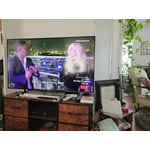
[This review was collected as part of a promotion.] I'm in love with the tv. Makes program watching an adventure experience. The color and sound makes you feel in the the shows and movies I watch.

Review from Samsung US
Helpful?7052JBFI9KAV17348165019
Sep 21, 2026
Reviewer name: Allie
4 out of 5 stars
4 out of 5 stars review

Works well for the money

[This review was collected as part of a promotion.] It works well, but every so often it'll make a pop noise. Nothing happens, Responsiveness is good and brightness is great!

Review from Samsung US
Helpful?7052JBFI9KAV17348165019
Jul 12, 2026
Reviewer name: Yousef Shakboua
5 out of 5 stars
5 out of 5 stars review

Outstanding display and even better features!

[This review was collected as part of a promotion.] The color amd brightness on this TV are amazing! There is so much contrast especially when compared with other TVs and the responsiveness is great! It even lets us use our Samsung phones as remotes

Review from Samsung US
Helpful?7052JBFI9KAV17348165019
Sep 6, 2026
Reviewer name: Dominique
1 out of 5 stars
1 out of 5 stars review

Tv

[This review was collected as part of a promotion.] Turned my tv on today and have a black circle at the bottom of tv.. how can get a replacement on the tv

Review from Samsung US
Helpful?7052JBFI9KAV17348165019
reply from Samsung Advisor

Hi Dominique, Thank you for your feedback regarding the screen abnormalities you're seeing on your TV. To help determine if the issue is related to the panel itself, we recommend starting with a Picture Test, which displays a high-definition image you can examine for flaws: Settings > Support > Device Care > Self Diagnosis > Picture Test If the issue appears during the test and across all sources (built-in apps, HDMI devices, etc.), it may indicate a panel-related concern. You can also try displaying solid-color test videos (red, green, blue, black, white) from a USB drive or YouTube. This can help you identify whether any pixels are stuck or not functioning properly. In some cases, unplugging the TV for a few minutes and rebooting it can help resolve stuck pixels caused by temporary display behavior. If the problem persists after these steps, the TV may require service. To set up a service appointment, please contact Samsung Support at 1-800-SAMSUNG (8AM – 9PM EST Mon – Fri, 8AM – 6PM Sat – Sun). LiveChat and additional support resources are also available through the Support link on our website. ~ Samsung Advisor

Sep 5, 2026
Reviewer name: JaeSung4L
5 out of 5 stars
5 out of 5 stars review

Great EVERYTHING

[This review was collected as part of a promotion.] I absolutely love everything about my Tvs absolutely the best and only brand my family uses bravo ❤️

Review from Samsung US
Helpful?7052JBFI9KAV17348165019