Skip to Main Content
Sam's Club
Sam's Club
All Departments
All Services
Customer reviews for SAMSUNG 55" Class U8000F Series 4K Crystal UHD Smart TV for
SAMSUNG 55" Class U8000F Series 4K Crystal UHD Smart TV
4.5 out of 5 stars
stars
1,786 ratings1,717 reviews
  1. 5 stars72% (1,292)
  2. 4 stars15% (271)
  3. 3 stars6% (108)
  4. 2 stars3% (51)
  5. 1 star4% (64)

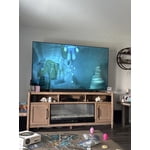
Member photos

  • +494 images
Sort by |
Showing 581-590 of 1,717 reviews
Jun 1, 2026
Reviewer name: Thisguy
5 out of 5 stars
5 out of 5 stars review

Samsung 65 in

[This review was collected as part of a promotion.] Love that I get consistent updates and the sound and picture is what I expect from Samsung. App sections allows me to watch live tv and movies.

Review from Samsung US
Helpful?43WYLKDSIONN15546751433
Jun 5, 2026
Reviewer name: iversonhof
3 out of 5 stars
3 out of 5 stars review

SLOWEST TV

[This review was collected as part of a promotion.] This TV is terrible. I think its probably the worst TV I got. Its so slow like it 20 years old. After this TV I may not buy another samsung.

Review from Samsung US
Helpful?43WYLKDSIONN15546751433
reply from Samsung Advisor

Hi iversonhof, We appreciate your feedback regarding response time. For optimal performance, please ensure your TV is running the latest firmware. You can check this by going to: Home > left directional key > Settings > Support > Software Update To further optimize performance, try running Device Care, which checks memory, clears unused cached data, and closes background apps: Home > left directional key > Settings > Support > Device Care > Start Device Care If issues continue, please reach Samsung Support at 1-800-SAMSUNG (8AM – 9PM EST Mon – Fri, 8AM – 6PM Sat – Sun). LiveChat is also available via the ‘Support’ link on our website. ~ Samsung Advisor

May 25, 2026
Reviewer name: MISTER11
5 out of 5 stars
5 out of 5 stars review

Like all features!

[This review was collected as part of a promotion.] This TV brought a beautiful world to our kitchen! We spend a lot of time to watch news, You tube and entertainment, so we hade been connected to the world !

Review from Samsung US
Helpful?43WYLKDSIONN15546751433
Jul 6, 2026
Reviewer name: Bonnie
5 out of 5 stars
5 out of 5 stars review

Great contrast, and brightness

[This review was collected as part of a promotion.] I recommend this product for being the most upscaling TV I ever purchased. You won't be disappointed.

Review from Samsung US
Helpful?43WYLKDSIONN15546751433
Jun 26, 2026
Reviewer name: Johnny
5 out of 5 stars
5 out of 5 stars review

I love Samsung TVs

[This review was collected as part of a promotion.] I have never had any problems with my TV, the picture quality is just amazing.....although I am ready for my next one....thinking about an 8k this time

Review from Samsung US
Helpful?43WYLKDSIONN15546751433
Jul 5, 2026
Reviewer name: Jules
5 out of 5 stars
5 out of 5 stars review

Great 85” TV

[This review was collected as part of a promotion.] Nice easy to use TV clear, bright good colors and sound even without sound bar . Quick to load .Grand Children love it

Review from Samsung US
Helpful?43WYLKDSIONN15546751433
Jul 20, 2026
Reviewer name: gman
5 out of 5 stars
5 out of 5 stars review

available channel list

[This review was collected as part of a promotion.] beautiful tv, beyond my expectations. Samsung plus is great . Grit channel is right up my alley. love it

Review from Samsung US
Helpful?43WYLKDSIONN15546751433
Jun 1, 2026
Reviewer name: Miika
5 out of 5 stars
5 out of 5 stars review

Picture

[This review was collected as part of a promotion.] Very good product can use it with my samsung phone. Easy to use picture quantity is great. I have 2 one in my bedroom one in my living room.

Review from Samsung US
Helpful?43WYLKDSIONN15546751433
Jun 1, 2026
Reviewer name: Izzy
4 out of 5 stars
4 out of 5 stars review

Decent

[This review was collected as part of a promotion.] Not as good as my QLED 4K TV, but it recently broke outside ot warranty and I needed a fast replacement. It will do, but I definitely notice the differences

Review from Samsung US
Helpful?43WYLKDSIONN15546751433
Jun 7, 2026
Reviewer name: Andi
1 out of 5 stars
1 out of 5 stars review

Does NOT Hold WiFi Connection

[This review was collected as part of a promotion.] It does not hold my WiFi connection while every other computer and device in my house does. And while I understand the difference between Samsung and Apple, does not stream AppleTV well.

Review from Samsung US
Helpful?43WYLKDSIONN15546751433
reply from Samsung Advisor

Hi Andi, Thank you for your feedback. For optimal performance, please ensure your TV is running the latest firmware Update Version 1269.9. You can check this by going to: Home > left directional key > Settings > Support > Software Update If this firmware version is not yet available on your TV, you can download the update on a USB drive and manually update your TV: 1. On Samsung's website (upper right corner), go to: Support > Manual & Software > Find your TV model, and click on the Firmware – Upgrade File. 2. When the file has finished downloading, locate it and then unzip it. There is normally one folder inside but there may be multiple files. 3. Copy or move all of the files that were included in the zip file to a USB flash drive, but do not place them inside any other folders. If you place the software folders inside a folder on the USB flash drive, the TV or monitor will not find them. 4. Connect the USB drive containing the software upgrade into a USB port on your device. 5. Using your device's remote, navigate to and select Settings, then select All Settings, and then select Support. Select Software Update, select Update Now, and then select Yes if prompted. Your device will search the USB drive for update files. Follow the on-screen instructions to install the updated software. Updates usually take a few minutes; please do not turn off the TV until the update is complete. When the update is finished, it will restart automatically. If you continue to have issues, please call us at -800-SAMSUNG (8AM – 9PM EST Mon – Fri, 8AM – 6PM Sat – Sun). LiveChat support and additional help are available at the ‘Support’ link on our website. ~ Samsung Advisor