Skip to Main Content
Sam's Club
Sam's Club
All Departments
All Services
Customer reviews for SAMSUNG 55" Class U8000F Series 4K Crystal UHD Smart TV for
SAMSUNG 55" Class U8000F Series 4K Crystal UHD Smart TV
4.5 out of 5 stars
stars
1,786 ratings1,717 reviews
  1. 5 stars72% (1,292)
  2. 4 stars15% (271)
  3. 3 stars6% (108)
  4. 2 stars3% (51)
  5. 1 star4% (64)

Member photos

  • +494 images
Sort by |
Showing 541-550 of 1,717 reviews
Jul 22, 2026
Reviewer name: Sammil
4 out of 5 stars
4 out of 5 stars review

GOOD VALUE ACROSS THE BOARD!

[This review was collected as part of a promotion.] Best Tv for the price can't match the worth of the Benefits with Samsung TV Plus app!! Keep bringing the best of innovation. NICE FEELING with remote! Picture is great!!

Review from Samsung US
Helpful?43WYLKDSIONN15546751433
Jul 20, 2026
Reviewer name: Red barron
5 out of 5 stars
5 out of 5 stars review

Every night is movie night
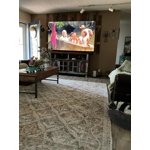
[This review was collected as part of a promotion.] 85” tv is like being at the movie theatre it's really awesome we went from a70” to 85” bid difference all u need is a bowl of popcorn and you at the movies.

Review from Samsung US
Helpful?43WYLKDSIONN15546751433
Jun 5, 2026
Reviewer name: LakeChuck
3 out of 5 stars
3 out of 5 stars review

Not user friendly

[This review was collected as part of a promotion.] I'm finding it not very user-friendly at all. The picture quality if great but general usage of the TV has not been favorable.

Review from Samsung US
Helpful?43WYLKDSIONN15546751433
reply from Samsung Advisor

Hi LakeChuck, We appreciate your feedback on the U8000FD user interface. Please know we are available if you ever have any questions or need help. You can contact Samsung Support at 1-800-SAMSUNG (8AM – 9PM EST Mon – Fri, 8AM – 6PM Sat – Sun). LiveChat support and additional help are available at the ‘Support’ link on our website. ~Samsung Advisor

Jun 23, 2026
Reviewer name: CJCPA
5 out of 5 stars
5 out of 5 stars review

Samsung 75"

[This review was collected as part of a promotion.] I like it. The screen is huge. I used to be jealous of people that had TVs that you could see driving down the street, now I have one. The picture is awesome, it is bright, sharp, and clear.

Review from Samsung US
Helpful?43WYLKDSIONN15546751433
Jul 20, 2026
Reviewer name: Slim
5 out of 5 stars
5 out of 5 stars review

Samsung TV

[This review was collected as part of a promotion.] TV works great once we figured out the remote. Have all Samsung TVs in both homes. Not happy with only one of the TVs and that being the 50" one. Let's say it's not the best unit.

Review from Samsung US
Helpful?43WYLKDSIONN15546751433
Jun 6, 2026
Reviewer name: Vall
2 out of 5 stars
2 out of 5 stars review

Tv

[This review was collected as part of a promotion.] It's a television. The picture is rather flat and no matter how I adjust the picture it's to dark. But what am I gonna do about it. And I detest AI!

Review from Samsung US
Helpful?43WYLKDSIONN15546751433
reply from Samsung Advisor

Hi Vall, We’re sorry to hear you’re not fully satisfied with the picture quality on your Samsung U8000F TV. If the image appears too dark, we suggest disabling certain energy-saving features, which can automatically adjust brightness and affect how the screen looks. Go to: Settings > All Settings > General & Privacy > Power and Energy Saving, then turn off Brightness Optimization, Energy Saving Solution, Motion Lighting, and/or Contrast Enhancer. You can also adjust the Picture Mode to better suit your environment: Settings > All Settings > Picture > Picture Mode • Standard – Default mode for general viewing • Dynamic – Brighter and clearer, ideal for well-lit rooms • Movie – Best for dark room viewing • Eco – Energy-saving mode • Filmmaker Mode – Preserves content as intended by creators To fine-tune brightness, go to: Home > left directional key > Settings > All Settings > Picture > Expert Settings, then adjust the Brightness level (0–50) to your preference. Lastly, please make sure your TV is running the latest firmware: Home > Home > left directional key > Settings > Support > Software Update > Update Now We hope these tips help improve your viewing experience. If you need further support, feel free to contact us at 1-800-SAMSUNG (8AM – 9PM EST Mon – Fri, 8AM – 6PM Sat – Sun). LiveChat is also available via the ‘Support’ link on our website. ~ Samsung Advisor

Jul 21, 2026
Reviewer name: MBC84
5 out of 5 stars
5 out of 5 stars review

Sharp clear picture.

[This review was collected as part of a promotion.] I love it. It is crisp, clear, and responsive. It is such an upgrade from my outdated 65” Samsung. I. have it in my bedroom and find it to be more than adequate in size b

Review from Samsung US
Helpful?43WYLKDSIONN15546751433
Jun 21, 2026
Reviewer name: Franny
5 out of 5 stars
5 out of 5 stars review

My 70” Samsung TV

[This review was collected as part of a promotion.] I am very happy with my first 70” Samsung TV. I always had an old school TV and I cannot believe the difference and the quality! I highly recommend.

Review from Samsung US
Helpful?43WYLKDSIONN15546751433
Jul 6, 2026
Reviewer name: Luke
3 out of 5 stars
3 out of 5 stars review

Good for what it is

[This review was collected as part of a promotion.] Does have a pretty good picture worked great for awhile then started freezing and couldn't change the channels had to factory reset it and start over

Review from Samsung US
Helpful?43WYLKDSIONN15546751433
Jun 20, 2026
Reviewer name: Best 75
5 out of 5 stars
5 out of 5 stars review

BEST TV EVER

[This review was collected as part of a promotion.] Best TV does everything hooks up to things and I love it! Responsive, updated, great experience! Get one!

Review from Samsung US
Helpful?43WYLKDSIONN15546751433