Skip to Main Content
Sams Club
Sams Club
Customer reviews for HP Envy 6558e Wireless All-in-One Color Photo Inkjet Printer, 6 Months Instant Ink with HP+ for
HP Envy 6558e Wireless All-in-One Color Photo Inkjet Printer, 6 Months Instant Ink with HP+

Member photos

Sort by |
Showing 1-10 of 78 reviews
Apr 15, 2026
Juile R
5 out of 5 stars review

Verified Purchase

A perfect (occasional) colour printer for our household

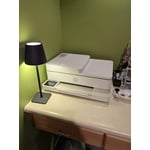
Having three black and white printers in our house, I was continually frustrated that I couldn't print colour documents such as charts, maps and quilting patterns. The HP ENVY 6155e sits in our dining room, unobtrusive by its light colour and low profile. While its slower speed doesn't suit it for high volume printing, nor does it print high quality photos, but it is proving to be just what we needed - an occasional colour printer.

Review from hp.com
Helpful?1DDHN6VGE4M213957706171
Apr 15, 2026
Mac.
5 out of 5 stars review

Verified Purchase

This is best value for a home office printer/scanner

I ordered HP 6155e on line. /delivery was couple of days It is really a nice home office, printer/scanner --set up was simple and I am a senior ! print quality amazing --Just excellent value for the money

Review from hp.com
Helpful?1DDHN6VGE4M213957706171
Mar 14, 2026
Mark of the lake
4 out of 5 stars review

Verified Purchase

A good printer

I was very happy with the performance of the printer when I would print from the computer. However when printing from my iPhone it would print a page and a half and error out. Everytime! I haven't had time to call HP on this issue but intend to do that soon. I'm sure it's something I am doing wrong.

Review from hp.com
Helpful?1DDHN6VGE4M213957706171
Mar 28, 2026
Anonymous
4 out of 5 stars review

Verified Purchase

Easy set up and good print quality.

This is my second HP Envy printer. Set up was easy although I had to switch to the mobile app from my laptop to finish the setup. The wifi was doing good but after 3 weeks, it was disconnecting. I had to do a reset and re-install the printer. Print quality is great and the instant ink is good.

Review from hp.com
Helpful?1DDHN6VGE4M213957706171
Nov 11, 2025
Anonymous
3 out of 5 stars review

Verified Purchase

Manual arm to catch printed pages is a cheap piece of junk

This works just fine, but my older hp had an arm that would automatically come out to catch the printed pages. This printer does not, so I end up finding the printed papers all over the floor. Could I stop everything to run upstairs to pull the manual arm out before I print? Sure, but why should I? Also, there were no other options in this price range except for a white clunky looking machine. My cheaper hp with the automatic arm was black and sleek looking. Unfortunately the hard drive died or I wouldn't have replaced it.

Review from hp.com
Helpful?1DDHN6VGE4M213957706171
Mar 26, 2026
Anonymous
3 out of 5 stars review

Verified Purchase

HP Envy 6155e AllinOne

The only reason I gave my HP Envy 6166e AllinOne! three stars is I have been unsuccessful with establishing my email address as a default, a send to, or an email. I have followed directions on how to set and apply this necessary feature but unfortunately it has not worked.

Review from hp.com
Helpful?1DDHN6VGE4M213957706171
Mar 28, 2026
EdPaul
3 out of 5 stars review

Verified Purchase

ok printer but not the greatest

The QR code is displayed to finish install. installing on a PC does not allow reading QR code like a iPhone. The SW from HP or Microsoft on PC should complete install with NO QR code link. I got it to work so I ignore the QR code display that comes up all the time. Also uses #68 ink cartridge...there are thousands of ink cart from HP why a NEW one for each new printer. Also new cart requires running alignment print out. There should be a cart centering sensor that aligns internal without alignment page being printed and scanned.

Review from hp.com
Helpful?1DDHN6VGE4M213957706171
Jun 15, 2025
What for?
1 out of 5 stars review

Verified Purchase

Poor is too Good a Rating

Set-up used to be smoother for your printers. Since the first time we replenished the supply of 8-1/2" x 11" paper, we receive an error message every time we want to print an 8-1/2" x 11" sheet because the "paper does not match." Instead, we must press an "Ignore" button to print, so truly remote printing is out of the question. It takes 5+ minutes to print one black-and-white sheet in "Draft" quality. When trying to print "Normal" or "Best," the printer gives up, printing a couple of inches of the sheet at most. The scanner worked the first time; however, the printer no longer lists itself as a scanner, and using the computer software cannot overcome this flaw. Time to pack the printer up and make a warranty claim.

Review from hp.com
Helpful?1DDHN6VGE4M213957706171
Apr 25, 2026
Sanny
1 out of 5 stars review

Verified Purchase

Disappointed

Poor color qualit of print. Very slow. Screen doesn't show print option on the menue. Mobile printing worked once and stopped working. Rather frustrating experience am sorry to say.

Review from hp.com
Helpful?1DDHN6VGE4M213957706171
Feb 1, 2026
Anonymous
1 out of 5 stars review

Verified Purchase

Don't!

This model is 4 years old and no longer supported by hp. There is no software available to run it.

Review from hp.com
Helpful?1DDHN6VGE4M213957706171