Skip to Main Content
Sam's Club
Sam's Club
All Departments
All Services
Customer reviews for SAMSUNG 50" Class DU7200 Series 4K Smart TV for
SAMSUNG 50" Class DU7200 Series 4K Smart TV
4.3 out of 5 stars
stars
1,145 ratings1,023 reviews
  1. 5 stars62% (710)
  2. 4 stars19% (223)
  3. 3 stars9% (98)
  4. 2 stars5% (54)
  5. 1 star5% (60)

Member photos

  • +160 images
Sort by |
Showing 81-90 of 1,023 reviews
Dec 1, 2024
Lgrssm
5 out of 5 stars review

Great picture

[This review was collected as part of a promotion.] The TV is used in my living room. Great picture. Color is amazing. Just set up so not familiar with all the features. Can't wait to try the gaming it looks amazing with the dynamics and color. Will have to take down though have learned not to put a tv up again till trying on floor first. Has an huge oblong mark looks like a puddle within the bottom of the screen. Can't wait to try all the features. Quick to turn on and set up.

Review from Samsung US
Helpful?6FFFIGX8UWW613884652301
Mar 5, 2025
Grayvlad
4 out of 5 stars review

Good TV, lousy remote.

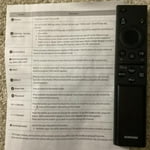
The tv is fine and the picture is great. My problem is with the remote which is sort of indecipherable Gone are all the familiar ttems like vol. arrows, channel arrows, and basically all words. The control and buttons are too small and trickier to work. I gave up trying to figure it out and just use my internet subscriber remote. Probaly missing out on things but it is what it is.

Review from Samsung US
Helpful?6FFFIGX8UWW613884652301
Jul 11, 2025
TCFord
4 out of 5 stars review

It's okay.

We love the picture. However, after only owning this t.v. for three weeks, we already had to unplug it for a soft restart as we had no volume. Since then, we have had to unplug it almost once a week in order to watch it. The Samsung t.v. we had before this one we didn't need to unplug until years later. We laughed at a Samsung refrigerator we certainly were not going to buy because we cannot reach behind where it would be to keep unplugging it. We have Samsung phones and have enjoyed being able to connect to our t.v. Our faith in Samsung is fading.

Review from Samsung US
Helpful?6FFFIGX8UWW613884652301
Apr 21, 2025
Present to myself
5 out of 5 stars review

Everything I needed

I love all the features and the extra free channels. The ease of setting it up , adding devices and getting help when I needed from Samsung technical team. The only thing I don’t like is the power cord not made where it can be pushed in and stay securely connected. The cord to the TV comes out really easy with little bumping, or having to move the TV, to where I want to tape it in place, or put super glue on the outside of the connector to hold it in place. Other than that it is a very good, clear, vibrant colorful pictures, excellent sound and is lightweight. Well worth the price.

Review from Samsung US
Helpful?6FFFIGX8UWW613884652301
Mar 11, 2025
TVPRO
2 out of 5 stars review

Not Happy With New Smart TV

Very disappointed in the performance of this TV. Same refresh rate as the 55' TCL I replaced with this TV, yet it constantly gets blurry before ultimately displaying a clear picture. The remote is terrible, ridiculously small and impossible to read in a darkened room when changing programming. Is there an alternative remote? The home screen is a mess, with so much junk I would never use and again, the layout is too small for a TV this size. I have a ROKU stick plugged into my 45' Samsung plasma in a bedroom that I have had since 2013 and it performs flawlessly. The new set audio is fine with the TCL soundbar, and excellent with the Avantree blue tooth headphones, but the overall performance of the new Samsung is lacking, despite a super high speed internet connection.. I am a television professional and am at a loss at what to do with this new set. Suggestions helpful, as right now I want to return it and try something that performs as advertised.

Review from Samsung US
Helpful?6FFFIGX8UWW613884652301
reply from Samsung Specialist

TVPRO, Thank you for sharing your thoughts on the picture quality of your DU7200D TV. To ensure you’ve got the latest image updates, please confirm that your TV is up to date with the latest firmware version. You can check by going to: Home > Menu > Settings > Support > Software Update. If the picture you’re seeing is still not to your liking after updating firmware, you may want to adjust the picture clarity settings by going to: Menu > Settings > All Settings > Picture > Expert Settings > Picture Clarity Settings - Off: Picture Clarity Settings will always be off - Auto: Picture Clarity Settings will automatically activate and deactivate based on the type of program being watched - Custom: Allows custom adjustments and settings to be used. By selecting the Custom option, you can access these advanced settings for Judder Reduction, LED Clear Motion, and Noise Reduction. To assist in learning the various functions, please know you can download your TV's User Manual, e-Manual, Remote Control Leaflet, and Quick Setup Guide on Samsung's website under Support > Manuals & Software > TVs & Home Theater. You can search for and select the DU7200D TV to download the guides you would like. The e-Manual and Remote Guide are both also embedded into your TV itself under Menu > Settings > Support > Open e-Manual. If you need more help, Samsung is here for you. Please call us at 1-800-SAMSUNG, 8AM - 12AM EST, 7 days a week. Our LiveChat agents are also available by clicking on the ‘Support’ link on our website. ~ Samsung Specialist

Feb 6, 2025
Phil
4 out of 5 stars review

Glad I bought it (with one or two caveats)!!

I bought this television a few months ago and I am very happy with the purchase. My concern is with the lack of literature on how to use all its features. I am old school and would appreciate a manual. Maybe even an on-line (or instore) class to learn about its features.

Review from Samsung US
Helpful?6FFFIGX8UWW613884652301
reply from Samsung Advisor

Hi Phil, Thanks for your feedback. We understand sometimes there is a learning curve when you get a new TV! This is why we created step-by-step guides, to make it easier for you. To learn about your TV go to https://www.samsung.com/us/support/answer/ANS00062199/. There are also built-in guides available on your TV. Just go to Home> (left directional button) Settings> Support> Remote Control Guide. If you’d like more help with settings, we are always happy to help! Call us at 1-800-SAMSUNG, 8 AM - 12 AM EST, seven days a week. Or visit us on the Samsung website and click on the ‘Support’ link for: 1) LiveChat 2) Manuals, Software, & Warranty Info ~ Samsung Advisor

Apr 21, 2025
darling diana
5 out of 5 stars review

A must buy, picture clarity at a great price!

The enhanced color in the picture of skin tones and backgrounds are fantastic! I upgraded from a smaller Samsung 2 weeks ago and honestly I don't know why I hadn't done it sooner. So proud of it, I've had family and friends over several times to watch tv!! 65" may not be the biggest but total satisfaction.

Review from Samsung US
Helpful?6FFFIGX8UWW613884652301
Feb 5, 2025
Daryl
4 out of 5 stars review

Sound/Audio Issue.

We've had the Samsung TV since June 2024. The picture is very good. We've had some trouble with the audio/sound. When changing channels, sometimes the sound "pops" and we lose sound on the new channel. If we turn the TV off for a few seconds and turn it back on, the sound returns to normal. I plan to call Samsung customer/technical service to discuss this issue the next time we experience the problem.

Review from Samsung US
Helpful?6FFFIGX8UWW613884652301
May 22, 2025
Jimini24
3 out of 5 stars review

Beautiful picture!

The unit has a beautiful picture, but as far as ease of use, that's another story. I have 4 Samsung TV's and this one for some reason is very difficult to navigate. I can't add apps that I view and always have to go to search to find them, which is annoying.

Review from Samsung US
Helpful?6FFFIGX8UWW613884652301
reply from Samsung Brand Ambassador

Jimini24: Thanks for sharing your thoughts. If there's anything we can do to improve your experience, please reach Samsung Support at 1-800-SAMSUNG, 8AM - 12AM EST, 7 days a week. Or visit us on the Samsung website and click on the ‘Support’ link for: • LiveChat • Manuals, Software, & Warranty Info ~ Samsung Ambassador

Apr 19, 2025
Pammy
4 out of 5 stars review

Great picture. The controller is a little hard to.

Bought this a few months ago and we have an irritating issue with the tv. While watching the tv all of a sudden the whole screen goes black. It’s like a black out. This doesn’t happen to any other tv in the house. Otherwise the picture is beautiful. Too late to take it back to Cocsco.

Review from Samsung US
Helpful?6FFFIGX8UWW613884652301