Skip to Main Content
Sams Club
Sams Club
Customer reviews for SAMSUNG 50" Class DU7200 Series 4K Smart TV for
SAMSUNG 50" Class DU7200 Series 4K Smart TV
4.3 out of 5 stars
stars1,144 ratings1,022 reviews
  1. 5 stars62% (709)
  2. 4 stars19% (223)
  3. 3 stars9% (98)
  4. 2 stars5% (54)
  5. 1 star5% (60)
Write a review

Customer photos

  • +159 images
Sort by |
Showing 311-320 of 1,022 reviews
Feb 20, 2025
None
5 out of 5 stars review

TV doesn't work.

I bought a Saimsung because I liked the quality. But I've nothing but trouble trying to have repaired.. I bougt 9 months ago and after no luck getting it working by a phone call. a repair man was sent out a week later. he decided the part he needed was not in his truck and an appointment was made a week later when told the part had come in. Yesterrday he came back to put the new sensor in only to find a corroded part in the box they sent him. Now we must wait for his 3rd visit and hope it will work. Very disappionted!

Review from Samsung US
Helpful?6FFFIGX8UWW613884652301
Apr 22, 2025
Telephonetim
4 out of 5 stars review

Good TV, reccomend it above some others.

4th Samsung tv I've had, and this one seems to lose communication with internet often. If there's a momentary outage, Samsung won't restore w/o a turn-off/on. Frustration. Other devices restore quickly. Great picture, occasional issues with tuning various app's; MAX, Paramount+ mostly. Samsung did mostly stand-up for failed "curve" tv, after many months of "testing".

Review from Samsung US
Helpful?6FFFIGX8UWW613884652301
Feb 22, 2025
Never to old to learn
2 out of 5 stars review

Not what I expected

I bought this DU7200 75 inch a couple weeks ago. All reviews were good is the reason I bought it. Didn't realize it is a very entry level TV. I can't connect my older Bose system to it or my new Bose sound bar because it doesn't have optical or rca connections. I did connect the sound bar via Bluetooth just to find out the sound does not sync with the picture. I even bought an audio converter only to find out it wouldn't work either. wish I had kept my older Samsung that worked perfectly. I just wanted a larger tv. Lesson learned on my part that what seems to be good is not always what you get.

Review from Samsung US
Helpful?6FFFIGX8UWW613884652301
reply from Samsung Advisor

Hi Never to old to learn, Thank you for purchasing the Samsung DU7200 TV. To address the audio delay, you may want to try the Audio Pass-Through feature. This feature allows the audio signal to be sent out unprocessed to an external Soundbar or receiver connected to the TV. The external Soundbar or receiver then processes the audio, thereby eliminating the added step of processing by the TV, which adds delay. To activate this feature, go to Settings > All Settings> Sound > Expert Settings > Digital Output Audio Format > set to Pass-Through. For assistance to troubleshoot why your converter is not working, please know we are always available and happy to help. Call us at 1-800-SAMSUNG, 8 AM - 12 AM EST, seven days a week. Or visit us on the Samsung website and click on the ‘Support’ link for: 1) LiveChat 2) Manuals, Software, & Warranty Info ~ Samsung Advisor

Feb 5, 2025
Coco
3 out of 5 stars review

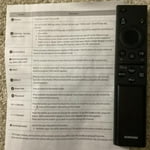
Small remote control buttons

Unfortunately, I am not smart enough to be able to use a smart tv. The remote controls buttons are so small. Itʼs hard for us seniors with our arthritic fingers to maneuver. Also the key pad is not lit. Wish I could get a larger, senior friendly remote. Remote control has no microphone to search, even tho screen says ask......

Review from Samsung US
Helpful?6FFFIGX8UWW613884652301
reply from Samsung Advisor

Hi Coco, Thank you for choosing the Samsung DU7200 TV and for taking the time to provide us with detailed feedback on your experience. Your opinion is important to us and will be shared with our internal product teams. Samsung remotes are designed to be convenient and useful, but we understand if you’d prefer to use a third-party remote, whether it’s a universal remote, a game controller, or something else! Whether you are replacing a lost remote or using an alternative remote to help reduce clutter, a third-party remote is a great option to use to control your Samsung TV. If you ever have questions or need help, Samsung is here for you! Give us a call at 1-800-SAMSUNG, 8 AM - 12 AM EST, seven days a week. Our LiveChat agents are also available by clicking on the ‘Support’ link on our website. ~Samsung Advisor

Feb 21, 2025
Steve J
4 out of 5 stars review

not wonderfull

I am pretty disappointed that the messaging app no longer has a microphone for voice to texting. I have spent way to much time trying to resolve this significant annoyance. many app replacements are not as funcional on this phone. My approval of this upgrade is still being evaluated. SJ

Review from Samsung US
Helpful?6FFFIGX8UWW613884652301
Mar 5, 2025
Steven R
4 out of 5 stars review

Almost perfect, almost.

Great, love the TV. I would give it 5 stars but I can because the app store is missing some pretty big apps. I had to buy a fire stick just so I could watch football on the NFL app. I don't understand how the biggest tech company in the world doesn't have access to all of the biggest apps. Other than that I love the TV especially the new remote.

Review from Samsung US
Helpful?6FFFIGX8UWW613884652301
Sep 25, 2024
Tvgeek
5 out of 5 stars review

Fantastic TV with easy, fast setup

[This review was collected as part of a promotion.] Purchased this tv to replace a 10+ year old 1st generation Samsung smart TV that stll worked perfectly but was not able to download new streaming apps. (We finally cut the cord!) The setup of my new DU7200D was totally seamless. The easiest tv I have ever set up. It even connected automatically to my 8 year old Samsung soundbar. Total time to unbox, setup, register, and connect to 4 streaming apps was less than 20 minutes. This tv is in our bedroom and the 43" size is perfect. Picture quality is fantastic. Good light balancing when room is dark or with all the lights on. Colors are vivid and natural and the blacks are black. Love the connectivity availability with my Samsung smart phone. I highly recommend this product to anyone looking for a great value.

Review from Samsung US
Helpful?6FFFIGX8UWW613884652301
Apr 22, 2025
Anonymous
4 out of 5 stars review

Excellent visual experience. Good quality.

I bought my tv a couple of months ago and am happy with this purchase but I with I had bought a Roku tv. I hate the remote that came with this tv. It is too skinny and I don't like how it moves through the channels. Unless you have super skinny fingers it's too easy to mess up what you are trying to do. I tried to purchase a different remote but they are all the same for this particular TV. Ugh.

Review from Samsung US
Helpful?6FFFIGX8UWW613884652301
Apr 19, 2025
Cjb1
3 out of 5 stars review

Sound features not as good

Liked my old Samsung much better. The speaker in this is not nearly as good. Have to turn the volume Up over 60 to 70 on most programs to even be able to hear. And no, I’m not hard of hearing! Still have my other Samsung and like that TV much better. Not sure if it’s because they’re making them so much thinner that the speakers aren’t the quality that they used to be. My old one is not that old and definitely better quality. Disappointed in this one.

Review from Samsung US
Helpful?6FFFIGX8UWW613884652301
reply from Samsung Advisor

Hi Cjb1, Thank you for sharing your experience with low volume. There are several volume features you can adjust, which may improve your audio experience. 1) Auto Volume automatically adjusts the sound to a certain level when changing channels or switching to another external input. Go to Settings > All Settings> Sound > Expert Settings > Auto Volume. 2) Adaptive Sound automatically adjusts to a specific volume level while watching TV. The TV analyzes your volume usage history by time period to automatically adjust the volume when you use an app or switch to an external input source. Go to Settings> All Settings> Sound> Sound Mode> Adaptive Sound. 3) Several Sound Modes are likewise available to meet your personal preferences: Home > Settings > All Settings> Sound > Sound Mode. Also, some sources have their own volume control, which might need to be set higher. Please check the volume control of the external device (cable box or satellite box, DVD, Blu-ray, etc.) connected to your TV. Also, check the cable connection between an external device and the TV and then try the cable connection again. If you need more help, Samsung is here for you! Please call us at 1-800-SAMSUNG, 8 AM - 12 AM EST, seven days a week. Our LiveChat agents are also available by clicking on the ‘Support’ link on our website. ~ Samsung Advisor

May 13, 2025
Zman
5 out of 5 stars review

New Choice

I was uncertain of the brand of TV to purchase. I knew the size I wanted, but with all the choices I was a bit lost. My prior TV was a Sony that I was very pleased with. I am not certain what drew me towards Samsung, but I am pleasantly surprised. Time will tell.

Review from Samsung US
Helpful?6FFFIGX8UWW613884652301