Skip to Main Content
Sam's Club
Sam's Club
All Departments
All Services
Customer reviews for SAMSUNG 50" Class DU7200 Series 4K Smart TV for
SAMSUNG 50" Class DU7200 Series 4K Smart TV
4.3 out of 5 stars
stars
1,145 ratings1,023 reviews
  1. 5 stars62% (710)
  2. 4 stars19% (223)
  3. 3 stars9% (98)
  4. 2 stars5% (54)
  5. 1 star5% (60)

Member photos

  • +160 images
Sort by |
Showing 321-330 of 1,023 reviews
Apr 19, 2025
Reviewer name: Sonup417
5 out of 5 stars
5 out of 5 stars review

Great quality with excellent picture.

Bought this one after the first one came in broken. This is the lower model, but the price was right and the picture quality is excellent. With the SmartThings app you can add streaming services plus you get Samsung TV with lots of free features.

Review from Samsung US
Helpful?6FFFIGX8UWW613884652301
May 5, 2025
Reviewer name: Greg
5 out of 5 stars
5 out of 5 stars review

Samsung is the best.

I had a Samsung Flat Screen before, and I love them. I recently purchased a little larger screen but struck with Samsung because of the quality and ease of on-screen instructions. Very well made TV.

Review from Samsung US
Helpful?6FFFIGX8UWW613884652301
Apr 19, 2025
Reviewer name: BillinNM
3 out of 5 stars
3 out of 5 stars review

User interface needs work

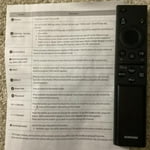
It's really hard to download apps. Remote control needs more features. "Fast forward" would nice. Called for support twice. I'm batting .500 TV itself is pretty good. Could REALLY use some documentation, tho.

Review from Samsung US
Helpful?6FFFIGX8UWW613884652301
reply from Samsung Advisor

Hi BillinNM, We appreciate your review of the DU7200 TV. To learn how to use your Samsung remote and understand the settings on your TV, please use your remote to access the remote guide. Go to Home> (left directional button) Settings> Support> Remote Control Guide. If you need more help, Samsung is here for you. Please call us at 1-800-SAMSUNG, 8 AM - 12 AM EST, seven days a week. Our LiveChat agents are also available by clicking on the ‘Support’ link on our website. ~Samsung Advisor

Feb 5, 2025
Reviewer name: hate to complain
3 out of 5 stars
3 out of 5 stars review

good picture

I bought tis set appx. 4mo's ago and overall have been happy with it. The only problem has been the sound keeps vascillating up and down. You have to keep the remote in hand and constantly increase or decrease the volume.

Review from Samsung US
Helpful?6FFFIGX8UWW613884652301
reply from Samsung Advisor

Hi, I apologize for the inconvenience you have had with the inconsistent sound volume. Please try adjusting the following Settings to improve your experience. The Auto Volume function automatically adjusts the sound to a certain level when changing channels or switching to another external input. Go to Settings > All Settings> Sound > Expert Settings > Auto Volume = On. You may also want to perform a Sound Test under Support > Self Diagnosis > Start Sound Test. If the issue persists, please reach out to us so that we can provide further troubleshooting. You can call us at 1-800-SAMSUNG, 8 AM - 12 AM EST, seven days a week. Our LiveChat agents are also available by clicking on the ‘Support’ link on our website. ~ Samsung Advisor

Feb 5, 2025
Reviewer name: Dmkk
4 out of 5 stars
4 out of 5 stars review

Great except for no optical audio output
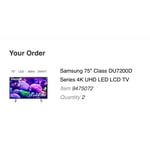
Excellent picture and ease of install and setup. One star off for no optical audio output. Almost returned because of it. But found workaround thanks to the internet.

Review from Samsung US
Helpful?6FFFIGX8UWW613884652301
Feb 10, 2025
Reviewer name: Mike
3 out of 5 stars
3 out of 5 stars review

Hard to use remote

TV is good however Remote is too small and not easy to use.. 3 Stares because of the remote.. would have been 5 stares if better and easier friendly remote..

Review from Samsung US
Helpful?6FFFIGX8UWW613884652301
reply from Samsung Advisor

Hi Mike, Thank you for sharing your opinion on the DU7200 TV remote. We understand there can be a learning curve when you get a new TV! This is why we have built a guide built into the TV that teaches you how to use your remote. You can learn how to use your Samsung Remote by going to Home> (left directional button) Settings> Support> Remote Control Guide. If you need more help, Samsung is here for you. Please call us at 1-800-SAMSUNG, 8 AM - 12 AM EST, seven days a week. Our LiveChat agents are also available by clicking on the ‘Support’ link on our website. ~Samsung Advisor

Apr 14, 2024
Reviewer name: MargHun
5 out of 5 stars
5 out of 5 stars review

This TV is a great value

[This review was collected as part of a promotion.] The TV is great and the pictures are awesome. Definitely not the same thing as a normal HD flat screen TV

Review from Samsung US
Helpful?6FFFIGX8UWW613884652301
Mar 5, 2025
Reviewer name: Whya61
4 out of 5 stars
4 out of 5 stars review

Beautiful picture

I bought this TV for my den a month ago and set it up last week end for my granddaughter who is visiting. I love the TV, beautiful picture but I despise the remote. Easily lost due to its size and very touchy. I really don't like it.

Review from Samsung US
Helpful?6FFFIGX8UWW613884652301
Feb 20, 2025
Reviewer name: Dana
5 out of 5 stars
5 out of 5 stars review

Better than Iphones

We decided to change from iphones back to android. So far I love this phone. The camera is amazing! It was not difficult to figure out. Plus we got a spanking, great deal through our provider!

Review from Samsung US
Helpful?6FFFIGX8UWW613884652301
Mar 3, 2025
Reviewer name: Noel
5 out of 5 stars
5 out of 5 stars review

Christmas Purchase to Remember

As they say size really matters... What a beautiful picture. What beautiful sound. What a great PRICE. "IT'S BEEN A GREAT SAVINGS OVER CABLE" AGAIN THANK YOU RLP

Review from Samsung US
Helpful?6FFFIGX8UWW613884652301