Skip to Main Content
Sams Club
Sams Club
Customer reviews for SAMSUNG 50" Class DU7200 Series 4K Smart TV for
SAMSUNG 50" Class DU7200 Series 4K Smart TV
4.3 out of 5 stars
stars1,144 ratings1,022 reviews
  1. 5 stars62% (709)
  2. 4 stars19% (223)
  3. 3 stars9% (98)
  4. 2 stars5% (54)
  5. 1 star5% (60)
Write a review

Customer photos

  • +159 images
Sort by |
Showing 301-310 of 1,022 reviews
Jun 16, 2024
SansungRon
4 out of 5 stars review

Dedicated to Samsung ....

[This review was collected as part of a promotion.] This TV has a lot of great features.I'd like to fact that i'm able to mirror my phone to it. I enjoyed that it could be cast too . I will make a great word-of-mouth advertisement for Samsung.If I win this project.

Review from Samsung US
Helpful?6FFFIGX8UWW613884652301
Oct 24, 2024
6084871555
5 out of 5 stars review

Quality u can see

[This review was collected as part of a promotion.] I love my new Samsung TV. It's got all the expected bells and whistles. Plus it's got the quality I've come to expect from Samsung products . Quality u can see from the moment u open the box . And reliability u can count on . I love my Samsung TV!!!!!

Review from Samsung US
Helpful?6FFFIGX8UWW613884652301
Apr 19, 2025
Desktop
2 out of 5 stars review

Never again

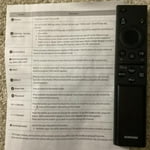
The picture is good. The user interface is slow, cluttered, clumsy, and non intuitive. Multiple keystrokes required to do simple tasks. The remote is the worst I've seen. The center button is physically connected to the up, down, left, right arrows and has a high error rate. No button for device input, but there is Netflix and prime that I don't use. Other than the larger screen size, much worse than a 10 year old LG 42 inch TV that it replaced.

Review from Samsung US
Helpful?6FFFIGX8UWW613884652301
reply from Samsung Advisor

Hi, Thanks for sharing your thoughts. If there's anything we can do to improve your experience, please reach Samsung Support at 1-800-SAMSUNG, 8AM - 12AM EST, 7 days a week. Or visit us on the Samsung website and click on the ‘Support’ link for: • LiveChat • Manuals, Software, & Warranty Info ~ Samsung Advisor

Jul 2, 2024
Downforthecount
4 out of 5 stars review

Limited features

[This review was collected as part of a promotion.] New technology! Only 3 HDMI connections. No way to connect old surround sound system. I called the company, and they told me I had to order a sound bar, there is no way to connect my exciting surround sound system. So, returned the TV. I bought an Insignia that has the connections I need to connect my surround sound system.

Review from Samsung US
Helpful?6FFFIGX8UWW613884652301
reply from Samsung Advisor

Hi Downforthecount, Thank you for choosing the Samsung DU7200 TV and for taking the time to provide us with detailed feedback on your experience. Your opinion is important to us and will be shared with our internal product teams. The DU72000F TV offers 3 HDMI ports and is Bluetooth and Wi-Fi capable, allowing a seamless connection across multiple devices at a time. Please keep in mind that an Optical port can be found on our DU8000F Series and above. Should you ever decide to give Samsung TVs another try and have questions or need help with settings, setup, or features, we would be happy to help. Call us at 1-800-SAMSUNG, 8 AM – 12 AM EST, seven days a week. LiveChat with an agent, as well as manuals, software, and warranty info, can be found at the ‘Support’ link on our Samsung website. We hope to regain you as a customer in the future. ~ Samsung Advisor

Mar 6, 2025
LisaT
2 out of 5 stars review

Not completely satisfied.

My spouse bought this several months ago Khe thought we needed a bigger screen)& so far have not been completely satisfied. Not enough ports on back of TV: No port for external sound system we used on old TV, so spouse bought complete new external speakers (extra expense). Cable box uses 1 HDMI port. DVD player uses 2nd HDMI port. No ports for WII game console. Had to purchase a converter to HDMI & then have to unplug either the cable box or the DVD player to plug game consoles in. External antenna port only tunes 1 channel at a time. Have to perform a new search each time we want to watvch a different channel from the external antenna. (Same external antenna used on old TV which scanned in 14 different channels at one time) Can't figure out how to use the the streaming channels preprogrammed on TV. (Not user friendly for senior citizens) If it was up to me I would have returned this TV & used the old one we had until it croaked.

Review from Samsung US
Helpful?6FFFIGX8UWW613884652301
reply from Samsung Specialist

LisaT, Thank you for sharing your thoughts on the input selection - we'll be sure to pass this feedback along to our design teams. To assist in learning the various functions, please know you can download the DU7200D TV's User Manual, e-Manual, Remote Control Leaflet, and Quick Setup Guide on Samsung's website under Support > Manuals & Software > TVs & Home Theater. You can search for and select the DU7200D TV to download the guides you would like. The e-Manual and Remote Guide are both also embedded into your TV itself under Menu > Settings > Support > Open e-Manual. If you need more help, Samsung is here for you. Please call us at 1-800-SAMSUNG, 8AM - 12AM EST, 7 days a week. Our LiveChat agents are also available by clicking on the ‘Support’ link on our website. ~ Samsung Specialist

Jan 18, 2025
Nancy
3 out of 5 stars review

Don't switch from Roku

I have been a Roku girlie for 10 years but then got gifted a larger Samsung tv. Samsung's interface is not as user friendly as Roku and definitely not as pretty. The home screen also aggressively pushes Samsung TV and their options - I don't care, I just want my apps. The remote is also limited given the app version of the remote has a worse UX and UI than the actual TV. The TV shows microphone capabilities but the remote does not have that function. I am giving this 3 out of 5 stars because at least the picture is decent and sound is fine. But otherwise, this TV is unnecessarily complicated.

Review from Samsung US
Helpful?6FFFIGX8UWW613884652301
reply from Samsung Specialist

Hi Nancy, Thank you for sharing your thoughts on the interface and remote - we'll be sure to pass your feedback along to our internal teams. If there’s anything we can ever help with, please call us at 1-800-SAMSUNG, 8AM - 12AM EST, 7 days a week. Or visit us on the Samsung website and click on the ‘Support’ link for: • LiveChat • Manuals, Software, & Warranty Info ~ Samsung Specialist

Apr 19, 2025
ACT5418
4 out of 5 stars review

It has lot of options and picture quality is good.

In general, it is a nice TV and I am happy with it's performance. However, being a senior citizen and limited ability to use the it's remote control, I find it hard to use. It is so small (probably preferred by younger generation) and difficult to use. I am just wondering if there is a different version that may be easier to use. I understand that this is probably not possible, but just checking!!!

Review from Samsung US
Helpful?6FFFIGX8UWW613884652301
Mar 5, 2025
No nickname
4 out of 5 stars review

43” Samsung tv

We replaced our older tv because it was not a smart tv. We have a Samsung smart tv in another room and have been very pleased with it’s performance so when we decided to replace the older tv we decided to get another Samsung. I do not want to get more emails. Please!

Review from Samsung US
Helpful?6FFFIGX8UWW613884652301
Feb 20, 2025
colokaren
5 out of 5 stars review

Awesome television

My old Visio finally died, replaced it with a new Visio and it was a horrible tv. Then bought this Samsung and absolutely LOVE everything about it! No more having to deal with 3+ remotes, the picture is sharp and clear. Remote is easily learnable and did I say how much I LOVE this television?!?!

Review from Samsung US
Helpful?6FFFIGX8UWW613884652301
Apr 21, 2025
DfamOf5
3 out of 5 stars review

Nice tv, but cuts out while gaming

This is a great tv, but we have one major problem with it. When my family is playing video games, the screen will randomly go black for a few seconds, then come back on. It's like it switches itself off of game mode by itself. Very frustrating, but other than that, it has been a nice tv. Wish there was a way to fix this problem.

Review from Samsung US
Helpful?6FFFIGX8UWW613884652301
reply from Samsung Advisor

Hi DfamOf5, If you've switched on your TV and the sound comes through fine, but you do not see any picture, there are three potential issues. 1) A connection issue is the most common problem where there is a bad connection, faulty cables, or improper installation. 2) An issue with the device connected to the TV. There may be a video output setting on the device that you must set properly before it will output to the TV. 3) There is something wrong with the TV, requiring a technician to assess the TV and find a solution. Please give us the opportunity to assist you by contacting Samsung Customer Support via any of the following options: 1-800-SAMSUNG, 8AM - 12AM EST, 7 days a week. Or visit us on the Samsung website and click on the ‘Support’ link for: • LiveChat • Manuals, Software, & Warranty Info ~Samsung Advisor