Skip to Main Content
Sam's Club
Sam's Club
All Departments
All Services
Customer reviews for SAMSUNG 50" Class DU7200 Series 4K Smart TV for
SAMSUNG 50" Class DU7200 Series 4K Smart TV
4.3 out of 5 stars
stars
1,145 ratings1,023 reviews
  1. 5 stars62% (710)
  2. 4 stars19% (223)
  3. 3 stars9% (98)
  4. 2 stars5% (54)
  5. 1 star5% (60)

Member photos

  • +160 images
Sort by |
Showing 191-200 of 1,023 reviews
Apr 21, 2025
Present to myself
5 out of 5 stars review

Everything I needed

I love all the features and the extra free channels. The ease of setting it up , adding devices and getting help when I needed from Samsung technical team. The only thing I don’t like is the power cord not made where it can be pushed in and stay securely connected. The cord to the TV comes out really easy with little bumping, or having to move the TV, to where I want to tape it in place, or put super glue on the outside of the connector to hold it in place. Other than that it is a very good, clear, vibrant colorful pictures, excellent sound and is lightweight. Well worth the price.

Review from Samsung US
Helpful?6FFFIGX8UWW613884652301
Apr 19, 2025
Samsung Fan
2 out of 5 stars review

Way off with your interface/software!

Ok, the picture is fantastic, but the o/s is crap. It’s a jumbled mess with a bunch of automated switching and preloaded Samsung-provided (marketing) apps and content. There a bunch of people narrative political shows and Fox News with no easy way to remove. Controls for audio are buried and I still can’t find them…after months. I’m in my fifties, no, not a boomer. I’m no dummy. The HUI or whatever is junk. They tried to do something neat, but failed. As much as I don’t want to give Bezos any money, I gotta go back to the Amazon interface. It’s dummy proof and works fine, you’re dancing with the devil. Please do better. It’s so annoying I want to get rid of the tv.

Review from Samsung US
Helpful?6FFFIGX8UWW613884652301
reply from Samsung Advisor

Hi, Thanks for sharing your thoughts. If there's anything we can do to improve your experience, please reach Samsung Support at 1-800-SAMSUNG, 8AM - 12AM EST, 7 days a week. Or visit us on the Samsung website and click on the ‘Support’ link for: • LiveChat • Manuals, Software, & Warranty Info ~ Samsung Advisor

Dec 3, 2024
Upset
3 out of 5 stars review

Cannot connect soundbar no audio port

I recently purchased a tcl 55” tv. Had to return it because I could not get certain channels we really love to watch. Returned and purchases a Samsung Crystal UHD 7200D tv. We Cannot connect our soundbar. Why why why ???? On earth do you remove certain things people really use? So we have to spend more money?? This world is ridiculous and businesses just go along with it. Sorry. I needed to rant a little but really why?

Review from Samsung US
Helpful?6FFFIGX8UWW613884652301
reply from Samsung Advisor

Hi Upset, Thank you for choosing the Samsung DU7200 TV and for taking the time to provide us with detailed feedback on your experience. Your opinion is important to us and will be shared with our internal product teams. The DU72000F TV offers 3 HDMI ports and is Bluetooth and Wi-Fi capable, allowing a seamless connection across multiple devices at a time. If your external device requires an Optical port, we recommend utilizing an HDMI to Optical Converter. These can be found at your local electronics store. Please also keep in mind that an Optical port can be found on our DU8000F Series and above. We apologize for any confusion. If you ever have questions or need help, Samsung is here for you! Give us a call at 1-800-SAMSUNG, 8 AM - 12 AM EST, seven days a week. Our LiveChat agents are also available by clicking on the ‘Support’ link on our website. Thanks for being a part of the Samsung family! ~ Samsung Advisor

May 20, 2025
JBCH
2 out of 5 stars review

Two lines runneth through my screen

After about one week, there are two thin purple lines the go across the entire screen. One horizontal across the middle and a vertical one about a foot over from the left side. It’s too much trouble to remove from the wall bracket so I just decided to live with it. But definitely disappointed with the quality of this tv.

Review from Samsung US
Helpful?6FFFIGX8UWW613884652301
reply from Samsung Advisor

Hi JBCH, We appreciate your feedback regarding the screen abnormalities you’re seeing on your DU7200 TV. Please run a Picture Test to determine if the problem is caused by the TV. Picture Test displays a high-definition picture you can examine for flaws or faults. Go to Settings > Support > Device Care > Self Diagnosis > Picture Test. If this occurs on all sources and the picture test, this may require service. For help with setting up a service appointment, please contact Samsung Support at 1-800-SAMSUNG, 8 AM - 12 AM EST, seven days a week. Our LiveChat agents are also available by clicking on the ‘Support’ link on our website. ~Samsung Advisor

May 8, 2025
Simple Simón
3 out of 5 stars review

Picture is good, but remote is a mystery

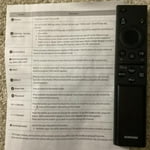
So far, the tv is great, but the remote is a mystery. It says speak into it for quick program access, but I can’t find the microphone. The sleep timer is a function I like to use, but so far I can’t locate it and the manual does little to help me understand the remote’s capabilities. I think I will have to invest more time than desired to figure out how to use this tv.

Review from Samsung US
Helpful?6FFFIGX8UWW613884652301
reply from Samsung Brand Ambassador

Simple Simón: We appreciate your review of the DU7200 TV. To learn how to use your Samsung remote and understand the settings on your TV, please use your remote to access the remote guide. Go to Home> (left directional button) Settings> Support> Remote Control Guide. If you need more help, Samsung is here for you. Please call us at 1-800-SAMSUNG, 8 AM - 12 AM EST, seven days a week. Our LiveChat agents are also available by clicking on the ‘Support’ link on our website. - Samsung Ambassador

Apr 21, 2025
Celticman88
5 out of 5 stars review

Amazing product

My wife surprised me with a new tv on Christmas. I have been amazed at the quality of the picture, the sound and the many features on this tv. Picture is so crisp and clear. Certain movies or shows are so dark and this tv can brighten up the picture to make it an enjoyable viewing experience. Love this tv price was fantastic thinking of getting another for our room. Thanks Samsung for your amazing affordable product can’t say enough. Sports on this tv is perfect I watch a ton of basketball and it’s the best tv I’ve ever owned

Review from Samsung US
Helpful?6FFFIGX8UWW613884652301
Oct 14, 2024
AlwaysASamsung
5 out of 5 stars review

Great Picture!

[This review was collected as part of a promotion.] I am using my Samsung for streaming. It has a great picture and priced very reasonable. My only concern while using a separate Roku device, you need to shut off the power button twice, once for the device and once for the TV, which can be inconvenient and frustrating at times.

Review from Samsung US
Helpful?6FFFIGX8UWW613884652301
Mar 5, 2025
Marlene
4 out of 5 stars review

Don’t like the remote!

I replaced my previous Samsung with a new one…happy with the quality of the picture…but I hate the new remote! I find it very hard to use..and especially don’t like the fact that I cannot push a number and get the channel I desire…I have to run through the whole batch of numbers to get to the one I want..I think it is made cheaply!

Review from Samsung US
Helpful?6FFFIGX8UWW613884652301
Apr 19, 2025
Cjb1
3 out of 5 stars review

Sound features not as good

Liked my old Samsung much better. The speaker in this is not nearly as good. Have to turn the volume Up over 60 to 70 on most programs to even be able to hear. And no, I’m not hard of hearing! Still have my other Samsung and like that TV much better. Not sure if it’s because they’re making them so much thinner that the speakers aren’t the quality that they used to be. My old one is not that old and definitely better quality. Disappointed in this one.

Review from Samsung US
Helpful?6FFFIGX8UWW613884652301
reply from Samsung Advisor

Hi Cjb1, Thank you for sharing your experience with low volume. There are several volume features you can adjust, which may improve your audio experience. 1) Auto Volume automatically adjusts the sound to a certain level when changing channels or switching to another external input. Go to Settings > All Settings> Sound > Expert Settings > Auto Volume. 2) Adaptive Sound automatically adjusts to a specific volume level while watching TV. The TV analyzes your volume usage history by time period to automatically adjust the volume when you use an app or switch to an external input source. Go to Settings> All Settings> Sound> Sound Mode> Adaptive Sound. 3) Several Sound Modes are likewise available to meet your personal preferences: Home > Settings > All Settings> Sound > Sound Mode. Also, some sources have their own volume control, which might need to be set higher. Please check the volume control of the external device (cable box or satellite box, DVD, Blu-ray, etc.) connected to your TV. Also, check the cable connection between an external device and the TV and then try the cable connection again. If you need more help, Samsung is here for you! Please call us at 1-800-SAMSUNG, 8 AM - 12 AM EST, seven days a week. Our LiveChat agents are also available by clicking on the ‘Support’ link on our website. ~ Samsung Advisor

Oct 24, 2024
Iansouthca
4 out of 5 stars review

Great TV at great price

[This review was collected as part of a promotion.] Overall I am very happy with the quality of the TV at bargain price. Samsung live comes with many programs, I use mostly music related channels. The only issue I have is the speed of the Apps. For example, if I go back to an APP that I previously ran, it takes a while to response.

Review from Samsung US
Helpful?6FFFIGX8UWW613884652301