Join Now
Skip to Main Content
Sam's Club
Sam's Club
All Departments
All Services
Customer reviews for SAMSUNG 55" Class Q6-Series 4K Ultra HD Smart QLED TV QN55Q6DAAFXZA for
SAMSUNG 55" Class Q6-Series 4K Ultra HD Smart QLED TV QN55Q6DAAFXZA
4.6 out of 5 stars
stars
1,350 ratings1,286 reviews
  1. 5 stars74% (998)
  2. 4 stars18% (248)
  3. 3 stars4% (51)
  4. 2 stars1% (19)
  5. 1 star3% (34)

Member photos

  • +20 images
Sort by |
Showing 21-30 of 1,286 reviews
Aug 14, 2023
Reviewer name: GaryK
5 out of 5 stars
5 out of 5 stars review

Verified Purchase

Q60A 55” Television

A great viewing TV that is easy to setup in minutes. Many nice features including Samsung television giving a variety of cable cutting channels to watch only with the need of internet.

Review from Samsung Canada
Helpful?6YW7ERS0HTVS13877667901
reply from Samsung Support Team

Hello, thank you for your 5 star review and feedback. We will pass your comments along to our store staff and hope you visit us again someday soon.

May 2, 2022
Reviewer name: Anonymous
5 out of 5 stars
5 out of 5 stars review

Verified Purchase

My 50" LS03A Frame

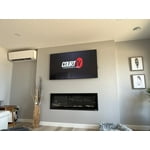
Great quality screen that looks great on the new fireplace wall in our Master bedroom. Its got a very nice picture . Fairly easy to install as long as you have prepped the wall for it .

Review from Samsung Canada
Helpful?6YW7ERS0HTVS13877667901
reply from Operations

Thank you, John Kennedy! We love to hear positive feedback and we’re delighted you’re enjoying your new Samsung Frame TV.

Aug 31, 2021
Reviewer name: Snorkeloki
5 out of 5 stars
5 out of 5 stars review

Verified Purchase

A Clear Choice

The picture is exactly the right size for a mid size room. It is an extremely clear, bright and true to life picture. The remote control is surprisingly small and takes a little bit of getting used to.

Helpful?6YW7ERS0HTVS13877667901
May 4, 2021
Reviewer name: Happyman
4 out of 5 stars
4 out of 5 stars review

This is a big tv

[This review was collected as part of a promotion.] Movies sports news Netflix dvd really nice on programs HD but kinda washed white light on others sound definitely needs improvement l will have to add a sound system to enhance the enjoyment of movies don't know whats recommended for that all and all great TV I love the clarity of my samsung 55in. Curved TV 6yrs old and perfect picture on all programs wish the qled60 was as clear

Review from Samsung US
Helpful?6YW7ERS0HTVS13877667901
reply from Samsung Brand Ambassador

Happyman: Thank you for your review of your new 75” Q60A QLED TV. Your TV features Object Tracking Sound Lite which tracks the action with strategically placed dynamic speakers and Adaptive Sound which automatically adjusts audio to enhance everything from dialogue to music and sports. You can select a sound mode that you prefer for a content type or your listening environment. Go to: Settings > Sound > Sound Mode You can also customize sound with Expert Settings. Go to: Settings > Sound > Expert Settings Additionally, there are image adjustments you can make to optimize your picture to suit your preferences. Your TV has several Picture Modes to choose from allowing you to enjoy content in optimal conditions. Go to Home > Settings > Picture > Picture Mode You can also go to: Settings > Picture > Expert Settings > Contrast Enhancer to manually fine tune your image. Should you ever have questions or need help, you can reach us at 1-800-SAMSUNG (ask for TVs), available 8AM -12AM EST, 7 days a week. Or text HELP to 62913. For additional support resources, visit us on the Samsung website and click on the ‘Support’ link in the upper right corner of the homepage for: 1) More ‘Contact Us’ options – LiveChat, Facebook, Twitter, Samsung Community, Samsung Members app 2) Manuals & Software 3) Warranty Info 4) Product Registration: For access to easy warranty support, convenient opt-in to special promos and offers, faster troubleshooting and service, and quick notification of system updates. ~ Samsung Solutions

Jan 30, 2022
Reviewer name: Debra L
3 out of 5 stars
3 out of 5 stars review

What is happening?
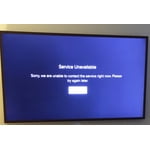
We got the Frame as a Christmas gift. It will turn itself of in gallery mode from time to time, but what is most frustrating is, when we are watching a program, it will say that ‘we are unable to contact the service right now. Try again later". Our internet is fine. I will sign out and in and out, turn off the tv, turn it on, but nothing. I don't get it.

Review from Samsung Canada
Helpful?6YW7ERS0HTVS13877667901
reply from Operations

i Debra L, thank you for sharing your feedback. At Samsung.ca, we always aim to satisfy our valued customers and would love to help. Please feel free to contact us at 1-800-SAMSUNG or via live chat on our website (http://www.samsung.com/ca/support/) for assistance. Thanks!

Jan 27, 2022
Reviewer name: Bg3112
5 out of 5 stars
5 out of 5 stars review

Great picture and easy to set-up!

We bought this TV towards the end of December 2021 and once we had unpacked, installed the feet and placed it on our TV console it was up and running in about 15 mins. As soon as the TV had connected to our home internet it downloaded the latest software version. We registered our streaming accounts and we were off and running. As soon as I hooked up the HDMI arc cable the TV recognised the brand and model of our soundbar and paired automatically. The TV remote works the soundbar as well. We like the Hot Buttons for Netflix and Prime on the remote and the fact that it charges by solar (or in fact any light). We wished that there was a Source button on the remote but otherwise very happy. We found that the built in Samsung software worked so well we did not need to use a Fire stick. The picture is very good after I did a simple adjustment to the factory settings. Sound from the built in speakers was better than I was expecting but we use a 5.1 soundbar system which is now working better than with our previous TV! Overall we highly recommend this TV.

Review from Samsung Canada
Helpful?6YW7ERS0HTVS13877667901
reply from Operations

Hi Bg3112, thanks so much for your kind words! We sincerely appreciate your feedback and will share this with our team. We hope you enjoy many years of great entertainment with your Samsung TV!

Oct 10, 2021
Reviewer name: Ryan
1 out of 5 stars
1 out of 5 stars review

Broken TV

tv came broke cant seem to get to the right person to get it fixed have had a ticket open since this thing came. my reviews keep getting censored hopefully this one doesnt. i cant stress enough how bad this experience has been. product is broken. i have asked for managers to help this is my plea.

Review from Samsung US
Helpful?6YW7ERS0HTVS13877667901
reply from Samsung Brand Ambassador

Ryan, Thank you for your review of Samsung's Q60A TV. We greatly value your feedback on the issues you have faced. We are unable to look up your customer contact information based only on your review name. Please do try reaching out to us again with the Service/Call-In Ticket # we issued you during your initial contact with Samsung Service. You can reach us at 1-800-SAMSUNG (ask for TVs), available 8AM - 12AM EST, 7 days a week. For additional support resources, visit us on the Samsung website and click on the ‘Support’ link in the upper right corner of the homepage for: 1) Contact Us: For additional Chat & Text options, choose ‘TVs & Home Theater’ and select your model & topic. 2) Manuals, Software, & Warranty Info We look forward to hearing from you and correcting this unfortunate experience. ~ Samsung Specialist

Dec 8, 2022
Reviewer name: Razzo
2 out of 5 stars
2 out of 5 stars review

Lots of back light bleed and flashlighting

They replaced my panel two times because of light coming from corners and hazy white light bleed through. The last one is just worse and now they won't do anything! I'm done with Samsung TVs. I don't reccomend qled especially bad, as my older ones were great for at least the first few years. I have a Bright room, so they look great during the day, however, at night the white light that comes from the corners and middle is distracting. Especially if you are watching a movie with lots of black scenes.

  • +1 image
Review from Samsung US
Helpful?6YW7ERS0HTVS13877667901
Mar 30, 2021
Reviewer name: LivetolovemyQLED
4 out of 5 stars
4 out of 5 stars review

The Samsung QLED

[This review was collected as part of a promotion.] I love to watch concerts and listen to music and play games on my QLED. I use it for watching movies and local weather. has a wonderful picture quality. The sound is excellent and even better with surround sounds. The program and setup is as easy to use as anything I have used. I love the option of changing my sound according to what I'm doing. I would recommend Samsung QLED to anyone.

Review from Samsung US
Helpful?6YW7ERS0HTVS13877667901
Apr 26, 2021
Reviewer name: MNhockeyguy
4 out of 5 stars
4 out of 5 stars review

Pro - Con

[This review was collected as part of a promotion.] Pro - first off clear picture. -apps to content are good -remote is easy to use Con - Sound is weak. Have to use sound system to get a real solid sound - Not bright enough at times. Even when setting brightness at 50 scenes on night shots are to dark.

Review from Samsung US
Helpful?6YW7ERS0HTVS13877667901
reply from Samsung Brand Ambassador

MNhockeyguy: We greatly value the details you provided in your review regarding the sound and image quality of your new Q60A QLED TV. Your TV features Object Tracking Sound Lite which tracks the action with strategically placed dynamic speakers and Adaptive Sound which automatically adjusts audio to enhance everything from dialogue to music and sports. You can select a sound mode that you prefer for a content type or your listening environment. Go to: Settings > Sound > Sound Mode You can also customize sound with Expert Settings. Go to: Settings > Sound > Expert Settings Additionally, there are image adjustments you can make to optimize your picture to suit your preferences. Your TV has several Picture Modes to choose from allowing you to enjoy content in optimal conditions. Go to Home > Settings > Picture > Picture Mode You can also go to: Settings > Picture > Expert Settings > Contrast Enhancer to manually fine tune your image. If you have any questions about features, settings, etc., Samsung Customer Support is here to help. You can reach us at 1-800-SAMSUNG (ask for TVs), available 8AM -12AM EST, 7 days a week. Or text HELP to 62913. For additional support resources, visit us on the Samsung website and click on the ‘Support’ link in the upper right corner of the homepage for: 1) More ‘Contact Us’ options – LiveChat, Facebook, Twitter, Samsung Community, Samsung Members app 2) Manuals & Software 3) Warranty Info 4) Product Registration: For access to easy warranty support, convenient opt-in to special promos and offers, faster troubleshooting and service, and quick notification of system updates. ~ Samsung Solutions