Skip to Main Content
Sam's Club
Sam's Club
All Departments
All Services
Customer reviews for SAMSUNG 55" Class Q6-Series 4K Ultra HD Smart QLED TV QN55Q6DAAFXZA for
SAMSUNG 55" Class Q6-Series 4K Ultra HD Smart QLED TV QN55Q6DAAFXZA
4.6 out of 5 stars
stars
1,348 ratings1,284 reviews
  1. 5 stars74% (996)
  2. 4 stars18% (248)
  3. 3 stars4% (51)
  4. 2 stars1% (19)
  5. 1 star3% (34)

Member photos

  • +20 images
Sort by |
Showing 211-220 of 1,284 reviews
Jun 29, 2021
paulh
5 out of 5 stars review

Extraordinary picture quality

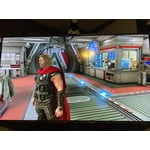
[This review was collected as part of a promotion.] I'm very happy with this TV, particularly the picture clarity and color. I had originally purchased a competing brand which turned out to be incompatible with my streaming service. The Samsung is so much better though that I'm glad it turned out this way. My only (tiny) complaint is that the solar powered remote requires you to remember to leave it upside-down so that the charge doesn't run out. They should have at least provided a charging cable for the times when one forgets this. All in all though, I'm delighted with my purchase.

Review from Samsung US
Helpful?6YW7ERS0HTVS13877667901
Apr 27, 2021
CCTV
5 out of 5 stars review

CC's TV

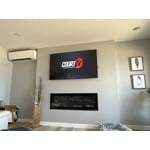
[This review was collected as part of a promotion.] I am continually finding new ways to use my TV. From streaming, to document review, to zoom meetings with Media share, I see it as an essential part of my homes communications capabilities. Further, I see having a 70 plus inch screen as necessity for fitting multiple people in to a zoom or remote calls. In short I love my TV and understand it as the beginning of a new means of communication.

Review from Samsung US
Helpful?6YW7ERS0HTVS13877667901
Apr 27, 2021
Gropper
2 out of 5 stars review

Sam-Stung

[This review was collected as part of a promotion.] After reviewing & researching every kind of TV under the sun, we came to the conclusion that this would give us the best bang for our buck. Boy oh boy, were we wrong. The picture quality is atrocious. The navigation through the remote control in attempting to set up different devices is a cluster. We were hoping to hook up our soundbar in such a way that everything we did through the TV would play right through it, will that was not the case at all. Finally I took the TV and I throw out side and burnt it that's how bad this television was.

Review from Samsung US
Helpful?6YW7ERS0HTVS13877667901
Jul 5, 2021
GRendon7
5 out of 5 stars review

Love my new Samsung Qled

[This review was collected as part of a promotion.] I did a lot of researching when I was looking to replace my 12 year old Samsung TV. I was torn between the Qled and a regular 4k tv... the more researching that I did the more I learned towards the Qled. I went ahead and went for it, brought my 75 inch Qled home! We loved it from the start and we still do. The picture quality is awesome and the volume of the speakers is just fine for us. Yes, you may want to get a sound bar for movies etc but for watching regular TV they're just fine. We have had no issues with it so far and would definitely recommend this TV to our friends and family.

Review from Samsung US
Helpful?6YW7ERS0HTVS13877667901
reply from Samsung Brand Ambassador

Hi GRendon7, Thank you for choosing Samsung’s 2021 Q60A TV. I’m happy to hear that the 4K experience is the best you’ve ever had. Our Quantum Processor 4K Lite transforms what you’re watching into stunning 4K. Additionally, Object Tracking Sound Lite (OTS Lite) gives you immersive 3D surround sound with strategically places dynamic speakers that move the sound around you. Should you ever have questions or need help, please call us at 1-800-SAMSUNG (ask for TVs), available 8AM -12AM EST M-F (9AM – 6PM EST Sat). Or text HELP to 62913. For additional support resources, visit us on the Samsung website and click on the ‘Support’ link in the upper right corner of the homepage for: 1) More ‘Contact Us’ options – LiveChat, Facebook, Twitter, Samsung Community, Samsung Members app 2) Manuals & Software 3) Warranty Info 4) Product Registration: For access to easy warranty support, convenient opt-in to special promos and offers, faster troubleshooting and service, and quick notification of system updates. Thank you for choosing Samsung! ~ Samsung Specialist

Jun 30, 2021
isac
3 out of 5 stars review

Disappointed.

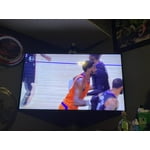
[This review was collected as part of a promotion.] I mostly just watch movies and shows, no gaming etc. I upgraded to a 4K QED TV because I was told the picture quality was better, which it was in the store. When I got the TV hooked up at home the picture was the same as my old TV. Called my provider and was told they could upgrade my connection so I could get better picture quality but that was only availble for sports, whch I do not watch, and a very few channels. Not sure why these TVs are being sold when there is such limited programming available that gives you a high quality picture. Feel like I wasted my money on an upgrade.

Review from Samsung US
Helpful?6YW7ERS0HTVS13877667901
reply from Samsung Brand Ambassador

Hello isac, Thank you for sharing your thoughts on the picture quality of your new 2021 Q60A QLED 4K TV. If the picture you are seeing out-of-the-box are not to your liking, there are several picture settings you may want to try adjusting. You can select the Picture Mode that provides the best viewing experience. Go to Home > Settings > Picture > Picture Mode 1) Standard: Is the default mode suitable for general viewing environments. 2) Natural: Reduces eye strain for a comfortable viewing experience. 3) Movie: Is suitable for watching TV or movies in a dark room. 4) Dynamic: Makes the picture brighter and clearer in bright viewing environments. 5) Filmmaker Mode: You can watch the source content (e.g., movie) as it is. If the image is defined as Filmmaker Mode, it will automatically switch to Filmmaker Mode while watching. You can also go to: Settings > Picture > Expert Settings > to manually fine tune your image. In addition, the quality of the image on your screen depends on the source and the connection. HDMI cables are recommended for optimal HD viewing; when possible, 4K content will provide the best picture quality. The TV will upscale as best as possible any content sent to it. The closer the signal is to 4K, the better it will look coming out. Please also give us the opportunity to assist you with image quality adjustments tailored to your preferred viewing experience. You can reach us via any of the following options: 1-800-SAMSUNG (ask for TVs), available 8AM -12AM EST, 7 days a week. Or text HELP to 62913. For additional support resources, visit us on the Samsung website and click on the ‘Support’ link in the upper right corner of the homepage for: 1) More ‘Contact Us’ options – LiveChat, Facebook, Twitter, Samsung Community, Samsung Members app 2) Manuals & Software 3) Warranty Info 4) Product Registration: For access to easy warranty support, convenient opt-in to special promos and offers, faster troubleshooting and service, and quick notification of system updates. We hope to hear from you. ~ Samsung Specialist

Apr 1, 2021
BIGTRUCKDRIVER
5 out of 5 stars review

Best TV I've Owend. .

[This review was collected as part of a promotion.] Should I say what don't I use my Samsung Smart TV for?? I'm a Samsung Guy so that being said. Linking my TV to stream show, Gaming, Work, Entertaining, Security. Honestly when it comes to technology and innovation!

Review from Samsung US
Helpful?6YW7ERS0HTVS13877667901
Sep 24, 2021
Davie
2 out of 5 stars review

Missing Apps

[This review was collected as part of a promotion.] I Purchased my Samsung television to replace an external streaming device that I use to connect my smart phone to the television and stream sports events. When I installed the Samsung TV at my home and powered it up I was instructed to search for the app that I needed, unfortunately the app was not installed and was not offered on the certain model of Samsung TV. Unfortunately I return the Samsung and purchased a different product. Maybe in the future Sam song can offer more detailed information as to what is and is not installed on the television

Review from Samsung US
Helpful?6YW7ERS0HTVS13877667901
reply from Samsung Brand Ambassador

Davie, Thank you for your review of the Samsung Q60A TV and for sharing the issues that have caused you to return your unit. Please know we could have assisted in helping you find the app you were looking for. Should you ever decide to give Samsung TVs another try and have questions or need assistance with settings, setup, or features, please know we are always here to help. Call us at 1-800-SAMSUNG (ask for TVs), available 8AM - 12AM EST, 7 days a week. For additional support resources, visit us on the Samsung website and click on the ‘Support’ link in the upper right corner of the homepage for: 1) Contact Us: For additional Chat & Text options, choose ‘TVs & Home Theater’ and select your model & topic. 2) Manuals, Software, & Warranty Info We hope to regain you as a customer in the future. ~ Samsung Specialist

Jun 29, 2021
Designer
5 out of 5 stars review

Great features but haven't learn them all yet.

[This review was collected as part of a promotion.] When my previous Samsung Smart TV died I wanted to replace it with another Samsung. Being an 81 yr old female it took a bit of trial and error to connect this new one. When I got it up and running, I was stun by how beautiful and bright the picture was. So far I use it to watch regular TV and also streaming movies. All my other chores are on hold while I play with my new toy. Thanks Samsung

Review from Samsung US
Helpful?6YW7ERS0HTVS13877667901
Feb 2, 2023
Shaye
3 out of 5 stars review

Burn in

Pretty good TV, my only complaint is I seem to get some minor burn in when I leave the screen on one thing for long. This can be really annoying as sometimes I like to use it as a second monitor but that doesn't really happen much because if I leave messages or something on it for long I can see them later when watching something. So now whenever it is on I usually just have to run a show on it and I just mute it if I want to listen to something else. I do use this as my main TV for my ps5 though and it looks great, again the only downside is a lot of games have a fixed hud/gui and when I leave the application I still tend to see stuff on the corners of screen like my health bar and other character stats. Would love to give this a better review but it sadly the burn in/image retention ruins a lot and I did not expect to worry about a problem like this considering I only bought another qled because my 55" I've had for years now has been freaking amazing.

Review from Samsung US
Helpful?6YW7ERS0HTVS13877667901
Dec 16, 2021
Maximas
1 out of 5 stars review

Dark tv

sorry samsung but u guys dropped the ball on this one. all my tvs are '46 & above 1080 p or 4k samsung & i have a few of em. doesn't matter how much u mess w the picture settings. in a night scene especially the tv shows /movies are dark & can't see anything hardly. no matter how much you mess w the settings. returning & replacing i luv samsung not crazy about tv.

Review from Samsung US
Helpful?6YW7ERS0HTVS13877667901
reply from Samsung Brand Ambassador

Maximas, Thank you for purchasing the Samsung Q60A TV and for sharing details of your image quality. To ensure your picture is always optimized, please be sure your firmware is up to date with version 1901.0 which includes picture quality updates. You can check this by going to: Settings > Support > Software Update. If this firmware version is not yet available on your TV, you can download the update on a USB drive and manually update your TV: 1. On Samsung's website (upper right corner), go to: Support > Manuals & Software > Find your TV model. 2. Download the update and extract it to the root of a USB thumb drive. (Do not put it in any folders on the thumb drive.) 3. Connect the USB thumb drive to a USB port on your TV. 4. Navigate to Settings > Support > Software Update, select Update Now, and then select Yes. 5. Follow the on-screen instructions to install the updated software. Should you need further assistance with image quality adjustments, please give us the opportunity to assist you. Call us at 1-800-SAMSUNG (ask for TVs), available 8AM - 12AM EST, 7 days a week. For additional support resources, visit us on the Samsung website and click on the ‘Support’ link in the upper right corner of the homepage for: 1) Chat with Us/Product Help: To begin a chat or find solutions, choose ‘TVs & Home Theater’ and select your model & topic. 2) Manuals, Software, & Warranty Info ~ Samsung Specialist