
 Customer reviews for SAMSUNG 65” Class Q80D Series QLED Smart TV for
Member photos





 +106 images
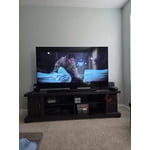
65" replaces 55"
This replaced a 55" Bravia that's now residing on our outside deck. As a MBR TV it's very solid in it's picture clarity, color saturation and depth. Might have given it a 5, except for the lack of Fine tuning the sound - mine tends to be "bassy" and could benefit from a treble adjustment. Overall a very good performer, especially at the price point.
Samsung Q80DD QLED 4K TV
[This review was collected as part of a promotion.] The Samsung Q80DD QLED 4K TV is a powerhouse of picture quality and innovative technology. With its Quantum Dot panel and advanced features, it delivers stunning visuals and immersive viewing experiences. Quantum Dot Technology -Offers exceptional color accuracy and a wide color gamut. 4K Resolution-Provides crisp and detailed images. Quantum HDR- Enhances contrast and color for more lifelike visuals. Object Tracking Sound- Creates an immersive audio experience. Overall- The Samsung Q80DD QLED 4K TV is an excellent choice for those seeking top-notch picture quality and cutting-edge features. Its impressive performance makes it ideal for gaming, movies, and more.

Clarity and color are mesmerizing
[This review was collected as part of a promotion.] I love the color and clarity of our new TV. People just stand out in the picture like they're on it not just in it. Images are crisp and bright. Viewing on this TV is a different experience. It doesn't need a sound bar but it adds a wow factor that only makes the viewing better. No blur on the edges. People almost look like they can just walk off the screen at any moment.
Great picture
[This review was collected as part of a promotion.] The 85 inch screen is great. My wife has vision issues and the larger screen has enhanced her TV viewing experience. It was easy to set-up and get started. The only issue we have experienced is that the sound sometimes gets louder on its own. It is not only during commercials. Have not investigated to see what might be causing it.
Stunning Caribbean Sea Clarity
[This review was collected as part of a promotion.] Jaw dropping is an understatement when it comes to the Samsung QN50Q80DAFXZA Samsung 50” Class Q80D QLED 4K Smart TV. Now I am coming from a previous TV that was almost 10 years old, so this upgrade had me gasping and saying my ooohhhs and ahhhs with the utmost of delight. Honestly I felt like a kid in a candy store. Not only was my picture clarity otherworldly, the sound that came out of this 50 inch visual dream box, was nothing short of loud, proud and magnificent. No complaints whatsoever! The unit doesn't come with wall mounting hardware, which honestly was a slight bummer. There is, however, a very high quality stand included. We mounted ours with a simple universal mount and couldn't be happier. The interface is super fast. Adding my streaming apps was a breeze and setting the TV up to the Samsung Smart Things App took seconds. It even allowed for me to use my smart phone as a remote once setup was complete. Very swift! The Remote: Well, talk about a whole new upgrade in the remote department of things. This remote can be charged using a port (wire not included however) or the best method, the solar cell on the back. I don't know why this tickled my fancy so much, but it did! Low on battery? Turn the remote over and face it towarda the sun. Very cool! I'm talking lighting fast, crystal clear clarity and sound that fills even a larger room. Hiccups? Well unfortunately I did run into a few small hiccups. The first was the lack of connection to my Alexa Cube. Granted normally you wouldn't need this device, because this Samsung TV has Alexa built into it. However, I use Alexa Studio as my surround sound because I prefer true surrou d sound over the sound that comes from the television. Sadly, the units wouldn't quite stay connected. This is not necessarily a deal breaker by any means. It just needed to be noted. The next small hiccup was that I found the user window to sometimes glitch up and freeze if I was trying to scroll or browse too quickly on the remote. Other than that though, my final thoughts are that this TV won't dissapoint. The clarity is unlike anything I've personally ever seen or owned before so I am incredibly happy. Is it perfect? No. But is it pretty darn close? Absolutely! I don't imagine anyone who was contemplating purchasing this unit would be dissapointed, nor would they regret their purchase.
Hi EmLynn5050, Thanks for choosing Samsung’s Q80D QLED! I’m happy to hear you’re enjoying the picture brought to you by our NQ4 AI Gen2 Processor. Using AI-Based deep learning, your TV analyzes content, precisely maps color, and directs light scene-by-scene to optimize content from any source into sharp 4K resolution. For the best performance of your new TV, it is recommend checking and (if available) installing the latest firmware updates; you can do this by going to Settings > Support > Software Update > Update Now. You may also want to further optimize performance with the self-diagnostic tool, which checks memory, frees up unused cached memory, and closes background apps. Go to: Home > Menu > Settings > Support > Device Care > Start Device Care If you're still having issues connecting your Alexa device, you may want to refer to Amazon's compatibility and setup instructions: https://www.amazon.com/b?ie=UTF8&node=18408486011 If you need more help, Samsung's here for you! Please feel free to give us a call at 1-800-SAMSUNG, 8AM - 12AM EST, 7 days a week. Or visit us on the Samsung website and click on the ‘Support’ link for: • LiveChat with an agent • Manuals, Software, & Warranty Info • Product Registration: For easy access to support, promos and offers, and more ~ Samsung Specialist
Great Tv
Samsung 75” Q82D TV Review The Samsung 75” Q82D is a stunning addition to any living space, delivering exceptional picture quality and a sleek, modern design that complements any décor. The TV boasts vibrant colors, deep blacks, and excellent contrast, making it a standout choice for movies, sports, and gaming. The Quantum Dot technology ensures sharp detail and vivid colors that bring every scene to life. Aesthetically, the Q82D is a masterpiece. Its slim profile and minimalist bezels create an elegant, sophisticated look that feels premium. Whether wall-mounted or placed on a stand, this TV blends seamlessly into any room. Setting up the Q82D is a breeze. The intuitive interface and clear instructions make installation quick and easy, even for those who aren’t tech-savvy. Samsung’s Smart Hub is also user-friendly, providing seamless access to popular streaming platforms and apps. The overall build quality of the Q82D feels durable and high-end, living up to Samsung’s reputation for premium products. The only downside is the onboard subwoofer, which occasionally drops out. This issue can be frustrating, as it requires rebooting the TV to restore functionality. While this isn’t a dealbreaker for most, it’s worth noting for those who rely on the built-in audio system. Overall, the Samsung 75” Q82D offers an outstanding viewing experience with a few minor hiccups. If you’re looking for a TV that combines exceptional picture quality, modern aesthetics, and ease of use, the Q82D is a fantastic choice.
I love my Samsung TV!
[This review was collected as part of a promotion.] I'm in awe of the picture quality this TV provides. The colors are so bright and vivid. The picture is clear, and crisp and truly gives a unique experience. It almost feels real with the way the pictures move and how you can see all of the little details down to fine lines. I love how the brightness adjusts automatically to give the best picture quality even in the daytime. The solar remote lasts forever as far as power goes and connection to smart things via my Samsung phone was seamless. There are SO many different apps and options that I haven't even gone through half yet. I am utterly amazed at how well this TV is set up. I hope to be able to get a larger version soon.


So much flexibility.
[This review was collected as part of a promotion.] The product is very simple to operate has so much flexibility. The sound and picture quality are great. The only challenge I have is that the remote control controlling other samsung tvs in the house. I currently have 4 samsung tvs and turning on or off sometimes affect the other tvs not in use or being used in another room in the house. I wish each remote is customized to each product. All in all I love my samsung products from tv,to soundbar,hoover , home theater and refrigerator. I am samsungnified.

Great picture!
[This review was collected as part of a promotion.] This is my 2nd large screen from Samsung. I've been been nothing but satisfied with this model. The picture clarity is great, the sound is as well. I like the connection options it has. A lot of tvs only have 1 HDMI Port. Not this tv Connecting additional devices is easy. The fact that i can also Kast to my tv is also helpful. I'd definitely buy it again!

Always the best
Love my Samsungs, I cannot compare them to others as I have always had Samsung's. I have never had any issues with any of them. The last one I had over 9 years and it still worked great, I simply upgraded to a larger size. I will say the sound is off, I simply use a sound bar now. Maybe it is just TV itself, talking is always too low compared to music which is always to loud.