
A fantastic new way to explore your world
I was a little skeptical that I would find the 360 feature any better than recording images on my S6. I am pleased to say that I was wrong. The Gear 360 easily links to my S6 allowing me to set up my photos and focus my images to get the best look. It is easy to flip between the 180 and 360 functions on my phone. Images are really good quality and after sticking the images together it was amazing being able to explore the images and zooming in on different areas of the image. The only downside is that when in video mode there is no ability to zoom in while recording that I found which means that you have to stop in the middle of recording and then reset the focal point before starting the filming again. Replay sound quality on video was as good as on my phone. I would invest in a selfie stick as when you try to hold it in your hand while taking pictures you can wind up with a weird half claw look. At Xmas I used it at a family function on the centre of the table which gave some really good images of us enjoying ourselves. The images came out really well and my relatives really enjoyed experiencing the images through the VR app and headset. The camera is light and come in its own little soft pouch making it easy for me to carry in a handbag on a night out or pack into my luggage when I went away on short breaks. Yet the camera is very solid in construction and gives you confidence that it could survive being knocked in a bag or a fall from a potential stand. I seriously love this camera and if you have any compatible Samsung phone that supports VR it is definitely a must have. I am looking forward to taking it away with me on my future travels.
You're in my world!
[This review was collected as part of a promotion.] This small device delivers the world to viewers! I took this Gear 360 out for a hike in the mountains and it captured my experience. When I showed my mom the video on the Gear VR she can see where my relatives that are in front and as well as behind me! No matter how high quality of a photo that's taken during a hike, is simply not immersive enough!
Gear 360
[This review was collected as part of a promotion.] The gear 360 is the perfect match up to my Gear VR and S8+. I got this when I was on a trip to New York, the footage captured with the Gear 360 is amazing, It feels like I am back at the Brooklyn Bridge or Times Square when I watch the 360 movies with my Gear VR. The battery life is fairly good it would last me all day taking intermittent photos and videos. One other great thing is it is small enough to fit in my pocket. It does struggle in the dark but I don't shoot a lot in the dark so it isn't a deal breaker for me.
Very clever but not for me
This is a small but very clever camera. It can operate on its own but it is a lot easier if you use the app on a compatible phone. I don't have any VR goggles but it is fun to tilt the phone and view the 360 degree picture. Amazingly Facebook also recognises a 360 degree picture and you can explore that with your mouse. Very cool. There are lots of options – stills, movies, timelapse, use either or both lenses. Perhaps the biggest question for me is when to use it. Great if you like sharing the moment. Probably great for sporting events or holidays. I'm just not sure it is likely to be a regular use for everybody. What it does it does very well and is fun but is that enough?
Fantastic quality 360 images easy to use
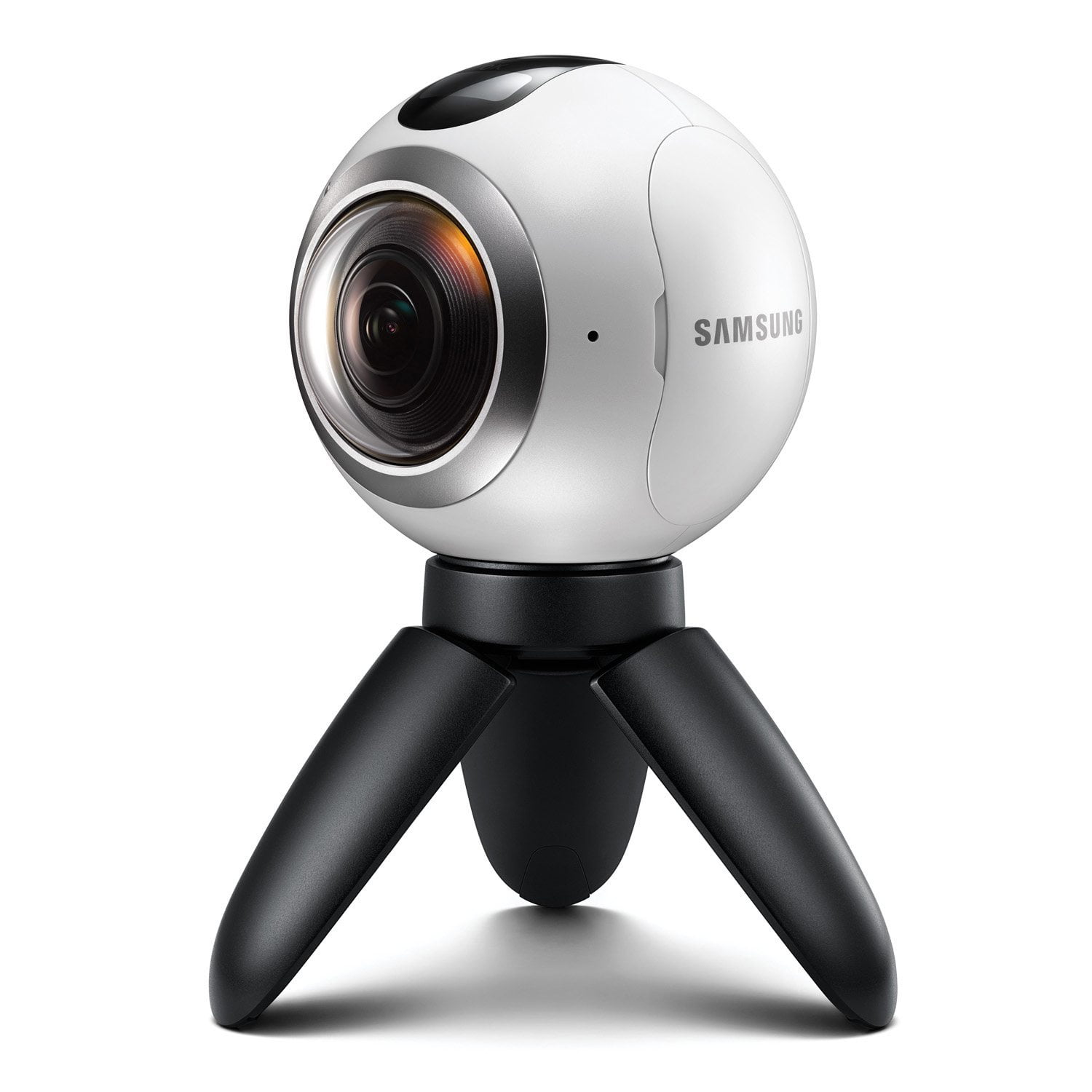
The Samsung Gear 360 out of the box looks great, the build quality is excellent, it feels very well built and the small tri-pod feet are a nice touch, larger ones can be fitted I believe. It is really easy to set up and seamlessly connected to my galaxy S7. The fact you can use your phone as a view finder and controller or have the option to use the 360 independently is a great feature. The photo quality of the stills you can take is excellent and so is the video quality, being able to pan round a video whilst playing it back is incredible. Using the director software you can also pull stills out of the videos which is a nice added feature. The battery life is also good and transferring media via the sd card is simple and effective. I am thoroughly enjoying the camera and it is great and easy to take pictures and video whilst your out and about. 10/10 :)
Technological milestone!
I currently own a few Samsung products as I feel their technology is superior to a lot of competitors. This includes the Galaxy S7 Edge, Gear VR headset and Curved TV. Having been blown away by Virtual Reality on the Gear VR when I purchased my S7 Edge (it was a free gift) I couldn't wait to purchase the Gear 360 to create fully 360 images and videos to try out and relive. The packaging of the 360 is premium and set up to the phone is great. You download an app from Google Play store (so it is compatible with other handsets). The product itself is well build and quite weighty to hold. Two cameras one each side are what makes the 360 image. Also in the box is a cloth bag, microfiber cloth cleaner and a mini tripod. Set up is easy and within seconds was ready to shoot. The included mini tripod is great to start with and it has the right adapter to attach to a bigger tripod if you wanted to! The image quality is amazing for stills in both single lens mode and 360 mode. The detail is amazing. Video quality is brilliant the only disappointment is the stiching down the middle of the camera which obviously cannot be avoided. Top Tip: If you look at the camera the line round the middle of the camera casing is a good indicator of where the stich will be, so try and frame your image using this as a guide! Using this in the Gear VR headset is something else. It really feels like I'm back there again! This camera is honestly so good and to be one of the first people to own this new technology is something special!
A good way to start filming in 360
The Samsung Gear 360 is a little sphere with two cameras on opposite sides. They capture images at 180 degrees each, and are able to produce immersive 360 degrees pictures and videos. You can still take advantage of the microSD card slot on the camera to take pictures and videos which can later be transferred and edited on a computer but you'll lose all the advanced settings that are available through the Gear 360 app. Changing mode, resolution and so on is doable through the physical buttons: power/menu button, back and record button. A small screen on the top gives you a hint about the battery status, how much time you can still record on video or number of pictures you can take. By using the companion app you can change all the settings using the smartphone, and you can access advanced options like white balance, HDR, exposure, ISO, and some more. The image and video quality are fairly good and deliver in shooting decent footage even in low light conditions, although the best results will be in open spaces with a lot of light. The timelapse function is one of my favourites and you can share your creations directly from the app on YouTube and social. Just be careful regarding the settings - a 4K 60fps video will require not just more memory but also effort from the camera, which might overheat if used for prolonged video recording sessions. Keep it in mind if you want to record for 30 minutes or longer. The small tripod can be removed from the base and lay flat on a surface, but the best thing is that you can use other standard accessories like bigger tripods or selfie sticks to extend the possibilities the Gear 360 can offer you at the time of creating 360 content. If you own a recent Samsung smartphone and are interested about producing original 360 video content, this is definitely a good gadget to get and I would recommend it.
A ball of fun!
This little ball of fun can be carried easily in a bag or pocket for spontaneous use and I think of it as addition to my S7 camera. The 360 lacks focus and zoom but don't let this put you off. It's not like conventional cameras but once you've got your head around that you'll soon be producing immersive dynamic videos you can edit easily with the bundled software ( product key included). Photos can be taken with either or both lenses and settings adjusted from your phone which can also show a live view. Longer videos take some time to be stitched together and unfortunately you can't save directly to your phone's SD card. Be careful what you stand the supplied tripod on as you will probably see it in your pics, I took some nice shots of the local harbour at night unfortunately I stood it on a bollard covered in seagull doodoo! you get the picture. I also own the Gear VR headset where you can view your creations like never before. Very well made and easy to use if a little pricey initially.
The best 360 camera around!
The Gear 360 Camera is the best of it's kind! From opening the box, to using the product and watching the live streams, the device is built to last! In the box: Gear 360 Camera Mini Samsung Gear 360 tripod Samsung Branded Carry Pouch Micro Fiber Cloth Wrist Strap USB>Micro USB Charging/Data cable Battery Start Guide Initial Impressions: The camera is well built, it's a little heavier than expected, but it just goes to show how well it's made. The lenses are robust enough to be able to withstand light bumps, and fingerprints, although easily on the glass, don't really interfere with the picture/video quality. First Uses: It's best to try the product out a couple of times before you use it at an event or at the dinner table. The menu is really easy to get used to, it's all very simple and the buttons on the device are easy to understand. However, it can be a little 'off' when trying to capture 360 video where there is white light. The light can throw the 'stitching' of the two videos off slightly. It's only when the light is in the frame itself, juts not on the sides of the frames. Time Lapses: This is the feature I'd use the most. Being able to time lapse on this device is amazing! Getting the sunset while sat on a boat in south Africa is just amazing, but also getting people to enjoy what's different about the city I live in. Every city has it's own 'Landmarks' and what aa great way to share them with the rest of the world! Future Uses? I don't see this camera becoming my go-to, but it's a fantastic piece of kit. It's much better when used with the Gear 360 App from Samsung Galaxy devices, however, I do not know what the camera is like without this app. The app allows you to see a live view of the camera and so can be used as a clicker. The best feature of this camera is the fact that is can be attached to any tripod or drone that allows a camera to be screwed on. Being able to see breathtaking views, from breathtaking heights in brilliantly breathtaking 360 is amazing.
Good 360 degree camera
Got one of these just before Christmas. Found it a little tricky to set up (recorded most of our initial videos in the Gear VR headset mode rather than the "standard" 360 degree mode). Once worked it out though, it seems to be a very capable 360 degree camera. Impressed withe the quality of video and sound that it records. Since I've got a Samsung Galaxy S7 edge, using it wasn't a problem; however, I understand that getting it to work with anything other than a Samsung is problematic.