Skip to Main Content
Sam's Club
Sam's Club
All Departments
All Services
Customer reviews for SAMSUNG 85” Class M70H Series Mini LED 4K UHD Vision AI Companion Smart Tizen TV for
SAMSUNG 85” Class M70H Series Mini LED 4K UHD Vision AI Companion Smart Tizen TV
4.4 out of 5 stars
stars
318 ratings315 reviews
  1. 5 stars69% (220)
  2. 4 stars15% (49)
  3. 3 stars7% (23)
  4. 2 stars5% (16)
  5. 1 star3% (10)

Member photos

  • +80 images
Sort by |
Showing 11-20 of 315 reviews
Sep 20, 2026
Reviewer name: C Iwa
1 out of 5 stars
1 out of 5 stars review

Remote control is wacko
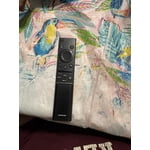
[This review was collected as part of a promotion.] We cannot or should I say I cannot get your remote control to work so most of the time I throw the channel I want from my iPhone I so want a return this TV get my money back and never get a Samsung again

Review from Samsung US
Helpful?5B1TBKY04O0L19900257824
reply from Samsung Advisor

Hi CIwa, We appreciate your feedback regarding remote performance. If your remote is unresponsive or slow: 1. Re-pair it – Hold Return and Play/Pause for 5+ seconds within 1 foot of the TV. 2. Check battery level – Home > left directional key > Settings > All Settings > General & Privacy > Remote Control Charge via sunlight or USB-C cable (Samsung-branded recommended). 3. Update firmware – Settings > Support > Software Update > Update Now 4. Run Device Care to boost performance – Settings > Support > Device Care > Start Device Care If these steps don’t resolve the issue, please contact Samsung Support at 1-800-SAMSUNG (8AM – 9PM EST Mon – Fri, 8AM – 6PM Sat – Sun). LiveChat is also available through the ‘Support’ link on our website. ~ Samsung Advisor

Sep 20, 2026
Reviewer name: HeidiV
4 out of 5 stars
4 out of 5 stars review

Great picture, remote sucks

[This review was collected as part of a promotion.] The color is great, but the sound control on the remote is annoying. The remote is not user friendly as to turn up the volume goes to mute most of the time. There are no number so you can dial a channel in quicker, instead you have to scroll through all the channels to get what you want.

Review from Samsung US
Helpful?5B1TBKY04O0L19900257824
reply from Samsung Advisor

Hi HeidiV, Thanks for your feedback on the remote. Many buttons have multiple functions—for example, press Volume UP/DOWN to adjust sound, press once to mute, or hold to access Accessibility Shortcuts. The RETURN button also acts as a back key or last-channel toggle depending on the context. If you ever need help with your remote or want to learn more shortcuts, we’re here to assist. You can reach us at 1-800-SAMSUNG (8AM – 9PM EST Mon – Fri, 8AM – 6PM Sat – Sun), or reach us via text anytime. You can also visit ‘Support’ on our website for: • Live Chat • Manuals, Software, & Warranty Info ~ Samsung Advisor

Sep 21, 2026
Reviewer name: Zakcattack426
5 out of 5 stars
5 out of 5 stars review

Insane picture

[This review was collected as part of a promotion.] Fast performing, incredibly responsive vibrant tv. The brightness is insane.dark black and bright white mini LEDs make this a top performer in the mini LED category. Contrast is amazing. It's sleek uniform look is just top notch.

Review from Samsung US
Helpful?5B1TBKY04O0L19900257824
Sep 25, 2026
Reviewer name: Groot
4 out of 5 stars
4 out of 5 stars review

65" tv

[This review was collected as part of a promotion.] The brightness, color, contrast, and uniformity are great they all are beyond expectations and I am happy about those. Now as for the responsiveness it is a little slow to react when the buttons are hit for anything. It is a little slow

Review from Samsung US
Helpful?5B1TBKY04O0L19900257824
Sep 20, 2026
Reviewer name: Nighthawk
4 out of 5 stars
4 out of 5 stars review

Great TV, Lousy for rendering from PC

[This review was collected as part of a promotion.] The Color and Clarity were the reason I chose this brand over other's. I was not disappointed in the results. The only reason I did not give it a 5 out of 5, was because it is very difficult to set up for rendering my PC to the television. I can get it to recognize the PC to play movies on the television for only a couple of seconds. Then it locks up and the PC is no longer available. This television system is not Google friendly. If I ever need to replace this TV I will probably go with another model. But as far as just being a television, this model is top notch.

Review from Samsung US
Helpful?5B1TBKY04O0L19900257824
Sep 21, 2026
Reviewer name: Samsung Lady
5 out of 5 stars
5 out of 5 stars review

The AI TV is Very Awesome.

[This review was collected as part of a promotion.] I totally Love my New AI Television it is Fantastic the only problem I have had is with the Remote Control. I am starting to learn how to use it, but it has been very frustrating for me. I am a 70 year old woman. And had to have my Grandson help me. I would love to know if I could buy an extra Remote Control for it. It is so small, I'm afraid of something happening to it. Thank You for letting me tell you my thoughts about My New Samsung Television. I have a 65 inch Samsung in my living room, and the New Samsung 55 inch in my bedroom. I also have a Samsung Laptop, and a Samsung Tablet. So I have been a Samsung Customer for Many Years.

Review from Samsung US
Helpful?5B1TBKY04O0L19900257824
Sep 21, 2026
Reviewer name: Swis
5 out of 5 stars
5 out of 5 stars review

Awesome TV

[This review was collected as part of a promotion.] We love this TV, it was a great value and fits out needs perfectly. The brightness is perfect for a sunny living room and a dark living room while watching movies, sports or just the average show. The color pops with a great level of contrast so the picture is displayed in the same uniformity as the creator's intent. The controller has great responsiveness and works perfectly with our Roku.

Review from Samsung US
Helpful?5B1TBKY04O0L19900257824
Oct 5, 2026
Reviewer name: Shee
1 out of 5 stars
1 out of 5 stars review

None

[This review was collected as part of a promotion.] TV looses channels. Have to move antenna around to get service on different channels. Print is way to small. Can't recall previous channel unless it is a samsung channel. Has static when a vehicle drives by When it is stormy it only let's you access certain channels.

Review from Samsung US
Helpful?5B1TBKY04O0L19900257824
Oct 5, 2026
Reviewer name: WisconsinWill
4 out of 5 stars
4 out of 5 stars review

55 Inch Class Mini LED M70HD 4K Samsung TV

[This review was collected as part of a promotion.] screen image is sometimes too bright. contrast setting needs adjusting - by me. Image looks " cartoonish" at times. not sure what makes it have that effect. Smart connections good with apps and accessory ( dvd player). would like to know how to adjust streaming lag. the picture and audio tracks are not in sync. that is bothersome.

Review from Samsung US
Helpful?5B1TBKY04O0L19900257824
reply from Samsung Advisor

Hi WisconsinWill, Thank you for your feedback on the lip sync issues you're experiencing with your Samsung M70HD TV. This may be related to the content source, but if you're noticing the audio delay across all sources or channels, especially when using an external speaker setup (soundbar, receiver, etc.), there are a few settings that may help: 1. Adjust Digital Audio Delay. You can manually increase the audio delay to better match the video: Settings > All Settings > Sound > Expert Settings > Digital Output Audio Delay 2. Enable Audio Pass-Through. Samsung TVs include an audio pass-through option, which sends the audio signal directly to your connected soundbar or receiver without additional processing by the TV. This can reduce delay when using external audio devices: Settings > All Settings > Sound > Expert Settings > Digital Audio Output Format > Pass-Through 3. Check for Firmware Updates. Ensure your TV is running the latest software, which may include performance improvements related to sound or sync: Home > left directional key > Settings > Support > Software Update > Update Now If the issue continues after these steps, please contact Samsung Support for additional troubleshooting or assistance. We’re here to help at 1-800-SAMSUNG (8AM – 9PM EST Mon – Fri, 8AM – 6PM Sat). LiveChat and additional support resources are also available through the Support link on our website. ~ Samsung Advisor

Oct 5, 2026
Reviewer name: Smooth Gamer
5 out of 5 stars
5 out of 5 stars review

Great for gaming!

[This review was collected as part of a promotion.] I love this TV! The picture and sound is good! I brought this TV for my gaming system and I am not disappointed! The M70HD offers responsive performance with low input lag and smooth motion handling. Fast-paced games feel fluid, and the television's gaming enhancements help reduce motion blur during action-heavy scenes.

Review from Samsung US
Helpful?5B1TBKY04O0L19900257824