Skip to Main Content
Sam's Club
Sam's Club
All Departments
All Services
Customer reviews for SAMSUNG 43” Class M70H Series Mini LED 4K UHD Vision AI Companion Smart Tizen TV for
SAMSUNG 43” Class M70H Series Mini LED 4K UHD Vision AI Companion Smart Tizen TV
4.5 out of 5 stars
stars
470 ratings466 reviews
  1. 5 stars71% (335)
  2. 4 stars15% (70)
  3. 3 stars7% (33)
  4. 2 stars5% (25)
  5. 1 star1% (7)

Member photos

  • +123 images
Sort by |
Showing 171-180 of 466 reviews
Sep 20, 2026
Reviewer name: Nighthawk
4 out of 5 stars
4 out of 5 stars review

Great TV, Lousy for rendering from PC

[This review was collected as part of a promotion.] The Color and Clarity were the reason I chose this brand over other's. I was not disappointed in the results. The only reason I did not give it a 5 out of 5, was because it is very difficult to set up for rendering my PC to the television. I can get it to recognize the PC to play movies on the television for only a couple of seconds. Then it locks up and the PC is no longer available. This television system is not Google friendly. If I ever need to replace this TV I will probably go with another model. But as far as just being a television, this model is top notch.

Review from Samsung US
Helpful?75IY9CO16QMG19894754865
Sep 7, 2026
Reviewer name: Debbie
5 out of 5 stars
5 out of 5 stars review

Great picture quality
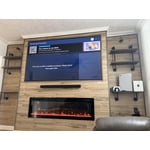
[This review was collected as part of a promotion.] The TV looks beautiful, feels very high quality, and the smart features are easy to use. I'm especially impressed with how detailed everything looks, even on a huge screen. It was definitely worth the investment, and I'm extremely happy with my purchase.

Review from Samsung US
Helpful?75IY9CO16QMG19894754865
Aug 6, 2026
Reviewer name: Hawaiimom
5 out of 5 stars
5 out of 5 stars review

Highly Satisfied! Perfect Visuals and Sound!
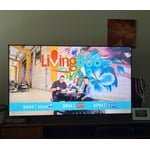
[This review was collected as part of a promotion.] Aloha‼︎ Living in Hawaii, Samsung is always my top choice due to their excellent delivery options and reliable after-purchase support. Unfortunately, my previous 55" Class Q7 Series QLED TV suddenly blacked out after about four and a half years. Thankfully, it was covered by a 5-year warranty, and Samsung responded quickly! This allowed us to upgrade to the Samsung 65" Class M70H Series 4K Mini LED Smart TV. Thanks to the Mini LED technology, the weak points of our previous model seem resolved, and this new one feels incredibly stable. It seems to be a very popular model, so delivery took some time, but we had fun rearranging our living room while anticipating its arrival. When it finally arrived, we were thrilled! While it is significantly larger, it doesn't feel overwhelming at all—in fact, the size is a perfect fit for our room. My husband, who wears hearing aids, was absolutely delighted. Not only is the picture quality amazing, but the sound is beautifully mellow. He noticed no harsh high frequencies, making it much easier for him to catch clear dialogue while watching movies. The picture quality is exceptionally smooth and gentle on the eyes. While the images are crystal clear, our very first impression was how soothing and natural the colors felt, just like the audio. I occasionally suffer from migraines with aura when watching TV in a dark room for too long, but this display causes zero eye strain, and I haven't had any issues at all. My husband is already counting down the days until football season! Since we've only had it for a short time, this might not be a definitive long-term review, but we can confidently say we are absolutely thrilled with this purchase. TV trends are moving toward massive, ultra-thin screens with blinding brightness, but for us, this size and quality are the perfect sweet spot. It offers incredible value for the price!

Review from Samsung US
Helpful?75IY9CO16QMG19894754865
Aug 24, 2026
Reviewer name: Potz
5 out of 5 stars
5 out of 5 stars review

Great bang for the buck

[This review was collected as part of a promotion.] Great picture, everything great on that front. Not crazy about the menu, especially built in links to things I will never use. But the picture, as expected, is excellent. I still have 2 30 year old Samsung 19” tvs and to this day they have the best color and sound of any tvs I've ever owned. Samsung doesn't disappoint!

Review from Samsung US
Helpful?75IY9CO16QMG19894754865
Aug 20, 2026
Reviewer name: Marty5223
3 out of 5 stars
3 out of 5 stars review

TV great! Remote is the worse!

[This review was collected as part of a promotion.] Great picture and sound! Remote is horrible! No microphone button! Can't use Alexa which is shown on box! I have no cell! I can't use my outdoor cameras because I can't use Alexa or Bixby without cell! Warranty great on tv.

Review from Samsung US
Helpful?75IY9CO16QMG19894754865
reply from Samsung Advisor

Hi Marty5223, Thank you for sharing your review. Your TV Works With Alexa, meaning you’ll need to connect a standalone Alexa device such as an Echo speaker, to control compatible smart home devices and some experiences on your TV. Here are the steps: 1. Download both the Amazon Alexa and Samsung SmartThings apps, if you don't already have them. Both are available for iOS or Android devices. 2. Make sure your Alexa device and TV are both connected to the same Wi-Fi network. 3. Your TV must be enabled within the SmartThings app. If not, make sure you are signed in with your Samsung account on the TV: Settings > All Settings > Samsung Account 4. Log in to the SmartThings app with the same Samsung account. Tap Devices, and if your TV isn’t already shown, tap + to add it to the app. 5. In the Alexa app, enable the SmartThings skill and sign into your Samsung account. This will automatically connect your Samsung TV to Alexa and let you use voice commands to control your television. If you need more help, we’re here. Give us a call at 1-800-SAMSUNG (8AM – 9PM EST Mon – Fri, 8AM – 6PM Sat – Sun). You can also connect with a LiveChat agent through the Support link on our website. ~ Samsung Advisor

Aug 21, 2026
Reviewer name: Dave
5 out of 5 stars
5 out of 5 stars review

Easy Setup

[This review was collected as part of a promotion.] The unit was easy to set up and everything has been top notch! Finding the audio settings truly helped with speech. Clarity. One suggestion; the Power Button seems difficult to find and use for me? A larger and. Perhaps Red button would help. Thanks. PS: I'm 88

Review from Samsung US
Helpful?75IY9CO16QMG19894754865
Sep 6, 2026
Reviewer name: CHICO
5 out of 5 stars
5 out of 5 stars review

75in upgrade to 85in great decision
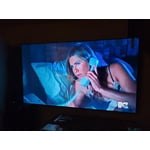
[This review was collected as part of a promotion.] Great TV and so much more. Colors brilliant and bright sound is great. Images are beautifully defined. Samsung TV is great with so much to watch with out streaming services. AI technology and easy wireless connectivity makes respone time very fast.

Review from Samsung US
Helpful?75IY9CO16QMG19894754865
Aug 29, 2026
Reviewer name: TV watcher
5 out of 5 stars
5 out of 5 stars review

Great TV, not great remote control set up

[This review was collected as part of a promotion.] Not crazy about the remote control set up. The volume buttons are not the best to use. I struggle to turn it up and then it suddenly gets really loud when I just wanted it a bit louder. Same issue with reducing the volume. Wish we could turn off the AI option.

Review from Samsung US
Helpful?75IY9CO16QMG19894754865
Sep 20, 2026
Reviewer name: C Iwa
1 out of 5 stars
1 out of 5 stars review

Remote control is wacko
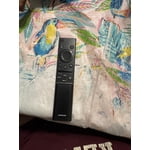
[This review was collected as part of a promotion.] We cannot or should I say I cannot get your remote control to work so most of the time I throw the channel I want from my iPhone I so want a return this TV get my money back and never get a Samsung again

Review from Samsung US
Helpful?75IY9CO16QMG19894754865
reply from Samsung Advisor

Hi CIwa, We appreciate your feedback regarding remote performance. If your remote is unresponsive or slow: 1. Re-pair it – Hold Return and Play/Pause for 5+ seconds within 1 foot of the TV. 2. Check battery level – Home > left directional key > Settings > All Settings > General & Privacy > Remote Control Charge via sunlight or USB-C cable (Samsung-branded recommended). 3. Update firmware – Settings > Support > Software Update > Update Now 4. Run Device Care to boost performance – Settings > Support > Device Care > Start Device Care If these steps don’t resolve the issue, please contact Samsung Support at 1-800-SAMSUNG (8AM – 9PM EST Mon – Fri, 8AM – 6PM Sat – Sun). LiveChat is also available through the ‘Support’ link on our website. ~ Samsung Advisor

Sep 7, 2026
Reviewer name: Fabiolous
1 out of 5 stars
1 out of 5 stars review

Disappointed.

[This review was collected as part of a promotion.] I was excited to purchase this tv. To my disappointment I had to return it because, now Samsung only uses their own propriety operating system. Many things I can't download, then if you need purchase a firestick. More money. I just returned it and got a different brand that is more android friendly.

Review from Samsung US
Helpful?75IY9CO16QMG19894754865
reply from Samsung Advisor

Hi Fabiolous, Thank you for your feedback. Samsung does use its own Operating System. Tizen is designed to work seamlessly with Samsung features like Multi View, Game Bar, and Samsung TV Plus (free live TV). It also gives you a clean, customizable interface with fast app switching and SmartThings built right in. We hope you’ll consider Samsung again in the future. If you do, we’re always here to help with setup and support. Reach us at 1-800-SAMSUNG (8AM – 9PM EST Mon – Fri, 8AM – 6PM Sat – Sun)or visit our website to chat live and access manuals or software. ~ Samsung Advisor