Skip to Main Content
Sam's Club
Sam's Club
All Departments
All Services
Customer reviews for Samsung 4.1 Channel Soundbar w/Subwoofer - HW C47M for
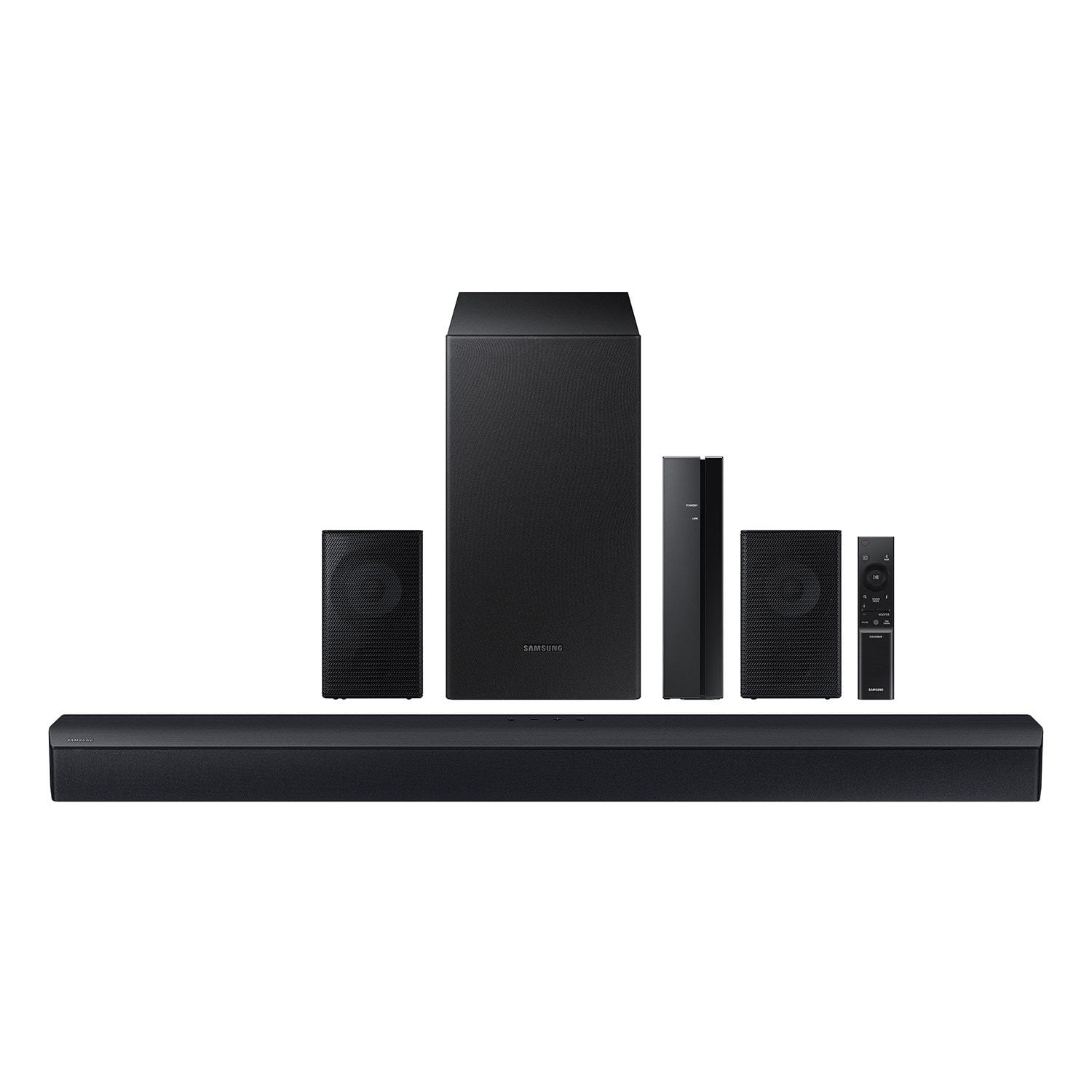
Samsung 4.1 Channel Soundbar w/Subwoofer - HW C47M
4.2 out of 5 stars
stars
800 ratings790 reviews
  1. 5 stars66% (531)
  2. 4 stars12% (98)
  3. 3 stars6% (48)
  4. 2 stars5% (38)
  5. 1 star11% (85)
Sort by |
Showing 191-200 of 790 reviews
Aug 2, 2023
Reviewer name: Christian
5 out of 5 stars
5 out of 5 stars review

Verified Purchase

These speakers work amazing beofre with just my tv I had to have at at almost 100 to hear anything and now I don’t even have to turn it past 20 volume definitely worth it for the price

Review from walmart.com
Helpful?6U2SK3AEJBKZ19585623078
Nov 16, 2023
Reviewer name: WalmartCustomer
4 out of 5 stars
4 out of 5 stars review

Verified Purchase

[This review was collected as part of a promotion.] Product was great but thought the rear surround sound speakers where completely wireless and not wired. I also thought that I was going to get the stand for the rear speakers.

Review from walmart.com
Helpful?6U2SK3AEJBKZ19585623078
Aug 29, 2024
Reviewer name: Juma
5 out of 5 stars
5 out of 5 stars review

Verified Purchase

Easy installation. Quick set up. The sound is amazing. I dont know why i waited so long. The 2 rear speakers are wired to the wireless receiver. Still much better than running wires from my tv to the other side of the room.

Review from walmart.com
Helpful?6U2SK3AEJBKZ19585623078
Nov 30, 2023
Reviewer name: BlackBarB
5 out of 5 stars
5 out of 5 stars review

Verified Purchase

Great Product

I had a Samsung soundbar in the past so I already knew the quality was going to be great. This product did not disappoint. Would definitely recommend.

Review from walmart.com
Helpful?6U2SK3AEJBKZ19585623078
Nov 21, 2023
Reviewer name: WalmartCustomer
5 out of 5 stars
5 out of 5 stars review

Verified Purchase

[This review was collected as part of a promotion.] I wasn’t originally planning on getting a soundbar with speakers but it was suggested to me after I added the TV to my cart. It was definitely a good addition to my purchase.

Review from walmart.com
Helpful?6U2SK3AEJBKZ19585623078
Nov 12, 2023
Reviewer name: anonymous
1 out of 5 stars
1 out of 5 stars review

Verified Purchase

Bad soundbar. Poor bass. Mediocre rear speakers.

Nothing about this soundbar is good. Maybe for the price it sound ok if you hook everything together. But. You will notice that horrific main soundbar immediately.

Review from walmart.com
Helpful?6U2SK3AEJBKZ19585623078
reply from Samsung

Hello Sq, Thank you for purchasing the new HW-C47M Soundbar. I am sorry to see that your expectations were not met. You can optimize your audio performance to your liking by pressing the SOUND MODE button on your soundbar remote and then selecting the desired sound effect by choosing SURROUND SOUND, GAME or STANDARD. By pressing the TONE CONTROL button, you can adjust the volume of the treble or bass sound. Press the button to select TREBLE or BASS and then adjust the volume between -6~+6 by using the Up/Down buttons. Press and hold the SOUND CONTROL button for about 5 seconds to adjust the sound for each frequency band. 150Hz, 300Hz, 600Hz, 1.2kHz, 2.5kHz, 5kHz, and 10kHz are selectable using the Left/Right buttons and each can be adjusted to a setting between -6 to +6 using the Up/Down buttons. Make sure the Sound mode is set to “STANDARD”. Additionally, using the WOOFER button on the remote, you can adjust the subwoofer’s volume between -6 to +6 by toggling the button up or down. To set the subwoofer volume level to 0, press the button down. When you press the CH LEVEL button on the remote, you can adjust the volume of the VIRTUAL CENTER CHANNEL or REAR LEVEL using the UP/DOWN buttons between -6 to +6. Should you ever have questions or need help, please call us at 1-800-SAMSUNG (ask for Soundbars), available 8 AM – 12 AM EST, 7 days a week. For additional support resources such as downloading a full manual, visit us on the Samsung website and click on the ‘Support’ link in the upper right corner of the homepage. ~Samsung Solutions

Oct 18, 2024
Reviewer name: marty
3 out of 5 stars
3 out of 5 stars review

Verified Purchase

NOT WIRELESS

Sound quality is decent. But this is NOT wireless like it says on box. You have to use wires for the 2 small speakers, so I had to mount the speakers close to tv due to the wires. Could not put them behind me like I wanted.

Review from walmart.com
Helpful?6U2SK3AEJBKZ19585623078
reply from Samsung

Hello marty, Thank you for taking a moment to review the Samsung HW-C47M Soundbar. You can optimize your audio performance to your liking by pressing the SOUND MODE button on your soundbar remote and then selecting the desired sound effect by choosing SURROUND SOUND, GAME, or STANDARD. By pressing the TONE CONTROL button, you can adjust the volume of the treble or bass sound between -6~+6 by using the Up/Down buttons. Additionally, using the WOOFER button on the remote, you can adjust the subwoofer’s volume between -6 to +6 by toggling the button up or down. To set the subwoofer volume level to 0, press the button down. When you press the CH LEVEL button, you can adjust the volume of the VIRTUAL CENTER LEVEL. This will allow you to adjust the overall dialogue between -6 to +6 using the UP/DOWN button on the provided Soundbar remote. When you press the CH LEVEL button when the Wireless Rear Speaker Kit connected to the Soundbar, you can adjust the rear speakers between -6 to +6 using the UP/DOWN buttons. Press and hold the SOUND CONTROL button for about 5 seconds to adjust the sound for each frequency band. 150Hz, 300Hz, 600Hz, 1.2kHz, 2.5kHz, 5kHz, and 10kHz are selectable using the Left/Right buttons and each can be adjusted to a setting between -6 to +6 using the Up/Down buttons. (Make sure the Sound mode is set to “STANDARD”. Occasionally, customers have trouble hiding and running speaker wires from the front of the room (where their soundbar is) to the back of their room (where they have their rear speakers). The Rear Speaker Kit eliminates that hassle. Connect the rear speakers to its wireless module and place these three in the back of your room. One wire is required to connect each rear speaker to the wireless module. Then plug in the power cable to the module. The “wireless” convenience is in connecting your soundbar and any other speakers at the front of the room to the rear speakers. If we can help with anything else, please call us at 1-800-SAMSUNG (Ask for Soundbars), 8 AM – 12 AM EST, 7 days a week. LiveChat with an agent as well as manuals, software, and warranty info can be found at the ‘Support’ link on our Samsung website. ~ Samsung Solutions

Nov 14, 2023
Reviewer name: pg
5 out of 5 stars
5 out of 5 stars review

Verified Purchase

Nice and compact item

Sound quality is above expectation compared to the price point. It's was easy to pair with Samsung TV. Fully satisfied. Perfect choose for living room.

Review from walmart.com
Helpful?6U2SK3AEJBKZ19585623078
Dec 27, 2024
Reviewer name: Jeanette
5 out of 5 stars
5 out of 5 stars review

Verified Purchase

Great quality sound.

We had a Vizio soundbar that we had for 8yrs. Tried to fine one of the comparison. Well we were very please in the sound of samsung. just as good. Very pleased.

Review from walmart.com
Helpful?6U2SK3AEJBKZ19585623078
Feb 26, 2025
Reviewer name: Edward
2 out of 5 stars
2 out of 5 stars review

Verified Purchase

Pass on this one

Not worth the money. Rear speakers are not wireless as claimed. It’s as good as the ones that cost about $100. Very disappointed in this sound systen

Review from walmart.com
Helpful?6U2SK3AEJBKZ19585623078
reply from Samsung

Edward, We appreciate you taking a few moments to review the Samsung HW-C47M Soundbar. You can optimize your audio performance to your liking by pressing the SOUND MODE button on your soundbar remote and then selecting the desired sound effect by choosing SURROUND SOUND, GAME, or STANDARD. By pressing the TONE CONTROL button, you can adjust the volume of the treble or bass sound between -6~+6 by using the Up/Down buttons. Additionally, using the WOOFER button on the remote, you can adjust the subwoofer’s volume between -6 to +6 by toggling the button up or down. To set the subwoofer volume level to 0, press the button down. When you press the CH LEVEL button, you can adjust the volume of the VIRTUAL CENTER LEVEL. This will allow you to adjust the overall dialogue between -6 to +6 using the UP/DOWN button on the provided Soundbar remote. When you press the CH LEVEL button when the Wireless Rear Speaker Kit connected to the Soundbar, you can adjust the rear speakers between -6 to +6 using the UP/DOWN buttons. Press and hold the SOUND CONTROL button for about 5 seconds to adjust the sound for each frequency band. 150Hz, 300Hz, 600Hz, 1.2kHz, 2.5kHz, 5kHz, and 10kHz are selectable using the Left/Right buttons and each can be adjusted to a setting between -6 to +6 using the Up/Down buttons. (Make sure the Sound mode is set to “STANDARD”. Occasionally, customers have trouble hiding and running speaker wires from the front of the room (where their soundbar is) to the back of their room (where they have their rear speakers). The Rear Speaker Kit eliminates that hassle. Connect the rear speakers to its wireless module and place these three in the back of your room. One wire is required to connect each rear speaker to the wireless module. Then plug in the power cable to the module. The “wireless” convenience is in connecting your soundbar and any other speakers at the front of the room to the rear speakers, eliminating any clutter of long wires running the length of your room. If we can help with anything else, please call us at 1-800-SAMSUNG (Ask for Soundbars), 8 AM – 12 AM EST, 7 days a week. LiveChat with an agent as well as manuals, software, and warranty info can be found at the ‘Support’ link on our Samsung website. ~ Samsung Solutions