Skip to Main Content
Sam's Club
Sam's Club
All Departments
All Services
Customer reviews for Samsung 4.1 Channel Soundbar w/Subwoofer - HW C47M for
Samsung 4.1 Channel Soundbar w/Subwoofer - HW C47M
4.2 out of 5 stars
stars
800 ratings790 reviews
  1. 5 stars66% (531)
  2. 4 stars12% (98)
  3. 3 stars6% (48)
  4. 2 stars5% (38)
  5. 1 star11% (85)
Sort by |
Showing 151-160 of 790 reviews
Jan 4, 2025
Reviewer name: Nick
1 out of 5 stars
1 out of 5 stars review

Verified Purchase

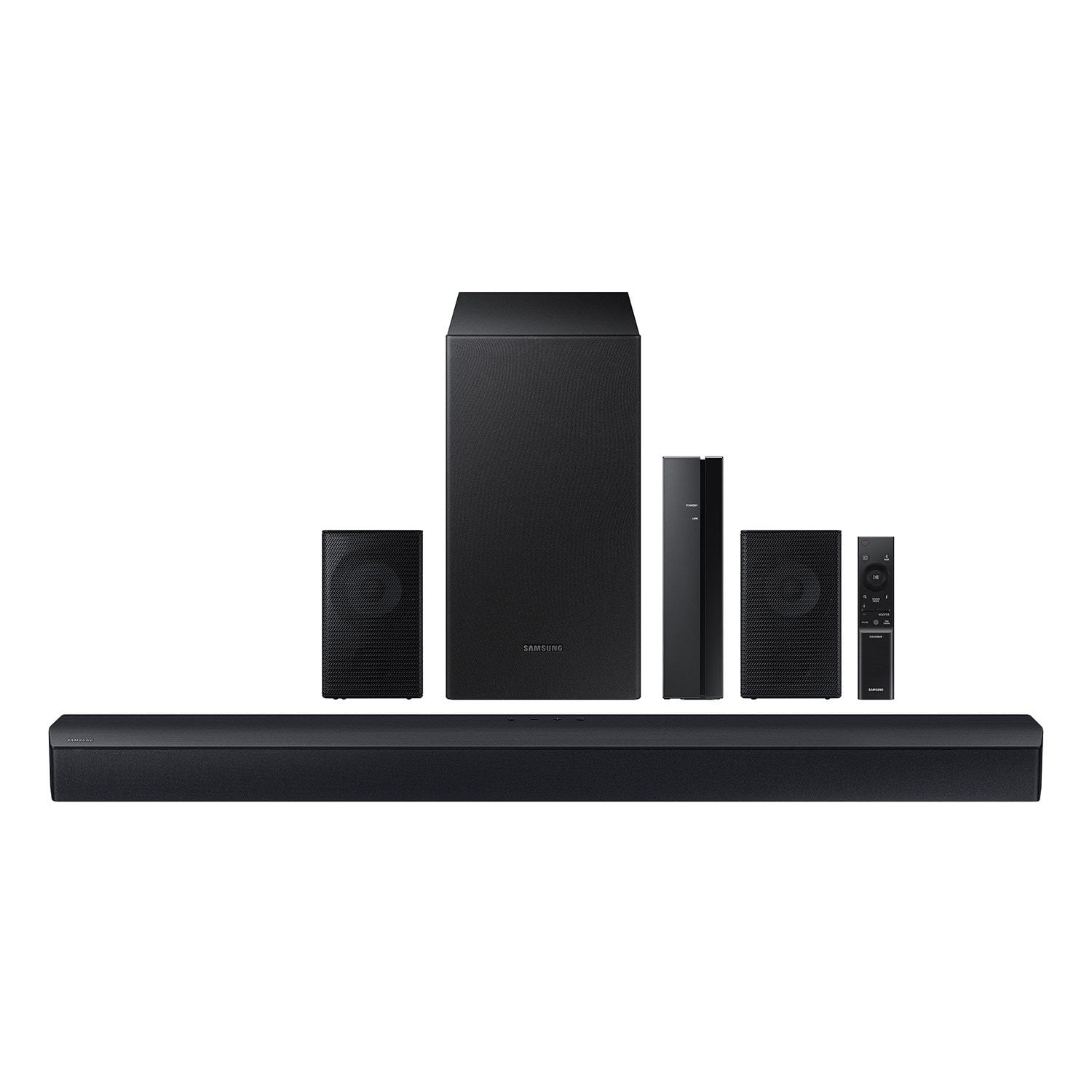
lets see. where do i start. the menu screen is behind the black speaker cover so its hard to see. the rear speakers are not on. the rear speaker wires are cheap and extremely short. so u will see wires on ur wall about 10ft apart from each other. nonsense Bluetooth set up. need to figure out how to get the back speakers on. Vizio is much better. just get the 10in sub.

Review from walmart.com
Helpful?6U2SK3AEJBKZ19585623078
reply from Samsung

Hi Nick,<br /><br />We appreciate you taking a few moments to review the Samsung HW-C47M Soundbar.<br /><br />Occasionally, customers have trouble hiding and running speaker wires from the front of the room (where their soundbar is) to the back of their room (where they have their rear speakers). The Rear Speaker Kit eliminates that hassle. Connect the rear speakers to its wireless module and place these three in the back of your room. One wire is required to connect each rear speaker to the wireless module. Then plug in the power cable to the module. The “wireless” convenience is in connecting your soundbar and any other speakers at the front of the room to the rear speakers – this can now be done through the wireless module, eliminating any clutter of long wires running the length of your room.<br /><br />There are a few things you may want to check:<br /><br />1) The maximum wireless signal transmission distance is about 33 ft. <br />2) Electronic devices may cause radio interference. Devices that generate electromagnetic waves should be kept away from the Soundbar main unit - e.g., microwaves, wireless LAN devices, etc.<br />3) Also, please be sure you have the latest firmware update. You can update your firmware by Auto Update, using the SmartThings app, or by using a USB device. You can find the update on the product page of your HW-C47M on the Samsung website.<br /><br />Should you need further assistance with this issue, or have any questions about features or operation, please know that Samsung is here to help. Just give us a call at 1-800-SAMSUNG (Ask for Soundbars), 8AM - 12AM EST, 7 days a week. Our Live Chat agents are also available by clicking on the ‘Support’ link on our website.<br /><br />~ Samsung Solutions

Mar 5, 2024
Reviewer name: Jay
4 out of 5 stars
4 out of 5 stars review

Verified Purchase

Loud but slightly misleading

Overall it’s a quality system especially when on discount however the only Bluetooth device seems to be the sound bar and not the side speakers which takes away from the surround sound I was expecting. Overall a good system, but consider a different option if you want a 360 field of sound.

Review from walmart.com
Helpful?6U2SK3AEJBKZ19585623078
Nov 27, 2023
Reviewer name: Kevin
2 out of 5 stars
2 out of 5 stars review

Verified Purchase

Unimpressed

You get what you pay for here. Bluetooth for the rear speakers is a nice feature and the connectivity to my Samsung TV is quick but the sound is very unimpressive. The sound bar is better than the TV speaker but just barely and bass is almost unnoticeable. It wasn’t a significant expense but I do regret it. I should have spent more for better quality.

Review from walmart.com
Helpful?6U2SK3AEJBKZ19585623078
reply from Samsung

Hello Kevin,<br /><br />Thank you for sharing your thoughts regarding the HW-C47M Soundbar.<br /><br />You can optimize your audio performance to your liking by pressing the SOUND MODE button on your soundbar remote and then selecting the desired sound effect by choosing SURROUND SOUND, GAME, or STANDARD.<br /><br />By pressing the TONE CONTROL button, you can adjust the volume of the treble or bass sound. Press the button to select TREBLE or BASS and then adjust the volume between -6~&#43;6 by using the Up/Down buttons.<br /><br />By pressing the CH LEVEL button, you can adjust the volume of the VIRTUAL CENTER LEVEL. This will allow you to adjust the overall dialogue between -6 to &#43;6 using the UP/DOWN button on the provided Soundbar remote. Also you can adjust the REAR LEVEL by using the CH LEVEL button as well.<br /><br />Press and hold the SOUND CONTROL button for about 5 seconds to adjust the sound for each frequency band. 150Hz, 300Hz, 600Hz, 1.2kHz, 2.5kHz, 5kHz, and 10kHz are selectable using the Left/Right buttons and each can be adjusted to a setting between -6 to &#43;6 using the Up/Down buttons. (Make sure the Sound mode is set to “STANDARD”.<br /><br />Additionally, using the WOOFER button on the remote, you can adjust the subwoofer’s volume between -6 to &#43;6 by toggling the button up or down. To set the subwoofer volume level to 0, press the button down.<br /><br />Should you ever have questions or need help, please call us at 1-800-SAMSUNG (ask for Soundbars), available 8 AM – 12 AM EST, 7 days a week.<br /><br />For additional support resources such as downloading a full manual, visit us on the Samsung website and click on the ‘Support’ link in the upper right corner of the homepage.<br /><br />~Samsung Solutions

Apr 15, 2024
Reviewer name: Paula
1 out of 5 stars
1 out of 5 stars review

Verified Purchase

Confused Sounds!

Shoppers should know in plain English how to turn on/work it! How to turn the back speakers up! Just better information! Still don’t know how to turn them up and I got this set for Christmas! Do a Video on YouTube or Google! Something better for the buyers!

Review from walmart.com
Helpful?6U2SK3AEJBKZ19585623078
reply from Samsung

Hello Paula,<br /><br />Thank you for taking a moment to review the HW-C47M Soundbar.<br /><br />Please know, there are various settings you can adjust to improve your experience with the rear speakers.<br /><br />You can adjust the volume of the rear speakers by using the remote included with the connected soundbar. Press the CH LEVEL button on the soundbar remote, then select REAR LEVEL and use the Up/Down buttons to adjust the volume within a -6 to &#43;6 range.<br /><br />Additionally, make sure that the source (e.g. TV output) is sending surround channels to the Soundbar. If you are using a format such as PCM, you may experience decreased volume to the rear speakers. Select Bitstream, Auto, or Pass-Through as these settings will allow the TV to send the correct channels to the rear speakers.<br /><br />Here is the link that will take you directly to the user manual: https://org.downloadcenter.samsung.com/downloadfile/ContentsFile.aspx?CDSite&#61;US&amp;CttFileID&#61;9216076&amp;CDCttType&#61;UM&amp;ModelType&#61;C&amp;ModelName&#61;HW-C47M/ZA&amp;VPath&#61;UM/202306/20230603042807001/HW-C47M_ZA_FM_01_ENG_230314.0.pdf<br /><br />Please refer to page 10 for instructions regarding using the remote control and its button functions. Please note in the diagram the button you will be looking for is numbered 5 in the manual.<br /><br />If you need more help, Samsung is here for you. Please call us at 1-800-SAMSUNG, 8AM - 12AM EST (Ask for Soundbars), 7 days a week. Our Live Chat agents are also available by clicking on the ‘Support’ link on our website.<br /><br />~ Samsung Solutions

Dec 28, 2023
Reviewer name: supercleaner23
5 out of 5 stars
5 out of 5 stars review

Verified Purchase

Buy!

I got this as a gift for my Dad for Christmas and he loves it. Little did I know that it was on his list, which he sent out a month after I bought it LOL. It was easy to setup and connect to the TV and Bluetooth. Definitely glad I purchased this for him and the family to use.

Review from walmart.com
Helpful?6U2SK3AEJBKZ19585623078
Oct 25, 2025
Reviewer name: Darlene
5 out of 5 stars
5 out of 5 stars review

Verified Purchase

Always time ! Courteous drivers!

Review from walmart.com
Helpful?6U2SK3AEJBKZ19585623078
Sep 15, 2025
Reviewer name: Mark
4 out of 5 stars
4 out of 5 stars review

Verified Purchase

Worth the trouble, price was right.

The instructions are horrible. Had to on You Tube to figure out how to install.

Review from walmart.com
Helpful?6U2SK3AEJBKZ19585623078
Oct 2, 2025
Reviewer name: Kimberly
1 out of 5 stars
1 out of 5 stars review

Verified Purchase

Not worth the money

Stopped working after 6 months, no return option given

Review from walmart.com
Helpful?6U2SK3AEJBKZ19585623078
reply from Samsung

Hello Kimberly,<br /><br />We appreciate your feedback regarding the issues you are experiencing with your HW-C47M Soundbar.<br /><br />Samsung is committed to providing the best possible product experience, quality, and value. We back this Samsung Soundbar with a 1-year limited manufacturer&#39;s warranty, including authorized repair for manufacturer defect, if purchased brand-new directly from an authorized seller. <br /><br />If you need more help, Samsung is here for you. Please call us at 1-800-SAMSUNG, 8AM - 12AM EST (Ask for Soundbars), 7 days a week. Live Chat with an agent as well as manuals, software, creating a service ticket, and warranty info can be found at the ‘Support’ link on our Samsung website.<br /><br />~ Samsung Solutions

Nov 22, 2025
Reviewer name: carlos
5 out of 5 stars
5 out of 5 stars review

Verified Purchase

Great bass and rear speakers are a must they make movies sounds so detailed

Review from walmart.com
Helpful?6U2SK3AEJBKZ19585623078
Sep 15, 2025
Reviewer name: anonymous
1 out of 5 stars
1 out of 5 stars review

Verified Purchase

it didn't work for my needs

Review from walmart.com
Helpful?6U2SK3AEJBKZ19585623078
reply from Samsung

Hi Lionel,<br /><br />Thank you for sharing your review of the HW-C47M Soundbar. We value your feedback and will share it with our teams. <br /><br />If there is anything we can do to improve your enjoyment such as helping to optimize settings for your specific sound scenario, please contact Samsung Customer Support. Just give us a call at 1-800-SAMSUNG (Ask for Soundbars), 8AM - 12AM EST, 7 days a week. Our Live Chat agents are also available by clicking on the ‘Support’ link on our website.<br /><br />~ Samsung Solutions