Skip to Main Content
Sams Club
Sams Club
Customer reviews for Samsung Galaxy Buds3 Pro for
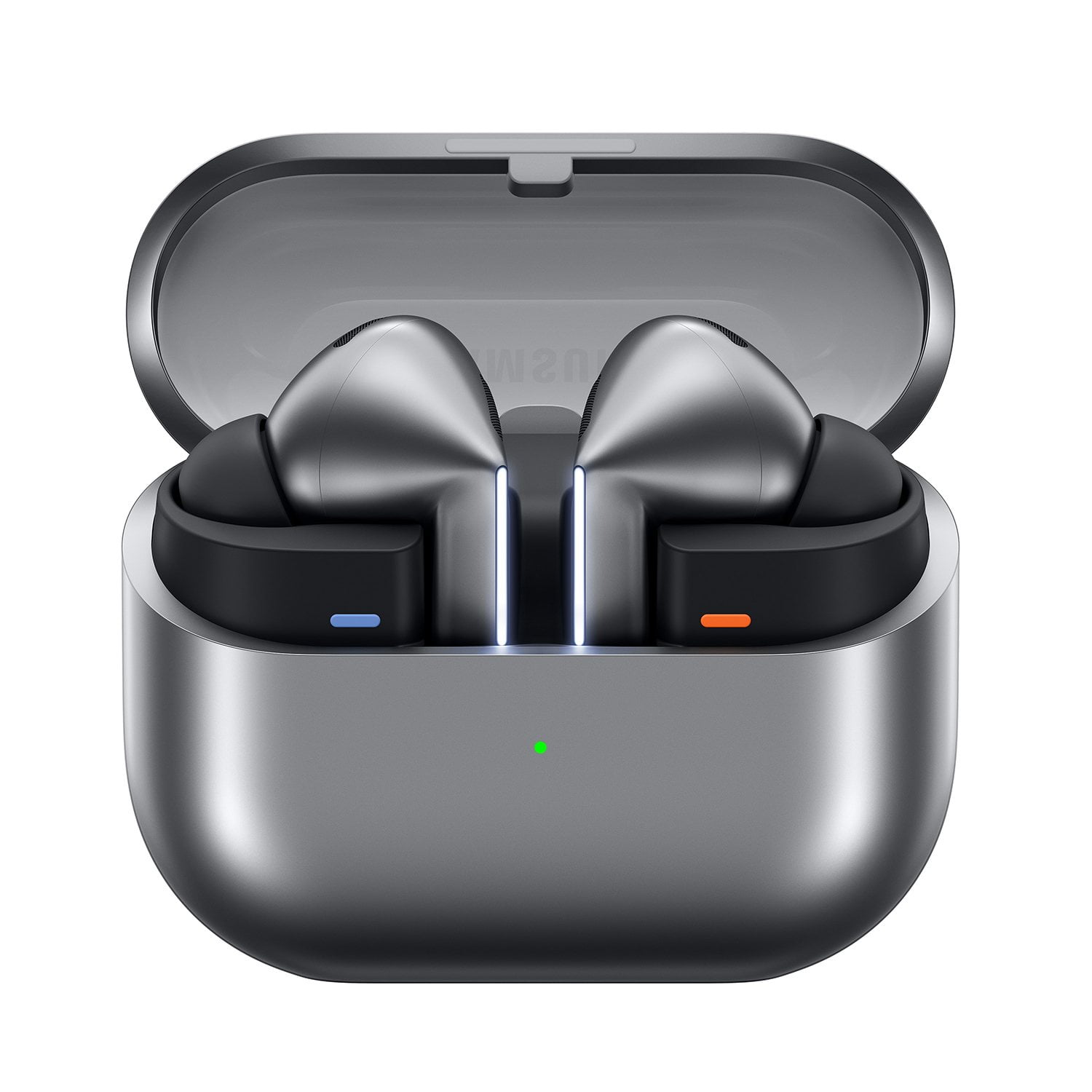
Samsung Galaxy Buds3 Pro

Member photos

  • +3548 images
Sort by |
Showing 781-790 of 13,573 reviews
Aug 6, 2024
Matt the Geek
5 out of 5 stars review

Verified Purchase

Great sounding buds!

When I saw Samsung was making the Buds 3 as a stem design, I knew I had to try them. I have the Galaxy Buds Plus, which sounded good as well, but was always fiddling with the Buds in my ears to get the correct fitting. With these, stem goes in notch in ear, and you can rotate with the stem if needed. Happily, these also sound fantastic. Now, I do have a custom EQ set system wide on my S23 Ultra, and not through the Galaxy Wear app. Very full, and clear sound! Battery life I also rate excellent, which for me means I can get through an 8-10 hr shift at work on one charge of the ear buds themselves. (this is also with noise cancelling off) one thing that I wish was implemented was full RGB control of the light strip in the app...

Review from Samsung US
Helpful?3MTCIEJ7RGUC18797511992
Jul 26, 2024
Evan
4 out of 5 stars review

Verified Purchase

A good pitch, but could use some work.

Sound quality and overall design is good. But a bit of a step back with the ANC and perhaps it being unpolished: metallic and sharp noises that the previous generation had no issues with are now a problem. Heavy vibration and wind also seems to be an issue. Perhaps can be remedied by a few updates, but for now, keep to quieter areas.

Review from Samsung US
Helpful?3MTCIEJ7RGUC18797511992
Jul 26, 2024
Rla0
4 out of 5 stars review

Verified Purchase

Wind noise fail

These are a improvement in sound over the Buds2 Pro but only while sitting stil. I ride my bicycle around 20 miles a day with my ear buds in, the wind noise with ANC on is terrible. The Bud2 Pro were the best at this. Why Samsung went downhill on this is mystifying. In addition, the voice controls are nice but again while riding my bike (wind) they do not work.

Review from Samsung US
Helpful?3MTCIEJ7RGUC18797511992
Feb 17, 2026
franklin
3 out of 5 stars review

Great Half of the Time

I want to love these earbuds but they are a very mixed bag. Biggest upsides - 1) the touch controls work great! 2) All sound comes through very clear. everything from music to the boosted ambient sounds. These have made hikes more fun because I can hear more critters. 3) I got a great deal on trading in my old earbuds. 4) The battery lasts all day with constant use for work calls and the active noise canceling Biggest downsides - 1) They do not stay in my ear. I have tried all the different size rear tips and none of them have helped. its been hard to want to keep using them. 2) They have started to take a long time to connect to my devices, mostly my cell phone (S22 Ultra). I have not even had these long. Over all I am not totally dissatisfied with my purchase. but i honestly wish i still had the galaxy buds 2 pro. they fit way better and stayed in my ear. I only got rid of them because they had almost zero battery life left. I would be careful buying these if earbuds don normally work in your ears.

Review from Samsung US
Helpful?3MTCIEJ7RGUC18797511992
reply from R&R

Hi franklin, Thank you for sharing your detailed experience with your Galaxy Buds3 Pro. We’re glad to hear you’re enjoying your Galaxy earbuds overall and that you’re a long-time fan coming from the Galaxy Buds2 Pro, which are also excellent. You mentioned that the wear of the Galaxy Buds3 Pro has been a downside for you. Properly wearing your earbuds is important for several reasons: it improves sound quality, provides a comfortable fit, and helps keep them secure in your ears. Incorrect wear can cause discomfort, sound leaks, and increase the risk of falling out. No one wants to lose an earbud, especially while jogging, so ensure they are worn correctly. The Galaxy Buds3 Pro come with different-sized ear tips. First, make sure you select the right size for your ears; they should fit snugly without gaps. This prevents sound leaks and delivers the best audio experience. If you need help changing the tips, consult our guide for the Buds3 Pro tips. Once you've fitted your earbuds, check the bottom for directional marks, labeled L and R. Insert the R earbud into your right ear with the R facing you, and the L into your left ear with the L facing you. Angle the earbuds slightly so the microphone points toward your mouth instead of straight down. Adjust by rotating them until the fit feels right. You can also run an earbud fit test to confirm proper fit. For more tips on fitting your Galaxy Buds3 Pro, see the online article linked below. To enhance your connection, try clearing your Bluetooth cache. Reset Bluetooth data by opening Settings, navigating to Apps, tapping the sort icon (down arrow with three vertical bars), selecting Show system apps, then tapping OK. Locate Bluetooth, then Storage, and tap Clear data, confirming with OK. You'll need to reconnect your Bluetooth device and any others previously paired. For additional troubleshooting and connection help, see the links below. Thank you for your feedback. We value you as a Samsung customer. How to wear your Samsung Galaxy Buds3, Buds3 Pro, or Buds3 FE https://www.samsung.com/us/support/answer/ANS10003519/ Bluetooth device won't stay connected to Galaxy phone or tablet https://www.samsung.com/us/support/troubleshooting/TSG01209182/ -Ty Samsung Support smsng.us/Samsung-Support Samsung Community smsng.us/Samsung-Community Facebook smsng.us/Facebook-Messenger X https://smsng.us/X-Messages

Sep 27, 2024
JosephwHan
4 out of 5 stars review

Verified Purchase

PRETTTTTTY GOOOOOOD

Awesome earbuds. I think they're a huge step-up from the Buds2 Pro. Noise cancelling works way better in my opinion. I do think the fit kinda needs getting used to, but it'll get there. Sometimes you can hear a high pitched noise when inserting back into the case or when you have one in your ear and the other right about to be inserted... I don't know if it's the noise cancelling thing and it stays in that mode/way when handled? I don't know. It can startle you but it doesn't really hurt the ear. Either way, I think this is a great one still

Review from Samsung US
Helpful?3MTCIEJ7RGUC18797511992
Mar 17, 2025
Angel
1 out of 5 stars review

Verified Purchase

Don't buy these, wait until the next generation

The eartips can get damaged when you remove them, even if you follow the instructions on the video provided by Samsung. The material used has the consistency of one of those gloves that are very soft but when you try to remove it it immediately tears apart. I had to buy third party eartips.

Review from Samsung US
Helpful?3MTCIEJ7RGUC18797511992
reply from R&R Team

Thank you for sharing your experience with the Galaxy Buds3 Pro, Angel. The Galaxy Buds3 Pro ear tips are crafted for comfort, using soft materials to ensure a secure and pleasant fit. However, it’s important to handle them gently when removing or replacing them to avoid any damage. As noted in the user guide, excessive pulling, twisting, or pressing of the ear tips can cause them to tear. We recommend carefully turning the ear tips over and pulling them vertically from the middle when removing them. When attaching new ear tips, align the protruding part with the groove on the earbud and push until they click into place, ensuring a proper fit. Once again, we appreciate your feedback. For any further questions or concerns, please reach out to us at Samsung Support. -Kelvin smsng.us/Samsung-Support smsng.us/Facebook-Messenger smsng.us/X-Messages smsng.us/Samsung-Community smsng.us/Warranty-Info smsng.us/Samsung-Care-Plus

Jul 26, 2024
David
5 out of 5 stars review

Verified Purchase

Great sounds, easy to set up and they look nice

When I first saw them, I thought they would be uncomfortable, but they fit perfectly, they were easy to set up, and I was able to customize the equalizer for my personalized sound. I probably need to spend more time with the instructions, because I haven't figured out how to use the sides to change volume, skip songs, etc, but that is because I just put them in my ear and started running with them. Nice product.

Review from Samsung US
Helpful?3MTCIEJ7RGUC18797511992
Mar 12, 2025
Daigoro
4 out of 5 stars review

Verified Purchase

These things rock!

I am enjoying my Samsung Galaxy Buds3 Pro Silver ear buds very much. They replace my Galaxy Buds Pro, and the difference between them is night and day. The Buds 3 Pro have a completely different form factor and won't fall out of my ears like my previous buds. I've worn them for air travel and the noise cancelling is pretty effective. I especially liked the feature on the app which lets you check out the effectiveness of the rubber tip. I also really like the integrated LED lights, though they can be difficult to get turned on. Overall, I'm using these way more than my previous buds and enjoying their sonic richness.

Review from Samsung US
Helpful?3MTCIEJ7RGUC18797511992
Aug 4, 2024
Colby
4 out of 5 stars review

Verified Purchase

Pretty great but not perfect.

Battery life not as good as Bud 2 Pro. Ear tips are easily damaged with no instruction on how to properly remove them. I damaged 2 of mine. They do sound great and cancel out noise well. I've been in noisy environments and people say they just hear me when I speak and no background noise which is great.

Review from Samsung US
Helpful?3MTCIEJ7RGUC18797511992
Jul 27, 2024
Brian
1 out of 5 stars review

Verified Purchase

Extremely Disappointed 😔

After eagerly awaiting the release of these earbuds, when I finally received them I was highly disappointed and returned them. I opened the box for the buds and attempted to change to a different size ear tip which caused the rubber to rip off. Known manufacturing issue for all of the new Pros that came out and it just shows the lack of testing that went into to this equipment. Really sad.

Review from Samsung US
Helpful?3MTCIEJ7RGUC18797511992
reply from Social Commerce

Hello Brian, we appreciate your feedback on your Samsung Galaxy Buds3 Pro. We understand how important the optimal and ideal fit of your earbuds are to your usage and enjoyment. We have provided a link to a video to help you with the steps to change out the eartips to the ones that best fit your ears. We have also provided a link to the Samsung Support Team to offer additional assistance or if you would like to discuss this matter further. Thank you for being a Samsung customer. -Elizabeth Replacing the ear tips on your Galaxy Buds3 Pro for a perfect fit https://www.youtube.com/watch?v=i3SBh9ySfgA Samsung Support smsng.us/Samsung-Support Samsung Community smsng.us/Samsung-Community Facebook smsng.us/Facebook-Messenger X https://smsng.us/X-Messages