

Member photos

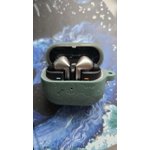
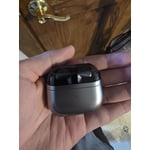

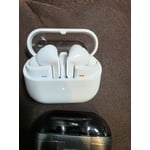
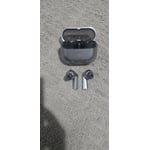
 +3896 images
Verified Purchase
Best Buds ever!
I use my earbuds for work often, and in the past, have received complaints about the noise from the person on the other line. With these Buds, the caller on the other end cannot tell the difference in call Quality whether I'm driving, outside, or in a quiet room. These are quite possibly the best earbuds I have ever owned. Thank you!
Verified Purchase
Good but not great
Previous buds 2 were better fit and noise cancelling. Charging is hit or miss. Sometime when putting the buds in the case they don't charge or stop charging. Frustrating when you think they'll be done charging after all night but only to find out they're still dead
Thank you for sharing your thoughts on the Galaxy Buds3 Pro, Angell! We appreciate your feedback and want to ensure you have the best possible experience with our products. We understand that fit and noise cancellation are vital for enjoying your audio. The Galaxy Buds3 Pro are designed with an ergonomic fit and enhanced active noise cancellation features, providing a more comfortable experience and allowing you to immerse yourself fully in your music without distractions. The Galaxy Buds3 Pro comes with different-sized ear tips. The first thing you want to do is make sure they have the right size tips for your ears. You want them to fit so there isn't a gap between your ear and the ear tip. This helps to avoid sound leaks and ensure optimal audio. You can also run an earbud fit test in the Galaxy Wearable app to ensure you have the proper fit. Regarding charging, we’ve introduced improvements to the charging case to help provide a more reliable experience. The Galaxy Buds3 Pro supports both wired and wireless charging, ensuring that you have flexible options to keep your buds powered up. We recommend checking that the charging contacts on both the buds and the case are clean, as this can sometimes affect the charging process. We truly value your feedback as it helps us continually enhance our products. If you have any more questions or need assistance, please feel free to reach out to us at Samsung Support. Enjoy your audio experience with the Galaxy Buds3 Pro! -Kelvin smsng.us/Samsung-Support smsng.us/Facebook-Messenger smsng.us/X-Messages smsng.us/Samsung-Community smsng.us/Warranty-Info smsng.us/Samsung-Care-Plus
Verified Purchase
Worth the upgrade
these are awesome! the new design is cool, took some getting used to having to kinda squeeze the stem instead of just tap like the previous models, but its so much better now. adjusting the volume is way easier now just scrolling your finger up or down on the stem, i could never get it right with my buds2 pro. i also like the light up feature. not sure what the point of it is, but i dig it. I got a great deal on my bud3 pro by trading in my buds2 pro
Verified Purchase
Bad sensors
Was really disappointed with the sensors. Had to send the buds back. The sensors had difficulty sensing when they were in my ears and continously left noise canceling mode or stop playing music because they could not tell that they were in my ears still. Even after switching the ear tips from mediums to smalls (the mediums tore in the process of changing) they continued to struggle. I wanted to really like these as they would have been my 3rd galaxy pair of ear buds. But I couldn't enjoy them. They also seemed to be affected by long hair brushing against them.
Hi there Danielle, we appreciate you sharing your thoughts with us about your Samsung Galaxy Buds3 Pro. We understand how frustrating it is to have a brand new device that is not operating as intended or expected. We have some great resources available online to help our customers reset their device to original settings and help you have the intended experience. We hope you have found earbuds that best align to your needs and wants, and have provided a link below to the Samsung Support Team if you have any questions. Thank you for being a Samsung customer. -Elizabeth Samsung Support smsng.us/Samsung-Support Samsung Community smsng.us/Samsung-Community Facebook smsng.us/Facebook-Messenger X https://smsng.us/X-Messages
I love how they stay in my ears
[This review was collected as part of a promotion.] The galaxy pro 3 earbuds has an awesome style and listen quality is impeccable the sound is clear and I have used them for asking AI to help me search and write different letters and interpret other languages
Verified Purchase
Wouldn't recommend these to anyone til redesign
Ear fitment is not sturdy, fall out easy and not seals well for the noise canceling. I have changed the rubber part and tried all 3. Miss the Samsung buds that I traded in. Best fitment for me. Putting ear pieces back into the case can give problems if not straight up and down. 3 star for me liking the Samsung only.
Thank you for your feedback on the Galaxy Buds3 Pro. We hate to see that you haven’t had the best experience with the fitment. Samsung is committed to providing a comfortable and secure fit for our users, which is why we offer a variety of ear tip sizes to help you find the perfect match. We urge you to also perform a fit test on the Galaxy Wearable app. The Galaxy Buds3 Pro is designed with advanced noise canceling designed to block out ambient noise, allowing you to fully immerse yourself in your music or calls. We understand how important it is for earbuds to be easy to store, and we appreciate your suggestion regarding the case design. Your satisfaction is important to us, and we hope you will give the Galaxy Buds3 Pro another chance to impress you! If you have any questions or need assistance, please feel free to reach out to us at Samsung Support. -Kelvin smsng.us/Samsung-Support smsng.us/Facebook-Messenger smsng.us/X-Messages smsng.us/Samsung-Community smsng.us/Warranty-Info smsng.us/Samsung-Care-Plus
Verified Purchase
Detailed review with a lot of problems
A big problem is it does not support call feature of mic isolation which the inbuilt samsung s23 ultra microphone does but when connected to this earbuds it doesnt do that. It's bad atleast from a samsung eco system perspective I expected it to have an option for that. Although, i think there is an inbuilt noise isolation is good. The case is not at all good. It is prone to scratches, the clear transparent body isn't also good gets a lot of scratches. Sound quality is good that got it 2 stars otherwise I would have returned it.
Hi there Zoheb, we appreciate you sharing your thoughts about your Samsung Galaxy Buds3 Pro with us. We completely understand how important your earbuds are to you and wanting to have the hands free clear calls every day. We have provided a link to an article to help you with the call features of your earbuds. We have also shared a link to the Samsung Support Team to offer additional assistance if this experience continues, or you have questions about your Samsung products. Thank you for being a Samsung customer. -Elizabeth Use call features on your Samsung earbuds https://www.samsung.com/us/support/answer/ANS00078132/ Samsung Support smsng.us/Samsung-Support Samsung Community smsng.us/Samsung-Community Facebook smsng.us/Facebook-Messenger X https://smsng.us/X-Messages
Awesome Sound
[This review was collected as part of a promotion.] The Galaxy Buds3 Pro are a highly recommended upgrade, especially for Samsung users. The integration of Galaxy AI is the defining new feature, offering improvements like Live Translation/Interpreter mode, Adaptive EQ (personalizing sound based on your ear shape), and Adaptive ANC (automatically adjusting noise cancellation). They deliver excellent, rich audio quality, have a comfortable new stem-based design with an IP57 rating, and the AI features genuinely enhance usability.
Verified Purchase
Great but gremlins surfaced
Things started off great. Then after two days the left ear bud stopped playing music and only emitted a loud consistent static sound. I unpaired them and repaired them and that fixed the problem. But I'm afraid this problem will return. Hence the 3 star rating.
Hey David F, we appreciate your feedback on your Samsung Galaxy Buds3 Pro. We are pleased to hear you have been able to resolve this matter with the audio quality of your earbuds. We have provided some resources to help you in the future to prevent this experience and troubleshoot this matter if it does return. We have also provided a link to the Samsung Support Team if you are ever interested in one on one assistance with any of your Samsung products. We appreciate you being a Samsung customer. -Elizabeth How to clean your Samsung earbuds https://www.samsung.com/us/support/answer/ANS00086123/ No, low, or poor audio quality on Samsung earbuds https://www.samsung.com/us/support/troubleshooting/TSG01111323/ Restart or reset your Samsung earbuds https://www.samsung.com/us/support/troubleshooting/TSG01218103/ Samsung Support smsng.us/Samsung-Support Samsung Community smsng.us/Samsung-Community Facebook smsng.us/Facebook-Messenger X https://smsng.us/X-Messages
Verified Purchase
falls short of what the buds live just works for
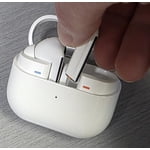
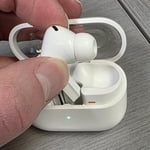
Good sound Comfy oval tips More premium feeling Bad case design: cannot take it out of the case and into the corresponding ear without having to delicately remove and rotate it to then put it in. Poor features: removed tap to play/pause in favor of a finicky pinch and swipe maneuver that only does volume control. Mic quality still needs improvement Have had 1 bud fall out on its own.
Thank you for sharing your thoughts on the Galaxy Buds3 Pro!, Derek. We’re thrilled to see you appreciate the good sound quality and the comfort of the oval tips. We noted your concerns regarding the case design. The Galaxy Buds3 Pro is designed to be easy to use, and we appreciate your feedback regarding the design. Your input helps us improve the overall experience. The new pinch controls provide a more intuitive way to make adjustments while on the go. With a single pinch, you can play or pause a song, answer or end a call, or stop features like “Read Notifications Aloud,” “Voice Detection,” or “Siren Detection.” A double pinch will allow you to play the next song, while a triple pinch will play the previous song; if you pinch the earbuds three times within three seconds after a song starts, it will restart from the beginning. Additionally, pinching and holding activates the preset function, which by default is set to noise control mode, or allows you to reject a call. For volume adjustments, simply swipe up or down. You can also customize these controls through the Galaxy Wearable app. Just open the app, select your earbuds, and then go to "Earbud controls" to enable or disable the features you'd like to use. Thank you for your insights, and we hope you continue to enjoy your Galaxy Buds3 Pro! For any questions or concerns, please do not hesitate to reach out to us at Samsung Support. -Kelvin smsng.us/Samsung-Support smsng.us/Facebook-Messenger smsng.us/X-Messages smsng.us/Samsung-Community smsng.us/Warranty-Info