Join Now
Skip to Main Content
Sam's Club
Sam's Club
All Departments
All Services
Customer reviews for Samsung Galaxy Buds3 Pro for
Samsung Galaxy Buds3 Pro
4.4 out of 5 stars
stars
14.8K ratings14.8K reviews
  1. 5 stars69% (10.1K)
  2. 4 stars16% (2,431)
  3. 3 stars7% (1,038)
  4. 2 stars4% (564)
  5. 1 star4% (619)

Member photos

  • +3976 images
Sort by |
Showing 2,201-2,210 of 14,844 reviews
Aug 4, 2024
Reviewer name: Colby
4 out of 5 stars
4 out of 5 stars review

Verified Purchase

Pretty great but not perfect.

Battery life not as good as Bud 2 Pro. Ear tips are easily damaged with no instruction on how to properly remove them. I damaged 2 of mine. They do sound great and cancel out noise well. I've been in noisy environments and people say they just hear me when I speak and no background noise which is great.

Review from Samsung US
Helpful?3MTCIEJ7RGUC18797511992
Nov 4, 2024
Reviewer name: MrRivers
5 out of 5 stars
5 out of 5 stars review

Verified Purchase

Awesome Versatility

I'm the type of person who needs music all the time. With the Galaxy Buds3 Pro, you can achieve music 24/7 with Adaptive and Ambient sound without the hassle of having to remove the buds to hear someone or something. They are a little tricky to get used to because of the versatility of the controls. But once you find the right settings for yourself, you'll never want another pair of buds in your ears except these.

Review from Samsung US
Helpful?3MTCIEJ7RGUC18797511992
Sep 8, 2024
Reviewer name: NigelM876
4 out of 5 stars
4 out of 5 stars review

Verified Purchase

Great buds, just need more tips

Lovely wireless ear buds, great features and design. Would be 5 stars if we had slightly better fitting buds tips as often enough without repositioning they time after time, they would fall out. Probably there's a possibility of feature memory foam tips or slight smaller tips to the smallest size currently offered.

Review from Samsung US
Helpful?3MTCIEJ7RGUC18797511992
Dec 6, 2025
Reviewer name: Martin
4 out of 5 stars
4 out of 5 stars review

Better experience but poor battery life

[This review was collected as part of a promotion.] I upgraded from Samsung Buds2 to Buds3 Pro and like them - positive click for interaction, swipe up or down to set volume, great sound- except for battery life of the case which seems to be measured in days. The GalaxyAI features work well - a spoken command to stop and start music instead of tapping on the ear

Review from Samsung US
Helpful?3MTCIEJ7RGUC18797511992
Oct 2, 2024
Reviewer name: Pete
5 out of 5 stars
5 out of 5 stars review

Verified Purchase

Best Android Buds I've Used

There are a lot of buds out there, but I can confidently say that these are some of the best I've ever used before! This is compared to the Sony mx5's, and other incredible buds. The fit is better, the sound is incredible for the size, the price was incredible through Samsung, and they are next level overall! If I had any feedback, it would be the ANC is a little overreactive, but that's a very minor thing compared to all the good stuff! Probably the best buds I've ever used! 10 out of 10!

Review from Samsung US
Helpful?3MTCIEJ7RGUC18797511992
Dec 10, 2024
Reviewer name: Jose B
4 out of 5 stars
4 out of 5 stars review

Verified Purchase

Amazing sound and ANC

I love the sound and look of the headset I walked around a busy store and everything was quiet and peaceful. the only thing I have against it is as I was trying to find the right size earbud to fit my ear they were very difficult to remove and I ended up breaking the small one

Review from Samsung US
Helpful?3MTCIEJ7RGUC18797511992
reply from R&R Team

Thank you for sharing your thoughts on the Galaxy Buds3 Pro, Jose. We’re thrilled to see that you love the sound quality and design! They are crafted to provide an immersive audio experience while looking sleek and stylish. We understand that finding the right earbud fit can be a challenge. The Galaxy Buds3 Pro features three different ear tip sizes to help ensure a comfortable and secure fit, and we encourage you to try them for a better experience. If you find the buds difficult to remove, we recommend gently twisting them as you pull them out, which may help. We appreciate your feedback about the earbud size options and your experience with them. At Samsung, we're committed to continuous improvement, and your insights are invaluable as we strive to create products that meet our users’ needs. If you have further questions or concerns, please don’t hesitate to reach out to us at Samsung Support. -Kelvin smsng.us/Samsung-Support smsng.us/Facebook-Messenger smsng.us/X-Messages smsng.us/Samsung-Community smsng.us/Warranty-Info smsng.us/Samsung-Care-Plus

Jul 27, 2024
Reviewer name: Frank G
5 out of 5 stars
5 out of 5 stars review

Verified Purchase

Samsung galaxy buds pro3

So far, to this point of me having the buds pro3 for a week, they are living up to their expectations. The sound is equivalent to Bose in my opinion and the actual phone calls, super clear amd concise. Now I just have to learn the pinch and swipe methods on this device. Otherwise, it's highly recommended and has my vote.

Review from Samsung US
Helpful?3MTCIEJ7RGUC18797511992
Aug 16, 2024
Reviewer name: Michael
4 out of 5 stars
4 out of 5 stars review

Verified Purchase

Great Features, Not So Great Fit

Amazing features and noise cancellation, probably some of the best and most intuitive I've seen. However, the buds don't necessarily fit in or with my ear. I prefer the Buds Live and hope a new Buds Live model with upgraded features will be released.

Review from Samsung US
Helpful?3MTCIEJ7RGUC18797511992
Jun 5, 2025
Reviewer name: Michelle
4 out of 5 stars
4 out of 5 stars review

Verified Purchase

Not a great fit
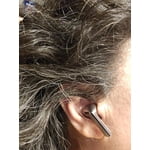
Sounds is great! But... The fit/style not made for small ears I guess and constantly fall out and do hurt if I wear for to long of aperiod. Yes I changes the fittings. Also i have long hair, the stick thing that samsung added when compared to the original and the pro 2, get caught all the time. I pull them out atleast 4 times a day.

Review from Samsung US
Helpful?3MTCIEJ7RGUC18797511992
reply from R&R Team

Thank you so much for your review of the Galaxy Buds3 Pro, Michelle! We truly appreciate you sharing your experience. To help you achieve that perfect fit, we recommend angling the earbuds slightly so that the microphone on the bottom points toward your mouth rather than straight down. You can also try adjusting the buds by rotating them forwards and backwards until they feel just right. We hope these tips enhance your listening experience! If you have any more questions or need assistance, don’t hesitate to reach out to Samsung Support. -Kelvin smsng.us/Samsung-Support smsng.us/Facebook-Messenger smsng.us/X-Messages smsng.us/Samsung-Community smsng.us/Warranty-Info smsng.us/Samsung-Care-Plus

Dec 5, 2024
Reviewer name: Sosta L
3 out of 5 stars
3 out of 5 stars review

Verified Purchase

Awesome: Sound, Features, Design

Amazing Features & Great Sounds- I can't give 5 starts because of the fit. And being honest, it could be the shape of my ears. I have tried all 3 sizes it comes with but I cant find the one that haves that good consistent grip inside my ear. If I smile or start talking they have the tendency to start wiggling out. I got the pros hoping for a better fit but for me it was not worth the extra money.

Review from Samsung US
Helpful?3MTCIEJ7RGUC18797511992
reply from Social Commerce

It's great to hear from you, Sosta! It looks like you reached out to share your candid thoughts on the Galaxy Buds3 Pro. We're elated to see that you love the features the Buds3 Pro offers. The Buds3 Pro weighs 0.31 ounces and has a battery capacity of 53.0 mAh for the earbuds and 515 mAh for the case. They offer a playtime of 6 hours with Active Noise Cancellation (ANC) turned on and 7 hours with ANC turned off. We understand that fit is an important part of having a great experience with any buds. We understand that a proper fit is crucial for a great experience, and it seems you’ve already tried different tips, which is a great first step. To ensure you wear the earbuds correctly, check the bottom for directional markings; you'll find an ‘L’ for the left earbud and an ‘R’ for the right. Insert the right bud with the ‘R’ facing you into your right ear, and the left bud with the ‘L’ facing you into your left ear. Make sure to angle the microphones towards your mouth rather than downward. Adjust the earbuds by rotating them until they feel right. You can also run an earbud fit test in the Galaxy Wearable app to confirm that you have the proper fit. For steps on how to run a fit test, please check out the link attached. If you need any further assistance with this or anything else, please be sure to reach out to us at Samsung Support. -Kelvin https://www.samsung.com/us/support/answer/ANS10003519/ smsng.us/Samsung-Support smsng.us/Facebook-Messenger smsng.us/X-Messages smsng.us/Samsung-Community smsng.us/Warranty-Info smsng.us/Samsung-Care-Plus