Customer reviews for SAMSUNG 65" Class U7900F Series 4K Crystal UHD Smart TV forMember photos


+878 images
Great price, disappointing viewing
[This review was collected as part of a promotion.] It’s a large screen TV at a great price. My primary quarrel is with watching dark shows (so many are these days) during the daytime in a well lit room. It proves nearly impossible to see any detail. It’s unfortunate and what that means is I can only watch my primary shows during the evening. TV is a serious hobby and I go to sleep fairly early so it’s upsetting to be confined to evenings only which provides only 1-2 of quality watch time. Unfortunately there is not enough adjustment within the TV’s picture capabilities to combat this though I’ve optimized settings as much as possible. I also had an issue with weird red lines appearing onscreen occasionally. I had to unplug the TV to make them go away. This issue seems to have resolved after 3-4 months.
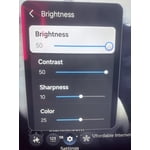
Hi Bought the tshirt, We’re sorry to hear you’re not fully satisfied with the picture quality on your Samsung U7900F TV. If the image appears too dark, we suggest disabling certain energy-saving features, which can automatically adjust brightness and affect how the screen looks. Go to: Settings > All Settings > General & Privacy > Power and Energy Saving, then turn off Brightness Optimization, Energy Saving Solution, Motion Lighting, and/or Contrast Enhancer. You can also adjust the Picture Mode to better suit your environment: Settings > All Settings > Picture > Picture Mode • Standard – Default mode for general viewing • Dynamic – Brighter and clearer, ideal for well-lit rooms • Movie – Best for dark room viewing • Eco – Energy-saving mode • Filmmaker Mode – Preserves content as intended by creators To fine-tune brightness, go to: Home > left directional key > Settings > All Settings > Picture > Expert Settings, then adjust the Brightness level (0–50) to your preference. Lastly, please make sure your TV is running the latest firmware: Home > Home > left directional key > Settings > Support > Software Update > Update Now. I hope these suggestions help. If you have any other questions, feel free to call us at 1-800-SAMSUNG between 8AM – 9PM EST Mon – Fri, 8AM – 6PM Sat – Sun, any day of the week. You can also reach our LiveChat team by selecting the ‘Support’ link on our website. ~ Samsung Advisor
No internet access.
[This review was collected as part of a promotion.] I've tried and tried to connect my TV to the internet with no luck. I had a subscription to Paramount + and couldn't watch it. Why are there so many videos on YouTube how to connect to the internet?
Hi JW128, Thank you for sharing your experience with the internet connection on your Samsung U7900F TV. Whether you're using Wi-Fi or a wired (LAN) connection, there are a few steps you can take to help resolve the issue: 1. Power Cycle Your Equipment. Unplug both your TV and router/modem from the wall outlet. Wait at least 30 seconds, then plug them back in and allow both devices to fully restart. 2. Check the Network Status. On your TV, go to: Home > left directional key > Settings > All Settings > Connection > Network > Network Status. This will help determine if the issue lies with the network or the TV. 3. Try a Different Connection Type. If you're using Wi-Fi, try connecting an Ethernet (LAN) cable directly from your router to the TV to test the connection. If you're using a wired connection, try switching to Wi-Fi to see if the issue persists. 4. Reestablish the Network Connection. Go to: Settings > All Settings > Connection > Network > Open Network Settings, and follow the prompts to reconnect to your Wi-Fi or wired network. 5. Update Firmware. Software updates can often resolve network bugs. To check for the latest version: Settings > Support > Software Update > Update Now If these steps don't resolve the issue, we’d be happy to provide further assistance. Please call Samsung Support at 1-800-SAMSUNG, 8AM - 12AM EST, 7 days a week. LiveChat is also available at the ‘Support’ link on our website. ~ Samsung Advisor
Love it
[This review was collected as part of a promotion.] Best Best product ever my kids to sit down watch the movie in a big screen it's very bright I love the volume I love how it looks in my co z Best product ever my kids to sit down watch the movie in a big screen it's very bright I love the volume I love how it looks in my Cozy Best product ever my kids to sit down watch the movie in a big screen it's very bright I love the volume I love how it looks in my cozy apartment and in the future I will be buying another one for my bedroom
Disappointed with the functionality
[This review was collected as part of a promotion.] In terms of resolution and picture quality, this TV is an excellent buy. The image is sharp, bright, and very enjoyable for everyday viewing. However, the functionality is limited. It only has two HDMI ports. In my case, one is used for the cable box and the other for my home theater system, which leaves no additional HDMI inputs available. Another significant limitation is the app platform. The TV does not allow you to add apps beyond those offered in Samsung’s app store. I was unable to install some of the streaming services I use, such as Peacock, Max (HBO Max), and Paramount+. As a result, I now need to purchase an external streaming device like a Roku or Fire Stick — but with no available HDMI ports, that creates another challenge. I want to emphasize that I am a big Samsung fan. I love the brand and own several Samsung products, including my phone, refrigerator, stove, and air conditioner. That’s actually why I chose this TV. I was aware of the HDMI limitation when I purchased it, but it was not clearly advertised that app availability would also be restricted by the platform. Overall, the picture quality is very good, but the limited connectivity and restricted app ecosystem reduce its overall functionality.
Hi Capu, Thank you for reaching out to us. Please know the apps you listed: Peacock, Max (HBO Max), and Paramount+ are all available for download. To ensure your TV is up to date, please update your Firmware. Go to Settings> Support> Software Update. To Search for & Install Apps: 1. From the Home screen, press left on the remote’s directional pad. 2. Navigate to and select Search. 3. Using the search bar, enter the content or app you’d like to find. 4. Navigate to and select the app you’d like to install, then select Install. Note: Previously installed apps can be accessed on the Settings screen. Adding & Managing Apps on Home Screen 1. Go to App Settings (these can be found at the bottom of the Apps screen) and select the app you want to move. The following options will be available: a. Add to Home: Move the app to your desired location on the Home screen. b. Delete: Delete app. c. Lock/Unlock: Lock the app with a PIN so only you can use it. When the app is selected again, you will be prompted to enter the PIN to unlock it. d. Reinstall: Reinstall the app. e. View Details: View the app’s information and details. If you continue to have issues, please contact us at 1-800-SAMSUNG, available daily from 8AM - 12AM EST. You can also visit the Samsung website and click on ‘Support’ for: • Live Chat • Manuals, Software, & Warranty Info ~ Samsung Advisor
Gift for Me!
[This review was collected as part of a promotion.] I have been contemplating upgrading my TV for a while and over the holidays I thought I deserved to spoil myself. The price was well within my budget and I couldn't pass it up. Being loyal Samsung user, it was a no brainer to pull the string on this TV. I have been pleasantly surprised with the quality and picture. The functionality is also great. Set up was a breeze! Great purchase!
Great TV, needs more memory
[This review was collected as part of a promotion.] Overall it's a great TV, not as crisp of a picture as the 8 or 9 series, but still good. Only down side is all ofnthe undeletable apps take up so much space that I had to get a Roku because I no longer had room to update my TV with the few streaming apps that I have.
Samsung is the best
[This review was collected as part of a promotion.] I am incredibly delighted with my Samsung TV. The resolution and color are simply outstanding, providing an immersive viewing experience. Additionally, I am particularly fond of the Q Symphony feature, which seamlessly integrates with my soundbar, enhancing the audio quality to a whole new level. It has truly elevated my home entertainment experience to a new level. I highly recommend this TV to anyone looking for a top-notch viewing and listening experience.
T v dies within a year
[This review was collected as part of a promotion.] This TV worked awesome when we first got it. But in the year that we've had, it is gone downhill. I don't know what happened, but it just quit working. And I 'm a Samsung fan. I have a samsung phone I have samsung everything, but the t v is pretty shotty i've already had to go buy another one. Not real happy. I wished I had purchased the warranty!
Hi Meduza, We regret to hear about your experience with the Samsung U7900F TV. Samsung stands behind the quality and performance of our products and offers a 1-year limited warranty covering manufacturer defects when purchased new from an authorized seller. You can enter your model number to review the full terms here: https://www.samsung.com/us/support/warranty/ If you haven’t already, please contact Samsung Customer Support at 1-800-SAMSUNG (available 8AM – 12AM EST daily) or via LiveChat on our website under the ‘Support’ section. We’d welcome the chance to assist. ~ Samsung Advisor
he's a TV
[This review was collected as part of a promotion.] an interesting TV can you say color black levels off axis response but the one thing I do not like is the mandatory requirement to sign into a Samsung account before you can even get your TV set up I want my TV to turn on go to the main screen do my updates if I choose as a customer to create a Samsung account to use my TV that it should be my choice not your choice to make it for me and the ties it operating system is no fun to use
Hi ribstpb, Thank you for sharing your concerns. Samsung’s privacy policies are designed to protect your personal information and ensure it’s handled responsibly. We always request your consent before collecting any data, and we are committed to managing that information with the utmost care and transparency in accordance with our privacy guidelines. If you have any questions about privacy settings or need assistance using your TV, we’re here to help. Please contact Samsung Support at 1-800-SAMSUNG, 8AM – 12AM EST, 7 days a week. LiveChat and additional support resources are also available through the Support link on our website. ~ Samsung Advisor
Great Vibrant picture
[This review was collected as part of a promotion.] This Tv is one of the best tvs ive had had great vibrant picture kind of seems like an oled but still with a little backlight i love this tv. It also has great resolution and the parental control security it very good! Needs a little work on the brightness and dimming and has a modern looking frame would recommend