Skip to Main Content
Sam's Club
Sam's Club
Customer reviews for SAMSUNG 65" Class U7900F Series 4K Crystal UHD Smart TV for
SAMSUNG 65" Class U7900F Series 4K Crystal UHD Smart TV
4.6 out of 5 stars
stars2,414 ratings2,337 reviews
  1. 5 stars76% (1,843)
  2. 4 stars14% (347)
  3. 3 stars5% (118)
  4. 2 stars2% (44)
  5. 1 star3% (62)

Member photos

  • +895 images
Sort by |
Showing 1,271-1,280 of 2,337 reviews
Nov 22, 2025
Ravencorvin
5 out of 5 stars review

One my best buys yet

[This review was collected as part of a promotion.] It is beyond the quality you would expect for the price sharp crisp picture. Full dive sound. Plus easy pairing with my other samsung devices . Iwear Galaxy buds when watching so i can pause any live stream shows. Lose my remote a bit. Will definitely get another set later on

Review from Samsung US
Helpful?7052JBFI9KAV17348165019
Jan 15, 2026
Pablo
1 out of 5 stars review

Not so great.

This product is not what I expected.Expectation is very low,color is not what it was advertised to be.The TV has a skipping problem while surfing for apps. My Vizio 65 inch that is 6 year old p3rfroms better in color etc .I will say that Samsung tech service is great, anytime I call the go of their was to assist. Product I. Question is the 65 in U7900F series

Review from Samsung US
Helpful?7052JBFI9KAV17348165019
reply from Samsung Advisor

Hi Pablo, Thank you for sharing your experience. Buffering during streaming is typically related to internet speed or signal strength. This can happen when your connection isn’t able to deliver data quickly enough for smooth playback. We recommend the following steps to help improve streaming performance: 1. Use a 5GHz Wi-Fi connection, if available 2. Try a wired LAN connection for more stability 3. Reposition your router to minimize obstacles between it and the TV 4. Make sure your TV is running the latest firmware (Settings > Support > Software Update) 5. Run Device Care to optimize performance: Home > left directional key > Settings > Support > Device Care > Start Device Care If buffering continues, you may want to contact your internet service provider to check your current speed or explore upgrade options. To explore picture mode options, navigate to: Home > Left directional button > Settings > All Settings > Picture > Picture Mode. Options include: • Standard – Ideal for general viewing • Dynamic – Brighter and more vibrant for well-lit spaces • Eco – Optimized for energy efficiency • Movie – Best for viewing in low light • Filmmaker Mode – Preserves the content creator’s intent and disables motion smoothing for supported content You can further customize your image by going to: Settings > All Settings > Picture > Expert Settings, where you can adjust Brightness, Contrast, Color Tone, Sharpness, Contrast Enhancer and more. If you’d like help fine-tuning your display or exploring these settings, please call Samsung Customer Support at 1-800-SAMSUNG, available 8AM – 12AM EST, 7 days a week, or visit the ‘Support’ section on our website to LiveChat with an agent. ~Samsung Advisor

Jan 4, 2026
Anonymous
1 out of 5 stars review

It’s a BLUR

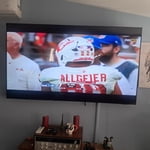
Don’t buy this TV if you watch sports. Everything has tracers and not clear during a game. The 60 refresh rate is wholly Insufficient. Idk how you can make a tv that literally doesn’t show a clear picture. I understand the price Point but as consumer I am counting on th tv to show a clear picture, not the best but clear. This tv does NOT do that. I have a 65” TCL with the same 60 refresh rate and NEVER has this problem. If I could do it over I would spend whatever is needed to get at least a 120 refresh rate

Review from Samsung US
Helpful?7052JBFI9KAV17348165019
reply from Samsung Specialist

Hi, Thank you for your feedback on the Samsung U7900F TV and your experience when watching fast-motion content. If the picture appears blurry or unnatural during high-speed scenes, there are several settings you can adjust to improve motion clarity. Go to: Home > left directional key > Settings > All Settings > Picture > Expert Settings, and review these key settings: Picture Clarity Settings • Off: Disables all motion enhancement • Auto: Automatically adjusts motion clarity based on content • Custom: Enables manual control of: o Judder Reduction: Smooths motion in film-based content o LED Clear Motion: Increases sharpness during fast movement o Noise Reduction: Helps reduce distortion in lower-quality sources Additional Picture Controls • Brightness – Adjust overall image brightness • Contrast – Controls the difference between light and dark areas • Sharpness – Enhances the definition of object edges • Color – Adjusts color intensity for more natural or vivid tones We hope these settings help improve your viewing experience, especially with fast-moving content. If you'd like further assistance, feel free to reach out to Samsung Support at 1-800-SAMSUNG, 8AM – 12AM EST, 7 days a week. LiveChat is also available via the ‘Support’ link on our website. ~ Samsung Specialist

Dec 26, 2025
Mike
4 out of 5 stars review

Good and Great but.........

The 85" Crystal UHD U7900F 4K Smart TV 2025 is good but with the following problems, first, the remote control, it is very hard and sometimes you have to come very closer to the TV for the volume to work. The remote is a problem. Sometimes the remote jumps faster than you press it, I do not know why. Secondly, the TV has no good volume. The highest volume of 100 does not go beyond my sitting room. You need to connect it to a kind of extra speakers for it to sound as loud as you want it sound

Review from Samsung US
Helpful?7052JBFI9KAV17348165019
Feb 5, 2026
GiantsFan
5 out of 5 stars review

Problem with accessing original sat. programming.

[This review was collected as part of a promotion.] Having a problem getting to my original programing. When turned on goes to Samsung TV then I need to use select button on my satellite [Direct TV] remote to take me to my original programing. At times this does not work, and I need to turn off TV and then turn on again to repeat. Is there a better way?

Review from Samsung US
Helpful?7052JBFI9KAV17348165019
Feb 17, 2026
Sj1254
5 out of 5 stars review

Fabulous tv

[This review was collected as part of a promotion.] Absolutely love this TV, the size is great wish it came with a voice remote but still love the tv. I have it on about a hours a day playing kids shows. The colors of the shows are amazing, the picture is so clear. Also I love the storage space on the tv

Review from Samsung US
Helpful?7052JBFI9KAV17348165019
Feb 17, 2026
Terrencetrent
4 out of 5 stars review

Great product

[This review was collected as part of a promotion.] This Tv has impressive resolution with very sharp, clear text and images, which makes both work and streaming look great. The brightness is strong enough to handle a well‑lit room without washing out colors, and dimming it for nighttime use is easy and comfortable on the eyes. Aesthetics are sleek and modern, with slim bezels that make it look clean on the desk and help it blend in with other devices. The built‑in security features and on‑screen menus are straightforward to use, so adjusting settings never feels confusing. Colors have good vibrancy right out of the box, with rich tones for movies and games, and only minor fine‑tuning was needed to get everything looking just right.

Review from Samsung US
Helpful?7052JBFI9KAV17348165019
Nov 6, 2025
InLove
5 out of 5 stars review

Best TV hands down

[This review was collected as part of a promotion.] I absolutely love my new Samsung TV. The picture quality is Great! The sound is wonderful! And I purchased a 75" definitely the biggest screen I've ever owned. Lots of new features compared to the last Samsung TV I had. I would definitely recommend the newer models with the additional features.

Review from Samsung US
Helpful?7052JBFI9KAV17348165019
Nov 1, 2025
LamboX1
5 out of 5 stars review

I like the connectivity and apps

[This review was collected as part of a promotion.] I like the fact that my hands run smoothly with a decent response rate. I also love the fact that the TV has game pass. This gives me access to different games that I didn't have available to me before.

Review from Samsung US
Helpful?7052JBFI9KAV17348165019
Feb 17, 2026
Shanner
4 out of 5 stars review

Excellent value

[This review was collected as part of a promotion.] Overall the Crystal UHD is an excellent TV. You will want to pick out good placement for your TV because too much light can wash out the picture. The image quality is fantastic, and the colors really pop. I am very happy with the purchase.

Review from Samsung US
Helpful?7052JBFI9KAV17348165019