Customer reviews for SAMSUNG 75” Class U7900F Series 4K Crystal UHD Smart TV for
Member photos









 +1528 images
Viewing Options
[This review was collected as part of a promotion.] Just frustrated where each time you turn on the tv you have to select whether you wish to view live tv or stream services. Wish it would just continue with what was previously selected the last time watched.
Great tv
[This review was collected as part of a promotion.] The 75-inch Samsung TV is an impressive centerpiece for any living room, delivering a truly immersive viewing experience. The picture quality is outstanding, with vibrant colors, deep blacks, and sharp detail that make movies, sports, and games come to life. Whether you're watching in a bright room or a darker setting, the brightness and contrast hold up extremely well. The large 75-inch screen size makes a huge difference, especially for family movie nights or gaming sessions. Samsung's smart TV platform is easy to navigate, offering quick access to popular streaming apps like Netflix, YouTube, and Disney+. The interface is smooth and responsive, which adds to the overall user experience. Sound quality is decent for a flat-screen TV, but pairing it with a soundbar or surround system really takes things to the next level. Setup is simple, and the sleek, modern design looks great mounted on a wall or sitting on a stand. Overall, this Samsung 75-inch TV is a fantastic investment if you're looking for a high-quality, large-screen TV with excellent performance, smart features, and a premium feel.
Ok TV
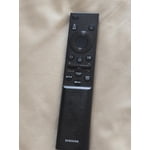
[This review was collected as part of a promotion.] The TV is OK, but the remote control could be a lot better as it has very limited buttons and functions. You can't type in the TV channel you have to select from the TV Guide on the screen or press the up-and-down channel button. The apps on the TV such as YouTube and DIRECTV are a little slow and they are Not as easy to use versus using them on a phone or tablet.
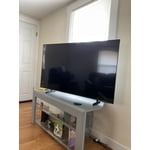
Hi David, Thank you for your feedback. Many buttons on your remote have multiple functions. • Settings/Number/Color: Allows you to easily access your TV's Quick Settings and input channel numbers. • Volume rocker: Push up/down to adjust volume. Press and release quickly to mute. • Long-press Volume button: Hold for more than 1 second to open Accessibility Shortcuts. • RETURN button: Press to go back to the previous menu or screen. While watching TV, it takes you back to the previous channel. These functions allow for a more streamlined experience without adding extra buttons. Learn TV Remote is a feature designed to help users become familiar with the layout and function of each button on the Samsung remote. When enabled, pressing any button (except the Power button, which will still turn off the TV) will prompt the TV to announce the button’s name and its purpose – without affecting TV operation. This teaching mode is especially useful for users who are visually impaired or new to Samsung remotes. To enable this feature, go to: Settings > All Settings > General & Privacy > Accessibility > Learn TV Remote. To exit, simply press the Return key twice. If you’d like more assistance with this feature, please reach Samsung Support at 1-800-SAMSUNG (8AM – 9PM EST Mon – Fri, 8AM – 6PM Sat – Sun). LiveChat agents are also available through the ‘Support’ link on our website. ~ Samsung Advisor
Great value!
[This review was collected as part of a promotion.] I made the decision to buy this TV set due to the brand recognition and the awesome price. I was quite surprised by how great the quality of the picture and ease of working through the remote actually was. This TV is an exceptional product.
The volume for the sound is way to low.
[This review was collected as part of a promotion.] The color is great, the sound sucks. It makes we wish that I didn't buy it. I have to turn it up to 75 to hear what's going on. My last Samsung TV still works with great sound. I just wanted a bigger TV and tje price was decent.
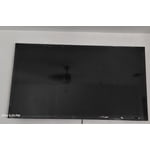
Hi Chris1, Thank you for purchasing Samsung’s U7900F TV and for sharing your feedback regarding low volume. To start, we recommend making sure your TV is running the latest firmware, as updates can include improvements to sound performance: Home > left directional key > Settings > Support > Software Update If volume levels still seem too low, you can improve sound performance by adjusting a few key settings: Sound Mode: Navigate to: Settings > All Settings > Sound > Sound Mode Auto Volume: This feature helps maintain consistent volume levels across content and input sources. Turn it on under: Settings > All Settings > Sound > Expert Settings > Auto Volume = On You can also explore Expert Settings to fine-tune sound output with adjustments for Balance, Equalizer, and more. If you’re considering enhancing your setup, Samsung’s Q- and S-Series Soundbars feature Q-Symphony, which syncs your TV and soundbar speakers for a fuller, more immersive sound experience. For personalized support with these settings or selecting a soundbar to complement your setup, contact Samsung Support at 1-800-SAMSUNG (8AM – 9PM EST Mon – Fri, 8AM – 6PM Sat – Sun) or use LiveChat via the ‘Support’ link on our website. ~ Samsung Advisor
Poor research on my part
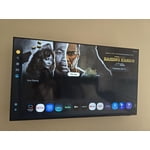
[This review was collected as part of a promotion.] I should have purchased something else because the remote is beyond clunky and the home screen is so cluttered with unusable apps, I just don't get it. Picture and resolution are fine. Sound does not match the lip movement on most channels especially older movies but on my tablet sound is not a problem. Just look at the remote, 50% of it is blank from the YouTube button down to Samsung logo... nothing. There's no fast forward or backwards, you piggy back 3 or 4 functions on a button, and if there are online directions, how would I know about them. Sorry to be critical but you asked. I don't expect you to post this because it is what you want customers to know. I'm stuck with it, though.
Hi Robo, We greatly appreciate your feedback. Please know it will be shared with our internal teams. If you're experiencing lip sync issues: • For external speakers (like a soundbar or receiver), try adjusting: Settings > Sound > Expert Settings > Digital Output Audio Delay. Also set Digital Audio Output Format to Pass-Through to reduce processing delays. • If you're using the TV’s internal speakers, a software update may help improve sync: Settings > Support > Software Update > Update Now If the delay continues across all sources, feel free to reach out to Samsung Support at 1-800-SAMSUNG, available daily from 8AM – 9PM EST Mon – Fri, 8AM – 6PM Sat – Sun. You can also visit the Samsung website and click on ‘Support’ for: • Live Chat • Manuals, Software, & Warranty Info ~ Samsung Advisor
Greatest TV I've ever owned
[This review was collected as part of a promotion.] the TV is awesome it's bright vibrant and you can put it in the mode where it takes care of its own picture mode is awesome great sound resolution is amazing contrast as if the image on the screen is more real than real life and super lightweight for is size absolutely love the TV and all of the features and I can get my phone connect to it through the smart things app absolutely love the TV and all of the features all around the best of tv I've ever had

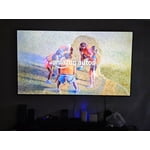

All around GREAT TV!
[This review was collected as part of a promotion.] Best TV I have bought in a long time. Boot time is quick! UI is very user friendly. Picture and sound quality are unmatched, compared to TVs in this class. TV features great aesthetics. Including the thin casing it has. Seemless and easy on the eyes! Will buy another Samsung TV for sure!
Best Picture Clarity and security features!
[This review was collected as part of a promotion.] Upgraded to this 65-inch Samsung, and it has completely transformed my viewing experience. The colors are vibrant, the blacks are deep, and the smart interface is incredibly snappy. Beyond the amazing 4K display, I really appreciate the built-in Knox security features. Knowing my accounts, passwords, and smart home connections are protected directly on the TV gives me great peace of mind. It looks amazing on the wall and performs even better. Highly recommend!
Excellent Picture Quality and Outstanding Value
[This review was collected as part of a promotion.] I recently purchased the Samsung 55" Class Crystal UHD U7900F 4K TV, and I could not be happier with my decision. From the moment I turned it on, the picture quality was impressive. The colors are vibrant, the image is crisp and clear, and the 4K resolution brings movies, sports, and streaming content to life. The setup process was straightforward and user-friendly. Within minutes, I was connected to my Wi-Fi and accessing all of my favorite streaming apps. The smart TV interface is intuitive and responsive, making it easy to navigate between apps and content. I am especially impressed with how well this TV performs in both bright and dark rooms. The Crystal UHD technology delivers excellent contrast and detail, creating an immersive viewing experience. Whether I am watching a blockbuster movie, live sports, or the evening news, the picture remains consistently sharp and vibrant. The design is sleek and modern, fitting perfectly into my living room without taking up unnecessary space. The sound quality is also surprisingly good for a television in this price range. Samsung continues to deliver exceptional quality, and this TV offers tremendous value for the price. If you are looking for a reliable, beautiful, and feature-rich 4K television, I highly recommend the Samsung 55" Class Crystal UHD U7900F.This version reads like a genuine consumer review while highlighting the features most shoppers look for when making a purchase decision.