Skip to Main Content
Sam's Club
Sam's Club
All Departments
All Services
Customer reviews for SAMSUNG 75” Class U7900F Series 4K Crystal UHD Smart TV for
SAMSUNG 75” Class U7900F Series 4K Crystal UHD Smart TV
4.5 out of 5 stars
stars
3,936 ratings3,909 reviews
  1. 5 stars73% (2,886)
  2. 4 stars15% (599)
  3. 3 stars6% (238)
  4. 2 stars2% (92)
  5. 1 star3% (121)

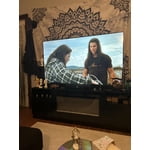
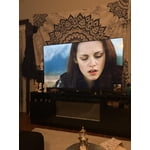
Member photos

  • +1528 images
Sort by |
Showing 701-710 of 3,909 reviews
Jun 5, 2026
Reviewer name: Coreyc
4 out of 5 stars
4 out of 5 stars review

Nice tv, poor remotw

[This review was collected as part of a promotion.] The larger screen size is nice, mostly I need to upgrade to a newer tv that could be updated to work with various apps. The sound from the tv is decent but I opted to go with a sound bar for better overall enjoyment. Picture quality is what you'd expect from Samsung tvs sharp colors and contrast from light to dark. My one dislike is the tiny remote, not sure if this is done to cut cost down or just make it harder to use and navigate systems and channels. If you have hands the size of a toddler then may be suitable but honestly is a joke for such a nice tv. I'm just getting use to the Samsung tv format and Channel selections but it seems to offer a lot of choice yet it's to early to decide if it's worth using much over other streaming options we use regularly.

Review from Samsung US
Helpful?5E42PT4DC65117304274207
Jun 22, 2026
Reviewer name: Boss
5 out of 5 stars
5 out of 5 stars review

Great TV

[This review was collected as part of a promotion.] I love my Samsung's TV! The picture quality is nice and crisp with bright colors and deep color contrast making movies and sports look excellent. The sound is clear and the smart functions are easy to use so I can stream all my favourite apps with ease. It was easy to set up and looks fantastic in my living room with its sleek appearance. Overall it's a fantastic TV with excellent quality and great value. Definitely highly recommended!

Review from Samsung US
Helpful?5E42PT4DC65117304274207
Jun 1, 2026
Reviewer name: Bargainkween
4 out of 5 stars
4 out of 5 stars review

Lovely smart TV

[This review was collected as part of a promotion.] I like the connection to my other samsung devices and accounts. I can get notifications on screen, listen with my earbuds as to not distrupt anyone and download other streaming services easily. The screen is clear and beautiful. The colors and sound blend appropriately. I have had no issues with my purchase. -Happy customer that will probably buy more samsung when needed

Review from Samsung US
Helpful?5E42PT4DC65117304274207
Jul 13, 2026
Reviewer name: Tattood Mama
5 out of 5 stars
5 out of 5 stars review

Unsurpassed picture quality
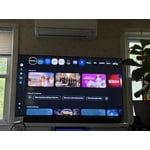
[This review was collected as part of a promotion.] This television blows my mind the brightness color and contrast are superior and the black level is unsurpassed. It is way smarter than I am and I'm pretty smart! I discovered a new things about the abilities of this TV practically every day I strongly urge everyone to sit and experiment and push buttons !

Review from Samsung US
Helpful?5E42PT4DC65117304274207
Jun 19, 2026
Reviewer name: TacotoTheCloud
5 out of 5 stars
5 out of 5 stars review

Great Quality and Value

[This review was collected as part of a promotion.] This is the first Samsung TV I have ever owned and I am impressed! The picture is crystal clear, bright, and the colors are vibrant. The features are easy to use. I love being able to connect my phone to the TV and mirror the screen. I really enjoy the free Samsung TV app, as well as the variety of apps that were pre-programmed on the TV. The remote is sleek, lightweight and simple. For the price, you won't find a higher quality TV. I highly recommend it!

Review from Samsung US
Helpful?5E42PT4DC65117304274207
Jun 22, 2026
Reviewer name: Disappointed
1 out of 5 stars
1 out of 5 stars review

Frustrated

[This review was collected as part of a promotion.] all my samsung tvs have gotten so slow and sluggish with each update. very frustrating just trying to get to the channels that I like to watch. it's gotten so bad we are researching other manufacturers and plan on switching to another brand. sad, We bought only Samsung products for decades and now I won't buy another Samsung product for anything.

Review from Samsung US
Helpful?5E42PT4DC65117304274207
reply from Samsung Advisor

Hi, We appreciate your feedback regarding your U7900FD TV’s performance. If you're experiencing freezing or lag in general response time, please try the following steps: 1. Check for firmware updates – Keeping your TV up to date can resolve many performance issues: Home > left directional key > Settings > Support > Software Update > Update Now 2. Run Device Care – This tool checks system memory, frees up cached data, and closes background apps that could be slowing things down: Home > left directional key > Settings > Support > Device Care > Start Device Care 3. Cold boot your TV – With the TV powered on, press and hold the Power button on your remote for 5+ seconds until the TV restarts. This helps refresh the system. If you're still noticing performance snags after these steps, please contact Samsung Support at 1-800-SAMSUNG (8AM – 9PM EST Mon – Fri, 8AM – 6PM Sat – Sun). You can also connect with a LiveChat agent via the ‘Support’ link on our website. ~ Samsung Advisor

Jun 30, 2026
Reviewer name: KevinM
5 out of 5 stars
5 out of 5 stars review

Crystal UHD picture is great

[This review was collected as part of a promotion.] The picture quality is great, especially for the price. Connected seamlessly to the Samsung sound bar, and makes a great home theatre experience. The color is fully saturated, and the contrast is good. The 4K picture quality from my 4K Disc player is amazing.

Review from Samsung US
Helpful?5E42PT4DC65117304274207
Jun 5, 2026
Reviewer name: Daniel
2 out of 5 stars
2 out of 5 stars review

Fine but not great.

[This review was collected as part of a promotion.] It's fine but sometimes the sound cuts out and you have to power cycle the tv to get it to work again. Also kind of annoying that only the remote that came with it can click the update buttons. Overall a decent tv, but I don't think I'd buy it again.

Review from Samsung US
Helpful?5E42PT4DC65117304274207
reply from Samsung Advisor

Hi Daniel, For optimal performance, please ensure your TV is running the latest firmware. You can check this by going to: Home > left directional key > Settings > Support > Software Update To further optimize performance, try running Device Care, which checks memory, clears unused cached data, and closes background apps: Home > left directional key > Settings > Support > Device Care > Start Device Care If issues continue, please reach Samsung Support at 1-800-SAMSUNG (8AM – 9PM EST Mon – Fri, 8AM – 6PM Sat – Sun). LiveChat is also available via the ‘Support’ link on our website. ~ Samsung Advisor

Jun 5, 2026
Reviewer name: Jody
3 out of 5 stars
3 out of 5 stars review

Nice picture
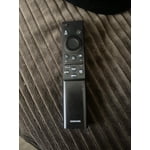
[This review was collected as part of a promotion.] I expected to be able to use voice commands and it doesn't have that feature in 2026. Also I expected the tv to have the time of day available on the tv and I was surprised that it didn't have that feature. It is a beautiful tv even without those features but I would like those simple features

Review from Samsung US
Helpful?5E42PT4DC65117304274207
reply from Samsung Advisor

Hi Jody, Thank you for sharing your review. Your TV Works With Alexa, meaning you’ll need to connect a standalone Alexa device such as an Echo speaker, to control compatible smart home devices and some experiences on your TV. Here are the steps: 1. Download both the Amazon Alexa and Samsung SmartThings apps, if you don't already have them. Both are available for iOS or Android devices. 2. Make sure your Alexa device and TV are both connected to the same Wi-Fi network. 3. Your TV must be enabled within the SmartThings app. If not, make sure you are signed in with your Samsung account on the TV: Settings > All Settings > Samsung Account 4. Log in to the SmartThings app with the same Samsung account. Tap Devices, and if your TV isn’t already shown, tap + to add it to the app. 5. In the Alexa app, enable the SmartThings skill and sign into your Samsung account. This will automatically connect your Samsung TV to Alexa and let you use voice commands to control your television. If you need more help, we’re here. Give us a call at 1-800-SAMSUNG (8AM – 9PM EST Mon – Fri, 8AM – 6PM Sat – Sun). You can also connect with a LiveChat agent through the Support link on our website. ~ Samsung Advisor

Jun 6, 2026
Reviewer name: MemaP
5 out of 5 stars
5 out of 5 stars review

LOVE IT!

[This review was collected as part of a promotion.] LOVE my new Samsung TV!! It's such an amazing picture that I've gone back to watch movies over and over. The quality is so vibrant and bright it keeps my attention better than my old tv. I also love that it's a smart tv and am able to have the apps already there securely.

Review from Samsung US
Helpful?5E42PT4DC65117304274207