Skip to Main Content
Sam's Club
Sam's Club
Customer reviews for SAMSUNG 75” Class U7900F Series 4K Crystal UHD Smart TV for
SAMSUNG 75” Class U7900F Series 4K Crystal UHD Smart TV
4.6 out of 5 stars
stars1,967 ratings1,941 reviews
  1. 5 stars77% (1,513)
  2. 4 stars14% (285)
  3. 3 stars5% (89)
  4. 2 stars2% (34)
  5. 1 star2% (46)

Member photos

  • +759 images
Sort by |
Showing 531-540 of 1,941 reviews
Jun 30, 2025
Nikki2U
5 out of 5 stars review

This TV is Amazing

[This review was collected as part of a promotion.] Using it to watch TV clear picture was an easy set up and the remote is user friendly!

Review from Samsung US
Helpful?5E42PT4DC65117304274207
Aug 31, 2025
Ninssamsung
5 out of 5 stars review

My new Samsung TV has so many features.

[This review was collected as part of a promotion.] The picture is exceptional. So clear and bright. It makes everything you watch an experience

Review from Samsung US
Helpful?5E42PT4DC65117304274207
Feb 24, 2026
DrT
5 out of 5 stars review

Verified Purchase

Good for the price!

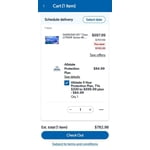
Pretty good for the price. With the 5 year warrantee it should at least last that long!

Helpful?5E42PT4DC65117304274207
Jan 1, 2026
Tammy
4 out of 5 stars review

Verified Purchase

Nice TV

Nice TV remote not user friendly

Helpful?5E42PT4DC65117304274207
Mar 13, 2026
Steven
4 out of 5 stars review

Verified Purchase

Tv

Love it

Helpful?5E42PT4DC65117304274207
May 11, 2026
Ashhood1379
5 out of 5 stars review

Great features

[This review was collected as part of a promotion.] Its amazing.. the picture is crystal clear.. the ultra HD movies are beautiful.. its like looking into the real deal outside world.. ive never seem so much and cought so much on my mystery movies like I do now. Its definitely a 10 star!!

Review from Samsung US
Helpful?5E42PT4DC65117304274207
May 20, 2026
sundown
5 out of 5 stars review

support on tv channels

[This review was collected as part of a promotion.] i love the tv but i have issues watching some channels and the screen of the tv goes and it say tv doesnt support channels and they are channels that the tv has .. and I called my cable company and they say its the tv

Review from Samsung US
Helpful?5E42PT4DC65117304274207
May 11, 2026
DANSOUTHUNTING
5 out of 5 stars review

Gaming

[This review was collected as part of a promotion.] I really enjoy the picture quality. the color definition is really good. Security seems to be well maintained. Brightened, rightness doesn't seem to be a problem. the resolution on the TV is high quality. The size and the thinness of the TV is really, really remarkable.

Review from Samsung US
Helpful?5E42PT4DC65117304274207
May 20, 2026
Sunshine
4 out of 5 stars review

Wall installations

[This review was collected as part of a promotion.] We're having difficulty mounting it on the wall because the back of the mounting bar sits lower. Once we install it, the top side of the TV leans forward, making it feel unstable and like it might fall down. That’s why we had to place it on top of the table instead..

Review from Samsung US
Helpful?5E42PT4DC65117304274207
May 21, 2026
Brian
1 out of 5 stars review

Terrible

[This review was collected as part of a promotion.] Have not been able to connect to internet at all with tv. Not wireless anyway. Doesn’t find any networks. Already hung it up. Wish I never bought it. Feels cheap. Picture isn’t great. Volume constantly creeps up too.

Review from Samsung US
Helpful?5E42PT4DC65117304274207
reply from Samsung Advisor

Hi Brian, Thank you for sharing your experience with Wi-Fi connectivity. If your TV is having trouble connecting to the network, the following steps may help resolve the issue: Signal & Setup Tips: 1. Check TV-to-router distance – Your TV should be within 50 feet of the modem or access point for reliable signal strength. 2. Minimize interference – Turn off nearby wireless devices and make sure there are no physical barriers (stone walls, fireplaces, appliances) between the TV and router. Power Cycle Devices: 3. Restart both your TV and router – Unplug both devices for at least 30 seconds, then plug them back in and allow them to reboot fully. Connection Type: 4. Evaluate your connection method – o If using Wi-Fi, move your router closer to the TV and eliminate any obstructions. o For a more stable connection, we strongly recommend using a wired Ethernet cable. o If already using Ethernet, verify the cable is working by testing it with another device. Run Built-In Diagnostic Tools: 5. Network Test: Settings > Support > Device Care > Self Diagnosis > Smart Hub Connection Test 6. Wi-Fi Check: Settings > Support > Device Care > Self Diagnosis > Wi-Fi Last Resort: 7. Perform a Factory Reset (if issues persist): Settings > All Settings > General & Privacy > Reset > Factory Data Reset. Note that this will return all settings to their original defaults. If these steps don’t resolve the issue, please reach out to Samsung Support at 1-800-SAMSUNG, available from 8AM – 9PM EST Mon – Fri, 8AM – 6PM Sat – Sun. You can also visit the Samsung website and click on ‘Support’ for: • Live Chat • Manuals, Software, & Warranty Info ~ Samsung Advisor