Skip to Main Content
Sam's Club
Sam's Club
All Departments
All Services
Customer reviews for SAMSUNG 85" Class U8000F Series 4K Crystal UHD Smart TV for
SAMSUNG 85" Class U8000F Series 4K Crystal UHD Smart TV
4.5 out of 5 stars
stars
3,010 ratings2,978 reviews
  1. 5 stars71% (2,146)
  2. 4 stars16% (471)
  3. 3 stars7% (199)
  4. 2 stars3% (92)
  5. 1 star3% (102)

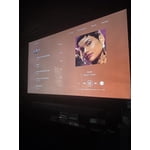
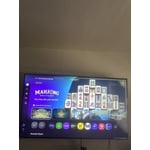
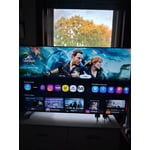
Member photos

  • +932 images
Sort by |
Showing 1-10 of 2,978 reviews
May 17, 2026
Reviewer name: Cj Chill
5 out of 5 stars
5 out of 5 stars review

Great product

[This review was collected as part of a promotion.] I bought this TV to watch all my favorite sports and movies and I been lo ing it since I got it home and make united it on my wall its like a movie Theater at home.

Review from Samsung US
Helpful?3CTS2O15ZY1416007408101
May 7, 2026
Reviewer name: RVH58
5 out of 5 stars
5 out of 5 stars review

Great product at a bargain price!

[This review was collected as part of a promotion.] The resolution and brightness are outstanding. Connectivity and setup were easy. The aesthetics are minimalist and security is adequate.

Review from Samsung US
Helpful?3CTS2O15ZY1416007408101
Aug 26, 2026
Reviewer name: Dubb
5 out of 5 stars
5 out of 5 stars review

Syncs great

The TV is wonderful. I opted for a Samsung because over the years of issues I've had with cell phones and tablets, My Samsung phone has been top notch. This was a big buy for me and the way it operates with my phone is the main reason I went for it. I stream so using it as a virtual chalkboard is a big plus. Can't wait to upgrade to a bigger size!

Review from Samsung US
Helpful?3CTS2O15ZY1416007408101
Oct 28, 2025
Reviewer name: Lupiyoelpiyo
5 out of 5 stars
5 out of 5 stars review

Great Picture, Sound, and Smart Features

[This review was collected as part of a promotion.] I've had the Samsung U8000F Crystal UHD TV for a while now, and honestly, I'm really happy with it. The TV is lightweight and easy to mount, and the picture quality is excellent — colors look bright and natural, and the motion feels super smooth whether I'm watching movies, shows, or even playing games. Even though it's not mainly a gaming TV, it still performs really well with my console. The frames look great, and I haven't noticed any lag. I also thought about getting a soundbar just to upgrade my setup, so I paired it with a Samsung S-Series soundbar — and wow, it blends perfectly. The TV already has surprisingly good built-in sound, but adding the soundbar made it feel like a mini home theater. Another thing I love is how well it works with the rest of my Samsung devices. I use SmartThings to connect my phone, earbuds, and the TV, and it's super convenient being able to control everything from one place. Overall, I think this TV offers amazing quality for its price, with a clean design, sharp visuals, and a sound that honestly doesn't need much help. It fits perfectly in my room setup and definitely makes watching anything more enjoyable.

Review from Samsung US
Helpful?3CTS2O15ZY1416007408101
Aug 5, 2026
Reviewer name: Nezuko26
5 out of 5 stars
5 out of 5 stars review

Great picture!

This tv is perfect for me! The picture quality and sound are fantastic. I've noticed new details in movies Ive seen 100x before. Love the soccer mode too. Also, i like how the hub is set up on this one vs my last Samsung tv. Its easier and faster to use. Highly recommend Samsung tvs.

Review from Samsung US
Helpful?3CTS2O15ZY1416007408101
Jun 10, 2026
Reviewer name: KenS
1 out of 5 stars
1 out of 5 stars review

Connectivity

[This review was collected as part of a promotion.] Can not connect to normal l cable channels in my area for which I pay large monthly bill. Spoke with your help line and we still can't receive the cable stations such as CNN, MSNOW, TMC, ABC, CBS, FOX, etc. which we receive on our other TVs in other rooms of our home. We receive many Samsung channels. We have tried to connect for several months with no resolution. We are very unhappy with this television.

Review from Samsung US
Helpful?3CTS2O15ZY1416007408101
reply from Samsung Advisor

Hi KenS, Thank you for your review. If your U8000F TV isn’t receiving all available channels, first check that your coaxial cable is securely connected. Then, try running Auto Program by going to: Home > left directional key > Settings > All Settings > General & Privacy > Broadcasting > Auto Program If the issue persists, a factory reset may help: Home > left directional key > Settings > All Settings > General & Privacy > Factory Data Reset Please also note: • Broadcasting settings are only accessible when your source is set to TV. • These settings are not available when watching TV via a cable or satellite box. If you continue to experience issues, please don’t hesitate to contact Samsung Customer Support at 1-800-SAMSUNG, available 8AM – 12AM EST, 7 days a week. LiveChat agents and additional resources are also available through the ‘Support’ link on our Samsung website. ~Samsung Advisor

Jul 13, 2026
Reviewer name: Muzthedog
1 out of 5 stars
1 out of 5 stars review

Faulty Remote / Samsung Policy

Do not purchase a Samsung TV. My remote became faulty after about 2 months and it was very difficult to navigate through apps, menus, etc. I contacted Samsung and after a lot of trouble shooting and being on a chat for almost 2 hours the problem was not resolved. I requested a replacement remote with a Mic (a small upgrade for my inconvenience) and Samsung would not honor my request. Even after chatting with a Supervisor they still would not honor my request due to Samsung's policies. Please think twice about purchasing any Samsung product

Review from Samsung US
Helpful?3CTS2O15ZY1416007408101
Nov 22, 2025
Reviewer name: Michi
1 out of 5 stars
1 out of 5 stars review

Terrible HDMI set up

Hdmi ports are out of the back of the TV and not sideways like every other television, deeming them unusable when mounted. We have multiple gaming systems and only one usable port. My fault for not checking before buying, I guess, but very poor design.

Review from Samsung US
Helpful?3CTS2O15ZY1416007408101
reply from Samsung Advisor

Hi Michi, We appreciate your feedback on the design of the U8000F TV. Please know your opinion is important to us and will be shared with our internal teams. If there’s anything we can assist with, please don’t hesitate to call us at 1-800-SAMSUNG, available daily from 8AM - 12AM EST. You can also visit the Samsung website and click on ‘Support’ for: • Live Chat • Manuals, Software, & Warranty Info ~ Samsung Advisor

Mar 21, 2026
Reviewer name: Sick
1 out of 5 stars
1 out of 5 stars review

Please don't buy a Samsung

[This review was collected as part of a promotion.] Bought the TV and in two weeks the TV went out. I have been having so many problems trying to even get a new TV and the TV is under warranty. I've been through so much with Samsung. I will never buy a Samsung product again.

Review from Samsung US
Helpful?3CTS2O15ZY1416007408101
reply from Samsung Advisor

Hi, We're very sorry to hear about your experience. Please contact us so we can better assist you. You can reach us at 1-800-SAMSUNG (8AM – 12AM EST, 7 days a week), or connect with a LiveChat agent by selecting ‘Support’ on our website. ~ Samsung Advisor

Feb 6, 2026
Reviewer name: Frank
1 out of 5 stars
1 out of 5 stars review

BAD PICTURE!!!!!!

THE PICTURE SUCKS! I read all kinds of good reviews before purchasing this TV, but the one we got a bad picture. Depending on what you are watching it's OK on some stuff, but other stuff not so much. I do not recommend buying this TV. If you want a Samsung TV your better off stepping up to the Q7F.

Review from Samsung US
Helpful?3CTS2O15ZY1416007408101
reply from Samsung Advisor

Hi Frank, We appreciate your feedback on the picture quality of Samsung’s U8000F TV. If the image doesn’t quite match your preferences, there are several adjustments you can make to better suit your viewing environment and content type. First, please ensure your TV is running the latest firmware, as updates may include important picture quality enhancements. Go to: Home > Left directional button > Settings > Support > Software Update > Update Now To explore picture mode options, navigate to: Home > Left directional button > Settings > All Settings > Picture > Picture Mode. Options include: • Standard – Ideal for general viewing • Dynamic – Brighter and more vibrant for well-lit spaces • Eco – Optimized for energy efficiency • Movie – Best for viewing in low light • Filmmaker Mode – Preserves the content creator’s intent and disables motion smoothing for supported content You can further customize your image by going to: Settings > All Settings > Picture > Expert Settings, where you can adjust Brightness, Contrast, Color Tone, Sharpness, Contrast Enhancer and more. If you’d like help finding the best picture settings for your preferences, please don’t hesitate to contact Samsung Support at 1-800-SAMSUNG, available 8AM – 12AM EST, 7 days a week. You can also LiveChat with an agent or explore additional resources on our website by clicking the ‘Support’ link. ~ Samsung Advisor