Skip to Main Content
Sam's Club
Sam's Club
All Departments
All Services
Customer reviews for SAMSUNG 65" Class U8000F Series 4K Crystal UHD Smart TV for
SAMSUNG 65" Class U8000F Series 4K Crystal UHD Smart TV
4.5 out of 5 stars
stars
1,440 ratings1,383 reviews
  1. 5 stars74% (1,066)
  2. 4 stars15% (213)
  3. 3 stars5% (74)
  4. 2 stars3% (44)
  5. 1 star3% (43)

Member photos

  • +373 images
Sort by |
Showing 71-80 of 1,383 reviews
Jun 19, 2026
Kevin
4 out of 5 stars review

Good tv software glitchy sometimes

The tv is fairly bright and picture looks good. Its resolution is sharp and has good darkness and black that is true dark in color. The refresh rate is good for high motion video and sports and action events look good on the tv. It’s a good tv only thing is it has had a few software glitches that required a restart to clear

Review from Samsung US
Helpful?23IWKCJCPHCF15992409490
Jun 4, 2026
Valentine
5 out of 5 stars review

Perfect
[This review was collected as part of a promotion.] I was in dire need for a new television for my bedroom as my old one has broken. So I invested in a samsung television and let me tell you, I can't believe the difference. I was so scared that I would have to mess with the brightness and the contrast just to enhance my movie watching experience, but , no. It's literally perfect. Have i just been missing out on effortless viewing my whole life? The answer is yes. The picture is clear and the sound is immaculate. Thank you Samsung

Review from Samsung US
Helpful?23IWKCJCPHCF15992409490
Jun 5, 2026
All Samsung
4 out of 5 stars review

TV is GREAT. Remote is HORRIBLE
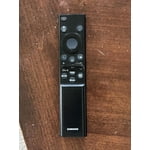
[This review was collected as part of a promotion.] This is my 6th or 7th Samsung TV and we have been happy with them all. But the remote on this newest one is terrible, hard to use and doesn't always respond. Nor does it seem to have a speak function.

Review from Samsung US
Helpful?23IWKCJCPHCF15992409490
Jun 20, 2026
Ednircs
5 out of 5 stars review

learning curve on the remote.

I love it for NASCAR, can't wait for the NFL season. Watching Landman and Marshalls on it was like a new experience. The picture detail was awesome. No pixelation here. It looks like you are sitting on the opposite side of a wall, watching through a window into that world

Review from Samsung US
Helpful?23IWKCJCPHCF15992409490
Jun 5, 2026
Meaux
4 out of 5 stars review

Great visual experience

[This review was collected as part of a promotion.] This is an excellent product. The picture is clear and I love the color differentiation. Streaming is smooth with the only glitches originating from the source. The reason for only four stars is you can't get all streaming services with the ultra units.

Review from Samsung US
Helpful?23IWKCJCPHCF15992409490
Jun 26, 2026
Watch me watch you
5 out of 5 stars review

Nothing beats the picture quality

I've personally always gone with the Samsung brand when it comes to tv's and this one is no different. It gives me everything that I ask for. Beautiful brightness within the led screen, the picture quality is immaculate, the refresh rate is fast so I don't get any lag within the picture, and the best part about it is I partnered it with the Samsung sound bar with subwoofer and I use my tv everyday I would never choose another brand!!!

Review from Samsung US
Helpful?23IWKCJCPHCF15992409490
Jun 6, 2026
Nisey
2 out of 5 stars review

Good features poor connectivity

[This review was collected as part of a promotion.] The picture quality is terrific and the Samsung television channels do provide some good viewing programs. My biggest complaint is its inability to sync properly with my cable box and the television will not allow me to connect my Roku streaming device. If I could return this television for another I would, but I've held on to it too long.

Review from Samsung US
Helpful?23IWKCJCPHCF15992409490
reply from Samsung Advisor

Hi Nisey, We appreciate you sharing the issues you’re experiencing when connecting your U8000FD TV to your cable box. To ensure everything is set up correctly, we recommend using the Connection Guide, which provides step-by-step instructions for connecting external devices. Navigate to: Home > left directional key > Connected Devices > Connection Guide Also, please double-check that your cable box is powered on and that the HDMI cable is securely connected. To change input sources, go to: Connected Devices > Sources You can also run HDMI Troubleshooting, which checks the connection between your TV, HDMI cable, and external device. This takes approximately 2 minutes and can be found under: Connected Devices > Connection Guide > Video Device > HDMI Troubleshooting Finally, please ensure that the broadcast signal or network your cable box is connected to is functioning properly. If you continue to experience issues, don’t hesitate to reach out to Samsung Support at 1-800-SAMSUNG (8AM – 9PM EST Mon – Fri, 8AM – 6PM Sat – Sun), or reach us via text 24/7. You can also visit ‘Support’ on our website for: • Live Chat • Manuals, Software, & Warranty Info ~ Samsung Advisor

Jun 5, 2026
BobW
2 out of 5 stars review

Issues may cause us to switch away from Samsung

[This review was collected as part of a promotion.] I may switch away from Samsung although I have purchased all my TVs and computer screens Samsung. Problem is the remote is too small and touchy, the mute same button as up/down volume is a bad choice, keep muting when only want to change volume. The remote only for on/off function some computer screens aggravating if using a PC. The menu on TV is frustrating to use and navigate. I can only say that someone over thought these products. Changing TV input frustrating to navigate to. Think Roku, keep it simple and adjust the remote so that each time you pick it up or put it down the buttons are not pressed and TV mute or changes. That NEVER happens with Roku type remote or the larger 3rd party remotes.

Review from Samsung US
Helpful?23IWKCJCPHCF15992409490
reply from Samsung Advisor

Hi BobW, Thank you for sharing your experience. Samsung remotes are designed to offer convenient control, but we understand if you’d prefer to use a universal remote. Many third-party remotes work well with Samsung TVs, though setup steps may vary by brand and model. To get started, we recommend checking the manufacturer’s instructions for programming codes and pairing methods. If you run into any trouble or have compatibility questions, Samsung Support is happy to help. You can reach us at 1-800-SAMSUNG (8AM – 9PM EST Mon – Fri, 8AM – 6PM Sat – Sun). LiveChat agents are also available at the ‘Support’ link on our website. ~ Samsung Advisor

Jun 11, 2026
kinkyboots
5 out of 5 stars review

BRIGHT, BIG, BEAUTIFUL IN YOUR FACE COLOR
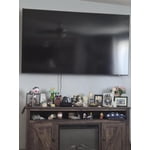
[This review was collected as part of a promotion.] When our old TV died, I had a hard time thinking about a brand of TV we wanted to buy. I did a consumers report deep dive and came up with Samsung. The crisp, bright, and beautiful resolution of this TV was the best I've seen in a long time. No. Now mind you we've only purchased vizio brand tvs but I went be going back to them.

Review from Samsung US
Helpful?23IWKCJCPHCF15992409490
Jun 20, 2026
Ricc
4 out of 5 stars review

Nice TV but not without issues

Well packaged. Easy set up. Clear picture and sound. 2 weeks in, all apps stopped working. A YouTube search told me to fix any Samsung issues try doing a reboot by holding the power button down. That worked thankfully. Hoping the issue does not repeat. App responsiveness is slow.

Review from Samsung US
Helpful?23IWKCJCPHCF15992409490