Skip to Main Content
Sam's Club
Sam's Club
All Departments
All Services
Customer reviews for LG 55" Class UA7700 Series 4K UHD Smart TV for
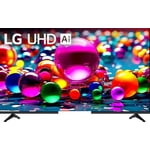
LG 55" Class UA7700 Series 4K UHD Smart TV
4.2 out of 5 stars
stars
116 ratings76 reviews
  1. 5 stars61% (71)
  2. 4 stars19% (22)
  3. 3 stars8% (9)
  4. 2 stars5% (6)
  5. 1 star7% (8)

Member photos

Sort by |
Showing 51-60 of 76 reviews
Aug 14, 2025
Booberry22
1 out of 5 stars review

Awful tv

It wants to update every app and it hangs up on YouTube tv. Remote is very sensitive and the tv lags.

Review from lg.com
Helpful?6NED4DW4ASZZ15850524784
reply from LG Digital Team

Hey there. We get it—tech should make life easier, not more complicated. If your LG TV is lagging or struggling with app updates, a few quick tweaks in the settings menu can often bring things back up to speed. To resolve this, check out these troubleshooting steps here: https://www.lg.com/us/support/help-library/tv-video-lag--20150774974899. If this persists after these steps, send us your contact details at lg.sprinklrsuppport.com. Your comfort and convenience matter to us, and we’re always working to improve. Thanks for sharing your experience—it helps us serve you better. ^David

Aug 5, 2025
Nikki 75
4 out of 5 stars review

Amazing Picture

Great picture and the AI features are great! I gave it a four because it didn't have the magic remote!

Review from lg.com
Helpful?6NED4DW4ASZZ15850524784
reply from LG Digital Care Team

We’re thrilled to hear you’re loving the amazing picture quality and AI features—your appreciation means the world to us, Nikki! We totally understand how important the Magic Remote is in bringing that seamless LG experience to life, and we’re here to help make every moment with your TV feel effortless and immersive. Your feedback is invaluable, and we’re so grateful you chose LG to be part of your home entertainment. Here’s to many more stunning views ahead! 📺✨ ^Anthony

Jul 30, 2025
CantCme
3 out of 5 stars review

Why Do I have to spend extra for a remote?

Pros: great picture. Cons: no magic remote. I bought an LG sound bar and can not control it with TV remote supplied.

Review from lg.com
Helpful?6NED4DW4ASZZ15850524784
reply from LG Digital Care Team

Thanks for sharing your thoughts about the 65UA7700PUB—your praise for its picture quality means a lot. 🌟 We’re thrilled it delivers a stunning visual experience! We hear your feedback on the remote setup, and we understand how important seamless control is for an elevated entertainment experience. While the Magic Remote isn’t bundled with every model, it’s designed to unlock intuitive control and richer compatibility across LG devices, including sound bars. That said, your insight helps us better tailor our offerings to what matters most to our LG family. If you’re ever curious about enhancing your setup or exploring remote options, our team @LGUSSupport through our social media platforms are always ready to assist. Your voice shapes the future of innovation—and we’re thankful you shared it with us. ^Anthony

May 12, 2026
KathyKF
2 out of 5 stars review

Poor set up information.

We bought this LG television because we had other LG products. Unfortunately, we found the TV impossible to set up. The instructions were hard to understand and there weren't even very basic instructions included. It was so frustrating that we returned the TV and are now trying to decide on a different brand instead.

Review from lg.com
Helpful?6NED4DW4ASZZ15850524784
reply from LG

Hello, Kathy. We appreciate you sharing your experience with your LG 50UA7700AUA, and we always want setup to feel smooth and straightforward from the moment you unbox the TV. Our TVs include an on‑screen guided setup, and many customers find that walking through the steps in our Getting Started guide makes the process much clearer. You can review it here: https://www.lg.com/us/support/tvs/getting-started If you’d like us to walk through the setup process with you or review anything further for future reference, feel free to email us at lgdigitalcare@lg.sprinklrsupport.com. LG Digital Care ^James

Mar 15, 2026
ALLAN
1 out of 5 stars review

NEW: Unwanted ads

It just started playing ads while it is on sleep mode 🤮🤢 This was just introduced in a software update last week.

Helpful?6NED4DW4ASZZ15850524784
reply from LG Digital Customer Care

Hi, Allan. Thanks for reaching out. We understand the importance of having your LG TV (55UA7700PUB) model operate the way you expect, especially when the TV is in sleep mode. A helpful step you can try is going to Settings → All Settings → General → System → Additional Settings → Home Settings, then switching Home Promotion off. This option often prevents unexpected ads from appearing on webOS TVs. For more guidance, visit https://www.lg.com/us/support/product/lg-55UA7700PUB.AUSQ. If the behavior continues, we’d be glad to take a closer look. Please send us an email at lgdigitalcare@lg.sprinklrsupport.com so our team can assist you further. We're here to help. ^Juvy

May 26, 2026
Disappointed 26
1 out of 5 stars review

Randomly powers on

Our TV has been nothing but problems since we got it. It terms on randomly. It has had the motherboard replaced and still has problems. We can hear channels that we don't have on. LG channels turn on with no one around.

Review from lg.com
Helpful?6NED4DW4ASZZ15850524784
reply from LG

Hello. Thanks for sharing what’s been going on with your LG 75UA7700AUA TV. We appreciate you walking us through the random powering‑on, unexpected audio, and the channel behavior you’ve been seeing — we want your TV to feel reliable every time you use it. When a TV turns on by itself or switches to channels unexpectedly, it can sometimes be tied to features like Quick Start+, timers, or external devices sending signals through HDMI‑CEC. Turning off Quick Start+, checking that no timers are enabled, and disconnecting external devices one at a time can help narrow down the source. Power‑cycling the TV by unplugging it for a full minute can also help reset the internal board after a repair. You can refer to this helpful link for guidance on the intermittent power issues you're encountering with your LG TV: https://www.lg.com/us/support/help-library/lg-tv-troubleshooting-tv-intermittently-powers-onoff--1427121212479 If you’d like us to take a closer look at your case or continue troubleshooting with you, feel free to reach out to lgdigitalcare@lg.sprinklrsupport.com. ^James

Nov 26, 2025
JO
4 out of 5 stars review

NO instructions so cannot operate

I just got this tv after doing research and deciding that this was the tv I wanted and that Sam's Club offered the most for the money. I was excited to get it and I got it standing upright on a bureau, turned it on, found the only remote that came with it, the magic remote. It came on, I clicked everything on the magic remote and all I could do was put it on English. I looked thru the box and there was not one spec of instructions. That is where I am, on English and cannot get further. I think I will love it, once I can find something that guides me in actually using it. If you get this tv, get a regular remote, one that you understand and some instructions.

Helpful?6NED4DW4ASZZ15850524784
Feb 14, 2026
Crab69
3 out of 5 stars review

Value Driven

Nice picture with lots of viewing options! This is a good value, especially when on sale! The bells and whistles are many and the thin geometry makes it an attractive wall mount. Processor is a bit slow and LG+ Gallery functionality is not as expected due to it lacking an active auto brightness sensor to adjust brightness to changing room lighting conditions automatically. All around good value driven 4K UHD TV!

Review from lg.com
Helpful?6NED4DW4ASZZ15850524784
reply from LG

Hello. Thanks for sharing your experience with your LG TV. It’s great to hear you’re enjoying the picture quality, viewing options, and the slim design—those are definitely standout strengths of this model. Your notes about the processor speed and the LG+ Gallery brightness behavior give helpful insight into how the TV is performing in your space, and feedback like this is valuable for us to review. To allow us to properly investigate the details of your specific product model and to see how we can assist with your LG TV features and performance issue being encountered, please send us an email at lgdigitalcare@lg.sprinklrsupport.com if you need further assistance. You can also refer to this helpful link for reference on LG TV features and settings: https://www.lg.com/us/support/help-library/lg-tv-picture-quality-and-optimization--20152175493545 ^James

Feb 19, 2026
TomB
4 out of 5 stars review

Clue to set up, patience,

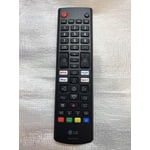
I am an older male without any help from younger people. The remote setup took me over two hours to somewhat master. My cat was having a great time chasing the pointer. The remote did not have any instructions and had all unfamiliar buttons. My wife told me to quit trying several times, box it up, and take it back to Sams. Finally almost figured it out, except pairing to my BTES universal remote, it will not turn my set off The color and sound are above average. I would suggest a printout of how the remote buttons are for, sure they have it on line but that would save others the time to figure it out for older adults

Helpful?6NED4DW4ASZZ15850524784
Jul 21, 2026
LARRY BK
2 out of 5 stars review

Not Happy. Picture regularly Blurry and Looping.

Unlike my other 2 TVs including another LG this regularly has Blurry picture and looping. Unhappy for the Quality!

Review from lg.com
Helpful?6NED4DW4ASZZ15850524784
reply from LG

Hi, Larry. We appreciate you sharing your thoughts and review regarding your LG 65UA7700AUA TV. We recognize your experience with the blurry picture quality and screen looping on your unit. To help improve picture clarity and resolve display performance issues, ensure your TV's software is updated to the latest version and inspect your connected HDMI cables for a secure connection. For step-by-step guidance on picture issues, you can review our support guides at https://www.lg.com/us/support/help-library/lg-tv-troubleshooting-a-blurry-screen-on-an-lg-tv--20153130477848?srsltid=AfmBOoqp_XzVdbXand5EBo4C24bZGjD6dlF5RX9DOE3Ik0B3K88-FdLz and https://www.lg.com/us/support/help-library/lg-tv-troubleshooting-continuous-screen-flickering--20154896543894?srsltid=AfmBOoq_JCggGP2kSiPISPHGCNb4SEHBsQaQHV1zpr7NcnnWvbkWLJza. We want to help ensure your home entertainment setup operates perfectly and comfortably for your household. Please send us an email at lgdigitalcare@lg.sprinklrsupport.com if you need further support. ^James