Skip to Main Content
Sam's Club
Sam's Club
All Departments
All Services
Customer reviews for LG 65" Class UA7700 Series 4K UHD Smart TV for
LG 65" Class UA7700 Series 4K UHD Smart TV
3.9 out of 5 stars
stars
147 ratings91 reviews
  1. 5 stars54% (79)
  2. 4 stars17% (25)
  3. 3 stars11% (16)
  4. 2 stars4% (6)
  5. 1 star14% (21)

Member photos

  • +10 images
Sort by |
Showing 81-90 of 91 reviews
Nov 4, 2025
Reviewer name: Dad
5 out of 5 stars
5 out of 5 stars review

Verified Purchase

Great picture limited connections

Great picture

Helpful?3O3N5M4V5LCZ15834722736
Jul 15, 2025
Reviewer name: disappointed010
1 out of 5 stars
1 out of 5 stars review

Updates make it worse

Performance gets worse with each update. "Free Channels" now take forever to load.

Review from lg.com
Helpful?3O3N5M4V5LCZ15834722736
reply from LG Digital Care Team

Thanks for sharing your feedback, we know it’s frustrating when updates seem to slow things down instead of improving them. We'd like to help look into this, reach us through social media @LGUSSUpport. We’ll be glad to check if there are any optimizations or resets that could help get things running smoother again! ^Jose

Dec 28, 2025
Reviewer name: Reither
3 out of 5 stars
3 out of 5 stars review

Inconsistent

Picture is inconsistent and if poor color quality with no real process if improvement

Review from lg.com
Helpful?3O3N5M4V5LCZ15834722736
reply from LG

Hi. Thank you for sharing your experience with your LG TV. The way you described the inconsistent picture quality and color performance gives us a clear sense of what you’re seeing on your screen, and we appreciate you taking the time to point it out. To allow us to properly investigate the details of your specific product model and to see if there is anything we can do to assist with this picture‑quality and color‑adjustment issue being encountered, please send us an email at lgdigitalcare@lg.sprinklrsupport.com if you need further assistance. You can also refer to this helpful link for picture and color optimization steps: https://www.lg.com/us/support/help-library/lg-tv-picture-quality-and-optimization--20152175493545 ^James

Mar 6, 2026
Reviewer name: Michael
1 out of 5 stars
1 out of 5 stars review

No mute on remote = dealbreaker. Menu's messed up too. Returning.

Helpful?3O3N5M4V5LCZ15834722736
reply from LG Digital Customer Care

Hi, Michael. Thanks for sharing your thoughts on the LG TV (65UA7700PUB) model. We understand how important it is to have a remote that meets your everyday needs, and we really appreciate your feedback on the mute function and menu navigation. For your current unit, one helpful step you can try is checking the Quick Settings panel on the TV itself, as many LG UHD models allow you to access mute and audio controls directly through the on‑screen interface, even if the remote layout feels limited. For more guidance, visit https://www.lg.com/us/support/product/lg-65UA7700PUB.AUSQ. We’d be glad to take a closer look at this for you. Please send us an email at lgdigitalcare@lg.sprinklrsupport.com. Our team will be ready to help. ^Juvy

Aug 19, 2025
Reviewer name: Bobden
5 out of 5 stars
5 out of 5 stars review

Verified Purchase

Great TV

[This review was collected as part of a promotion.] Television has a good quality picture and was easy to set up

Review from lg.com/uk
Helpful?3O3N5M4V5LCZ15834722736
Jul 7, 2025
Reviewer name: jaxjohnny
2 out of 5 stars
2 out of 5 stars review

great picture, terrible user interface

Two stars only because the clarity is very good. The TV picture is great. However, the user interface running the device is terrible. It barely responds to the remote control. Instead of a button in the center of the directional arrows, there is a scroll wheel. But the scroll wheel does not do what you expect it to do, instead of moving from icon to icon, it activates a remote pointer mouse. Well the pointer mouses accuracy is horrendous. It jumps all over the screen, it clicks where you don't want it to, and doesn't click where you want it to. My recommendation for you before buying any television is to get the remote from sales and operate the tv, not just watch the high-resolution picture on display. This tv is very difficult to navigate. And there is no place to disable this annoying feature. Also, do not be fooled by the AI tag, this is NOT AI. The help feature they call chatbot, does not give prompts, it is merely a pre-defined set of questions and answers. Maybe they have some AI running in the background recording all you do so it can present content you are interested in, but even that is NOT AI, but simply maching learning and recording. don't be fooled, get the remote from sales, operate the TV. Make sure you are good with how this works. Also, the chromecast and apple air play barely work. I was finally able to use them both, but it seems to hang on to the connection after disconnection, so a second user cannot also cast via apple. The response time is slow and laggy when it finally does connect.

Review from lg.com
Helpful?3O3N5M4V5LCZ15834722736
May 31, 2025
Reviewer name: ALICE
5 out of 5 stars
5 out of 5 stars review

Verified Purchase

Lg tv

Was a little getting used to. It works wonderfully and the picture quality is great!

Helpful?3O3N5M4V5LCZ15834722736
Nov 5, 2025
Reviewer name: KD JOHNSON
3 out of 5 stars
3 out of 5 stars review

OK BUT

BIG PROBLEM I NEED TV THAT SITS ON TABLE THE LEGS ARE TOO FAR APART WHY LG DOES NOT MAKE TV STAND IN MIDDLE OF TV VS LEGS ON SIDES HAD TO RETURN

Review from lg.com
Helpful?3O3N5M4V5LCZ15834722736
reply from LG

Hello. Thank you for sharing your experience with your LG TV. We understand how important it is for a TV to fit your setup, and wide-set legs can be limiting when placing the unit on narrower furniture. While many LG TVs are designed with side-positioned legs for stability and style, select models do offer center-mounted stands or are compatible with third-party pedestal bases and wall mounts. For reference, you can explore LG TV specifications and stand options here: https://www.lg.com/us/tvs. To allow us to properly investigate the details of your specific product model and to see if there is anything we can do to assist with this TV stand configuration issue being encountered, please send us an email at lgdigitalcare@lg.sprinklrsupport.com if you need further assistance. ^James

Jul 21, 2025
Reviewer name: PJ
1 out of 5 stars
1 out of 5 stars review

Verified Purchase

Came damaged.
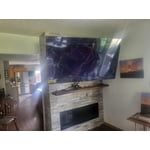
Cane damaged

Helpful?3O3N5M4V5LCZ15834722736
reply from LG Digital Customer Care

Hi there. Thank you for sharing your experience with us regarding your LG 65&#34; Class UA7700 Series 4K UHD Smart TV. We understand that your unit arrived damaged. For issues concerning products purchased from Sam&#39;s Club, we recommend contacting Sam&#39;s Club directly, as they handle returns and replacements for items purchased through their platform. <br />https://www.samsclub.com/ip/lg-65-ua77-series-4k-uhd-ai-smart-tv/15834722736<br />Please send us a private message on Social Media &#64;LGUSSupport and our team will be more than happy to explore possible solutions. We appreciate your patience. —Renzo

Jun 20, 2025
Reviewer name: jjjjjjjjjjjj
1 out of 5 stars
1 out of 5 stars review

NO where can I find a list of the 300 channels you offer for free.

Review from lg.com
Helpful?3O3N5M4V5LCZ15834722736
reply from LG Digital Team

We got you! LG Channels offers over 300 free live and on-demand channels on your LG Smart TV—no subscriptions or logins needed. You’ll find a wide variety of content, including news, sports, movies, music, lifestyle, and kids' entertainment. To view the complete list of channels, press the Home button on your LG Magic Remote and open the LG Channels app. From there, you can browse categories or access the built-in channel guide. The lineup may vary by region and is updated regularly with new content. For the latest list, visit the official LG Channels here: http://spr.ly/64284kUIw.. You can check out these tips and tricks to surf our LG Channels here: http://spr.ly/64294kUIb. It’s all designed to bring more entertainment to your screen and is free and easy to access. For more feedback or questions, private message us on social media @LGUSSupport . We're always here to help! ^David