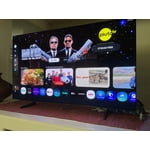
Join Now
Skip to Main Content
Sam's Club
Sam's Club
All Departments
All Services
Customer reviews for SAMSUNG 55" Class U8000F Series 4K Crystal UHD Smart TV for
SAMSUNG 55" Class U8000F Series 4K Crystal UHD Smart TV
4.5 out of 5 stars
stars
2,032 ratings1,963 reviews
  1. 5 stars72% (1,460)
  2. 4 stars15% (311)
  3. 3 stars6% (118)
  4. 2 stars3% (69)
  5. 1 star4% (74)

Member photos

  • +590 images
Sort by |
Showing 961-970 of 1,963 reviews
Jul 6, 2026
Reviewer name: Kelly O
3 out of 5 stars
3 out of 5 stars review

It was good for a couple weeks

[This review was collected as part of a promotion.] The TV was great for the first two weeks or so then it became unresponsive with the remote and then the picture started to dim. We had no choice but to return it.

Review from Samsung US
Helpful?43WYLKDSIONN15546751433
Jul 5, 2026
Reviewer name: RoD18
4 out of 5 stars
4 out of 5 stars review

Overall Good product
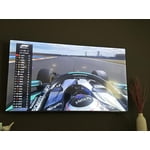
[This review was collected as part of a promotion.] Overall great product for the money. Wish Samsung kept the “one connect” feature. Brightness only good during “soccer” mode but colors are way off and picture looks fake.

Review from Samsung US
Helpful?43WYLKDSIONN15546751433
May 20, 2026
Reviewer name: YellowFlicker
3 out of 5 stars
3 out of 5 stars review

Night scene

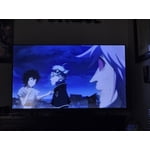
[This review was collected as part of a promotion.] I really am impressed with this TV. The colors are bright and vibrant BUT when the scene goes to a night scene it's too dark. Sometimes it's hard to see what is happening..

Review from Samsung US
Helpful?43WYLKDSIONN15546751433
reply from Samsung Advisor

Hi, We’re sorry to hear you’re not fully satisfied with the picture quality on your Samsung U8000F TV. If the image appears too dark, we suggest disabling certain energy-saving features, which can automatically adjust brightness and affect how the screen looks. Go to: Settings > All Settings > General & Privacy > Power and Energy Saving, then turn off Brightness Optimization, Energy Saving Solution, Motion Lighting, and/or Contrast Enhancer. You can also adjust the Picture Mode to better suit your environment: Settings > All Settings > Picture > Picture Mode • Standard – Default mode for general viewing • Dynamic – Brighter and clearer, ideal for well-lit rooms • Movie – Best for dark room viewing • Eco – Energy-saving mode • Filmmaker Mode – Preserves content as intended by creators To fine-tune brightness, go to: Home > left directional key > Settings > All Settings > Picture > Expert Settings, then adjust the Brightness level (0–50) to your preference. Lastly, please make sure your TV is running the latest firmware: Home > Home > left directional key > Settings > Support > Software Update > Update Now We hope these tips help improve your viewing experience. If you need further support, feel free to contact us at 1-800-SAMSUNG, 8AM – 9PM EST Mon – Fri, 8AM – 6PM Sat – Sun, or chat with us online via the ‘Support’ link on our website. ~ Samsung Advisor

May 21, 2026
Reviewer name: Rowdy
2 out of 5 stars
2 out of 5 stars review

NNOT IMPRESSED

[This review was collected as part of a promotion.] Not at all impressed. Mostly due to the high cost for an average TV that could be bought for much less money on another brand.

Review from Samsung US
Helpful?43WYLKDSIONN15546751433
reply from Samsung Advisor

Hi Rowdy, We appreciate your feedback on the quality of Samsung’s U8000F TV. If the image you’re seeing isn’t to your liking, there are several picture settings you may want to adjust. First, make sure your TV is up to date. To check for the latest version, go to: Home > Left directional button > Settings > Support > Software Update > Update Now. If the image doesn’t quite match your preferences after updating/checking for updates, there are several settings you can adjust to better suit your viewing environment. To explore picture mode options, go to: Home > Left directional button > Settings > All Settings > Picture > Picture Mode. Available modes include: 1. Standard – Default mode for general viewing 2. Dynamic – Brighter and sharper for well-lit rooms 3. Eco – Optimized for energy saving 4. Movie – Best for dark room viewing 5. Filmmaker Mode – Preserves the director’s intended look and feel (automatically enabled for supported content) You can also fine-tune settings like brightness, contrast, sharpness, and more by navigating to: All Settings > Picture > Expert Settings If you’d like help finding the best setup for your preferences or if there are other features that are leaving you unsatisfied, please don’t hesitate to contact Samsung Customer Support at 1-800-SAMSUNG, available from 8AM – 9PM EST Mon – Fri, 8AM – 6PM Sat – Sun. You can also visit the Samsung website and click on ‘Support’ for: • Live Chat • Manuals, Software, & Warranty Info ~ Samsung Advisor

Jul 6, 2026
Reviewer name: Luke
3 out of 5 stars
3 out of 5 stars review

Good for what it is

[This review was collected as part of a promotion.] Does have a pretty good picture worked great for awhile then started freezing and couldn't change the channels had to factory reset it and start over

Review from Samsung US
Helpful?43WYLKDSIONN15546751433
May 20, 2026
Reviewer name: Lito
5 out of 5 stars
5 out of 5 stars review

Watch the news

[This review was collected as part of a promotion.] Everything is good to my Samsung tv… I've got 70 inches at the living room and the other room with my parents 32 inches Samsung at mine 50 inches Samsung tv.. that's why I love Samsung..

Review from Samsung US
Helpful?43WYLKDSIONN15546751433
Jun 26, 2026
Reviewer name: Chap
1 out of 5 stars
1 out of 5 stars review

Unfortunately, the TV is trash.

[This review was collected as part of a promotion.] The lightweight TV tilted over and the screen became damaged Will never by a TV product. However, love your cell phones

Review from Samsung US
Helpful?43WYLKDSIONN15546751433
reply from Samsung Advisor

Hi Chap, We are very sorry to hear about your experience. If there’s anything we can assist with, please don’t hesitate to call us at 1-800-SAMSUNG (8AM – 9PM EST Mon – Fri, 8AM – 6PM Sat – Sun), or reach us via text anytime. You can also visit ‘Support’ on our website for: • Live Chat • Manuals, Software, & Warranty Info ~ Samsung Advisor

Jun 20, 2026
Reviewer name: Bill
5 out of 5 stars
5 out of 5 stars review

Easy Setup!

[This review was collected as part of a promotion.] TV was easy to unpack through setup. Selling point was the audio output because we use a receiver for surround sound. This is our third Samsung and they all have been great.

Review from Samsung US
Helpful?43WYLKDSIONN15546751433
May 27, 2026
Reviewer name: Yoyoh
5 out of 5 stars
5 out of 5 stars review

Color is amazing!
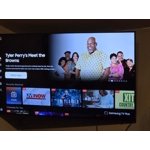
[This review was collected as part of a promotion.] The color on this tv is absolutly amazing! Its sharpness is great also! Would recomend 100x over!

Review from Samsung US
Helpful?43WYLKDSIONN15546751433
May 21, 2026
Reviewer name: dmp0503
3 out of 5 stars
3 out of 5 stars review

Problems with sound

[This review was collected as part of a promotion.] Sound is fuzzy, mostly noticeable during music, but ocassionally when characters are speaking. No idea how to address this. ,

Review from Samsung US
Helpful?43WYLKDSIONN15546751433
reply from Samsung Advisor

Hi dmp0503, Thanks for sharing your experience with your U8000F TV. Unusual sounds can come from different sources, so first check whether it’s from the TV speakers, an external device (like a soundbar), or the back of the TV. • For external audio, ensure cables are connected to the correct output • If using antenna or cable, check signal strength: Settings > Support > Device Care > Self Diagnosis > Broadcast Signal • Popping sounds from the back may be due to thermal expansion - this is normal and not a malfunction • Run a Sound Test to troubleshoot: Settings > Support > Device Care > Self Diagnosis > Sound Test If the issue continues, please contact Samsung Support at 1-800-SAMSUNG, available from 8AM – 9PM EST Mon – Fri, 8AM – 6PM Sat – Sun. You can also visit the Samsung website and click on ‘Support’ for: • Live Chat • Manuals, Software, & Warranty Info ~ Samsung Advisor