Skip to Main Content
Sam's Club
Sam's Club
All Departments
All Services
Customer reviews for SAMSUNG 55" Class U8000F Series 4K Crystal UHD Smart TV for
SAMSUNG 55" Class U8000F Series 4K Crystal UHD Smart TV
4.5 out of 5 stars
stars
2,032 ratings1,963 reviews
  1. 5 stars72% (1,460)
  2. 4 stars15% (311)
  3. 3 stars6% (118)
  4. 2 stars3% (69)
  5. 1 star4% (74)

Member photos

  • +590 images
Sort by |
Showing 951-960 of 1,963 reviews
May 19, 2026
Reviewer name: Modiodi
5 out of 5 stars
5 out of 5 stars review

Love my Samsung TV

[This review was collected as part of a promotion.] I love my Samsung TV It's my 2nd. I love all of Samsung's products! I also own the Fold 5 and the S25 ultra just to name a couple. Samsung never disappoints!

Review from Samsung US
Helpful?43WYLKDSIONN15546751433
Jul 6, 2026
Reviewer name: Willy
5 out of 5 stars
5 out of 5 stars review

Great pictures

[This review was collected as part of a promotion.] Awesome smart tv for the fraction of the price. , great color, brightness , contrast, upscaling and uniformity . W bit slow on powering on, maybe my enthernet mbps ha ha ha.

Review from Samsung US
Helpful?43WYLKDSIONN15546751433
May 27, 2026
Reviewer name: Yoyoh
5 out of 5 stars
5 out of 5 stars review

Color is amazing!
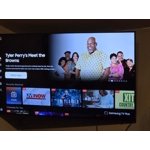
[This review was collected as part of a promotion.] The color on this tv is absolutly amazing! Its sharpness is great also! Would recomend 100x over!

Review from Samsung US
Helpful?43WYLKDSIONN15546751433
Jun 18, 2026
Reviewer name: Enimom
1 out of 5 stars
1 out of 5 stars review

Would Not Recommend This Unit

[This review was collected as part of a promotion.] The TV shuts off by itself. There are no AV hook-ups. I tried to hook up an antenna for local stations and we were unable to do so.

Review from Samsung US
Helpful?43WYLKDSIONN15546751433
reply from Samsung Advisor

Hi Enimom, We’re sorry to hear your U8000F TV is turning off on its own. Please try the following troubleshooting steps which may help resolve the issue: 1. Unplug the TV from the wall outlet or surge protector for at least 30 seconds. 2. Inspect the power cord for any visible damage. If damaged, the cord may need to be replaced. 3. Plug the TV directly into a wall outlet, bypassing any power strip or surge protector for now. 4. If the TV remains on long enough, try updating the TV’s software: Home > left directional key > Settings > Support > Software Update > Update Now. Note: If your TV powers off during the update, it could result in damage, so only proceed if the TV is stable. Next, check the TV’s Power and Energy Saving settings to ensure no timers or auto-off features are enabled: • Sleep Timer: Settings > All Settings > General & Privacy > Power and Energy Saving > Sleep Timer • Auto Power Off and Off Timer: Settings > All Settings > General & Privacy > Power and Energy Saving > Auto Power Off/Off Timer Also, if you have devices connected via HDMI, check if Anynet+ (HDMI-CEC) is enabled, as this can allow external devices to control the TV and may cause it to turn off: Settings > All Settings > General & Privacy > External Device Manager > Anynet+ (HDMI-CEC) = Off If your TV continues to power off unexpectedly, please call us at 1-800-SAMSUNG (8AM – 9PM EST Mon – Fri, 8AM – 6PM Sat – Sun). Our LiveChat agents are also available through the ‘Support’ link on our website. ~ Samsung Advisor

Jul 5, 2026
Reviewer name: KeithC
5 out of 5 stars
5 out of 5 stars review

Samsung Review
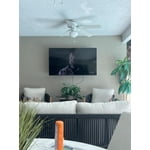
[This review was collected as part of a promotion.] Great price for an exceptional tv. Easy to mount on the wall and the picture quality is fantastic.

Review from Samsung US
Helpful?43WYLKDSIONN15546751433
Jun 13, 2026
Reviewer name: Pmartinez
5 out of 5 stars
5 out of 5 stars review

Great product

[This review was collected as part of a promotion.] Great picture and even the sound quality from being the TV speaker are good the brightness is amazing the resolution is great but you have to remember the programming matters

Review from Samsung US
Helpful?43WYLKDSIONN15546751433
Jun 26, 2026
Reviewer name: Johnny
5 out of 5 stars
5 out of 5 stars review

I love Samsung TVs

[This review was collected as part of a promotion.] I have never had any problems with my TV, the picture quality is just amazing.....although I am ready for my next one....thinking about an 8k this time

Review from Samsung US
Helpful?43WYLKDSIONN15546751433
Apr 21, 2026
Reviewer name: Oliver
3 out of 5 stars
3 out of 5 stars review

no microphone or voice activation..

[This review was collected as part of a promotion.] have called, no satisfaction. Wanted voice/microphone, told yes this model has it. NOPE it does not, even though your info on model number says it does. Very disapointing.

Review from Samsung US
Helpful?43WYLKDSIONN15546751433
reply from Samsung Advisor

Hi Oliver, Thank you for your feedback. We apologize for any confusion. Your TV Works With Alexa, meaning you’ll need to connect a standalone Alexa device such as an Echo speaker, to control compatible smart home devices and some experiences on your TV. Here are the steps: 1. Download both the Amazon Alexa and Samsung SmartThings apps, if you don't already have them. Both are available for iOS or Android devices. 2. Make sure your Alexa device and TV are both connected to the same Wi-Fi network. 3. Your TV must be enabled within the SmartThings app. If not, make sure you are signed in with your Samsung account on the TV: Settings > All Settings > Samsung Account 4. Log in to the SmartThings app with the same Samsung account. Tap Devices, and if your TV isn’t already shown, tap + to add it to the app. 5. In the Alexa app, enable the SmartThings skill and sign into your Samsung account. This will automatically connect your Samsung TV to Alexa and let you use voice commands to control your television. If you need more help, we’re here. You can reach us at 1-800-SAMSUNG (8AM – 9PM EST Mon – Fri, 8AM – 6PM Sat – Sun), or connect with a LiveChat agent by selecting ‘Support’ on our website. ~ Samsung Advisor

Jun 3, 2026
Reviewer name: Waynesworld
4 out of 5 stars
4 out of 5 stars review

All my electronic devices are Samsung
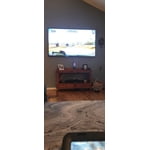
[This review was collected as part of a promotion.] The only issue with the tv is when the screen background is a solid color there is a ripple affect on each side.

Review from Samsung US
Helpful?43WYLKDSIONN15546751433
Apr 21, 2026
Reviewer name: DanVan
5 out of 5 stars
5 out of 5 stars review

Very pleased

[This review was collected as part of a promotion.] This is a replacement for my bedroom TV. I'm very happy with the picture, and I love the apps that Samsung provides.

Review from Samsung US
Helpful?43WYLKDSIONN15546751433