Skip to Main Content
Sam's Club
Sam's Club
All Departments
All Services
Customer reviews for SAMSUNG 55" Class U8000F Series 4K Crystal UHD Smart TV for
SAMSUNG 55" Class U8000F Series 4K Crystal UHD Smart TV
4.5 out of 5 stars
stars
2,032 ratings1,963 reviews
  1. 5 stars72% (1,460)
  2. 4 stars15% (311)
  3. 3 stars6% (118)
  4. 2 stars3% (69)
  5. 1 star4% (74)

Member photos

  • +590 images
Sort by |
Showing 921-930 of 1,963 reviews
Jul 6, 2026
Reviewer name: Rosecrest
5 out of 5 stars
5 out of 5 stars review

Great screen resolution and ease of use.

[This review was collected as part of a promotion.] Compact and light weight with a variety of input connectors. TV responds quickly to actions on remote control.

Review from Samsung US
Helpful?43WYLKDSIONN15546751433
Jun 22, 2026
Reviewer name: Maike
5 out of 5 stars
5 out of 5 stars review

Great features

[This review was collected as part of a promotion.] Best product to purchase and im glad that I get to enjoy it everyday. Bought my tv for a while now and I hasn't gone out on me yet.

Review from Samsung US
Helpful?43WYLKDSIONN15546751433
Jun 5, 2026
Reviewer name: Ted54
5 out of 5 stars
5 out of 5 stars review

Great TV

[This review was collected as part of a promotion.] In my opinion, Samsung makes the best tv's in the industry. I've had others, but Samsung's quality can not be beat.

Review from Samsung US
Helpful?43WYLKDSIONN15546751433
Jul 3, 2026
Reviewer name: Armagedon
5 out of 5 stars
5 out of 5 stars review

Works well

[This review was collected as part of a promotion.] The tv is good and we like to watch movies in it. There are better ones, but this is fine for us because it was more affordable.

Review from Samsung US
Helpful?43WYLKDSIONN15546751433
May 1, 2026
Reviewer name: MaliMal
5 out of 5 stars
5 out of 5 stars review

Samsung TV

[This review was collected as part of a promotion.] Love the resolution and brightness is amazing!!!! Picture so clear. I just love my Samsung TV!!!!

Review from Samsung US
Helpful?43WYLKDSIONN15546751433
May 20, 2026
Reviewer name: Dr De
5 out of 5 stars
5 out of 5 stars review

Top notch TV

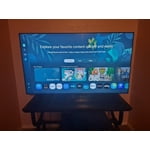
[This review was collected as part of a promotion.] I enjoy the way it's laid out on the screen when I turn it on. It makes it easy to find what I want. And the picture quality is amazing

Review from Samsung US
Helpful?43WYLKDSIONN15546751433
Jun 7, 2026
Reviewer name: Andi
1 out of 5 stars
1 out of 5 stars review

Does NOT Hold WiFi Connection

[This review was collected as part of a promotion.] It does not hold my WiFi connection while every other computer and device in my house does. And while I understand the difference between Samsung and Apple, does not stream AppleTV well.

Review from Samsung US
Helpful?43WYLKDSIONN15546751433
reply from Samsung Advisor

Hi Andi, Thank you for your feedback. For optimal performance, please ensure your TV is running the latest firmware Update Version 1269.9. You can check this by going to: Home > left directional key > Settings > Support > Software Update If this firmware version is not yet available on your TV, you can download the update on a USB drive and manually update your TV: 1. On Samsung's website (upper right corner), go to: Support > Manual & Software > Find your TV model, and click on the Firmware – Upgrade File. 2. When the file has finished downloading, locate it and then unzip it. There is normally one folder inside but there may be multiple files. 3. Copy or move all of the files that were included in the zip file to a USB flash drive, but do not place them inside any other folders. If you place the software folders inside a folder on the USB flash drive, the TV or monitor will not find them. 4. Connect the USB drive containing the software upgrade into a USB port on your device. 5. Using your device's remote, navigate to and select Settings, then select All Settings, and then select Support. Select Software Update, select Update Now, and then select Yes if prompted. Your device will search the USB drive for update files. Follow the on-screen instructions to install the updated software. Updates usually take a few minutes; please do not turn off the TV until the update is complete. When the update is finished, it will restart automatically. If you continue to have issues, please call us at -800-SAMSUNG (8AM – 9PM EST Mon – Fri, 8AM – 6PM Sat – Sun). LiveChat support and additional help are available at the ‘Support’ link on our website. ~ Samsung Advisor

Jun 5, 2026
Reviewer name: Mike
2 out of 5 stars
2 out of 5 stars review

Slow response

[This review was collected as part of a promotion.] Compared to my older Samsung 65” this interface is horrible totally inconsistent with the other and slower than a Intel 286 processor

Review from Samsung US
Helpful?43WYLKDSIONN15546751433
reply from Samsung Advisor

Hi Mike, We appreciate your feedback regarding your U8000FD TV’s performance. If you're experiencing freezing or lag in general response time, please try the following steps: 1. Check for firmware updates – Keeping your TV up to date can resolve many performance issues: Home > left directional key > Settings > Support > Software Update > Update Now 2. Run Device Care – This tool checks system memory, frees up cached data, and closes background apps that could be slowing things down: Home > left directional key > Settings > Support > Device Care > Start Device Care 3. Cold boot your TV – With the TV powered on, press and hold the Power button on your remote for 5+ seconds until the TV restarts. This helps refresh the system. If you're still noticing performance snags after these steps, please contact Samsung Support at 1-800-SAMSUNG (8AM – 9PM EST Mon – Fri, 8AM – 6PM Sat – Sun). You can also connect with a LiveChat agent via the ‘Support’ link on our website. ~ Samsung Advisor

May 11, 2026
Reviewer name: Phil84
4 out of 5 stars
4 out of 5 stars review

Can't wait to get a oled tv.....

[This review was collected as part of a promotion.] Nice picture and great for movie nights. It handles the Playstation 5 well for a great gaming experience.

  • +1 image
Review from Samsung US
Helpful?43WYLKDSIONN15546751433
Apr 20, 2026
Reviewer name: Marsha
5 out of 5 stars
5 out of 5 stars review

Great Features!

[This review was collected as part of a promotion.] As a Samsung household, going from my phone, computer, TV is seamless. Being able to control my TV with my phone never gets old. I love the picture quality there's never a complaint with Samsung.

Review from Samsung US
Helpful?43WYLKDSIONN15546751433