
 Customer reviews for SAMSUNG 43" Class U8000F Series 4K Crystal UHD Smart TV for
Member photos








 +1153 images
Its not the best
[This review was collected as part of a promotion.] Love the size and the screen. Connectivity is really poor. I make sure apps and softwares are update but its a constant struggle with any streaming services. Connecting to audio equipment with Bluetooth is another headache. Im constantly having to connect my Samsung sound bar to this TV.
Hi MeowMix18, We appreciate your feedback. To help ensure optimal performance, please try the following steps: 1. Check for firmware updates – An outdated version can affect overall performance: Home > left directional key > Settings > Support > Software Update > Update Now 2. Run Device Care – This tool clears unused cached memory and closes background apps: Home > left directional key > Settings > Support > Device Care > Start Device Care 3. Cold boot your TV – With the TV on, press and hold the Power button on your remote for about 5 seconds until the TV turns off and back on. This refreshes the system. 4. Power cycle the TV and any connected external devices – Unplug them from the power outlet, wait 30 seconds, then plug them back in. These steps often resolve issues with lag, freezing, or slow app performance. If the issue continues, please contact Samsung Support at 1-800-SAMSUNG (8AM – 9PM EST Mon – Fri, 8AM – 6PM Sat – Sun). LiveChat agents are also available through the ‘Support’ link on our website. ~ Samsung Advisor
Great picture but mechanical issues.
[This review was collected as part of a promotion.] I'm really not 100% satisfied with my new Samsung 43" Smart TV. The two major problems I'm seeing is that and it happened today actually, I was watching a TV sitcom and then all of a sudden, the picture was "frozen": stuck but the audio was still on talking about the next scene. So I pressed my remote control ( universal control because Samsung's is ridiculous) to the next channel and then back and that rectified the problem. The second problem is when I change apps from TV to YouTube, then back to TV app, the TV channel is not the same one I previously watched but a strange channel numbered 1134, usually a News channel. So, this new Samsung TV is quite different from my old Samsung Smart TV. Can the locking effect while watching sitcoms be repaired? Thanks for your concern. Hope to hear from you soon. Thanks , Jphn Baran
Hi luv2watch YouTube, We appreciate your feedback regarding your U8000F TV’s performance. If you're experiencing slow apps, freezing, or lag in general response time, try the following steps: 1. Check for firmware updates – Keeping your TV up to date can resolve many performance issues: Home > left directional key > Settings > Support > Software Update > Update Now 2. Run Device Care – This tool checks system memory, frees up cached data, and closes background apps that could be slowing things down: Home > left directional key > Settings > Support > Device Care > Start Device Care 3. Cold boot your TV – With the TV powered on, press and hold the Power button on your remote for 5+ seconds until the TV restarts. This helps refresh the system. If you're still noticing performance issues after these steps, please contact Samsung Support at 1-800-SAMSUNG, available from 8AM – 9PM EST Mon – Fri, 8AM – 6PM Sat – Sun. You can also visit the Samsung website and click on ‘Support’ for: • Live Chat • Manuals, Software, & Warranty Info ~ Samsung Advisor
Great features!!
[This review was collected as part of a promotion.] Excellent quality and performanceI am very satisfied with my purchase. This Samsung TV offers impressive image quality with vivid colors and excellent contrast. The interface is fast, intuitive, and easy to use. Additionally, the design is sleek and blends perfectly with any space. Without a doubt, a 100% recommended investment if you are looking for the best visual experience.
Love the TV, Hate the Remote
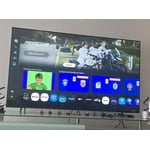
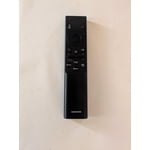
[This review was collected as part of a promotion.] We LOVE our new Samsung 55" Class Crystal UHD U8000FD 4K Smart TV. The picture is absolutely perfect, bright, vibrant and I feel like I am right there with everything we watch. The sound is amazing. The only thing we Hate is the Remote that came with it. The volume button is annoying and difficult to use. I don't know who created this remote, but it is Not user friendly and is stupid. Also very very small and hard to see what buttons are for what. Also, I just wanted to upload a picture of our remote and am not able to, You have a section for this but not able to upload.
Good product…except…
[This review was collected as part of a promotion.] Tv itself is great. The channel changer controller is uncooperative and i can never seem to get the screen to the channel i want.The controller is much to small and I often tap the button i did not want. It then takes three or four more confusing steps to return to the screen where i was. Wretched set up. Price was good though.
Hi Leo 3, Thanks for your review. While Samsung remotes are designed for ease and versatility, universal remotes can also be used to control your TV. If you're using a third-party remote, please refer to its manufacturer guide for the correct Samsung code and setup process. If you run into any trouble or have compatibility questions, Samsung Support is happy to help. You can reach us at 1-800-SAMSUNG (8AM – 9PM EST Mon – Fri, 8AM – 6PM Sat – Sun). LiveChat agents are also available at the ‘Support’ link on our website. ~ Samsung Advisor
Easy Setup for your Smart TV
[This review was collected as part of a promotion.] The set up process is simple and the connect ability of multiple apps onto the TV makes it easy to watch your favorite shows. Only issue is finding new apps to download can be a pain to find, but once you know what to do its easy. The free TV channels are pretty good and only a few software updates.
Bigger..better...brighter than life
[This review was collected as part of a promotion.] The clearest brightest resolution I have ever had. Colors are so bright and crisp and bold.. Easy setup for this 70+ old lady. It's everything I had and loved in my tablet. I highly recommend and most likely will be purchasing again.
Big Size Great Features Didn't Last
[This review was collected as part of a promotion.] Great television. Loaded apps fast. Beautiful picture. Very easy to use. I love the Samsung channels. I would get an extended warranty on it. Screen started to go out fast. I expected a better life for more expensive products but this one REALLY disappointed me in the longevity category. As hard as it is to oder, handle and mount these televisions they need to last longer.
A Honest Review
This tv is just ok. I came from last years 7200 model and it just doesn't feel like much of an upgrade. The UI is a tad bit faster but still not as snappy as i would like to see and sometimes still hangs up for a second or 2. The weakest things in this tv would be the back lighting and contrast. I have calibrated it to get an acceptable picture but not fantastic after some tweaking in the settings. However this tv does best in a low lighted room. I think this tv in general probably has worse lighting conditions on larger size screens. I think this tv is fine for a guest room or for the kids room but if you are buying as the main television for movies/sports ect. I would strongly recommend going up in tier anything above 55" on this model or going with the 7200 if its cheaper and in stock as its basically the same except for model design and new UI. The sound is pretty much what you would expect it to be. Not great. But in fairness not many tv's come with great sound quality. that is what sound bars and home theater is made for. Also if you are going to buy this exact size anyway (75") I believe the weight in specifications is wrong on this site. It says this tv weighs only 22.4 lbs which was a partial selling point to me but it is heavier than that. If i had to guess i would say probably around 40-45 lbs on the 75"
Hi BtheTvGuy, Thank you for your purchase and detailed feedback. Please know your opinion is important to us and will be shared with our product design teams. Also, thank you for letting us know about the incorrect specs. We are working on getting that fixed as quickly as possible. You mentioned already adjusting the image, but I am going to share a few settings adjustments, just in case you have not tried these specific ones. First, try disabling certain energy-saving features that may be dimming the screen automatically. Go to: Settings > All Settings > General & Privacy > Power and Energy Saving, then turn off Brightness Optimization, Energy Saving Solution, Motion Lighting, and/or Contrast Enhancer. Next, adjust the Picture Mode to better match your viewing environment: Settings > All Settings > Picture > Picture Mode and choose from the following: • Dynamic – Brighter and clearer for well-lit rooms • Standard – Balanced for most environments • Movie – Ideal for watching in a dark room • Eco – Designed for energy savings • Filmmaker Mode – Preserves the creator’s original intent You can also manually adjust brightness by going to: Settings > All Settings > Picture > Expert Settings > Brightness. Use the slider to set a level that suits your preferences (0–50). Finally, we recommend making sure your TV has the latest software installed: Settings > Support > Software Update > Update Now. To adjust the sound on your TV, go to Settings > All Settings > Sound > Sound Mode. For further help adjusting your image/sound settings or finding the right soundbar for your space, feel free to reach Samsung Support at 1-800-SAMSUNG (8AM – 12AM EST, 7 days a week) or visit the Support link on our website for: • LiveChat • Manuals, Software, & Warranty Info ~ Samsung Advisor
Refresh rate on ALL MY ELECTRONICS IS AMAZING
[This review was collected as part of a promotion.] but a brand new Samsung 55-in TV but a brand new Samsung 55 inch TV relation and brightness amazing obsolete to these other TVs price rate my gaming system is amazing no x-ray my gaming system is amazing no lagging reviewing pleasure is awesome thih is out of this world I would highly recommend this to anybody that is looking by a top notch top shelf product that is looking by a top notch top shelf product that is looking by a top notch top shelf products Samsung Electronics is the only way to go