Skip to Main Content
Sams Club
Sams Club
Customer reviews for SAMSUNG 43" Class U8000F Series 4K Crystal UHD Smart TV for
SAMSUNG 43" Class U8000F Series 4K Crystal UHD Smart TV
4.7 out of 5 stars
stars1,087 ratings988 reviews
  1. 5 stars79% (862)
  2. 4 stars13% (145)
  3. 3 stars4% (39)
  4. 2 stars2% (20)
  5. 1 star2% (21)
Write a review

Customer photos

  • +286 images
Sort by |
Showing 1-10 of 988 reviews
Aug 25, 2025
Jay
5 out of 5 stars review

Verified Purchase

Wonderful TV

Great tv…. Clear , clear picture. Fast wi-fi. Love it

Helpful?22SEGSGR5O6Z15524966302
May 3, 2026
Shelly S
5 out of 5 stars review

Love the TV, Hate the Remote

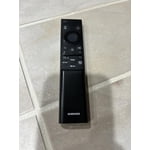
[This review was collected as part of a promotion.] We LOVE our new Samsung 55" Class Crystal UHD U8000FD 4K Smart TV. The picture is absolutely perfect, bright, vibrant and I feel like I am right there with everything we watch. The sound is amazing. The only thing we Hate is the Remote that came with it. The volume button is annoying and difficult to use. I don't know who created this remote, but it is Not user friendly and is stupid. Also very very small and hard to see what buttons are for what. Also, I just wanted to upload a picture of our remote and am not able to, You have a section for this but not able to upload.

Review from Samsung US
Helpful?22SEGSGR5O6Z15524966302
Apr 20, 2026
Gmohdz555
5 out of 5 stars review

Samsung Smart!

[This review was collected as part of a promotion.] We have been very satisfied with the quality of the television. Sports and Movies are very clear and sharp. Sound is very good and the addition of the Samsung soundbar enhances the environment. Using Smart Things app with all our Samsung products is great. Thank you.

Review from Samsung US
Helpful?22SEGSGR5O6Z15524966302
Apr 20, 2026
JayByrd
5 out of 5 stars review

Great TV

[This review was collected as part of a promotion.] I love this TV it is awesome as such great features and such a wonderful sharp picture . I love the resolution on this thing it is phen omen al . the brightness levels on this TV is just out of this world the contrast is spot on refresh rate on this TV is so awesome I love viewing any movie on this TV .

Review from Samsung US
Helpful?22SEGSGR5O6Z15524966302
Apr 27, 2026
Annelglez
5 out of 5 stars review

Exelente

[This review was collected as part of a promotion.] Product exceeds expectations. The picture quality is sharp, colors are vibrant, and the brightness looks great even in a well-lit room. Setup was quick and easy, and the smart features are smooth and responsive. Sound quality is clear, though adding a soundbar makes it even better. Overall, an excellent TV for movies, sports, and everyday streaming. Highly recommended.

Review from Samsung US
Helpful?22SEGSGR5O6Z15524966302
Apr 21, 2026
Funcle_Chris
5 out of 5 stars review

Movies and video games never looked better!

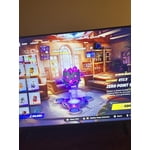
[This review was collected as part of a promotion.] I am very impressed with the UHD picture and all the picture modes. The simplified remote makes using the TV easy. For me the best feature is the video game mode with Xbox built in, no console required. My video games have never looked this good. I was able to use game controllers that I already owned, they easily paired with the TV.

Review from Samsung US
Helpful?22SEGSGR5O6Z15524966302
Apr 24, 2026
cristinalouise7
5 out of 5 stars review

Excellent

[This review was collected as part of a promotion.] I love Samsung products. But with all the recent things like removing Samsung messages from my phone I may need to make some hard choices cause I don't want Google messages. Samsung messages works alot better for me. But anyway this 65" TV is great only downfall is how delicate the screens are.

Review from Samsung US
Helpful?22SEGSGR5O6Z15524966302
Apr 20, 2026
TJujuB
5 out of 5 stars review

Great TV & Affordable

[This review was collected as part of a promotion.] My Crystal UHD has great resolution, refresh rate is perfect for our needs, and we like the Crystal UHD models so much we have 2 65" inch, and 4 42". Everything in our house is Samsung, from our kitchen appliances, phones, and TV's.

Review from Samsung US
Helpful?22SEGSGR5O6Z15524966302
Apr 29, 2026
Nep1
4 out of 5 stars review

Great features

[This review was collected as part of a promotion.] I found out that this TV is very very very great picture the brightness and the settings all accessible very good device for being a UHD TV I like the I care I like the device care feature on there where you can maintenance on the TV Great TV thanks stop

Review from Samsung US
Helpful?22SEGSGR5O6Z15524966302
Apr 27, 2026
Anonymous
3 out of 5 stars review

Samsung tv

[This review was collected as part of a promotion.] The picture is great as is the sound the App Store is ok it take a while to get used to the navigation if your not used to Samsung. Other than that I’m having trouble with the tv no holding internet connection. Honest opinion great tv with great quality

Review from Samsung US
Helpful?22SEGSGR5O6Z15524966302
reply from Samsung Advisor

Hi TerryWayne, Thank you for sharing your experience with Wi-Fi connectivity. If your TV is having trouble connecting to the network, the following steps may help resolve the issue: Signal & Setup Tips: 1. Check TV-to-router distance – Your TV should be within 50 feet of the modem or access point for reliable signal strength. 2. Minimize interference – Turn off nearby wireless devices and make sure there are no physical barriers (stone walls, fireplaces, appliances) between the TV and router. Power Cycle Devices: 3. Restart both your TV and router – Unplug both devices for at least 30 seconds, then plug them back in and allow them to reboot fully. Connection Type: 4. Evaluate your connection method – o If using Wi-Fi, move your router closer to the TV and eliminate any obstructions. o For a more stable connection, we strongly recommend using a wired Ethernet cable. o If already using Ethernet, verify the cable is working by testing it with another device. Run Built-In Diagnostic Tools: 5. Network Test: Settings > Support > Device Care > Self Diagnosis > Smart Hub Connection Test 6. Wi-Fi Check: Settings > Support > Device Care > Self Diagnosis > Wi-Fi Last Resort: 7. Perform a Factory Reset (if issues persist): Settings > All Settings > General & Privacy > Reset > Factory Data Reset. Note that this will return all settings to their original defaults. If these steps don’t resolve the issue, please reach out to Samsung Support at 1-800-SAMSUNG, available 8AM – 9PM EST Mon – Fri, 8AM – 6PM Sat – Sun. LiveChat support and additional help are available at the ‘Support’ link on our website. ~ Samsung Advisor