Skip to Main Content
Sam's Club
Sam's Club
All Departments
All Services
Customer reviews for SAMSUNG 43" Class U8000F Series 4K Crystal UHD Smart TV for
SAMSUNG 43" Class U8000F Series 4K Crystal UHD Smart TV
4.5 out of 5 stars
stars
2,690 ratings2,591 reviews
  1. 5 stars73% (1,961)
  2. 4 stars15% (408)
  3. 3 stars6% (159)
  4. 2 stars3% (77)
  5. 1 star3% (85)

Member photos

  • +786 images
Sort by |
Showing 271-280 of 2,591 reviews
Dec 6, 2025
Gray
3 out of 5 stars review

Remote Sucks

I hate the remote. Ive changed the batteries on the remote, reset the remote to the tv. The up and down does not work properly, I click on the reset which is the return and the forward/pause and it takes you to the guide instead of reseting 2/3 of the time. TV is nice but the remote absolutely sucks.

Review from Samsung US
Helpful?22SEGSGR5O6Z15524966302
reply from Samsung Advisor

Hi Gray, We’re sorry to hear your remote isn’t working as expected. Please try the following troubleshooting steps, which may help: 1. Check and clean the top edge of the remote. Dust or smudges on the IR sensor at the top of the remote can interfere with performance. Gently wipe the sensor area with a clean, dry microfiber cloth. 2. Replace the batteries. Weak or depleted batteries can cause erratic behavior. Insert a fresh set of batteries and make sure they are positioned correctly in the battery compartment. 3. Check for available software updates. Occasionally, remote responsiveness issues can be resolved with a firmware update to the TV. Go to: Settings > Support > Software Update > Update Now 4. Ensure there are no nearby devices interfering with the signal. Nearby electronics (like soundbars, game consoles, or even sunlight hitting the IR sensor) may interfere with your remote's signal. Try using the remote with other nearby devices powered off. If the issue continues after trying these steps, please reach out to Samsung Support at 1-800-SAMSUNG, 8AM – 12AM EST, 7 days a week. Our LiveChat agents are also available by clicking the ‘Support’ link on our website. ~ Samsung Advisor

Jun 9, 2026
Skyventor85
3 out of 5 stars review

Crystal UHD U8000F

[This review was collected as part of a promotion.] Great TV overall and yet does not compare to my curve. There are Sound issues at points and also it says unable to find network and when I go in there are no networks to choose from and ai have to reboot the TV by holding down power button. I have to do this multiple times a week it seems

Review from Samsung US
Helpful?22SEGSGR5O6Z15524966302
reply from Samsung Advisor

Hi Skyventor85, Thank you for your feedback. For optimal performance, please ensure your TV is running the latest firmware Update Version 1269.9. You can check this by going to: Home > left directional key > Settings > Support > Software Update If this firmware version is not yet available on your TV, you can download the update on a USB drive and manually update your TV: 1. On Samsung's website (upper right corner), go to: Support > Manual & Software > Find your TV model, and click on the Firmware – Upgrade File. 2. When the file has finished downloading, locate it and then unzip it. There is normally one folder inside but there may be multiple files. 3. Copy or move all of the files that were included in the zip file to a USB flash drive, but do not place them inside any other folders. If you place the software folders inside a folder on the USB flash drive, the TV or monitor will not find them. 4. Connect the USB drive containing the software upgrade into a USB port on your device. 5. Using your device's remote, navigate to and select Settings, then select All Settings, and then select Support. Select Software Update, select Update Now, and then select Yes if prompted. Your device will search the USB drive for update files. Follow the on-screen instructions to install the updated software. Updates usually take a few minutes; please do not turn off the TV until the update is complete. When the update is finished, it will restart automatically. If you continue to have issues, please call us at -800-SAMSUNG (8AM – 9PM EST Mon – Fri, 8AM – 6PM Sat – Sun). LiveChat support and additional help are available at the ‘Support’ link on our website. ~ Samsung Advisor

Jun 5, 2026
the roc
1 out of 5 stars review

not good

[This review was collected as part of a promotion.] so i m an alexa user .tv compatible to alexa.yup Right up to the time that I got my TV it even had the Alexa app try to use it no longer use so I can't tell my TV to change the channel volume up volume down on or off. That is a big thing for me so here I am stuck with this new TV that falls short of what it claimed it could do in the beginning of my new purchase so I'm very upset about that. I will never buy another Samsung and I will pass what happened along to anybody I can get to listen.

Review from Samsung US
Helpful?22SEGSGR5O6Z15524966302
reply from Samsung Advisor

Hi the roc, To best support you, please call us at 1-800-SAMSUNG (8AM – 9PM EST Mon – Fri, 8AM – 6PM Sat – Sun), or reach us via text anytime. You can also visit ‘Support’ on our website for: • Live Chat • Manuals, Software, & Warranty Info ~ Samsung Advisor

May 23, 2026
Shayo
5 out of 5 stars review

Awesome Features

[This review was collected as part of a promotion.] Best tv I have ever owned. We got the TV and sound bar and it's our center for all entertainment.

Review from Samsung US
Helpful?22SEGSGR5O6Z15524966302
Nov 25, 2025
Thomas
3 out of 5 stars review

Optical connection to soundbar
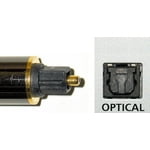
Went to connect soundbar and no connection on tv for an optical type connection. How is that possible?

Review from Samsung US
Helpful?22SEGSGR5O6Z15524966302
reply from Samsung Advisor

Hi Thomas, Thank you for sharing your thoughts on the available inputs for the U8000F. Your TV has 3 HDMI ports and is Bluetooth-enabled. If an Optical port is a crucial part of your setup needs, you’ll find that connection starting with our Q8F Series and above. Should you ever need assistance with your TV, Samsung is here for you. Reach out by calling 1-800-SAMSUNG between 8AM - 12AM EST, any day of the week. You can also chat with us online by visiting the ‘Support’ section of our website. ~Samsung Advisor

Oct 5, 2025
Mont1818
4 out of 5 stars review

This is great product

[This review was collected as part of a promotion.] For streaming movies and mirroring and for gaming and it would look good in my new living room

Review from Samsung US
Helpful?22SEGSGR5O6Z15524966302
Jul 14, 2026
BnB8
4 out of 5 stars review

Crisp Picture

Super crisp picture! I use my 43" Samsung Crystal TV for my 3rd monitor and it is great picture reviewing building plans. Great product!

Review from Samsung US
Helpful?22SEGSGR5O6Z15524966302
Jul 6, 2026
Shark
2 out of 5 stars review

Slow processor

Picture is fine, the processor is very slow and buffers way too much. I have conducted speed tests close to the tv and it receives excellent speeds. It's as if the tv is running 100 programs in the background.

Review from Samsung US
Helpful?22SEGSGR5O6Z15524966302
Jul 5, 2026
Kwill
5 out of 5 stars review

Wonderful verry happy!

We love our Samsung smart TV. It was so easy to hook up to our fire stock, Was very surprised that the channels the Samsung TV app has that we almost do not need YouTube TV. Great job. Will buy another for the screened in porch!

Review from Samsung US
Helpful?22SEGSGR5O6Z15524966302
Jul 5, 2026
JC5162
4 out of 5 stars review

Solid TV

Great picture, although I noticed a few pixels were damaged, but they're hardly noticed. Was excited about Samsung TV but it has maturing to do. Good foundation but not as easily used as the other streaming apps.

Review from Samsung US
Helpful?22SEGSGR5O6Z15524966302