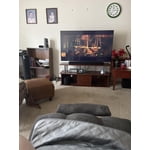
Customer reviews for SAMSUNG 43" Class U8000F Series 4K Crystal UHD Smart TV forAll in all it was well worth every penny spent.
[This review was collected as part of a promotion.] Great resolution. The color and contrast of the device were spot on and the brightness didn't affect any of the above mentioned negatively whatsoever. I didn't have to refresh the device as much either.
Excellent 4K TV for the Price
[This review was collected as part of a promotion.] I recently purchased the Samsung 55" Crystal UHD U8000F 4K Smart TV and have been very pleased with it so far. The picture quality is sharp and clear, with vibrant colors that make movies, sports, and streaming content look great. Setup was quick and straightforward, and the Tizen smart platform is easy to navigate with access to all the major streaming apps. For everyday viewing, the TV performs well and offers excellent value for the price. The slim design looks modern and fits nicely in my living room. Gaming performance is also solid for casual players, with low input lag and smooth gameplay. The built-in speakers are decent, though adding a soundbar would improve the overall audio experience. While it doesn't have the brightness and premium features of higher-end models, it's an outstanding choice for anyone looking for an affordable 4K smart TV from a trusted brand. Overall, I would recommend the Samsung U8000F to anyone seeking a reliable, budget-friendly television with excellent picture quality and smart features.
Great clarity!
[This review was collected as part of a promotion.] ⭐⭐⭐⭐⭐ This Samsung TV has been fantastic for watching sports. The picture is incredibly clear, and the vibrant colors make every game feel more exciting and immersive. Fast-moving action stays smooth and sharp, whether it's basketball, football, or baseball. The sound quality is excellent too, with clear commentary and crowd noise that makes you feel like you're right in the stadium. Overall, it's an outstanding TV that has taken my sports-watching experience to the next level. Highly recommended!
Unhappy with volume and color
I am happy with the size of the TV. Unfortunately, the color is not the same on all stations. Also the volume Is very low and I have to consistently have it in the 40 to 50 range in order to even hear the TV. I was happy with the price of the TV however I expected more from the Samsung unit
Hi Judi, Thank you for purchasing Samsung’s U8000F TV and for sharing your feedback regarding low volume. To start, we recommend making sure your TV is running the latest firmware, as updates can include improvements to sound performance: Home > left directional key > Settings > Support > Software Update If volume levels still seem too low, you can improve sound performance by adjusting a few key settings: Sound Mode: Navigate to: Settings > All Settings > Sound > Sound Mode • Standard: Balanced for everyday viewing • Optimized: Enhances effects and creates a more spacious sound • Amplify: Boosts mid and high tones, especially helpful if dialogue is difficult to hear Auto Volume: This feature helps maintain consistent volume levels across content and input sources. Turn it on under: Settings > All Settings > Sound > Expert Settings > Auto Volume = On You can also explore Expert Settings to fine-tune sound output with adjustments for Balance, Equalizer, and more. If you’re considering enhancing your setup, Samsung’s Q- and S-Series Soundbars feature Q-Symphony, which syncs your TV and soundbar speakers for a fuller, more immersive sound experience. For personalized support with these settings or selecting a soundbar to complement your setup, contact Samsung Support at 1-800-SAMSUNG (8AM – 9PM EST Mon – Fri, 8AM – 6PM Sat – Sun) or use LiveChat via the ‘Support’ link on our website. ~ Samsung Advisor
Great value, good views
[This review was collected as part of a promotion.] I really like this TV. It was sold at a good price and I feel it is a great value. The size and clarity improve my previous 6 year old tv. I did move that other tv into the bedroom. so, all is not waste. The clarity really meets expectations. the smart features work with my Samsung phone. That made it easy to set up. Overall a very good purchase.
Disappointed
[This review was collected as part of a promotion.] We replaced our 10 year old LG 60" smart TV with Samsung's 58" Class Crystal UHD U8000F 4K Smart TV. We were looking for a 60" TV that was compatible with our entertainment center, but apparently nobody is manufacturing 60" TVs any more, which is very strange. Anyway, major pitfalls with this Samsung TV include that it does not have an optical output connection, this was a problem because I wanted to connect a bluetooth transmitter to the TV, so I could listen to my Sony headphones and Samsung soundbar at the same time. Unfortunately, the transmitter could not be connected without an optical output. Funny, that Samsung hasn't figured out how to make a TV that can connect to a soundbar and bluetooth headphones simultaneously. Huge bummer for us! Otherwise, the TV picture quality is acceptable, but the sound quality mediocre because we have to listen to the TV speaker when I am donning my bluetooth headphones. Goes without saying, we are not real happy with this purchase, but we're stuck now.
Hi LRW53, Thank you for reaching out. Please know the U8000F TV features Multi-output Audio, which lets you hear audio through both the TV speakers and Bluetooth headphones at the same time. You can also adjust each audio output independently - for instance, keeping the TV volume lower while boosting volume on your headphones. To enable: Home > left directional key > Settings > All Settings > General & Privacy > Accessibility > Multi-output Audio. If you need additional help, feel free to reach Samsung Customer Support at 1-800-SAMSUNG. You can also LiveChat with an agent or explore more resources under the Support link on our website. ~Samsung Advisor
Great features easy to use easy to navigate.
[This review was collected as part of a promotion.] I love the Samsung it looks real vivid the brightness the contrast is so crisp and clean and sharp and everything looks great just like you would expect it to look very pleased with Samsung and I also only use Samsung Galaxy phones I currently have a Samsung Galaxy z flip 5 and I am absolutely over the top I am thrilled and overjoyed to have the Samsung products I will only use Samsung products and when I get a new refrigerator it'll be a Samsung I I love Samsung and Google but but I will use Samsung for life
Simply Sweet.
This 55 inch Samsung TV is Like all the other models I've had From Samsung and I'm very happy with them. This model like the others has a wonderfully practical useful Samsung remote that's very simple. And Almost most importantly I am so happy that these Samsung TVs are extremely easy to set up. They basically do the work on their own And you press a few buttons on the remote. Love it Richard 62
Crystal UHD U8000F
[This review was collected as part of a promotion.] Great TV overall and yet does not compare to my curve. There are Sound issues at points and also it says unable to find network and when I go in there are no networks to choose from and ai have to reboot the TV by holding down power button. I have to do this multiple times a week it seems
Hi Skyventor85, Thank you for your feedback. For optimal performance, please ensure your TV is running the latest firmware Update Version 1269.9. You can check this by going to: Home > left directional key > Settings > Support > Software Update If this firmware version is not yet available on your TV, you can download the update on a USB drive and manually update your TV: 1. On Samsung's website (upper right corner), go to: Support > Manual & Software > Find your TV model, and click on the Firmware – Upgrade File. 2. When the file has finished downloading, locate it and then unzip it. There is normally one folder inside but there may be multiple files. 3. Copy or move all of the files that were included in the zip file to a USB flash drive, but do not place them inside any other folders. If you place the software folders inside a folder on the USB flash drive, the TV or monitor will not find them. 4. Connect the USB drive containing the software upgrade into a USB port on your device. 5. Using your device's remote, navigate to and select Settings, then select All Settings, and then select Support. Select Software Update, select Update Now, and then select Yes if prompted. Your device will search the USB drive for update files. Follow the on-screen instructions to install the updated software. Updates usually take a few minutes; please do not turn off the TV until the update is complete. When the update is finished, it will restart automatically. If you continue to have issues, please call us at -800-SAMSUNG (8AM – 9PM EST Mon – Fri, 8AM – 6PM Sat – Sun). LiveChat support and additional help are available at the ‘Support’ link on our website. ~ Samsung Advisor
Good Choice
[This review was collected as part of a promotion.] Excellent bedroom TV for the money. Picture adjusts as desired, easily, with classic Samsung settings. "Samsung TV" service just keeps getting better. I do not prefer the miniature remote but, like our other Samsung products, I would be this product over again without hesitation.